
1. Introduction
Thank you for choosing the TEMMIO Wireless Meat Thermometer BQ50. This smart Bluetooth thermometer is designed to help you achieve perfectly cooked meats every time, whether you're grilling, smoking, or roasting. With its dual-sensor probe, long-range connectivity, and intuitive app control, monitoring your food's temperature has never been easier or more precise. Please read this manual carefully before use to ensure optimal performance and longevity of your device.
2. Product Overview
2.1 Key Features
- Smart App Control & Real-Time Alerts: Monitor cooking progress and receive alerts via the CHEFBBQ app (no registration or WIFI required).
- 0.5-Second Instant Read: Provides super-fast temperature readings for quick assessment.
- NIST Certified ±0.5°F Accuracy: Dual sensors track internal meat temperature (32°F–212°F) and ambient heat (up to 572°F) with high precision.
- Bluetooth 5.2 for 800ft Control: Enjoy a stable, long-range connection to monitor your cook from a distance, even through walls.
- Backlit LCD Display & Magnetic Base: The base unit can operate independently and features a backlit screen and magnetic back for convenient placement.
2.2 Included Components
- TEMMIO Wireless Meat Thermometer Base Unit
- 2 x Wireless Probes
- Charging Cable
- User Manual
2.3 Product Diagram
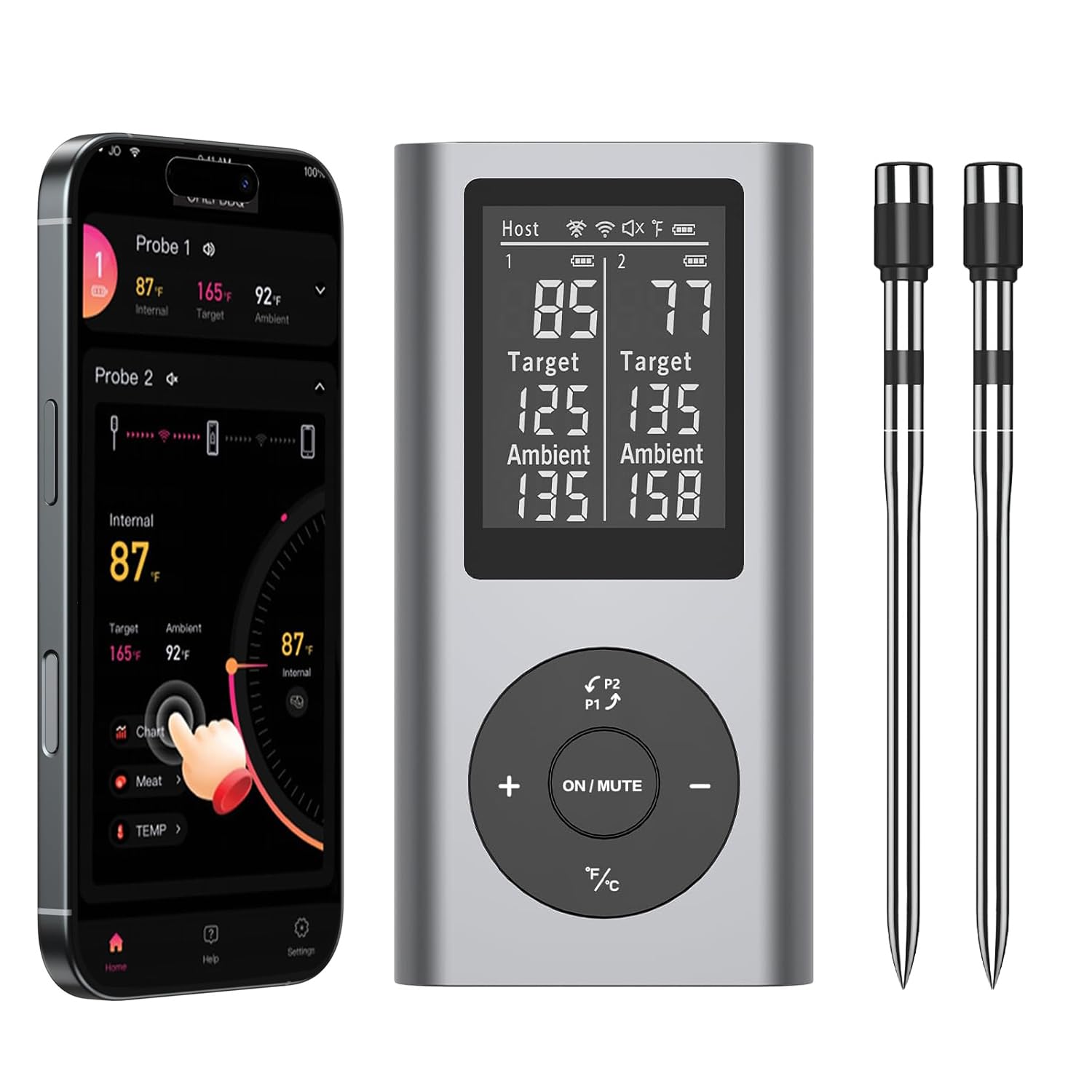
Figure 1: TEMMIO Wireless Meat Thermometer BQ50 Base Unit and Probes.
3. Setup
3.1 Charging the Device
Before first use, ensure the thermometer probes and base unit are fully charged. Connect the charging cable to the base unit and a suitable USB power source. The probes charge when inserted into the base unit.
3.2 App Installation
- Search for "CHEFBBQ" in your smartphone's app store (App Store for iOS, Google Play Store for Android).
- Download and install the CHEFBBQ app.
- Ensure Bluetooth is enabled on your smartphone.
3.3 Initial Pairing
The thermometer base unit and probes should automatically pair when powered on and within range. Open the CHEFBBQ app, and it will automatically detect and connect to the thermometer via Bluetooth. No manual pairing is typically required.

Figure 2: Inserting a probe into the base unit for charging and connection.
4. Operating Instructions
4.1 Using the Probes
- Carefully insert the probe into the thickest part of the meat, avoiding bones. Ensure the probe is inserted deep enough for accurate internal temperature readings.
- The probe is designed to withstand high temperatures, with the internal sensor tracking meat temperature (32°F–212°F) and the ambient sensor tracking oven/grill temperature (up to 572°F).
4.2 App Operation (CHEFBBQ)
The CHEFBBQ app provides comprehensive control and monitoring features:
- Select Meat Type: Choose from a variety of preset meat types (Beef, Veal, Chicken, Lamb, Pork, Fish, Venison, Duck) and desired doneness levels (e.g., Rare, Medium, Well Done).
- Set Target Temperature: The app will automatically suggest a target temperature based on your selection, which you can adjust manually if needed.
- Real-Time Monitoring: View both internal meat temperature and ambient cooking temperature on your phone.
- Alerts: Receive real-time alerts when your food reaches the target temperature or if the ambient temperature deviates significantly.
- Cooking Graph: Track temperature changes over time with a detailed cooking graph.

Figure 3: CHEFBBQ App Interface for monitoring and settings.
4.3 Standalone Base Unit Operation
The base unit can also function independently without the app:
- LCD Display: The backlit LCD shows current internal and ambient temperatures, as well as target temperature.
- Temperature Adjustment: Use the buttons on the base unit to set target temperatures directly.
- Audible Alerts: The base unit will emit an audible alert when the target temperature is reached.
4.4 Versatile Cooking Applications
This thermometer is suitable for various cooking methods and appliances:
- Oven
- Air Fryer
- Stove
- Grill
- Smoker
- Rotisserie

Figure 4: Versatile applications for the TEMMIO Wireless Meat Thermometer.

Figure 5: App interface displaying various doneness options for different meats.
5. Maintenance
5.1 Cleaning
After each use, allow the probes to cool completely. Wipe the probes clean with a damp cloth. The probes are dishwasher safe. Do not immerse the base unit in water. Wipe the base unit with a dry or slightly damp cloth. Ensure all components are dry before storage.
5.2 Storage
Store the thermometer and probes in a cool, dry place when not in use. Keep the probes inserted into the base unit for convenient storage and to ensure they remain charged.
6. Troubleshooting
- No Bluetooth Connection:
Ensure Bluetooth is enabled on your phone. Make sure the thermometer base unit is powered on and within the 800ft range. Close and reopen the CHEFBBQ app. If issues persist, try restarting your phone and the thermometer base unit. - Inaccurate Temperature Readings:
Ensure the probe is inserted correctly into the thickest part of the meat, avoiding bones. Verify that the probe tip is not touching the cooking surface. The thermometer is NIST certified for accuracy; if you suspect a significant deviation, contact customer support. - App Not Displaying Correctly or Freezing:
Try force-closing and reopening the CHEFBBQ app. If the problem continues, uninstall and reinstall the app. Ensure your phone's operating system is up to date. - Base Unit Not Responding:
Check if the base unit is charged. If the screen is blank, connect it to a power source. If buttons are unresponsive, try a soft reset by holding the power button for an extended period (e.g., 10 seconds) or allowing the battery to fully discharge and then recharging.
7. Specifications
| Brand | TEMMIO |
| Model | BQ50 |
| Connectivity Technology | Bluetooth 5.2 |
| Bluetooth Range | Up to 800 feet |
| Internal Temperature Range | 32°F – 212°F (0°C – 100°C) |
| Ambient Temperature Range | Up to 572°F (300°C) |
| Accuracy | ±0.5°F |
| Response Time | 0.5 seconds |
| Power Source | Battery Powered (Rechargeable) |
| Display Type | Digital LCD (Backlit) |
| Product Care | Wipe Clean (Probes are dishwasher safe) |
| Certifications | FCC, NIST Certified Accuracy |
8. Warranty and Support
For warranty information and customer support, please refer to the documentation included with your purchase or visit the official TEMMIO website. You can also visit the TEMMIO Store on Amazon for more product details and support options.


