
1. Introduction
Thank you for choosing the Havells Cook Pro TC-20 Induction Cooktop. This manual provides essential information for the safe and efficient operation, maintenance, and troubleshooting of your new appliance. Please read these instructions carefully before using the cooktop and retain them for future reference.
2. Safety Instructions
To prevent injury to yourself and others, or damage to the appliance, please observe the following safety precautions:
- Ensure the cooktop is placed on a stable, flat, and heat-resistant surface.
- Do not immerse the appliance, power cord, or plug in water or any other liquid.
- Keep the appliance out of reach of children and pets.
- Do not touch hot surfaces. Always use oven mitts or pot holders when handling hot cookware.
- Unplug the cooktop from the power outlet when not in use and before cleaning.
- Use only induction-compatible cookware. Non-induction cookware will not heat.
- Do not place metallic objects such as knives, forks, spoons, or lids on the cooktop surface as they can become hot.
- Ensure proper ventilation around the cooktop during operation.
- In case of any damage to the power cord or plug, do not operate the appliance. Contact authorized service personnel.
- The Havells Cook Pro TC-20 features 6kV Surge Protection to safeguard against voltage spikes. However, avoid using the appliance during electrical storms.
3. Product Overview
The Havells Cook Pro TC-20 Induction Cooktop is designed for efficient and precise cooking. It features a digital display, touch controls, and a crystal glass surface.
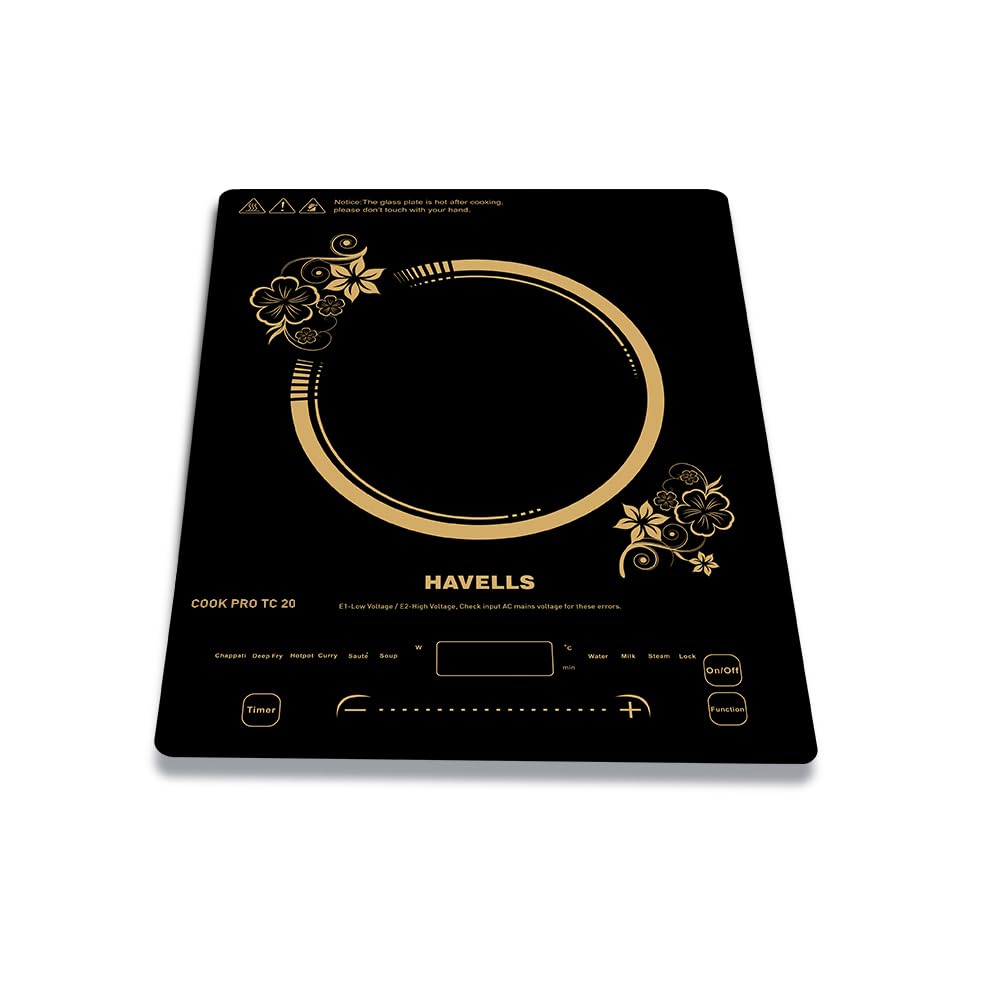
Figure 1: Havells Cook Pro TC-20 Induction Cooktop. This image shows the overall design of the cooktop with its sleek black crystal glass surface and control panel.
Control Panel
The control panel is located at the front of the cooktop and includes various touch-sensitive buttons and a digital display for easy operation.

Figure 2: Control Panel with Precision Time & Power. This image highlights the digital display and touch controls for adjusting time and power settings, demonstrating precise control over cooking.
- On/Off Button: To power the unit on or off.
- Function Button: To select different cooking modes.
- Timer Button: To set the cooking duration.
- +/- Buttons: To adjust power levels or time settings.
- Digital Display: Shows power level, temperature, time, and selected mode.
4. Setup
- Unpacking: Carefully remove the cooktop from its packaging. Retain the packaging for future storage or transport.
- Placement: Place the cooktop on a dry, stable, and level surface. Ensure there is adequate space (at least 10 cm) around the appliance for proper ventilation. Do not place it near heat sources or on metallic surfaces that could interfere with induction.
- Power Connection: Plug the power cord into a standard 230V AC electrical outlet. Ensure the outlet is properly grounded.
- Initial Cleaning: Before first use, wipe the crystal glass surface with a soft, damp cloth.
5. Operating Instructions
5.1 Powering On/Off
- To turn on, press the On/Off button. The digital display will light up.
- To turn off, press the On/Off button again.
5.2 Using Cooking Modes
The Havells Cook Pro TC-20 offers up to 9 preset cooking modes for various dishes. Place induction-compatible cookware with food on the cooktop before selecting a mode.

Figure 3: 9 Preset Cooking Modes. This image illustrates the variety of one-touch cooking options available, including Chappati, Soup, Deep Fry, Saute, Steam, Curry, Milk, Hotpot, and Water.
- Turn on the cooktop using the On/Off button.
- Press the Function button repeatedly to cycle through the available cooking modes: Chappati, Soup, Deep Fry, Saute, Steam, Curry, Milk, Hotpot, Water.
- Once a mode is selected, the cooktop will automatically adjust to a preset power level and temperature.
- You can manually adjust the power level using the +/- buttons if needed.
5.3 Setting the Timer
The timer function allows you to set a specific cooking duration.
- While a cooking mode is active, press the Timer button.
- Use the +/- buttons to set the desired cooking time.
- The cooktop will automatically turn off once the set time has elapsed.
5.4 Precision Control
The digital display allows for precision control over both time and power settings, ensuring optimal cooking results.
- Use the +/- buttons to fine-tune power levels during manual operation or to adjust preset power levels in specific modes.
- The digital display provides real-time feedback on the selected power or temperature.
6. Maintenance and Cleaning
Regular cleaning and maintenance will prolong the life of your Havells Cook Pro TC-20 Induction Cooktop.
- Before Cleaning: Always unplug the cooktop from the power outlet and allow it to cool completely before cleaning.
- Cooktop Surface: Wipe the crystal glass surface with a soft, damp cloth and a mild detergent. For stubborn stains, use a non-abrasive cleaner specifically designed for glass cooktops. Do not use abrasive pads, harsh chemicals, or steel wool.
- Splash-Resistant Design: The Havells Cook Pro TC-20 features IP67 Waterproof Protection, making it resistant to water splashes. This design helps in handling spills and splashes common in kitchen environments. However, avoid intentionally pouring large amounts of liquid onto the cooktop or immersing it.
- Ventilation Openings: Keep the ventilation openings on the underside and sides of the cooktop clear of dust and debris to ensure proper airflow.
- Storage: When not in use for extended periods, store the cooktop in a dry place, preferably in its original packaging.

Figure 4: IP67 Waterproof Protection. This image demonstrates the cooktop's resistance to water splashes, showing water droplets on its surface, ensuring safer and more reliable everyday use.
7. Troubleshooting
If you encounter issues with your Havells Cook Pro TC-20, refer to the following table for common problems and solutions:
| Problem | Possible Cause | Solution |
|---|---|---|
| Cooktop does not turn on. | No power supply; Power cord not properly plugged in; Faulty outlet. | Check if the power cord is securely plugged into a working outlet. Test the outlet with another appliance. |
| Cookware is not heating. | Non-induction compatible cookware; Cookware too small or too large; No cookware detected. | Use induction-compatible cookware (magnetic base). Ensure the cookware base covers at least 80% of the heating zone. |
| Display shows an error code (e.g., E0, E1, E2). | Specific error condition (e.g., E0: no pot, E1: low voltage, E2: high voltage). | Refer to the specific error code in the full manual (if available) or try resetting the cooktop by unplugging and replugging. For voltage errors, check your power supply. The 6kV Surge Protection helps mitigate issues from voltage fluctuations. |
| Fan continues to run after turning off. | Normal operation to cool down internal components. | This is normal. The fan will stop automatically once the internal temperature has cooled sufficiently. |
If the problem persists after attempting these solutions, please contact Havells customer support.
8. Specifications
| Feature | Specification |
|---|---|
| Brand | Havells |
| Model Number | Cook Pro TC-20 |
| Manufacturer Part Number | GHCICRVA200 |
| Power Source | Corded Electric |
| Voltage | 230 Volts |
| Wattage | 2000 Watts |
| Heating Elements | 1 |
| Burner Type | Induction |
| Installation Type | Freestanding |
| Color | Black |
| Heater Surface Material | Crystal Glass |
| Item Dimensions (D x W x H) | 38D x 28W x 4.5H Centimeters |
| Item Weight | 2340 Grams |
| Special Features | 9 Cooking Modes, Digital Display, Precision Control, 6kV Surge Protection, Splashproof Technology |
| Included Components | Cooktop |
9. Warranty and Support
9.1 Warranty Information
The Havells Cook Pro TC-20 Induction Cooktop comes with a 1-year Manufacturer Warranty from the date of purchase. This warranty covers manufacturing defects under normal use. Please retain your purchase receipt as proof of purchase for warranty claims.
9.2 Customer Support
For any queries, service requests, or technical assistance, please contact Havells customer support:
- Manufacturer: Havells India Ltd
- Contact Information: Refer to the contact details provided on the product packaging or the official Havells website for the most current support channels.