
1. Introduction
This manual provides essential information for the safe and efficient operation of your PXNQMTJM 48V 5000W Pure Sine Wave Solar Inverter. Please read this manual thoroughly before installation and use, and retain it for future reference. This inverter is designed to convert DC power from batteries (typically charged by solar panels) into clean AC power suitable for various household and commercial appliances.
Safety Precautions
- Installation and maintenance should only be performed by qualified personnel.
- Ensure all connections are secure and correct polarity is observed to prevent damage to the inverter and connected equipment.
- Do not expose the inverter to rain, moisture, or direct sunlight. Install in a well-ventilated area.
- Avoid touching live terminals. Always disconnect power before servicing.
- Do not operate the inverter if it is damaged or appears to be malfunctioning.
2. Product Overview
The PXNQMTJM 48V 5000W Pure Sine Wave Solar Inverter is a high-performance device featuring built-in MPPT (Maximum Power Point Tracking) for efficient solar charging and advanced inverter control. It delivers a stable 220V AC output, making it suitable for sensitive electronics and various power requirements.
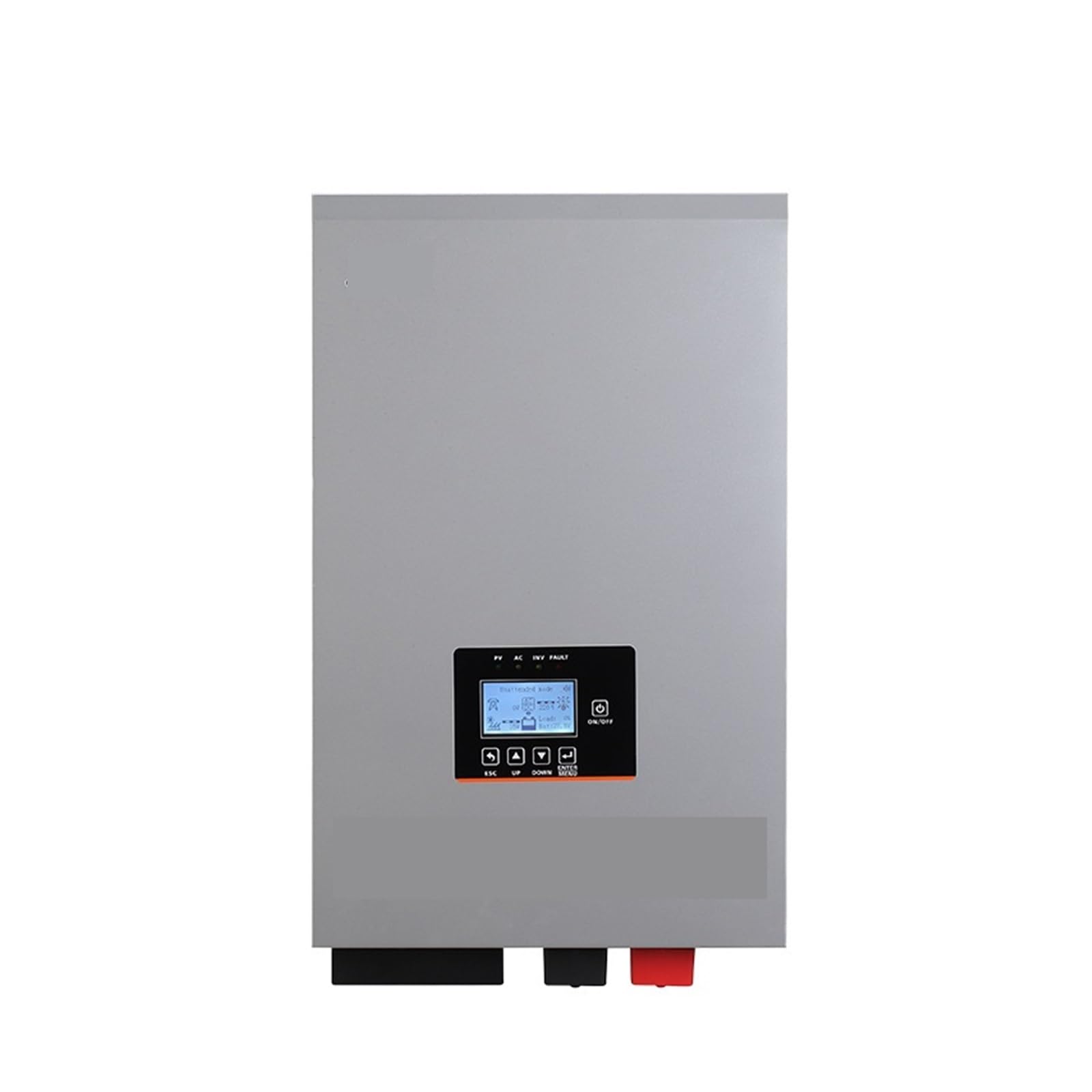
Figure 2.1: Front view of the PXNQMTJM 48V 5000W Pure Sine Wave Solar Inverter, showing input/output terminals and control panel.
Key Features:
- Pure Sine Wave Output: Provides clean power suitable for all types of loads, including sensitive electronics.
- Built-in MPPT Controller: Maximizes power harvest from solar panels.
- Advanced Inverter Control: Ensures stable and reliable power conversion.
- High Efficiency: Inverter efficiency of 90%.
- Robust Design: External dimensions of 596*363*193mm for durable installation.
3. Setup
Proper installation is crucial for the performance and longevity of your inverter. Ensure all components are correctly connected before powering on the unit.
Installation Steps:
- Mounting: Choose a dry, well-ventilated, and cool location. Mount the inverter securely to a wall or stable surface, ensuring adequate clearance for airflow around the unit.
- Battery Connection: Connect the 48V battery bank to the DC input terminals of the inverter. Ensure correct polarity (+ to + and - to -). Use appropriately sized cables and fuses.
- Solar Panel Connection (if applicable): If using solar panels, connect them to the MPPT solar input terminals. Verify correct voltage and current ratings for your solar array.
- AC Output Connection: Connect your AC loads (appliances, distribution panel) to the AC output terminals of the inverter. Ensure the total load does not exceed the inverter's rated capacity.
- Grounding: Connect the inverter's ground terminal to a reliable earth ground.
- Final Check: Before powering on, double-check all connections for tightness and correct polarity.
4. Operating Instructions
Follow these steps to safely operate your PXNQMTJM solar inverter.
Powering On:
- Ensure all DC and AC connections are secure.
- Turn on the DC breaker/switch between the battery bank and the inverter.
- Press the power button on the inverter. The display should illuminate, indicating the inverter is starting up.
- Monitor the display for status indicators, battery voltage, and AC output voltage.
- If connected, turn on the AC output breaker to supply power to your loads.
Powering Off:
- Disconnect all AC loads from the inverter by turning off the AC output breaker.
- Press and hold the power button on the inverter until it shuts down.
- Turn off the DC breaker/switch between the battery bank and the inverter.
Display and Controls:
The inverter features a control panel and display to monitor system status, input/output voltages, current, and error codes. Refer to the on-screen menu for navigation and parameter settings. Specific menu options may vary; consult the detailed user interface guide if provided separately.
5. Maintenance
Regular maintenance ensures optimal performance and extends the lifespan of your inverter.
- Cleaning: Periodically clean the exterior of the inverter with a dry, soft cloth. Ensure ventilation openings are free from dust and debris. Do not use liquid cleaners.
- Connection Checks: Annually, inspect all electrical connections (DC input, AC output, ground) for tightness and signs of corrosion. Tighten any loose connections.
- Ventilation: Ensure the area around the inverter remains clear to allow for proper heat dissipation. Overheating can reduce efficiency and lifespan.
- Battery Inspection: Regularly check the battery bank for proper voltage, electrolyte levels (for flooded batteries), and terminal corrosion.
6. Troubleshooting
This section provides solutions to common issues you might encounter. For problems not listed here, contact customer support.
| Problem | Possible Cause | Solution |
|---|---|---|
| Inverter does not power on. | No DC input power; loose battery connections; low battery voltage. | Check battery connections and voltage. Ensure DC breaker is on. Charge batteries if voltage is too low. |
| No AC output. | Overload; short circuit on AC output; inverter in fault mode. | Reduce AC load. Check for short circuits. Restart inverter after clearing fault. |
| Inverter displays an error code. | Internal fault; specific system issue. | Note the error code and refer to the detailed error code list (if available) or contact support. |
| Low efficiency/output. | Poor ventilation; undersized solar array; degraded batteries. | Ensure proper ventilation. Verify solar panel performance. Check battery health. |
7. Specifications
Technical specifications for the PXNQMTJM 48V 5000W Pure Sine Wave Solar Inverter.
| Feature | Detail |
|---|---|
| Brand | PXNQMTJM |
| Model | 48V 5000W Pure Sine Wave Solar Inverter |
| Input Voltage | 48V DC (Battery Powered) |
| Output Voltage | 220V AC |
| Rated Power | 5000W |
| Waveform | Pure Sine Wave |
| Inverter Efficiency | 90% |
| MPPT Controller | Built-in |
| External Dimensions (L x W x H) | 596mm x 363mm x 193mm |
| Power Source Type | Inverter Power Supply |
| ASIN | B0GK8NBHBD |
8. Warranty and Support
For warranty information, please refer to the documentation provided with your purchase or contact the seller directly. PXNQMTJM is committed to providing reliable products and customer service.
If you require technical assistance, troubleshooting beyond this manual, or have questions regarding your inverter, please contact PXNQMTJM customer support through your point of purchase or the official brand channels.