
MULTITRUST KJ9153BC-N1
MULTITRUST V8 Engine Building Blocks Model Toy - 692 Pieces Instruction Manual
Model: KJ9153BC-N1
Introduction
This instruction manual provides detailed guidance for assembling, operating, and maintaining your MULTITRUST V8 Engine Building Blocks Model Toy. This construction kit is designed to engage users in the principles of mechanics and engineering through hands-on building. It aims to develop problem-solving skills, creativity, and hand-eye coordination. The assembly process offers an opportunity for collaborative learning and family interaction.
Product Overview
The MULTITRUST V8 Engine Model is a realistic and engaging building kit. It features a compact design that accurately simulates the internal workings of a real V8 engine.
- Realistic V8 Engine Model: Features transparent cylinder heads, simulated piston movement, and a turbocharger.
- USB Charging Engine Design: Includes a motor and a USB charging cable, allowing the model to operate with electric power. No batteries are required for the motor itself.
- Safe and High-Quality Materials: Made of INMETRO-approved, non-toxic, and odorless ABS plastic.
- Educational STEM Toy: Stimulates interest in mechanics and engineering, expanding creativity and problem-solving abilities.
- Target Audience: Suitable for adults and children aged 8 and above, especially car and mechanical engineering enthusiasts.

Figure 1: Product components including the gift box, bidirectional motor, USB charging cable, and instruction manual.
Setup and Assembly
Assembly of the V8 Engine Model is required. Please follow the included instruction manual carefully. It is recommended to sort all pieces before beginning assembly.
- Unpack Components: Carefully open the packaging and lay out all components. Verify that all 692 pieces are present according to the parts list in the included manual.
- Organize Pieces: Sort the building blocks by type, size, or color to facilitate the assembly process.
- Follow Instructions: Refer to the detailed step-by-step instructions provided in the physical manual. Each step will guide you through connecting the blocks to form the engine structure.
- Connect Electrical Components: During assembly, integrate the bidirectional motor as instructed. Ensure all connections are secure.
- Final Checks: Once assembly is complete, double-check all connections to ensure stability and proper alignment of parts, especially the transparent cylinder heads and moving pistons.

Figure 2: The 692-piece V8 engine model during assembly, showing various components and the overall structure.

Figure 3: An adult and child engaging in the assembly process, highlighting the family-friendly nature of the STEM project.
Operating Instructions
The V8 Engine Model is designed for interactive display and educational purposes. It operates using a USB power source.
- Connect Power: Use the provided USB charging cable to connect the engine model to a standard USB power adapter (not included) or a computer USB port.
- Activate Motor: Locate the power switch on the model (refer to the physical manual for exact location). Turn the switch to the "ON" position.
- Observe Operation: The motor will activate, and you can observe the simulated movement of the pistons through the transparent cylinder heads. The turbocharger will also engage.
- Power Off: To stop the operation, turn the power switch to the "OFF" position and disconnect the USB cable.

Figure 4: The fully assembled V8 engine model, showcasing its functional design and transparent covers for viewing internal mechanisms.

Figure 5: Close-up views of the V8 engine model's detailed features, such as the sophisticated turbocharger, precise piston movement, transparent cylinder head, and bidirectional electric drive.
Maintenance
Proper care will ensure the longevity and functionality of your V8 Engine Model.
- Cleaning: Use a soft, dry cloth to gently wipe dust from the model. For stubborn dirt, a slightly damp cloth can be used, but ensure no water enters the electrical components.
- Storage: Store the model in a cool, dry place away from direct sunlight and extreme temperatures to prevent material degradation.
- Handling: Handle the model with care to avoid accidental disassembly or damage to delicate parts.
- Electrical Components: Do not attempt to open or modify the motor or USB cable. If any electrical component is damaged, discontinue use.
Troubleshooting
| Problem | Possible Cause | Solution |
|---|---|---|
| Motor does not start. |
|
|
| Pieces are missing during assembly. |
|
|
| Model is unstable or parts fall off. |
|
|
Specifications
- Brand: MULTITRUST
- Model Number: KJ9153BC-N1
- Number of Pieces: 692
- Material: ABS Plastic
- Theme: Car / V8 Engine
- Item Dimensions (L x W x H): 20 x 8 x 23 cm (approximately 7.9 x 3.1 x 9.1 inches)
- Item Weight: 750 Grams (approximately 1.65 lbs)
- Educational Objective: STEM (Science, Technology, Engineering, Mathematics)
- Assembly Required: Yes
- Power Source: USB (motor included, no batteries required for motor operation)
- Recommended Age: 8 years and up
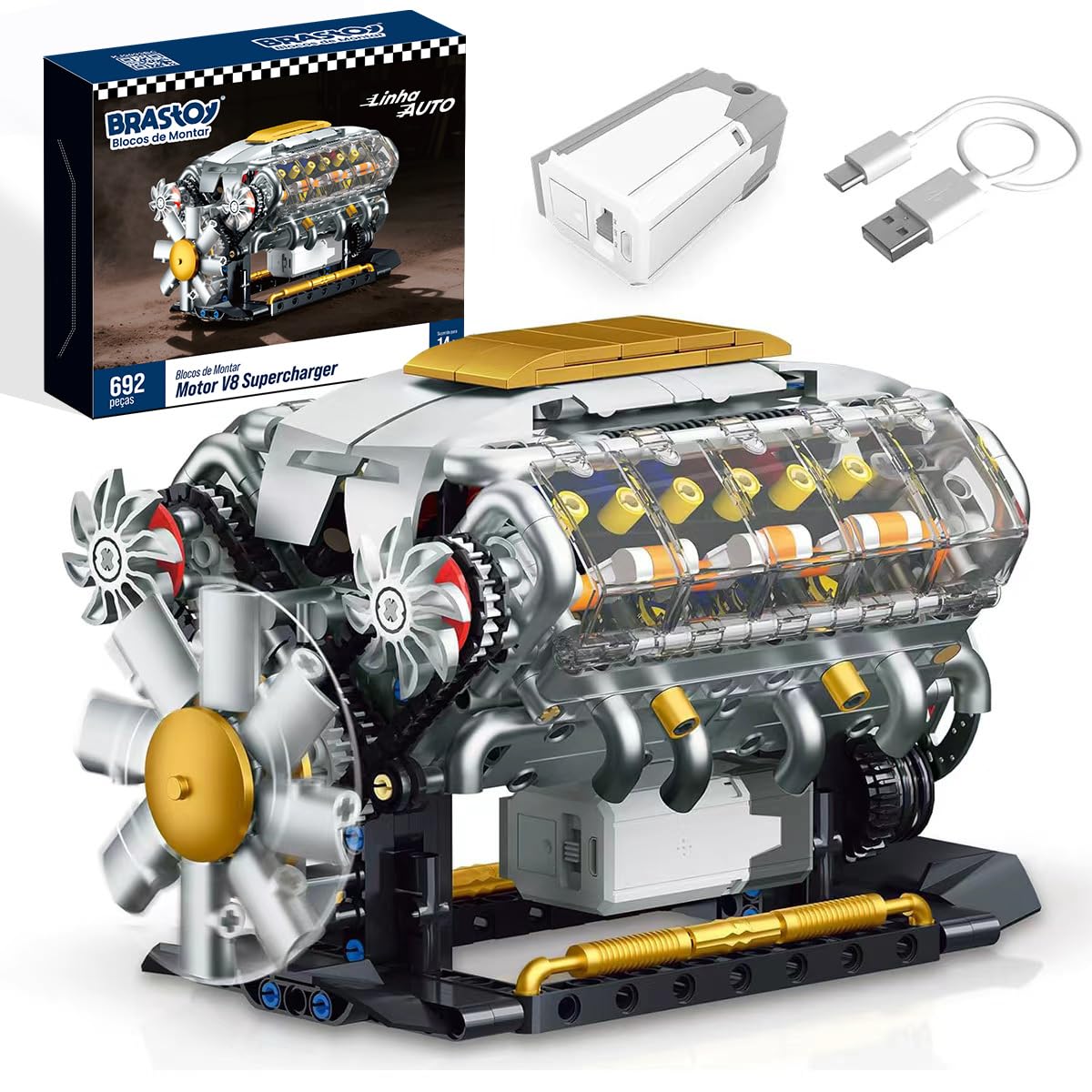
Figure 6: The assembled V8 engine model with approximate dimensions: 22cm length, 14cm width, 13cm height.
Safety Information
This product contains small parts and is not suitable for children under 3 years of age due to choking hazards. Adult supervision is recommended during assembly and play, especially for younger users.
- Keep away from open flames or heat sources.
- Do not ingest any parts.
- Ensure the USB cable is handled carefully to prevent damage.
- This product is made from non-toxic, INMETRO-approved ABS material.
Warranty and Support
Specific warranty information for this product is not provided in the available data. For any questions, missing parts, or support needs, please contact the seller or MULTITRUST customer service through the platform where the product was purchased.
We recommend retaining your proof of purchase for any warranty or support claims.
Ask a question about this manual
Ask about setup, troubleshooting, compatibility, parts, safety, or missing instructions. Manuals+ will review the question and use this page’s manual context to help answer it.