
1. Introduction
The Amazfit Active 3 Premium GPS Smartwatch is designed for active individuals, particularly runners, offering advanced tracking and health monitoring features. It combines a robust stainless steel casing with sapphire glass and a lightweight design for comfort and durability. The bright 1.32-inch AMOLED display ensures clear visibility of data and maps, even in direct sunlight.
Key features include precise GPS tracking with six satellite systems, free offline maps with turn-by-turn navigation, integrated race programs, personalized Zepp Coach coaching, and advanced analysis of running metrics such as posture, power, lactate threshold, and ground contact time. The smartwatch boasts a battery life of up to 12 days for daily use.
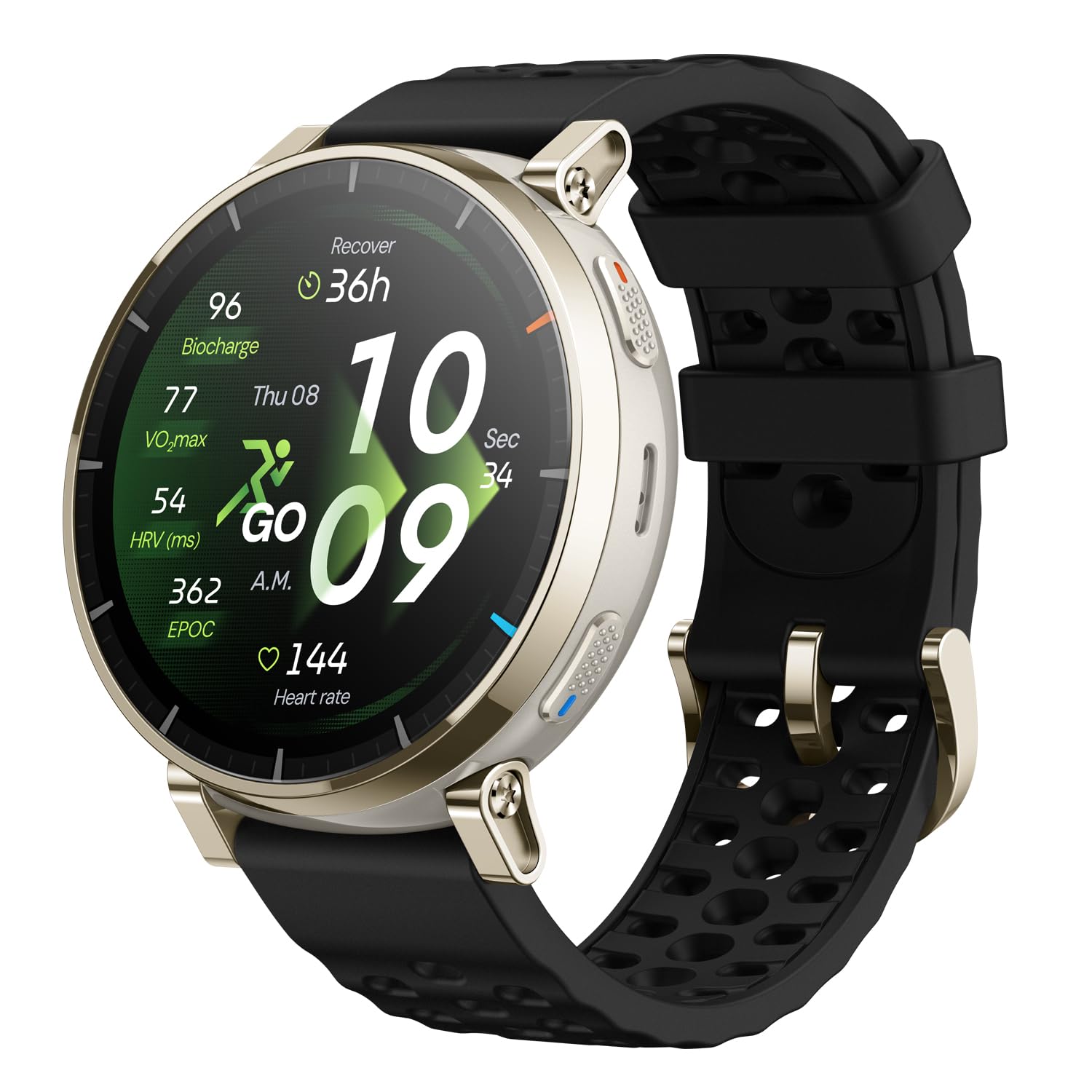
Figure 1: Amazfit Active 3 Premium GPS Smartwatch, showcasing its sleek design and vibrant display.
2. Setup
2.1 Charging the Device
Before first use, fully charge your Amazfit Active 3 Premium smartwatch. Use the included magnetic charging base. Connect the charging base to a USB power source (USB Type-C cable not included). Place the smartwatch onto the magnetic charging pins, ensuring proper alignment. The watch display will indicate charging status.
2.2 Initial Pairing with Your Smartphone
- Download the Zepp app from your smartphone's app store (compatible with iOS and Android).
- Open the Zepp app and create an account or log in.
- Turn on your Amazfit Active 3 Premium smartwatch.
- In the Zepp app, navigate to 'Profile' > 'My Devices' > 'Add device' and select 'Watch'.
- Follow the on-screen instructions to scan the QR code displayed on your watch or search for your device via Bluetooth.
- Confirm the pairing request on both your smartphone and the smartwatch.
Once paired, the watch will synchronize data with the app, and you can customize settings, watch faces, and notifications.
3. Operating Instructions
3.1 Display and Navigation
The smartwatch features a 1.32-inch AMOLED touchscreen display with a resolution of 320 x 320 pixels and a maximum brightness of 3000 NIT. Navigate the interface using touch gestures (swipe, tap) and the physical buttons on the side. The user interface also supports microphone input for voice commands.
3.2 GPS and Navigation
The Amazfit Active 3 Premium includes built-in GPS with support for six satellite systems for accurate location tracking. It offers free offline maps and turn-by-turn navigation, allowing you to navigate without a smartphone connection. To use offline maps, download them via the Zepp app before your activity.
3.3 Sport Modes and Training
With over 170 sport modes, the smartwatch tracks a wide range of activities. Select your desired sport mode from the watch menu to begin tracking. Integrated race programs and personalized Zepp Coach coaching are available to help you achieve your fitness goals, from 5K runs to marathons. The watch also monitors equipment usage, such as running shoes.
3.4 Health Monitoring
The smartwatch provides comprehensive health monitoring, including a heart rate monitor, sleep monitor, and multisport tracker. It offers advanced analysis of running posture, running power, lactate threshold, and ground contact time to improve training efficiency. Access detailed health data through the Zepp app.
3.5 NFC Functionality
The device supports NFC for convenient contactless payments or other NFC-enabled functions. Refer to the Zepp app for setup and availability of NFC services in your region.
3.6 Music Storage and Playback
With 4 GB of internal memory, you can store music directly on the smartwatch. Connect Bluetooth headphones to the watch for phone-free music playback during workouts.
4. Maintenance
4.1 Water Resistance
The Amazfit Active 3 Premium is water-resistant up to 5 ATM (50 meters), making it suitable for swimming and showering. Avoid using the watch in hot water, saunas, or steam rooms, as this may compromise the water resistance seals. Do not press buttons underwater.
4.2 Cleaning and Care
Regularly clean your smartwatch and strap to prevent skin irritation and maintain optimal performance. Wipe the watch body and strap with a soft, damp cloth. Ensure the charging contacts are clean and dry before charging. Avoid using harsh chemicals or abrasive materials.
5. Troubleshooting
5.1 Battery Life Issues
- Short Battery Life: Ensure all background apps are closed. Reduce screen brightness and disable always-on display if not needed. Limit frequent GPS usage or continuous heart rate monitoring.
- Not Charging: Check if the magnetic charging base is properly connected to a power source. Ensure the charging pins on the watch and base are clean and free of debris.
5.2 Connectivity Problems
- Bluetooth Disconnection: Ensure your smartphone's Bluetooth is enabled and the Zepp app is running in the background. Keep the watch within Bluetooth range of your phone. Restart both the watch and phone if issues persist.
- GPS Inaccuracy: Ensure you are in an open outdoor area with a clear view of the sky. Allow the watch sufficient time to acquire a GPS signal before starting an activity.
5.3 Display Not Responding
If the touchscreen is unresponsive, try restarting the smartwatch. If the issue persists, ensure the screen is clean and dry. Contact customer support if the problem continues.
6. Specifications
| Feature | Specification |
|---|---|
| Model Number | A2558 |
| Display Type | AMOLED |
| Screen Dimensions | 1.32 Inches |
| Resolution | 320 x 320 |
| Maximum Screen Brightness | 3000 NIT-coating |
| Battery Life | Up to 12 Days |
| Battery Cell Composition | Lithium-polymer |
| Memory Storage Capacity | 4 GB |
| Installed RAM Memory | 4 GB |
| Connectivity Technology | Bluetooth |
| Wireless Communication Standard | Bluetooth |
| Communication Feature | GPS, NFC |
| GPS | Built-in GPS |
| Water Resistance Level | 5 ATM (50 Meters) |
| Operating System | Android (Compatible with iOS and Android) |
| Special Features | GPS, Multisport Tracker, Heart Rate Monitor, Phone Call, Sleep Monitor |
| User Interface Input | Touch Bar, Microphone, Touchscreen |
| Item Weight | 150 Grams |
| Included Components | User Manual, Magnetic Charging Base (USB Type-C cable not included) |
| Manufacturer | Amazfit |
| First Available Date | February 26, 2026 |
7. Warranty and Support
7.1 Warranty Information
The Amazfit Active 3 Premium Smartwatch comes with a limited warranty. Please refer to the warranty card included in your product packaging or visit the official Amazfit website for detailed terms and conditions regarding warranty coverage and duration.
7.2 Customer Support
For technical assistance, troubleshooting, or any product-related inquiries, please visit the official Amazfit support website or contact their customer service. Support resources often include FAQs, user guides, and contact information for direct assistance.