
Introduction
The Paddsun Speed Sentinel Radar Detector (Model T0198(AB)-YKY) is designed to provide drivers with advance warning of speed monitoring devices. This device offers 360-degree detection capabilities, voice alerts, and an LED display to enhance driving awareness across various road conditions. It supports full frequency reception for X, K, and Ka bands, aiming to provide timely notifications.
Package Contents
Before proceeding with the setup, please ensure all items listed below are present in your package:
- 1 x Paddsun Speed Sentinel Radar Detector
- 1 x Car Charger (Power Cord)
- 1 x Anti-slip Pad
- 1 x User Manual

Image: Contents of the Paddsun Speed Sentinel Radar Detector package.
Setup
Follow these steps to set up your radar detector:
- Placement: Choose a suitable location on your vehicle's dashboard that does not obstruct your view of the road. The anti-slip pad can be used to secure the device. Ensure the detector has a clear line of sight to the front and rear for optimal detection.
- Power Connection: Insert the car charger into your vehicle's 12V power outlet (cigarette lighter socket). Connect the other end of the power cord to the Mini USB or DC charging port on the radar detector. The device will power on automatically.
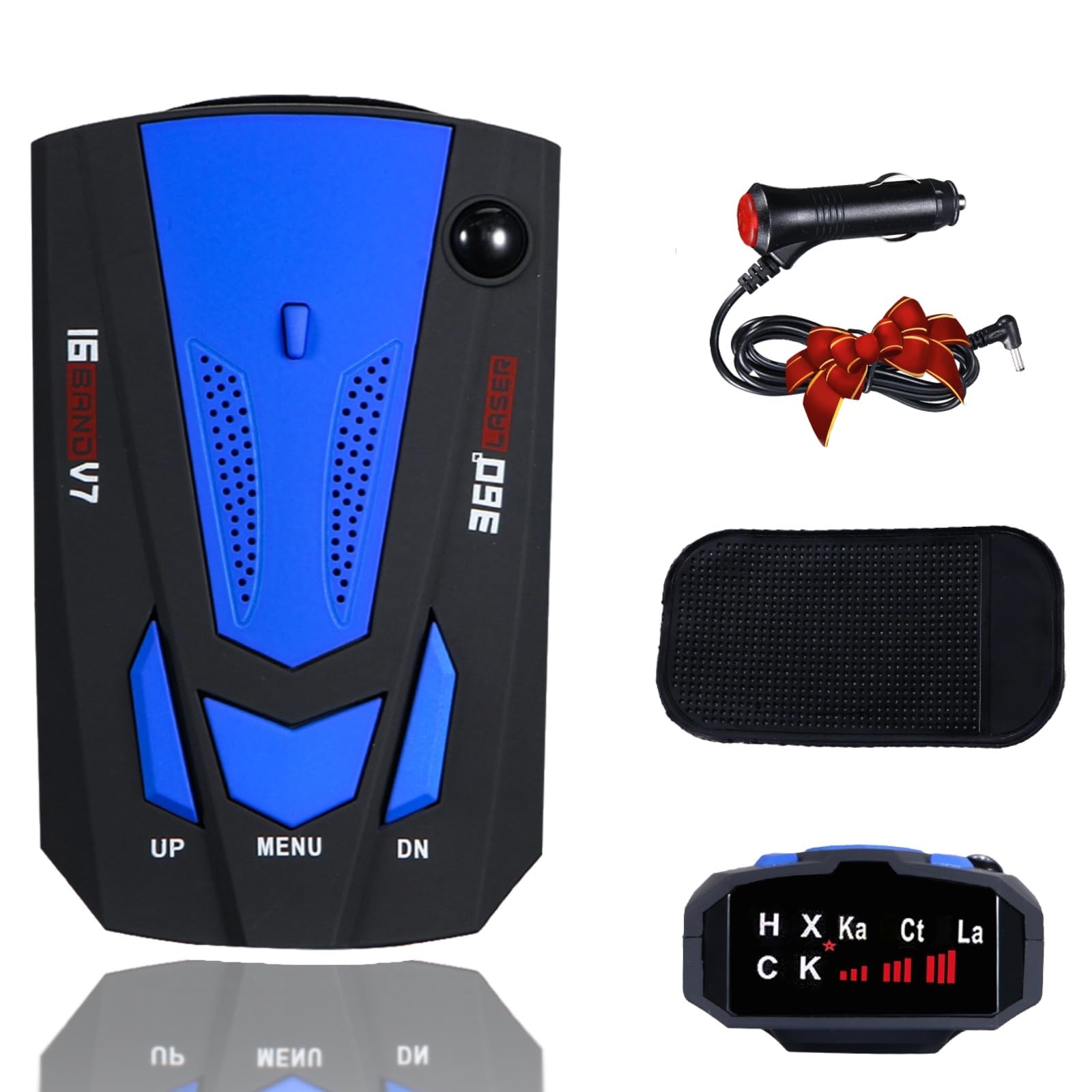
Image: Various views of the radar detector, showing its design and ports.
Operating Instructions
The radar detector is designed for simple operation with three primary buttons:
- UP Button: Press to increase the volume of alerts and voice prompts.
- MENU Button: Press to adjust screen brightness.
- DN Button: Press to decrease the volume of alerts and voice prompts. A long press (over 5 seconds) on the DN button will switch between City and Highway modes, and also change the device language between English and Russian.
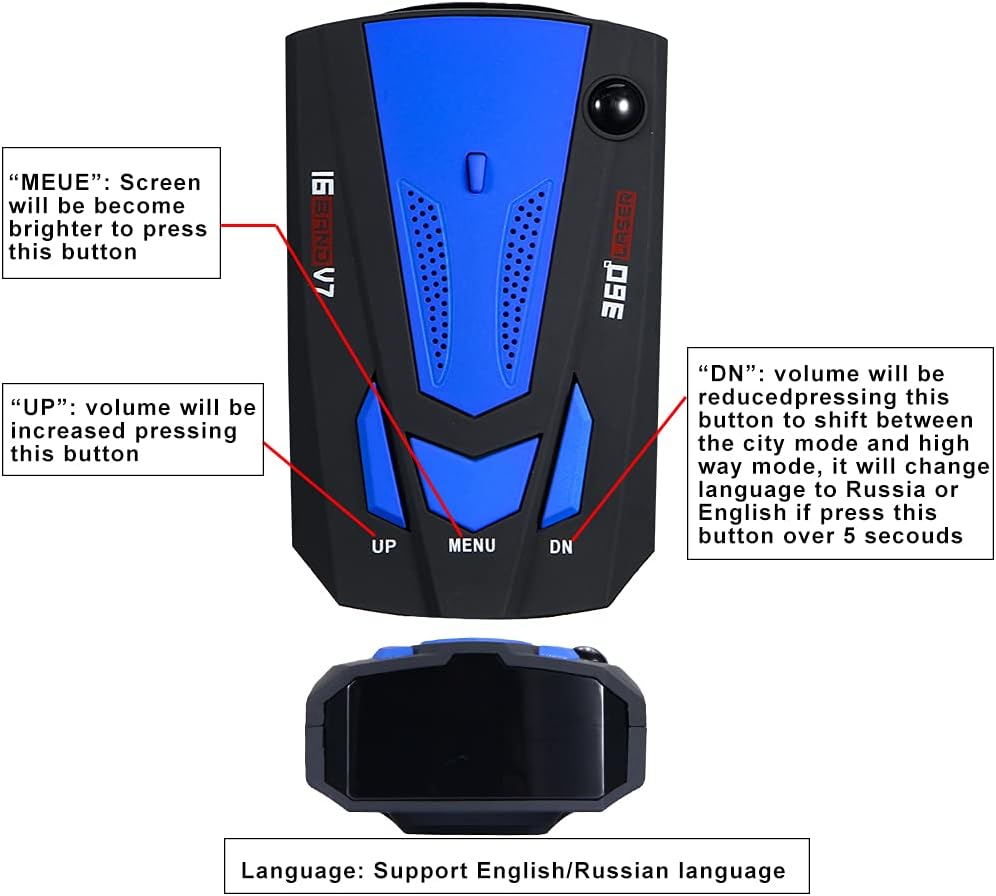
Image: Close-up of the radar detector's control buttons and their functions.
Operating Modes
- Highway Mode: Provides maximum detection range and sensitivity, suitable for open road driving.
- City Mode: Reduces sensitivity to minimize false alerts from common urban sources (e.g., automatic door openers, blind spot monitors), ideal for city driving.
Alerts and Display
When a speed monitoring device is detected, the unit will provide a clear voice prompt and display the detected band (X, K, Ka, Ct, La) on its LED screen. The display will also show signal strength indicators. The device is designed to provide advance warning, allowing sufficient time to adjust driving speed.
Maintenance
To ensure the longevity and optimal performance of your radar detector, follow these maintenance guidelines:
- Cleaning: Use a soft, dry cloth to clean the exterior of the device. Avoid using abrasive cleaners or solvents, which can damage the casing or screen.
- Storage: Store the device in a cool, dry place when not in use. Avoid prolonged exposure to direct sunlight or extreme temperatures, as this can affect internal components.
- Handling: Handle the device with care. Avoid dropping it or subjecting it to strong impacts.
- Servicing: The device contains no user-serviceable parts. Do not attempt to open or repair the unit yourself. Opening the device by non-professionals may void the warranty and cause damage.
Troubleshooting
If you encounter issues with your radar detector, please refer to the following common problems and solutions:
- Device does not power on:
- Ensure the car charger is securely plugged into both the vehicle's 12V power outlet and the detector's power port.
- Check the vehicle's 12V power outlet for power by testing it with another device.
- No alerts received:
- Verify that the device is properly positioned with a clear line of sight. Obstructions can block radar signals.
- Ensure the volume is not set to minimum or muted.
- Confirm the device is in the appropriate operating mode (Highway for maximum sensitivity).
- Frequent false alerts:
- Switch the device to City mode to reduce sensitivity to non-police radar sources.
- False alerts can be caused by automatic door openers, blind spot monitoring systems in other vehicles, or traffic flow sensors.
- Language is incorrect:
- Press and hold the DN button for over 5 seconds to cycle through available languages (English/Russian).
Specifications
| Model Number | T0198(AB)-YKY |
| Brand | Paddsun |
| Interface | Mini USB, DC Charging Port |
| Material | Plastic |
| Voltage | 12V |
| Detection Distance | 200-800 meters (accurate speed measurement 300 meters) |
| Full Frequency Band Support | X Band, K Band, Ka Band, CT, VG-2 |
| X Band Frequency | 10.525 GHz±100 MHz |
| K Band Frequency | 24.150 GHz±175 MHz, 24.125 GHz±175MHz |
| Ka Band Frequency | 34.700 GHz±1300 MHz, 33.400 GHz±1300 MHz |
| VG-2 Frequency | 11.150GHz±175MHz |
| Language Support | English, Russian |
Warranty Information
This Paddsun Speed Sentinel Radar Detector (Model T0198(AB)-YKY) comes with a 30-DAY warranty from the date of purchase. This warranty covers manufacturing defects under normal use. Please retain your proof of purchase for any warranty claims. The warranty does not cover damage caused by misuse, accidents, unauthorized modifications, or improper installation.
Support
For further assistance, technical support, or warranty inquiries, please contact the seller or manufacturer directly through the platform where the product was purchased. Please have your model number (T0198(AB)-YKY) and proof of purchase ready when contacting support.