
1. Introduction
Thank you for choosing the Zerodis Tower Crane Anemometer. This device is designed for accurate wind speed measurement and reliable alarm functions, suitable for applications in power plants, meteorological stations, and construction sites. This manual provides essential information for the safe and efficient installation, operation, and maintenance of your anemometer. Please read this manual thoroughly before use and retain it for future reference.
2. Safety Information
- Installation: Ensure the device is installed securely in a location free from obstructions that could affect wind measurement. Follow all local safety regulations for working at heights.
- Power Supply: Use only the specified USB 5V power supply. Incorrect voltage can damage the device or pose a safety risk.
- Cables: Route connection cables carefully to prevent tripping hazards or damage. Protect cables from sharp edges and extreme temperatures.
- Maintenance: Disconnect power before performing any maintenance or cleaning. Do not attempt to disassemble or repair the device yourself. Contact qualified personnel for service.
- Environmental Conditions: While the device is designed for outdoor use and is rainproof, avoid exposing it to extreme weather conditions beyond its specified operating temperature range (-30℃ to 65℃).
3. Package Contents
Verify that all items listed below are present in your package:
- 1 x Tower Crane Wind Speed Meter (Display Unit)
- 1 x Wind Cup with Cable (8m / 26.2ft)
- 1 x Connection Cable
- 1 x Mounting Bracket
- 1 x Mounting Bracket Accessories
- 5 x Screws
- 5 x Nuts
- 1 x USB Cable

Figure 3.1: Complete package contents.
4. Product Overview
The Zerodis Tower Crane Anemometer consists of two primary components: the 3-cup wind sensor and the digital display unit. The wind sensor measures wind speed, and the display unit processes and shows the data, along with alarm functions.
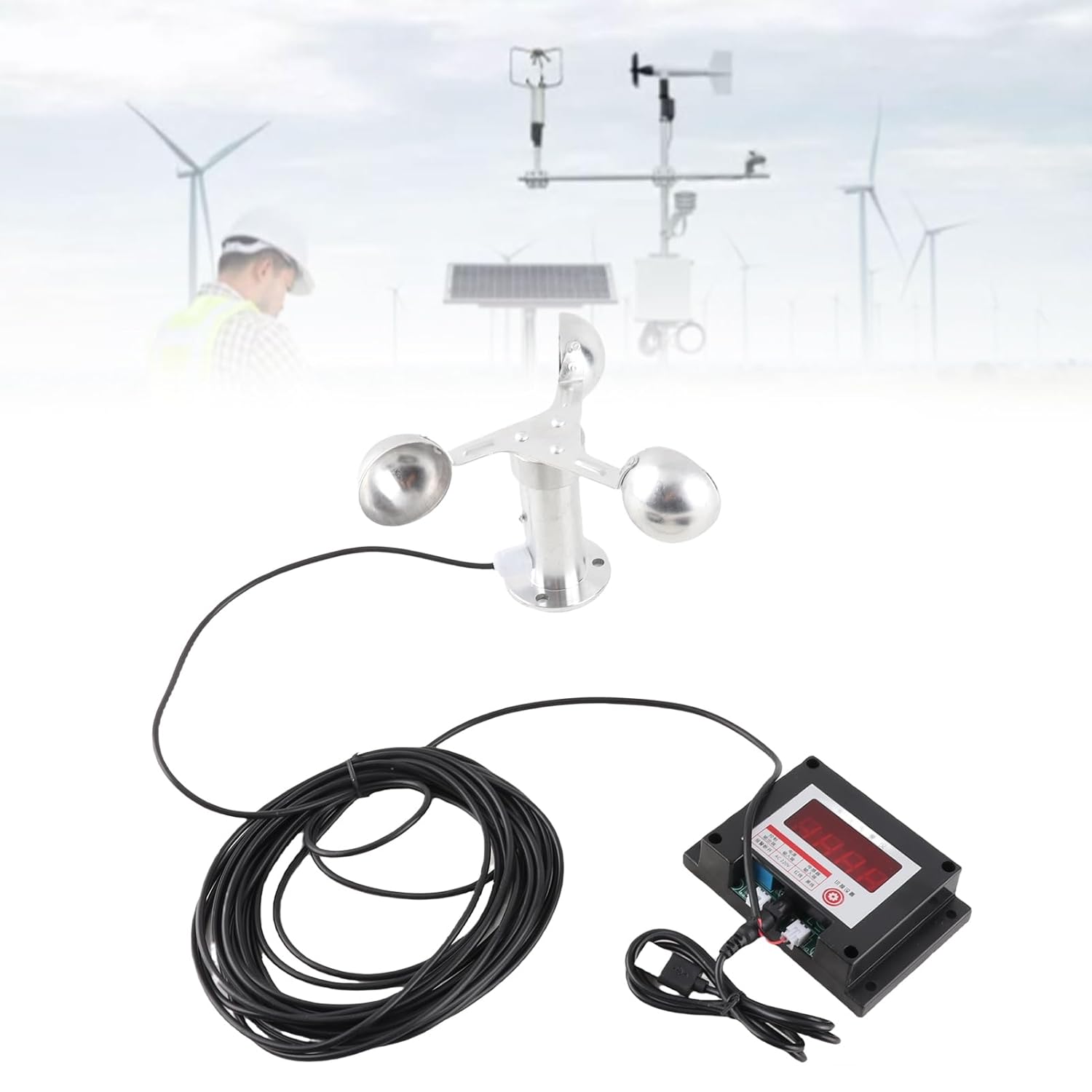
Figure 4.1: Anemometer system overview.
4.1 Wind Cup Sensor
The wind cup sensor features a 3-cup design for accurate wind speed capture, even at low speeds (starting at 0.7m/s). It is constructed from aluminum alloy for durability and resistance to outdoor elements.

Figure 4.2: Wind cup sensor.
4.2 Display Unit
The display unit houses the control circuitry and a digital readout for wind speed. It includes features such as power loss memory and electromagnetic interference protection. The unit is made from ABS material.

Figure 4.3: Display unit.
5. Setup
Follow these steps to set up your Zerodis Tower Crane Anemometer:
- Mounting the Wind Cup Sensor:
- Select a mounting location for the wind cup sensor that is clear of obstructions and allows for accurate wind measurement.
- Use the provided mounting bracket and accessories. The wind cup mounting aperture is 4cm.
- Securely fasten the wind cup sensor using the screws and nuts. Ensure it is level and stable.
- Mounting the Display Unit:
- Choose a suitable location for the display unit, considering visibility and protection from direct harsh weather if possible, despite its robust design.
- The mounting aperture size for the display unit is approximately 9.7x5.3cm.
- Attach the display unit using appropriate fasteners.
- Connecting the Cables:
- Connect the wind cup sensor cable (8m / 26.2ft) to the designated port on the display unit. Ensure a firm connection.
- Connect the provided USB cable to the display unit for power.
- Powering On:
- Connect the USB cable to a 5V power source. The display unit should power on and show a reading.

Figure 5.1: Example of an installed anemometer system.
6. Operating Instructions
Once powered on, the Zerodis Tower Crane Anemometer operates automatically.
6.1 Wind Speed Measurement
The 3-cup sensor continuously measures wind speed. The display unit will show the current wind speed reading. The device has a measurement accuracy of ±5% and a startup wind speed of 0.7m/s.
6.2 Intelligent Alarm System
The anemometer features an intelligent alarm system. When the wind speed reaches a preset level, the alarm will trigger. This function is crucial for safety at construction sites and power plants, providing timely warnings for high wind conditions. Refer to the device's specific settings for adjusting alarm thresholds, if applicable.
6.3 Advanced Features
- Power Loss Memory: The device retains its settings and last recorded data even after a power interruption, ensuring continuous monitoring.
- Electromagnetic Interference Protection: Built-in protection safeguards the device from electromagnetic interference, ensuring stable and accurate readings in industrial environments.
7. Maintenance
Regular maintenance ensures the longevity and accuracy of your anemometer.
- Cleaning: Periodically clean the wind cups and the display unit with a soft, damp cloth. Do not use abrasive cleaners or solvents. Ensure no debris obstructs the rotation of the wind cups.
- Inspection: Regularly inspect all cables for signs of wear or damage. Check mounting points to ensure they remain secure.
- Environmental Durability: The device is constructed from aluminum alloy and ABS, designed to withstand temperatures from -30℃ to 65℃ (-22°F to 149°F) and is rainproof, ensuring long-term outdoor use.
8. Troubleshooting
If you encounter issues with your anemometer, refer to the following common problems and solutions:
- No Display/Power:
- Check the USB 5V power supply connection.
- Ensure the USB cable is not damaged.
- Inaccurate Readings:
- Verify that the wind cup sensor is rotating freely and is not obstructed by debris.
- Ensure the sensor is mounted in an open area, away from buildings or trees that could create turbulence.
- Check the connection cable between the wind cup and the display unit for damage or loose connections.
- Alarm Not Triggering/Triggering Incorrectly:
- Confirm that the alarm threshold settings are correctly configured (if adjustable).
- Ensure the wind speed sensor is providing accurate data.
If the problem persists after attempting these solutions, please contact customer support for further assistance.
9. Specifications
| Feature | Specification |
|---|---|
| Item Type | Tower Crane Wind Speed Meter |
| Material | Aluminum Alloy (Wind Cup), ABS (Display Unit) |
| Weight | Approx. 676g / 23.8oz |
| Power Supply | USB 5V |
| Product Size (Display Unit) | Approx. 10.8x7.3x3cm / 4.3x2.9x1.2in |
| Mounting Aperture Size (Display Unit) | Approx. 9.7x5.3cm / 3.8x2.1in |
| Wind Cup Mounting Aperture | 4cm / 1.6in |
| Wind Cup Cable Length | 8m / 26.2ft |
| Wind Class Accuracy | 0.3 Class Accuracy: ±5% |
| Startup Wind Speed | 0.7m/S |
| Operating Temperature | -30℃ to 65℃ (-22°F to 149°F) |
10. Warranty and Support
For warranty information, please refer to the terms and conditions provided by your retailer at the time of purchase. If you require technical support or have questions not covered in this manual, please contact the Zerodis customer service department or your product supplier.