
Introduction
The NJBVRS Grain Moisture Meter YY-1011 is a digital instrument designed for accurately measuring the moisture content of various grains. It features a sensitive metal probe, an LCD backlight display, and voice announcements to assist in the measurement process. This manual provides detailed instructions for the proper setup, operation, and maintenance of your device.
Key Features
- LCD backlight for clear display in various lighting conditions.
- High-sensitivity metal probe for accurate measurements.
- Ability to measure 14 different grain types.
- Setting memory for user preferences.
- Voice announcements for operational guidance.
- Adjustable measurement limits and deviation.
- Alarm setting for exceeding moisture limits.
- Automatic shutdown after 15 minutes of inactivity to conserve power.
- Free switching function for selecting grain categories.
- Language switch between Chinese and English.

Figure 1: Overview of the YY-1011 Grain Moisture Meter's key features.
Package Contents
Please check the package contents upon unboxing to ensure all items are present:
- NJBVRS Grain Moisture Meter YY-1011
- Protective sleeve for the probe
- User Manual (this document)
Note: 4 x 1.5V AA batteries are not included and must be purchased separately.
Setup
Battery Installation
- Locate the battery compartment on the back of the device.
- Open the battery compartment cover.
- Insert four (4) 1.5V AA batteries, ensuring correct polarity (+/-).
- Close the battery compartment cover securely.
Initial Power On
Press the On/Off button to power on the device. The LCD screen will light up, and a self-test may occur. The device is ready for use when the main measurement interface is displayed.
Operating Instructions
Selecting Grain Type
The YY-1011 meter supports measurement for 14 different grain types. To select the appropriate grain type:
- Press the Varieties button.
- Cycle through the available grain codes (P0-P13) until the desired grain type is displayed.
- The selected grain type will be indicated on the LCD screen.
Refer to the table below for the corresponding grain types and their measurement ranges:
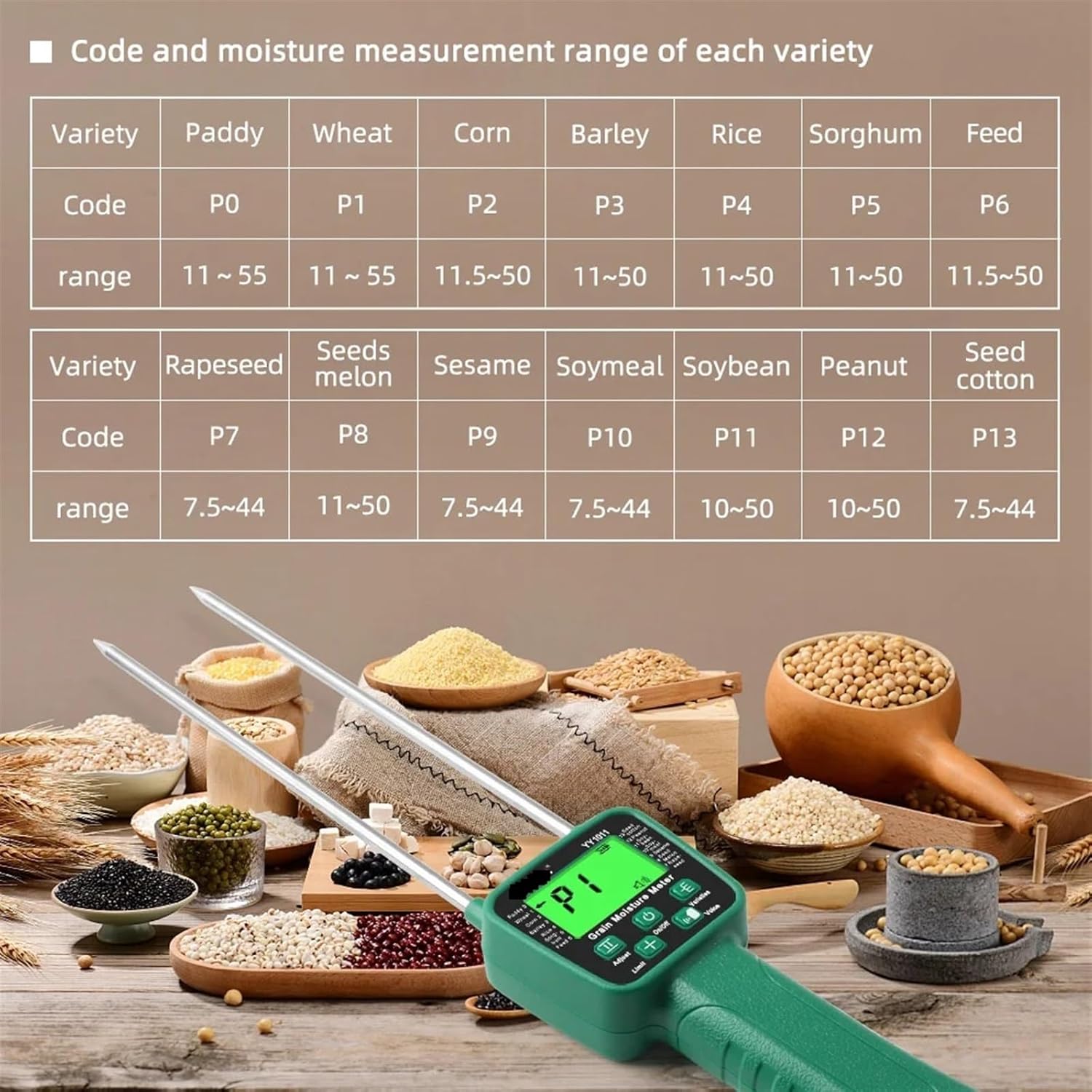
Figure 2: Grain codes and moisture measurement ranges.

Figure 3: Visual representation of the 14 measurable crops.
Taking a Measurement
- Ensure the correct grain type is selected as described above.
- Carefully insert the metal probe into the grain pile or sample to the desired depth.
- Wait a few seconds for the reading to stabilize. The moisture content will be displayed on the LCD screen.
- The device may provide voice announcements regarding the measurement.

Figure 4: Taking a measurement and adjusting deviation.
Adjusting Deviation
If calibration is needed, the user can adjust the measurement deviation from -3% to +5%.
- Press the Adjust button.
- Each press of the button will increase the deviation value by 0.5%. Continue pressing until the desired adjustment is reached.
Setting Measurement Limits
You can set upper and lower moisture limits for your measurements. The device will sound an alarm if the measured value falls outside this range. The settable range is 10% to 40%.
- Press the Limit button to enter limit setting mode.
- Use the + and - buttons to adjust the upper and lower limits.
- To restore the factory default limit of 10%, press and hold the Limit button for 2 seconds.
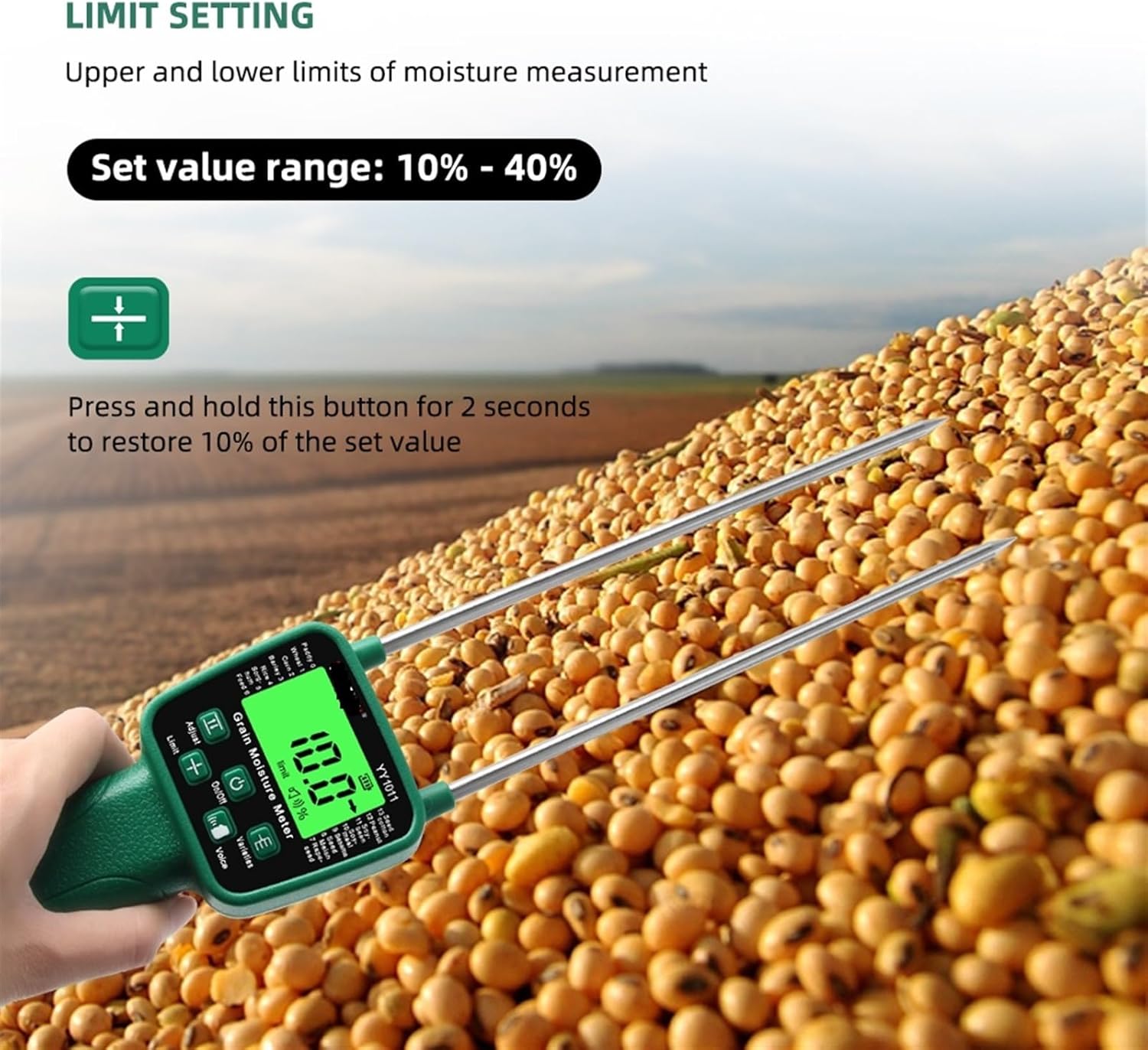
Figure 5: Setting moisture measurement limits.
Voice Announcements
The device provides voice prompts throughout the setting, testing, and checking processes. You can adjust the voice type:
- d1: Water content announcement.
- d2: High water content announcement.
- d3: Mute mode (silent).
- d4: Drip sound.
Press the Voice button to cycle through these options.
Language Switch
The instrument supports both Chinese and English languages.
- Ensure the device is powered off.
- Press and hold the On/Off and Voice keys simultaneously.
- The language will switch between Chinese and English.
Maintenance
Cleaning
- After each use, gently wipe the metal probe with a clean, dry cloth to remove any grain residue.
- Do not use abrasive cleaners or solvents, as these can damage the probe or the device casing.
- Ensure the device is completely dry before storing.
Storage
- Store the Grain Moisture Meter in a cool, dry place, away from direct sunlight and extreme temperatures.
- Always place the plastic protective sleeve over the probe when not in use to prevent accidental injury and protect the probe.
- If the device will not be used for an extended period, remove the batteries to prevent leakage.
Troubleshooting
Common Issues
- Device not powering on: Check battery installation and ensure batteries are not depleted. Replace batteries if necessary.
- Inaccurate readings: Ensure the correct grain type is selected. Clean the probe thoroughly. If deviation was adjusted, consider resetting it or recalibrating.
- No voice announcements: Check if the device is in mute mode (d3). Adjust voice settings using the Voice button.
- Display not clear: The LCD backlight may be dim if batteries are low. Replace batteries.
Specifications
| Feature | Specification |
|---|---|
| Model | YY-1011 |
| Display | LCD with backlight |
| Probe Type | High-sensitivity metal probe |
| Measurement Range | Varies by grain type (e.g., Paddy: 11-55%, Wheat: 11-50%) |
| Resolution | 0.1% (Water content value) |
| Deviation Adjustment | -3% to +5% (0.5% increments) |
| Limit Setting Range | 10% - 40% |
| Voice Announcements | Yes (d1, d2, d3, d4 options) |
| Language Options | Chinese, English |
| Automatic Shutdown | 15 minutes of no operation |
| Power Supply | 4 x 1.5V AA batteries (not included) |
| Product Size | 75mm * 420mm |
| Item Weight | 1.1 pounds |
| Manufacturer | NJBVRS |
Safety Information
- Keep the device out of reach of children.
- Do not immerse the device in water or other liquids.
- Avoid exposing the device to extreme temperatures, humidity, or direct sunlight.
- Use only the specified battery type. Do not mix old and new batteries or different types of batteries.
- Dispose of batteries according to local regulations.
- Do not attempt to disassemble or repair the device yourself. Contact qualified personnel for service.