
1. Introduction
Thank you for choosing the NJBVRS YY-1066L Soil Tester. This device is designed to provide accurate digital readings for various soil and environmental parameters, including pH, moisture, light intensity, temperature, air humidity, soil fertility, and salt content. This manual will guide you through the proper setup, operation, and maintenance of your soil tester to ensure optimal performance and longevity.
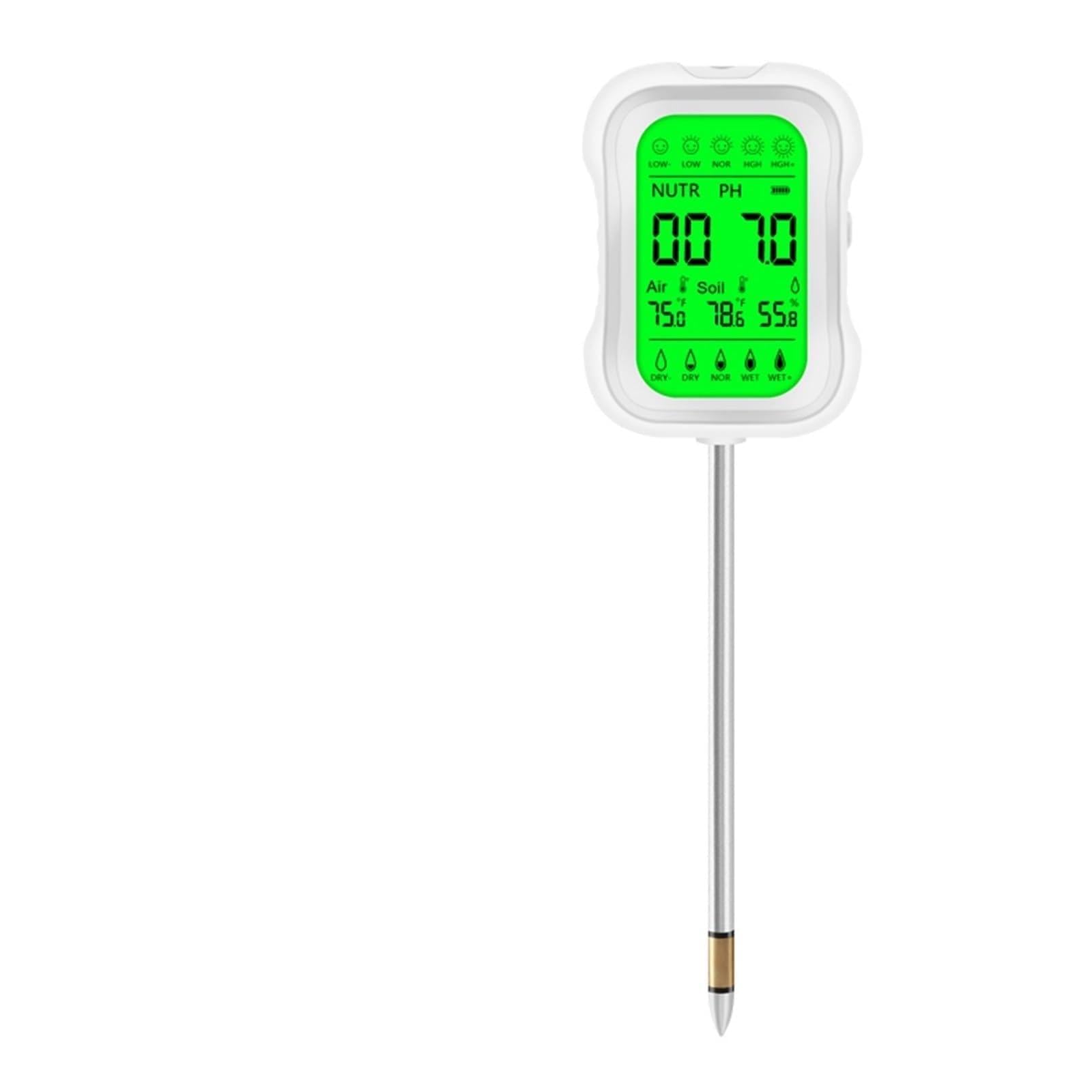
Figure 1: The NJBVRS YY-1066L Soil Tester, featuring its main unit, probe, and a digital display.
2. Product Components
The NJBVRS YY-1066L package includes:
- 1 x YY-1066L Soil Tester Unit
- 1 x User Manual
Note: 3 x AAA batteries are required and not included in the package.
3. Setup
3.1 Battery Installation
- Locate the battery compartment on the back of the main unit.
- Open the battery compartment cover.
- Insert three (3) AAA batteries, ensuring correct polarity (+/-).
- Close the battery compartment cover securely.
3.2 Initial Power On
After installing batteries, the device should power on automatically or by pressing the power button (if available). The LCD display will illuminate.
3.3 Probe Preparation
Before inserting the probe into soil, gently wipe the metal probe with a clean cloth to remove any dust or debris. Avoid touching the probe tip with bare hands to prevent oil residue from affecting readings.
4. Operating Instructions
4.1 General Usage
- Gently insert the metal probe into the soil to a depth of approximately 2-4 inches (5-10 cm). Ensure the probe is fully in contact with the soil for accurate readings.
- Wait for a few moments (typically 10-30 seconds) for the readings to stabilize on the LCD display.
- Read the desired parameters directly from the display.
- To save a reading, if applicable, refer to the device's specific button functions or connected app interface.
- After use, remove the probe from the soil and clean it thoroughly.
4.2 Understanding the Display

Figure 2: This image illustrates the NJBVRS YY-1066L Soil Tester in use, with its probe inserted into soil. A smartphone screen displays real-time readings for light, temperature, air humidity, soil moisture, EC, pH, fertility, and salt, indicating the device's multi-functional capabilities and app connectivity.
The LCD display provides readings for multiple parameters. Based on the typical interface, you will see:
- LIGHT: Indicates ambient light intensity (e.g., LOW-, LOW, NOR, HGH, HGH+).
- TEMP: Displays soil or ambient temperature in Celsius (°C) or Fahrenheit (°F).
- RH/%: Shows air humidity percentage.
- SOIL MOIST: Indicates soil moisture level (e.g., DRY-, DRY, NOR, WET, WET+).
- EC: Electrical Conductivity, often related to nutrient levels, displayed in mS.
- pH: Soil acidity or alkalinity, displayed numerically (e.g., 7.0 pH).
- Fertility: Soil fertility percentage.
- SALT: Salt content in mg/L.
The device may also feature a 'Save Reading' function, typically accessible via a button or through a connected application, allowing you to record measurements over time.
5. Maintenance
5.1 Cleaning the Probe
After each use, gently wipe the metal probe with a clean, soft cloth or paper towel. Do not use abrasive materials or harsh chemicals, as these can damage the sensor. Ensure the probe is completely dry before storage.
5.2 Storage
Store the soil tester in a cool, dry place away from direct sunlight and extreme temperatures. Remove batteries if the device will not be used for an extended period to prevent leakage.
6. Troubleshooting
- No Power/Display Not Working:
Check battery installation and ensure batteries are fresh. Replace if necessary. - Inaccurate Readings:
Ensure the probe is clean and inserted deeply enough into the soil. Make sure the soil is moist enough for accurate moisture and pH readings. Dry soil can lead to unreliable results. - Readings Fluctuate:
Allow sufficient time (10-30 seconds) for readings to stabilize. Ensure the probe is not in contact with air pockets or large debris in the soil. - Device Not Connecting (if applicable):
If your model supports app connectivity, ensure Bluetooth is enabled on your device and the soil tester is within range. Refer to the app's specific instructions for pairing.
7. Specifications (Model YY-1066L)
| Parameter | Range/Description |
|---|---|
| Model | YY-1066L |
| Light Intensity | LOW-, LOW, NOR, HGH, HGH+ |
| Soil Moisture | DRY-, DRY, NOR, WET, WET+ |
| Soil Fertility | 1-99% |
| Soil PH | 3-8.5pH |
| Soil Temperature | -10 ~ 60°C (14 ~ 140°F) |
| Air Humidity | 1 ~ 100% |
| Ambient Temperature | -10 ~ 60°C (14 ~ 140°F) |
| Display | LCD Lar Display |
| Auto Power Off | 5 minutes |
| Battery | 3 * AAA Battery (Not included) |
| Item Weight | 1.76 pounds |
| Package Dimensions | 0.39 x 0.39 x 0.39 inches |
8. Warranty Information
This product comes with a standard manufacturer's warranty against defects in materials and workmanship. Please retain your proof of purchase for warranty claims. For specific warranty duration and terms, refer to the product packaging or contact customer support.
9. Customer Support
For any questions, technical assistance, or support regarding your NJBVRS YY-1066L Soil Tester, please contact our customer service team. Refer to the contact information provided on the product packaging or our official website.