
Introduction
Thank you for choosing the Marsyu AI-GPT Smartwatch. This manual provides essential information for setting up, operating, and maintaining your device. Please read it carefully to ensure optimal performance and a complete understanding of its features.
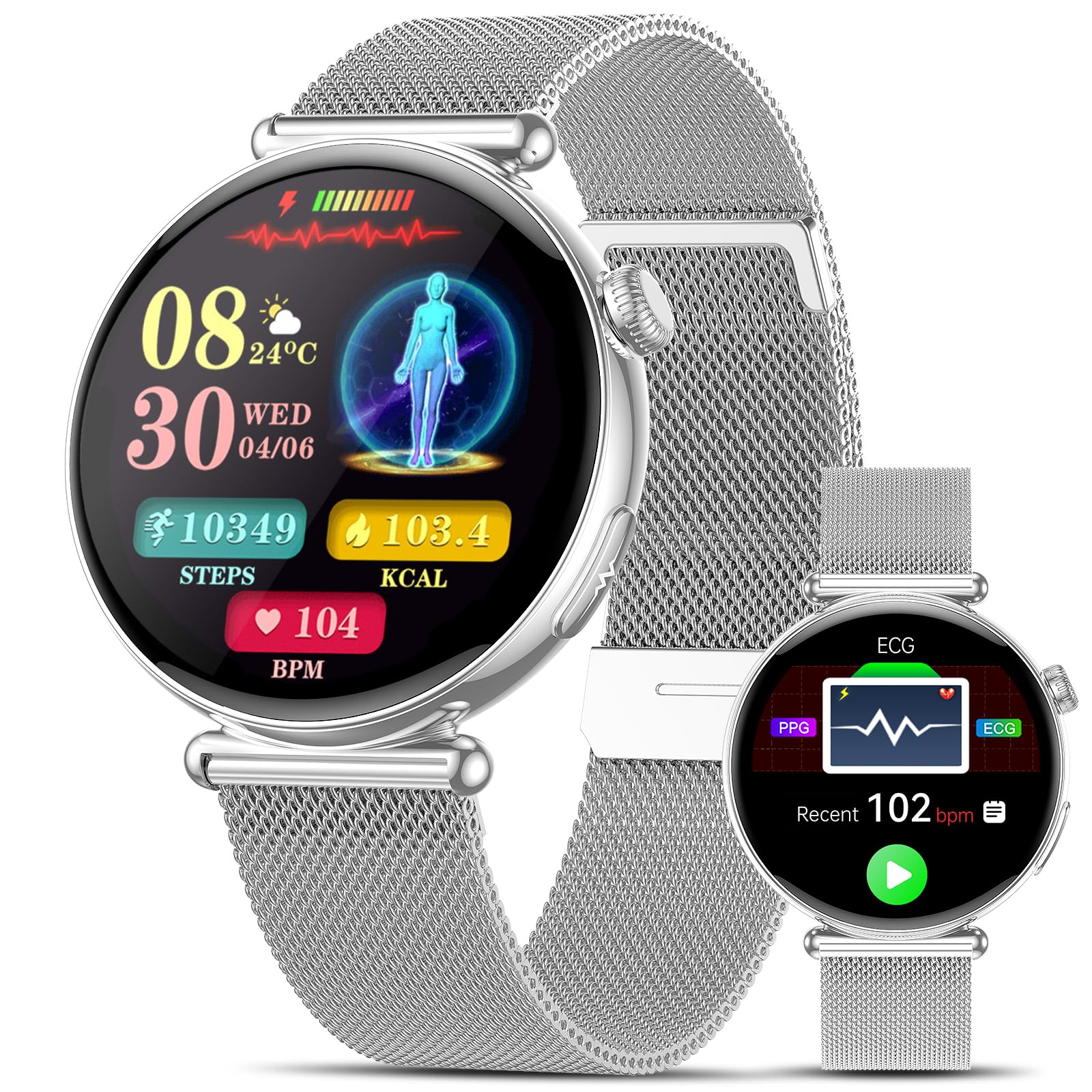
The Marsyu AI-GPT Smartwatch, featuring a 1.32-inch AMOLED display and a sleek silver design.
Setup
Package Contents
Ensure all items are present in the package:
- Marsyu AI-GPT Smartwatch
- Charging Cable
- User Manual (this document)

Illustration of the smartwatch dimensions (41mm diameter, 9mm thickness, 120-220mm strap) and typical package contents including the smartwatch, charging cable, and user guide.
Charging the Smartwatch
Before first use, fully charge your smartwatch. Connect the charging cable to the charging port on the back of the watch and to a USB power source. A full charge typically takes about 2 hours.
App Installation and Bluetooth Connection
To unlock all features, connect your smartwatch to your smartphone via the 'G Band' app.
- Activate Bluetooth on your smartphone.
- Open the Google Play Store (Android) or App Store (iOS), search for and install the 'G Band' app.
- Open the 'G Band' app and follow the on-screen instructions to scan the QR code on your smartwatch (if available) or manually search for 'ET491' to pair.
- Confirm any access authorizations requested by the app to complete the pairing process.

Visual guide for installing the G Band app and connecting your smartwatch via Bluetooth.
Operating the Smartwatch
Basic Navigation
- Touchscreen: Swipe left, right, up, or down to navigate through menus and features. Tap to select.
- Rotating Crown: Rotate the crown to scroll through menus and watch faces. Press the crown to return to the home screen or confirm selections.
- Side Button (ECG): Press the dedicated side button to initiate an ECG measurement.
Video demonstrating the functional rotating crown for menu scrolling and watch face changes, along with the ECG button and various health monitoring features.
Custom Watch Faces and Always-On Display
Personalize your smartwatch with over 150 watch faces available through the app, including AI-generated and DIY options. The 1.32-inch AMOLED screen supports an Always-On Display feature, showing the time continuously without needing to activate the screen.

Explore a wide range of customizable watch faces, including AI-generated designs, to match your personal style.

The AMOLED display features an Always-On mode, allowing continuous time visibility in both digital and analog formats.
Communication Features
- Bluetooth Calls: Make and receive calls directly from your wrist using the integrated microphone and speaker.
- Notifications: Receive timely notifications for calls, messages, and app alerts from your smartphone.
- AI Smart Q&A / Voice Assistant: Use the built-in AI voice assistant to get answers to questions, check weather, news, and control device functions with voice commands.

Interact with the smartwatch's AI Q&A and intelligent voice assistant for quick information and device control.

Stay connected with Bluetooth 5.4 for hands-free calls and receive push notifications directly on your smartwatch.
Other Functions
The smartwatch includes various utility features:
- Camera Remote Control
- Weather Forecast
- Calendar
- Music Playback and Control
- Sedentary Reminder
- Alarm Clock
- Games
- Flashlight
- Water Drainage Mode
- Calculator
- Find Phone function
- SOS Emergency Alarm (long press main button)

Overview of additional smartwatch features including camera remote, weather, calendar, music control, and more.
Video showcasing various features of the 2026 AI-GPT Smartwatch, including health monitoring, call functions, workout modes, and AI Q&A.
Health Monitoring
The Marsyu AI-GPT Smartwatch offers comprehensive health monitoring features. Note: This product is not a medical device. Measurement data is for reference only.
ECG Monitoring
Perform an ECG measurement with a single touch. The watch provides real-time waveform display and smart risk analysis. To measure:
- Rest your arm on a table. Remain calm, breathe regularly, and avoid talking.
- Position the watch on your wrist with the dial facing up (left wrist recommended for optimal results).
- Lightly touch the electrode button with your right finger. Keep your finger in contact for 30 seconds to complete the measurement.

Detailed instructions for performing an ECG measurement and viewing the results on the smartwatch and companion app.
Heart Rate and Blood Oxygen (SpO2) Monitoring
The smartwatch continuously monitors your heart rate and blood oxygen levels, providing real-time data and alerts for potential anomalies.

Real-time heart rate monitoring provides insights into your cardiovascular health during activity and rest.
Monitor your blood oxygen levels (SpO2) in real-time, crucial for respiratory safety and overall well-being.
Blood Pressure and Body Temperature
Quickly check your blood pressure and body temperature with a single touch on the watch interface.
Sleep Monitoring
The smartwatch provides 24/7 scientific sleep monitoring, tracking light and deep sleep stages to help you improve your sleep habits.

Detailed sleep monitoring tracks sleep stages and quality, providing insights for better rest.
Women's Health Tracking
The Women's Health Guardian feature accurately monitors menstrual and ovulation periods, offering personalized health risk warnings and support.

The Women's Health Guardian feature provides accurate tracking of menstrual and ovulation cycles.
Body Composition and Blood Component Analysis
Monitor your Body Mass Index (BMI), body fat, muscle mass, and analyze blood components like Uric Acid, Total Cholesterol, and Triglycerides for a comprehensive health overview.

Monitor your BMI and body composition to stay informed about your health and fitness.

Advanced sensors analyze blood components such as Uric Acid, Total Cholesterol, and Triglycerides for a deeper understanding of your health.
Stress, Fatigue, HRV, and MET Functions
The smartwatch assesses your stress levels, fatigue, Heart Rate Variability (HRV), and Metabolic Equivalent of Task (MET) to help you manage your energy and well-being. Breathing exercises are also available to promote relaxation.

The smartwatch provides instant assessment of emotions and fatigue, helping you manage your energy levels.
Utilize MET to quantify exercise intensity, HRV to monitor stress, and breathing exercises for mental and physical balance.
Fitness Tracking
Sports Modes
The smartwatch supports over 100 sports modes, providing intelligent analysis of steps, intensity, and calorie consumption for efficient and personalized training.
Access over 100 workout modes for scientific and personalized training, tracking steps, intensity, and calories.
Daily Activity Monitoring
Track your daily activity with three rings displaying steps, calories burned, and distance covered, motivating you to stay active.

Monitor your daily activity with visual rings for steps, calories, and distance, encouraging a healthy lifestyle.
Maintenance
Water Resistance (IP68)
The smartwatch is IP68 water-resistant, meaning it can withstand hand washing and rain. However, it is not suitable for sauna, immersion, or swimming. Avoid exposing the watch to hot water or steam.
Information on IP68 water resistance for daily use (hand washing, rain) and limitations (no swimming, immersion, sauna). Also shows battery life details.
Battery Life
The smartwatch features a 250 mAh lithium-ion battery, providing 5-7 days of typical daily use and over 20 days of standby time on a single 2-hour charge.
Cleaning
Wipe the watch and strap regularly with a soft, dry cloth. Avoid using harsh chemicals or abrasive materials.
Troubleshooting
If you encounter issues with your smartwatch, please refer to the following common solutions:
- Device not turning on: Ensure the watch is fully charged. Connect it to the charger for at least 30 minutes.
- Cannot pair with phone: Make sure Bluetooth is enabled on your phone and the 'G Band' app is installed and open. Ensure the watch is within Bluetooth range. Try restarting both the watch and your phone.
- Inaccurate health readings: Ensure the watch is worn snugly on your wrist, not too tight or too loose. Keep the sensor clean. Remember that readings are for reference only and not for medical diagnosis.
- Notifications not appearing: Check app permissions on your phone to ensure the 'G Band' app has access to notifications. Verify that notifications are enabled within the smartwatch settings.
For further assistance, please contact customer support.
Specifications
| Brand | Marsyu |
| Model Number | B0GJZN47Z2 |
| Operating System | Android Wear OS |
| Screen Size | 1.32 Inches |
| Screen Type | AMOLED |
| Resolution | 466 x 466 |
| Connectivity Technology | Bluetooth |
| Wireless Communication Standard | Bluetooth |
| Battery Capacity | 250 Milliamper-hour (mAh) |
| Battery Composition | Lithium Ion |
| Memory Capacity | 128 MB |
| Water Resistance Level | Moisture Resistant (IP68) |
| Band Material Type | Silicone |
| Color | Silver |
Warranty and Support
Warranty Information
Specific warranty details are typically provided with your purchase documentation. Please refer to the information included in your product packaging or contact the seller for warranty terms.
Customer Support
If you encounter any problems during the use of your smartwatch that you cannot resolve, please contact us. We aim to respond within one day and assist you in resolving your issue.
You can typically find contact information for Marsyu customer support on the official brand website or through your purchase platform.