
Introduction
Thank you for choosing the Mould King 13202 Technic Truck with Motor. This advanced building set offers a rewarding construction experience, culminating in a functional model with remote and app control capabilities. This manual provides essential information for assembly, operation, and maintenance to ensure optimal enjoyment of your model.
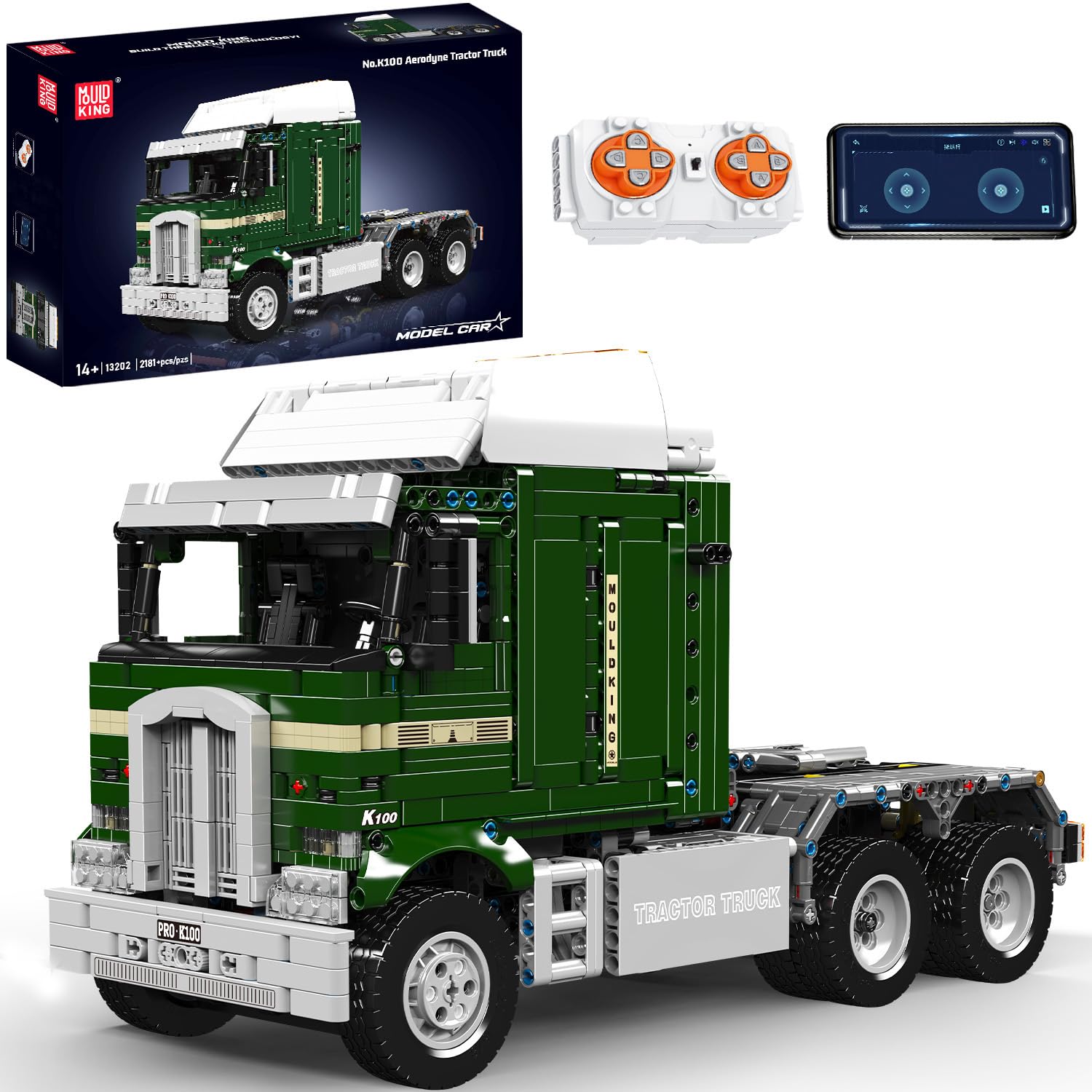
Figure 1: The fully assembled Mould King 13202 Technic Truck.
Product Overview
The Mould King 13202 Technic Truck is a sophisticated building model designed for enthusiasts. Key features include:
- Tractor Truck Model: This Mould King truck is compatible with 2.4G remote control and app operation, offering an engaging experience in Technic vehicle model construction.
- Easy Assembly: The kit comprises 2181 numbered building blocks and includes colored instructions to facilitate straightforward assembly.
- USB Powered Design: Equipped with a robust motor for high power and a lithium-ion battery for optimal performance. The model is easily rechargeable via a power outlet, portable power bank, or laptop.
- Educational Benefits: Assembling this model enhances spatial perception, hand-eye coordination, and problem-solving skills. It is suitable for adults, teenagers, and children aged 8 and above.

Figure 2: Overview of the Mould King K100 Aerodyne Tractor Truck features.
Assembly Instructions
The Mould King 13202 kit includes 2181 pieces and a detailed, colored instruction manual. Follow the step-by-step guide provided in the box for a smooth assembly process. Each bag of blocks is numbered to correspond with specific assembly stages.
- Unpack Components: Carefully open the packaging and sort the numbered bags of building blocks. Keep the instruction manual accessible.
- Follow Numbered Steps: Begin assembly by following the colored instructions. Each step clearly illustrates which pieces to use and how to connect them.
- Connect Electronic Components: During assembly, integrate the motor and battery box as indicated in the manual. Ensure all connections are secure.
- Verify Connections: After completing each major section, double-check that all blocks are firmly connected and electronic components are correctly installed.

Figure 3: A partially assembled truck model, illustrating the building process.

Figure 4: Collaborative assembly of the model.
Setup
Before operating your Mould King 13202 Technic Truck, ensure proper setup of the power system and control mechanisms.
Battery Installation and Charging
- The model is powered by a lithium-ion battery. Locate the battery compartment as shown in the assembly manual.
- Connect the battery to the designated port.
- To charge, use the provided USB charging cable. Connect it to the battery box and a compatible USB power source (e.g., wall adapter, power bank, computer USB port).
- Allow sufficient time for the battery to fully charge before first use.

Figure 5: USB rechargeable battery feature.
Remote Control and App Pairing
The truck can be controlled via a 2.4G remote control or a dedicated mobile application.
- Remote Control: Ensure the remote control has fresh batteries. Turn on the truck and then the remote. They should pair automatically. Refer to the remote control's specific instructions for detailed pairing steps if needed.
- App Control: Download the official Mould King app from your device's app store. Follow the in-app instructions to connect your truck via Bluetooth.

Figure 6: App and remote control options for the truck.
Operating the Truck
Once assembled and paired, you can operate your Mould King 13202 Technic Truck using either the remote control or the mobile app.
Basic Controls
- Use the joysticks or directional controls on your remote/app to move the truck forward, backward, left, and right.
- Experiment with different speeds and turning radii to get a feel for the truck's handling.

Figure 7: Operating the truck via the mobile application.
Interactive Features
The Mould King 13202 model includes several interactive features:
- Opening Roof: The roof of the truck's cabin can be opened, revealing internal details.
- Opening Doors: The cabin doors are functional and can be opened.
- Simulated Inflation/Deflation System: The model features a simulated system for tire inflation/deflation, adding to its realism.

Figure 8: Truck roof in open position.

Figure 9: Truck door in open position.

Figure 10: Simulated tire inflation/deflation system.
Maintenance
To ensure the longevity and optimal performance of your Mould King 13202 Technic Truck, follow these maintenance guidelines:
- Cleaning: Dust the model regularly with a soft, dry cloth. For stubborn dirt, use a slightly damp cloth and dry immediately. Avoid harsh chemicals or abrasive materials.
- Storage: Store the model in a cool, dry place away from direct sunlight and extreme temperatures to prevent material degradation.
- Battery Care: If storing for an extended period, fully charge the battery before storage and recharge it every few months to maintain battery health.
- Component Check: Periodically inspect all connections and moving parts to ensure they are secure and functioning correctly.
Troubleshooting
If you encounter any issues with your Mould King 13202 Technic Truck, refer to the following common troubleshooting steps:
- Missing or Damaged Parts: If any parts are missing or damaged during assembly, please contact Mould King customer service immediately for free replacement parts.
- Model Not Moving:
- Check if the battery is charged.
- Ensure the battery is correctly connected to the motor.
- Verify that the remote control or app is properly paired with the truck.
- Confirm all power switches on the truck and remote are in the 'ON' position.
- Control Issues:
- Ensure there are no obstructions between the remote/device and the truck.
- Check for interference from other 2.4Ghz devices.
- Restart both the truck and the control device.
- Assembly Difficulties: Re-examine the colored instruction manual carefully. Sometimes a small detail can be overlooked.
Specifications
| Feature | Detail |
|---|---|
| Brand | Mould King |
| Model Name | Technik Truck |
| Set Name | 13202 |
| Model Number | WX13202-ZJXCAS |
| Number of Pieces | 2181 |
| Material | Plastic |
| Color | Green |
| Item Dimensions (L x W x H) | 40 x 23 x 17 cm (16.1 x 6.9 x 9.1 inches) |
| Item Weight | 1.22 Kilograms |
| Minimum Recommended Age (Months) | 96 (8 years) |
| Age Range Description | Adolescent |
| Special Feature | Battery Operated |
| Power Source | Rechargeable Battery |
| Battery Type | Lithium-ion (1 included) |
| Educational Objective | Creative Thinking |
| Components Included | Instruction Manual |
| UPC | 705736913883 |

Figure 11: Product dimensions and included accessories.
Warranty and Support
Mould King is committed to providing high-quality products and excellent customer service.
- Manufacturer Warranty: This product comes with a 2-year manufacturer warranty. Please retain your proof of purchase for warranty claims.
- Customer Service: If you encounter any issues, have questions, or require replacement parts, please contact Mould King customer service. Our packaging process is fully automated, but in the rare event of missing or damaged parts, we offer free replacements.