
1. Introduction and Overview
The OKANEN ETCR3100C is a professional-grade Earth Resistance Meter designed for precise measurement of earth resistance and soil resistivity. This multimeter supports 2, 3, and 4-wire grounding resistance measurements, making it suitable for a wide range of electrical testing applications. Its robust design, including an IP65 protection grade, ensures reliability in various environments.
Key features include:
- Supports 2, 3, and 4-wire grounding resistance measurement.
- 4-digit large LCD display with white screen backlight for clear visibility in low light.
- IP65 protection grade for water and dust resistance.
- Ground resistance measurement range: 0.00Ω - 30.00kΩ.
- Soil resistivity measurement range: 0.00Ω·m - 9000kΩ·m.
- Measures ground voltage and AC voltage.
- Data storage for up to 300 groups of measurements.
2. Product Components
Carefully unpack the device and verify that all components listed below are present and in good condition. If any items are missing or damaged, please contact your supplier immediately.
- 1 x ETCR3100C Soil Resistivity Tester
- 1 x USB Cable
- 1 x Charger
- 1 x CD (Software/Drivers)
- 4 x Test Lines (various colors/lengths)
- 2 x Simple Test Lines
- 4 x Ground Pins
- 1 x User Manual
- 1 x Carrying Bag
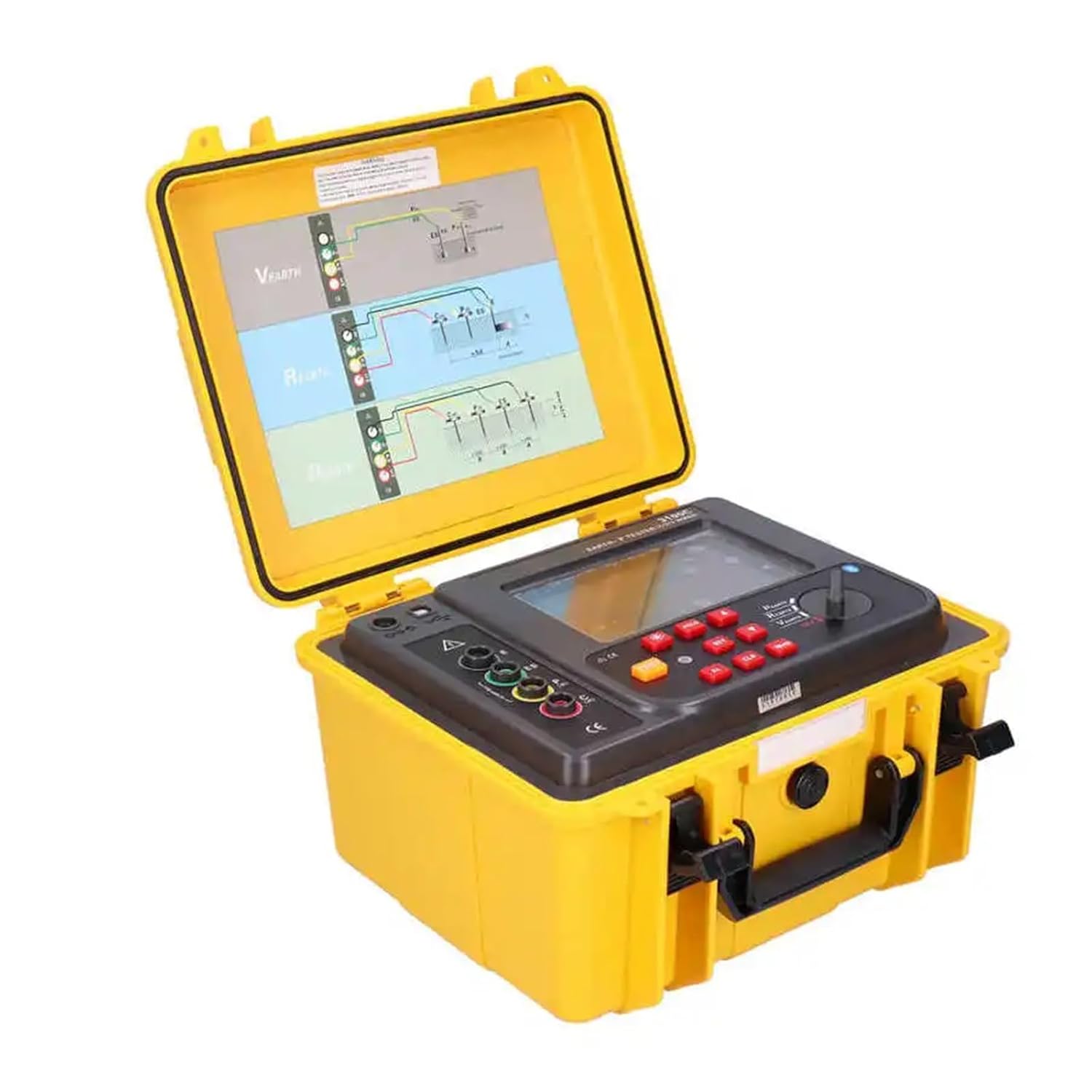
Figure 2.1: The ETCR3100C Earth Resistance Meter housed in its durable yellow protective case, with the lid open to reveal the control panel and display.

Figure 2.2: The ETCR3100C meter placed within its dedicated black soft carrying bag, designed for portability and protection.
3. Setup
Before operating the ETCR3100C, ensure proper setup for accurate and safe measurements.
- Battery Installation: The device is battery-powered. Ensure the internal battery is charged using the provided charger. Connect the charger to the device and a power outlet. The charging indicator will confirm the status.
- Power On/Off: Locate the power button on the control panel. Press it to turn the device on. The LCD display will illuminate. Press and hold to turn off.
- Connecting Test Lines: Depending on the measurement type (2, 3, or 4-wire), connect the appropriate test lines to the corresponding terminals on the meter. Refer to the diagrams on the inside lid of the protective case for correct wiring configurations.
- Ground Pin Placement: For earth resistance and soil resistivity measurements, correctly position the ground pins in the soil according to the specific test method and required spacing.
4. Operating Instructions
This section details the procedures for performing various measurements with the ETCR3100C.

Figure 4.1: Detailed view of the ETCR3100C's control panel, showing buttons for operation, display, and rotary selector.
4.1. Earth Resistance Measurement (2, 3, and 4-Wire Method)
- Select Mode: Use the rotary selector or mode button to choose the desired earth resistance measurement mode (2-wire, 3-wire, or 4-wire).
- Connect Test Leads: Connect the test leads to the meter and the ground pins/electrodes as per the selected method's diagram. Ensure good contact.
- Initiate Measurement: Press the 'TEST' button. The meter will perform the measurement, which typically takes about 15 seconds.
- Read Result: The earth resistance value will be displayed on the LCD.
- Save Data (Optional): Press the 'SAVE' or 'HOLD' button to store the measurement if available, then navigate to save. The device can store up to 300 groups of data.
4.2. Soil Resistivity Measurement
Soil resistivity measurements typically use the Wenner method (4-wire). Refer to the internal lid diagrams for specific pin spacing requirements.
- Select Mode: Choose the soil resistivity measurement mode.
- Connect Test Leads: Connect the four test leads to the meter and the four ground pins, ensuring correct spacing and configuration in the soil.
- Input Spacing: If required, input the spacing between the ground pins into the meter using the keypad.
- Initiate Measurement: Press the 'TEST' button.
- Read Result: The soil resistivity value (in Ω·m or Ω·km) will be displayed.
4.3. Ground Voltage and AC Voltage Measurement
- Select Mode: Switch to the 'V Earth' or 'AC V' measurement mode.
- Connect Test Leads: Connect the appropriate test leads to the points where voltage is to be measured.
- Read Result: The voltage value will be displayed on the screen. Voltage to earth measurements are updated approximately 3 times per second.
4.4. Display and Backlight
The 4-digit large LCD display provides clear readings. The white screen backlight can be activated (usually by a dedicated button or automatically) to improve visibility in dimly lit environments.
5. Maintenance
Proper maintenance ensures the longevity and accuracy of your ETCR3100C meter.
- Cleaning: Wipe the device exterior with a soft, damp cloth. Do not use abrasive cleaners or solvents. Ensure the device is powered off and disconnected from all test leads before cleaning.
- Battery Care: Recharge the battery regularly, especially if the device will not be used for an extended period. Avoid fully discharging the battery frequently.
- Storage: Store the meter in its protective case or carrying bag in a cool, dry place, away from direct sunlight and extreme temperatures. The IP65 rating provides protection against dust and water splashes, but it is not designed for submersion.
- Calibration: For continued accuracy, periodic calibration by a qualified service center is recommended, especially after significant impacts or prolonged use.

Figure 5.1: The robust yellow protective case of the ETCR3100C, designed to shield the meter from environmental elements.
6. Troubleshooting
If you encounter issues with your ETCR3100C, refer to the following common problems and solutions:
| Problem | Possible Cause | Solution |
|---|---|---|
| Device does not power on. | Low or depleted battery. | Connect the charger and allow the battery to charge. Ensure the charger is properly connected to a power source. |
| Inaccurate or unstable readings. | Poor connection of test leads or ground pins; incorrect test setup; environmental interference. | Check all connections for secure contact. Ensure ground pins are firmly inserted into the soil. Verify the test setup matches the selected measurement mode. Minimize external electrical interference. |
| Display is blank or unreadable. | Backlight off; extreme temperature; display malfunction. | Activate the backlight. Move the device to an environment within its operating temperature range. If the problem persists, contact customer support. |
| Cannot save data. | Memory full; incorrect save procedure. | Check if the data storage is full and delete old data if necessary. Refer to the operating instructions for the correct data saving procedure. |
If the problem persists after attempting these solutions, please contact OKANEN customer support for further assistance.
7. Specifications
| Parameter | Value |
|---|---|
| Model Number | ETCR3100C |
| Earth Resistance Range | 0.00Ω - 30.00kΩ |
| Soil Resistivity Range | 0.00Ω·m - 9000kΩ·m |
| Earth Voltage Range | 0 - 600V AC |
| Measurement Method | Earth resistance: rated current change-pole method, measurement current 20mA Max; Earth Voltage: average value rectification |
| Test Frequency | 128Hz/111Hz/105Hz/94Hz (AFC) |
| Short Circuit Test Current | AC 20 mA max |
| Measurement Time | Voltage to earth: 3 times/second; Earth resistance: 15 seconds/time |
| Data Storage | 300 groups |
| Display Type | 4-digit large LCD with white backlight |
| Protection Grade | IP65 |
| Dimensions | 280mm(L) x 260mm(W) x 160mm(H) |
| Weight | 5700g (with package) |
| Power Source | Battery Powered |
| Specification Met | UL |
8. Warranty and Support
OKANEN products are manufactured to high-quality standards. This product comes with a standard manufacturer's warranty against defects in materials and workmanship. Please refer to the warranty card included in your package for specific terms and conditions, including the warranty period.
For technical support, troubleshooting assistance, or warranty claims, please contact your point of purchase or visit the official OKANEN website for contact information. When contacting support, please have your product model number (ETCR3100C) and purchase details readily available.