
1. Introduction
Thank you for purchasing the Generic Fabric Shaver. This device is designed to effectively remove lint, fuzz, and bobbles from various fabrics, restoring their appearance. Please read this manual carefully before use to ensure proper operation and maintenance.
2. Safety Instructions
- Keep the device out of reach of children.
- Do not use the device on wet fabrics or in wet environments.
- Ensure the protective cover is securely in place before operation.
- Do not press the shaver head too hard against the fabric to avoid damage.
- Unplug the device before cleaning or when not in use.
- Do not disassemble or attempt to repair the device yourself. Contact qualified personnel for service.
- Avoid contact with the blades when the device is operating or when the protective cover is removed.
3. Package Contents
Please check the package for the following items:
- 1 x Generic Fabric Shaver
- 2 x Replacement Blades
4. Product Features
- High Power & Efficiency: Equipped with an 18W motor and a 6-blade cutter head for quick and effective lint removal.
- Rechargeable Battery: Features a 4000mAh built-in battery, providing up to 220 minutes of continuous use on a full charge.
- Five-Speed Regulation: Adjustable speed settings to suit various fabric types and lint levels.
- LED Display: Intelligent display shows digital battery level, current speed, and charging reminders.
- Vortex Suction Design: Engine vortex design enhances suction for efficient lint collection.
- Safety Protection Switch: Automatically stops operation when the protective cover is opened, preventing accidental injury.
- Waterproof: Designed with waterproof features for easier cleaning.
5. Setup
5.1 Charging the Device
Before first use, fully charge the fabric shaver. Connect the charging cable to the device and a suitable power source. The LED display will indicate the charging status. A full charge provides approximately 220 minutes of operation.
5.2 Checking Blades
Ensure the 6-blade cutter head is properly installed and secured before operating the device. Refer to the Maintenance section for blade replacement instructions.
6. Operating Instructions
6.1 Power On/Off
Press and hold the power button (marked with a universal power symbol) to turn the device on or off.

Figure 1: Power and Speed Adjustment Buttons. The power button is located at the bottom, with 'Speed +' and 'Speed -' buttons above it.
6.2 Adjusting Speed
Once powered on, use the 'Speed +' and 'Speed -' buttons to cycle through the five available speed settings. Choose a lower speed for delicate fabrics and a higher speed for more stubborn lint.

Figure 2: Intelligent LED Display. The display shows the digital battery level, current speed (RPM), and available operating time.
6.3 Using the Fabric Shaver
- Lay the fabric flat on a hard, smooth surface.
- Gently glide the shaver head over the linted area, applying light and even pressure.
- Avoid pressing too hard or holding the shaver in one spot for too long to prevent damage to the fabric.
- The vortex design helps to suck up removed lint into the collection bin.

Figure 3: Engine Vortex Design. This diagram shows how the internal fan creates a vortex for effective lint suction.
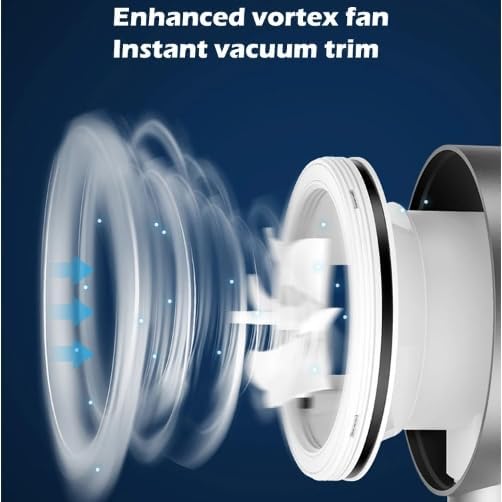
Figure 4: Powerful Cutting Force. The image highlights the 18W high power and 7500 RPM high-speed rotation for efficient lint removal.
7. Maintenance
7.1 Cleaning the Lint Storage Bin
Regularly empty the 130ML lint storage bin to maintain optimal performance. Press the release button to detach the bin, empty the collected lint, and then reattach it securely.
7.2 Cleaning Blades and Protective Cover
After emptying the lint bin, use a small brush (not included) to gently clean any remaining lint or debris from the blades and the inside of the protective cover. Ensure the device is turned off and unplugged before cleaning.
7.3 Replacing Blades
When the blades become dull or damaged, they can be replaced. Carefully remove the protective cover and then the old blade assembly. Install a new blade assembly, ensuring it clicks into place. Reattach the protective cover securely. The package includes two replacement blades.

Figure 5: Safety Protection Switch. This image shows the internal components and highlights the safety mechanism that stops operation when the cover is removed.
8. Troubleshooting
- Device not turning on: Ensure the device is fully charged. Check if the power button is pressed and held correctly.
- Lint not being removed effectively: Empty the lint storage bin. Clean the blades and protective cover. Consider replacing the blades if they are dull. Ensure the protective cover is securely attached.
- Device stops during operation: The battery might be low; recharge the device. Check if the protective cover has become loose, activating the safety switch.
- Unusual noise: Turn off the device immediately. Check for any foreign objects caught in the blades or fan. Clean thoroughly.
9. Specifications
| Brand | Generic |
| Model Number | Generic |
| Main Materials | ABS, PC, Stainless Steel |
| Battery Capacity | 4000mAh |
| Max Battery Life | 220 minutes |
| Rated Voltage | 7.4V |
| Operating Current | 0.6-0.7A |
| Max Speed | 7500 RPM |
| Power | 18W |
| Blade Type | 6-blade cutter head |
| Lint Bin Capacity | 130ML |
| Dimensions (approx.) | 248 x 95 x 85 mm |
| Item Weight | 2.64 Pounds |
| Functions | Waterproof, 5-gear adjust |
10. Warranty and Support
For warranty information or technical support, please refer to the retailer or contact the manufacturer directly. Keep your purchase receipt as proof of purchase.