
1. Introduction
Thank you for choosing the Titorion Mintak Pro Tri-Mode Wireless Gaming Headset. This headset is designed to provide a superior audio experience for gaming, entertainment, and professional use across multiple platforms. Featuring tri-mode connectivity (2.4GHz wireless, Bluetooth, and wired), a detachable microphone, and an ultralight design, the Mintak Pro offers versatility and comfort for extended use.

Image 1.1: Titorion Mintak Pro Headset (Model HE003) on a stand, showcasing its sleek design.
2. Package Contents
Please check the package for the following items:
- Titorion Mintak Pro Headset
- Detachable Microphone
- 2.4GHz Wireless USB/Type-C Dongle
- 3.5mm Audio Cable
- USB Charging Cable
- User Manual (this document)
3. Setup and Charging
3.1 Initial Charging
Before first use, fully charge your headset. A full charge takes approximately 2 hours and provides up to 23 hours of continuous use.
- Connect the USB charging cable to the headset's charging port.
- Connect the other end of the USB cable to a power source (e.g., computer USB port, USB wall adapter).
- The LED indicator on the headset will show charging status (refer to the LED indicator section for details).

Image 3.1: Visual representation of the headset's battery life, indicating up to 23 hours of continuous use.
3.2 Attaching the Microphone
The Titorion Mintak Pro features a detachable microphone for versatile use.
- Locate the microphone input port on the left earcup.
- Align the detachable microphone's 3.5mm jack with the port and gently push it in until it clicks into place.
- To remove, gently pull the microphone straight out from the port.

Image 3.2: The headset with its removable microphone and integrated volume control.
The headset also includes an internal microphone, which automatically activates when the external detachable microphone is not connected. This allows for continued communication even without the external mic.

Image 3.3: Detail of the internal microphone port on the headset, which captures audio even without the external microphone connected.
4. Operating Instructions
4.1 Power On/Off and Mode Switching
The main power button on the headset controls power and connection modes.
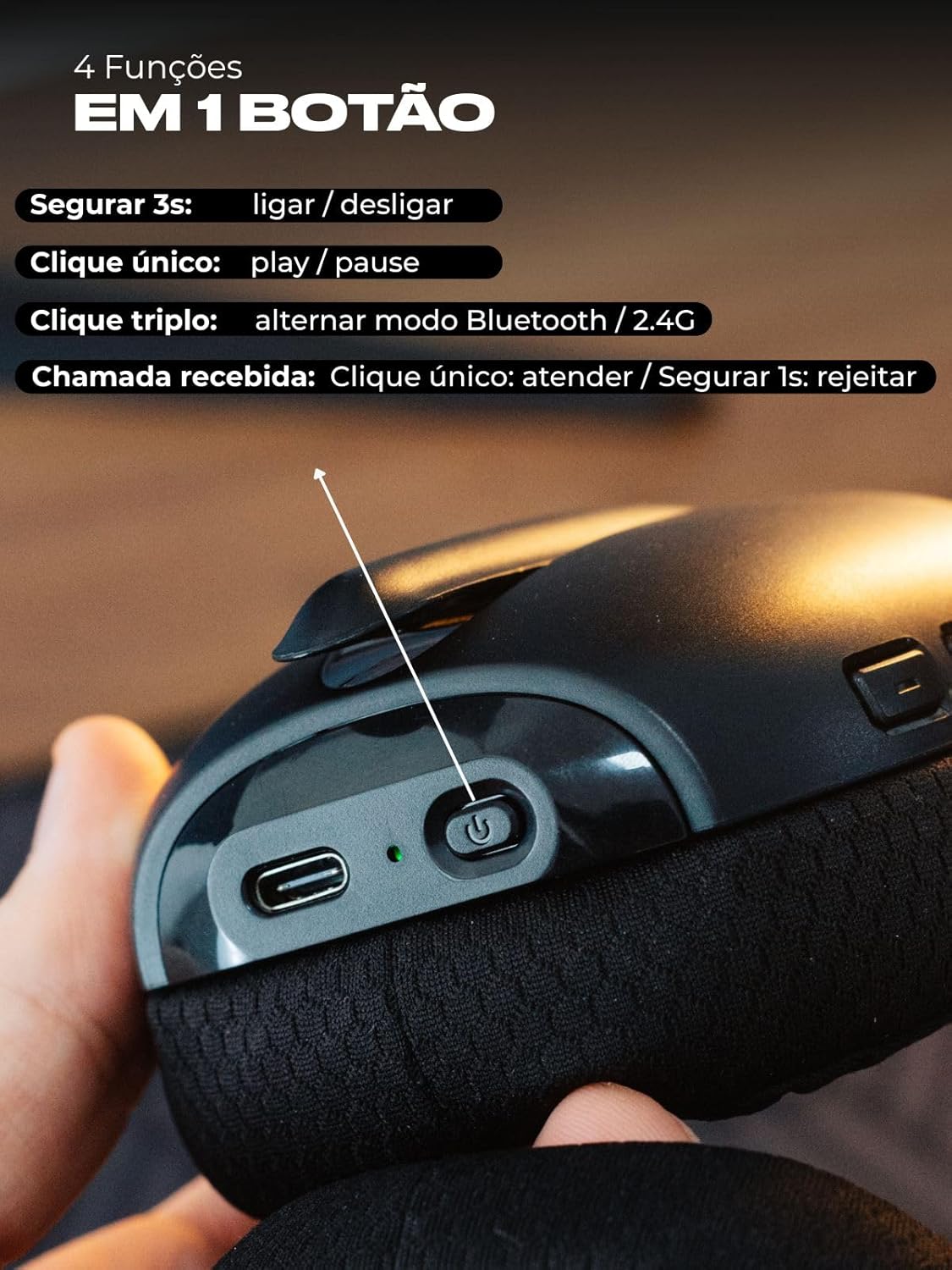
Image 4.1: The multi-function power button on the headset, detailing its various controls.
- Hold for 3 seconds: Power On/Off.
- Single Click: Play/Pause audio.
- Triple Click: Switch between Bluetooth and 2.4GHz wireless modes.
- Incoming Call - Single Click: Answer call.
- Incoming Call - Hold for 1 second: Reject call.
4.2 Connection Modes
The Mintak Pro headset supports three connection methods:
4.2.1 2.4GHz Wireless Connection
For low-latency wireless performance, use the included dual dongle.
- Identify the appropriate USB (Type-A) or Type-C connector on the dongle.
- Plug the dongle into a compatible port on your PC, console (PS4, PS5, Xbox), or other device.
- Power on the headset and ensure it is in 2.4GHz wireless mode (triple-click the power button to switch modes if necessary). The headset will automatically connect to the dongle.

Image 4.2: The robust construction of the headset and the versatile dual dongle (USB and Type-C).
4.2.2 Bluetooth Connection
For wireless connection to smartphones, tablets, and other Bluetooth-enabled devices.
- Power on the headset and switch to Bluetooth mode (triple-click the power button until the LED indicates Bluetooth mode).
- On your device, go to Bluetooth settings and search for available devices.
- Select "Titorion Mintak Pro" from the list to pair.
4.2.3 Wired Connection
Use the 3.5mm audio cable for a direct connection.
- Plug one end of the 3.5mm audio cable into the headset's audio jack.
- Plug the other end into the 3.5mm audio port of your device (PC, console controller, smartphone, etc.).
- The headset will operate in wired mode, bypassing wireless functions.
4.3 Volume Control
Adjust the volume using the dedicated controls on the headset's earcup. This allows for quick sound adjustments during gameplay or calls without needing to access system settings.
5. Features
5.1 Comfort and Design
The Mintak Pro is designed to be ultralight (approximately 200g) and extremely comfortable, ensuring long gaming sessions or extended use without discomfort. It features breathable memory foam earcups and an adjustable sliding mechanism for a perfect fit.

Image 5.1: The premium design of the Titorion Mintak Pro, highlighting breathable memory foam and regulable adjustment.
5.2 Immersive Sound and Noise Isolation
Experience clean and immersive sound quality, enhanced by effective sound isolation. The over-ear design perfectly encases your ears, blocking out external distractions for a focused audio experience.
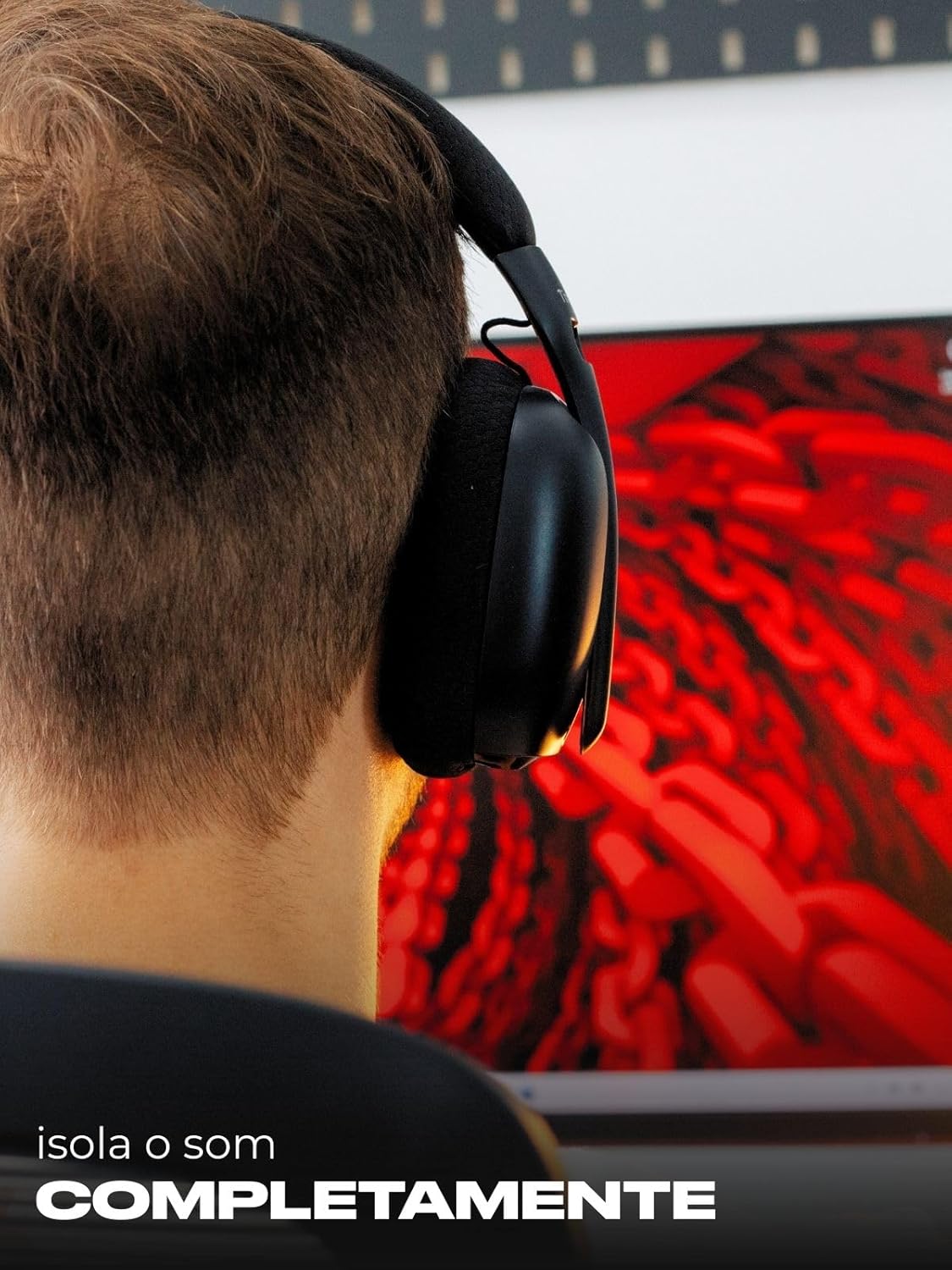
Image 5.2: The headset in use, demonstrating its complete sound isolation capabilities.
5.3 Multi-Device Compatibility
The Mintak Pro is compatible with a wide range of devices, including PCs, notebooks, smartphones, tablets, iPads, and gaming consoles such as PS4, PS5, Xbox, and PSP.
6. Maintenance
To ensure the longevity and optimal performance of your Titorion Mintak Pro headset, follow these maintenance guidelines:
- Clean the earcups and headband regularly with a soft, dry cloth.
- Avoid exposing the headset to extreme temperatures, humidity, or direct sunlight.
- Store the headset in a safe place when not in use to prevent damage.
- Do not attempt to disassemble or repair the headset yourself, as this will void the warranty.
7. Troubleshooting
If you encounter any issues with your headset, please refer to the following common solutions:
- No Sound: Check volume levels on both the headset and your device. Ensure the correct connection mode is selected (2.4GHz, Bluetooth, or wired) and that the headset is properly paired or plugged in.
- Microphone Not Working: Ensure the detachable microphone is securely connected. If using the internal microphone, confirm the external mic is removed. Check microphone settings on your device.
- Connection Issues: For 2.4GHz, ensure the dongle is properly inserted and the headset is in 2.4GHz mode. For Bluetooth, ensure the headset is in pairing mode and within range of your device. Try re-pairing.
- Short Battery Life: Ensure the headset is fully charged. Battery life can vary based on volume levels and usage patterns.
If the problem persists, please contact customer support.
8. Specifications
| Feature | Detail |
|---|---|
| Brand | Titorion |
| Model Name | Mintak |
| Model Number | HE003 |
| Color | Black |
| Ear Placement | Over-ear |
| Impedance | 32 Ohms |
| Sensitivity | 115 dB |
| Frequency Response | 20Hz - 20KHz |
| Noise Control | Sound Isolation |
| Connectivity Technology | 2.4GHz Wireless, Bluetooth, Wired |
| Compatible Devices | PC, Notebook, Smartphones, Tablets, iPad, Consoles (PS4, PS5, Xbox, PSP) |
| Special Features | Fast Charging, Lightweight, Detachable Microphone, Internal Microphone |
| Battery Life | Up to 23 hours (continuous use) |
| Charging Time | Approx. 2 hours |
| Material | Polymers |
9. Official Product Video
Watch this video for a visual guide on the Titorion Mintak Pro headset's features, including its comfortable design, detachable microphone, and versatile connection options. Please note that the video may feature a different color variant (white) but demonstrates the same product functionalities.
Video 9.1: Overview of the Titorion Mintak Pro Headset features and functionality.
10. Warranty and Support
The Titorion Mintak Pro Headset comes with a 3-month warranty against manufacturing defects. Please retain your proof of purchase for warranty claims.
For further assistance, troubleshooting, or warranty inquiries, please contact Titorion customer support through your retailer or the official Titorion website.