
Introduction
Thank you for choosing the BUDI EP08W Active Noise Cancelling True Wireless Stereo (TWS) Earbuds. This manual provides comprehensive instructions to help you set up, operate, maintain, and troubleshoot your new earbuds. Please read this manual carefully before use to ensure optimal performance and longevity of your device.
Package Contents
Please check the package for the following items:
- BUDI EP08W TWS Earbuds (Left and Right)
- Wireless Charging Case
- USB-C Charging Cable
- User Manual
Product Overview
Familiarize yourself with the components of your BUDI EP08W earbuds and charging case.
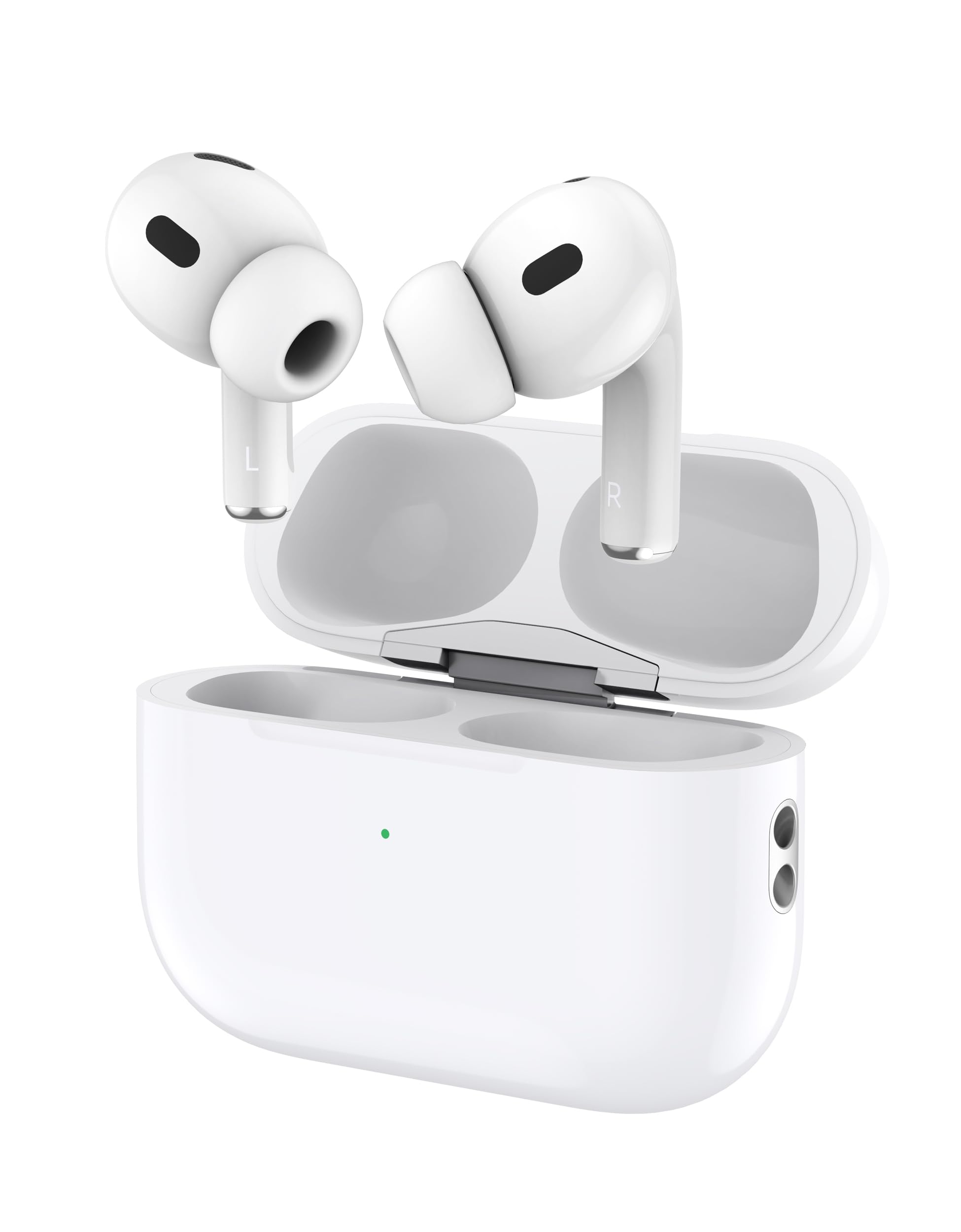
Figure 1: Front view of BUDI EP08W earbuds in their charging case, showing the LED indicator.

Figure 2: Angled view of BUDI EP08W earbuds in their open charging case, highlighting the 'L' and 'R' markings for left and right earbuds.

Figure 3: A pair of BUDI EP08W earbuds shown outside their case, highlighting their individual design and touch control areas.
Setup
1. Charging the Earbuds and Case
Before first use, fully charge the earbuds and the charging case.
- Wired Charging: Connect the provided USB-C cable to the charging port on the case and to a USB power adapter (not included). The LED indicator on the case will show charging status.
- Wireless Charging: Place the charging case on a Qi-compatible wireless charging pad. Ensure the case is centered on the pad for efficient charging. The LED indicator will confirm charging.
The earbuds charge automatically when placed inside the charging case, provided the case has power.

Figure 4: The BUDI EP08W charging case with a USB-C cable connected, illustrating wired charging.

Figure 5: The BUDI EP08W charging case placed on a wireless charging pad, demonstrating wireless charging capability.
2. Bluetooth Pairing
- Open the charging case. The earbuds will automatically enter pairing mode, indicated by a flashing LED on the earbuds or case.
- On your device (smartphone, tablet, computer), go to Bluetooth settings.
- Search for available devices and select "BUDI EP08" from the list.
- Once connected, the LED indicator will stop flashing, and you will hear a confirmation tone.
- The earbuds will automatically reconnect to the last paired device when taken out of the case, if Bluetooth is enabled on the device.
Operating Instructions
1. Wearing the Earbuds
Gently insert the earbuds into your ears, ensuring a snug and comfortable fit. Adjust them until the sound is clear and the earbuds feel secure. A proper fit is crucial for optimal sound quality and Active Noise Cancelling performance.
2. Touch Controls
The BUDI EP08W earbuds feature intuitive touch controls on each earbud. The specific functions are as follows:
| Action | Function |
|---|---|
| Single Tap (Left/Right Earbud) | Play/Pause Music, Answer/End Call |
| Double Tap (Right Earbud) | Next Track |
| Double Tap (Left Earbud) | Previous Track |
| Triple Tap (Left/Right Earbud) | Activate Voice Assistant |
| Long Press (Left/Right Earbud) | Toggle ANC/Transparency Mode/Normal Mode |
| Long Press (Incoming Call) | Reject Call |
3. Active Noise Cancelling (ANC)
The BUDI EP08W earbuds feature Active Noise Cancelling technology, reducing ambient noise by up to -30dB. To cycle through ANC modes (Active Noise Cancelling, Transparency Mode, Normal Mode), long-press either earbud's touch control area. Transparency Mode allows you to hear your surroundings while still enjoying your audio.
Maintenance
1. Cleaning
- Regularly clean the earbuds and charging case with a soft, dry, lint-free cloth.
- Do not use harsh chemicals, cleaning solvents, or strong detergents.
- Gently remove any earwax or debris from the ear tips and speaker mesh using a small, soft brush or cotton swab.
2. Storage
When not in use, always store the earbuds in their charging case to protect them from damage and to keep them charged. Store the case in a cool, dry place away from extreme temperatures and direct sunlight.
Troubleshooting
If you encounter any issues with your BUDI EP08W earbuds, please refer to the following common solutions:
| Problem | Solution |
|---|---|
| Earbuds not pairing | Ensure earbuds are charged. Place them back in the case, close, then open again to re-enter pairing mode. Turn off and on Bluetooth on your device. Forget "BUDI EP08" from your device's Bluetooth list and re-pair. |
| No sound from one earbud | Check if both earbuds are charged. Try placing both earbuds back in the case, closing it, and then taking them out again. Re-pair the earbuds with your device. |
| Charging case not charging | Ensure the USB-C cable is securely connected to both the case and the power source. If using wireless charging, ensure the case is correctly positioned on a Qi-compatible pad. Try a different cable or power adapter. |
| ANC not working effectively | Ensure the earbuds have a proper seal in your ears. Try adjusting their position. Make sure ANC mode is activated via touch control. |
| Poor sound quality | Ensure earbuds are clean and free of debris. Check the Bluetooth connection for interference. Try adjusting the volume on both your device and the earbuds. |
Specifications
Detailed technical specifications for the BUDI EP08W earbuds:

Figure 6: The back of the BUDI EP08W product packaging, displaying detailed specifications and features.
| Feature | Specification |
|---|---|
| Bluetooth Model | BUDI EP08 |
| Charging Case Battery | 300 mAh |
| Charging Time | 1.5 - 2 hours |
| Music Playtime | 4 hours (at 80% volume) |
| Talk Time | 3.5 hours (at 80% volume) |
| Standby Time | 30 hours |
| Impedance | 32Ω ±15% |
| Speaker Sensitivity | 103 ±3dB |
| Microphone Sensitivity | -42 ±3dB |
| Frequency Response | 20-20KHz |
| Driver Size | 13mm |
| Noise Control | Active Noise Cancellation (up to -30dB), Environmental Noise Cancellation |
| Water Resistance Level | Waterproof |
| Supported Systems | iOS, Android, Windows |
| Supported Protocols | A2DP, AVRCP, HFP, HSP |
| Connectivity Technology | True Wireless (Bluetooth) |
Warranty and Support
The BUDI EP08W Active Noise Cancelling TWS Earbuds come with a 12-month warranty from the date of purchase. This warranty covers manufacturing defects and ensures your product is free from material and workmanship flaws under normal use.
For warranty claims, technical support, or any inquiries, please contact your retailer or the BUDI customer service team through the contact information provided on the product packaging or official BUDI website. Please have your proof of purchase ready when contacting support.
For more information, you may refer to the official BUDI website or the contact details provided on the product packaging (UPC: 6977244000469).


