
1. Introduction
This manual provides essential information for the proper installation, operation, and maintenance of the SupplyMount 1100300 Universal Trac-Lock Slide. This product is an aftermarket replacement part designed for marine equipment. Please read this manual thoroughly before installation and use to ensure safe and effective performance.
2. Safety Information
WARNING: Improper installation or use can result in equipment damage or personal injury.
- Always verify part number compatibility with your specific marine equipment model before attempting installation.
- Installation of this component should be performed by a qualified technician or an individual with appropriate marine equipment repair experience.
- Ensure all tools and safety equipment are used correctly during installation.
- Do not modify the product. Any modifications may void compatibility and safety.
- Keep this manual for future reference.
3. Product Overview
The SupplyMount 1100300 is an aftermarket replacement Universal Trac-Lock Slide. It is designed to offer a compatible and reliable solution for marine equipment requiring this specific component.
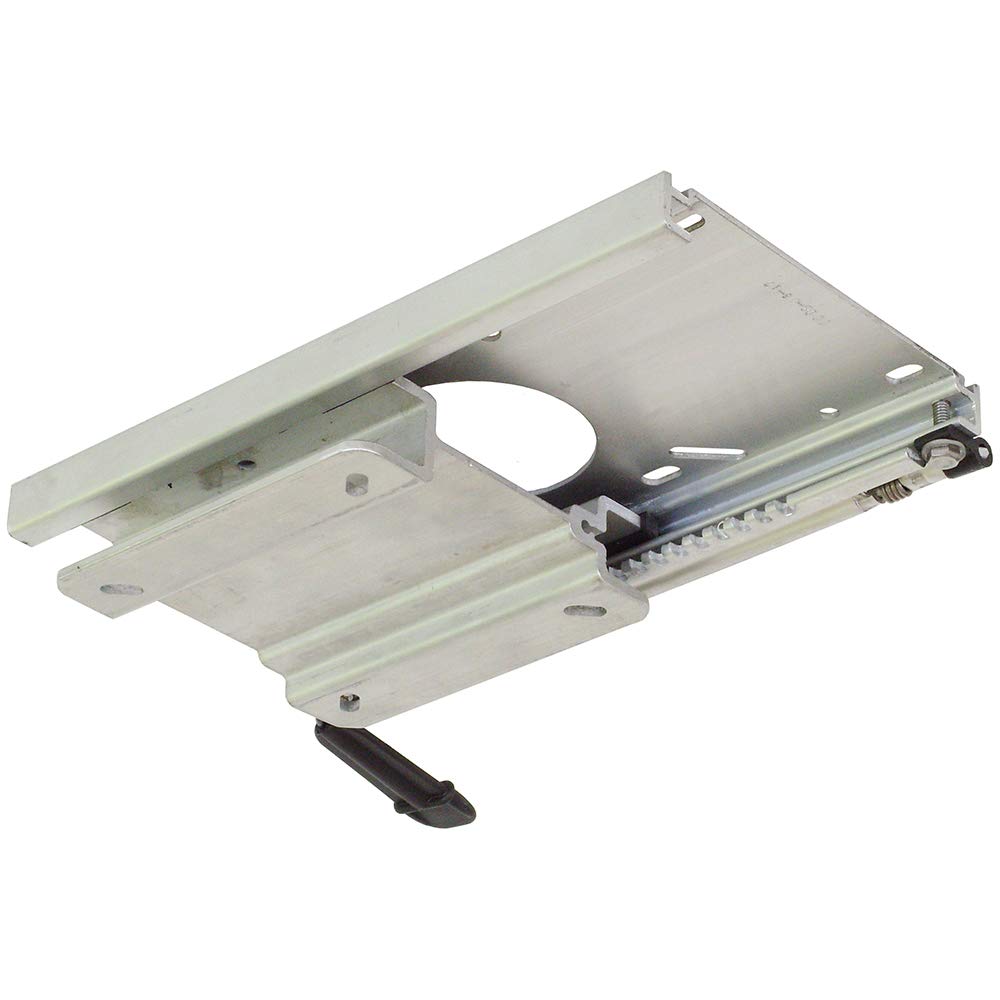
Figure 1: SupplyMount 1100300 Universal Trac-Lock Slide. This image shows the complete slide mechanism, typically used in marine seating or pedestal applications.
Key Features:
- Aftermarket replacement part for marine equipment.
- Manufactured to meet industry quality standards.
- Designed for reliable performance and durability.
- Cost-effective alternative to original equipment manufacturer (OEM) parts.
4. Setup and Installation
Proper installation is critical for the safe and effective operation of the Trac-Lock Slide. It is strongly recommended that installation be performed by a qualified marine technician.
- Verify Compatibility: Before beginning, confirm that the SupplyMount 1100300 is the correct replacement part for your specific marine equipment model. Refer to your equipment's original manual for part specifications.
- Gather Tools: Ensure you have all necessary tools, which may include wrenches, screwdrivers, measuring tape, and appropriate fasteners.
- Remove Old Part: Carefully remove the existing Trac-Lock Slide, noting the orientation and connection points. Documenting this process with photos can be helpful.
- Inspect Mounting Surface: Clean and inspect the mounting surface for any damage, corrosion, or debris. Ensure it is stable and secure.
- Position New Slide: Place the SupplyMount 1100300 in the correct orientation on the mounting surface.
- Secure Fasteners: Use appropriate marine-grade fasteners (not included) to secure the slide firmly. Tighten all fasteners to the manufacturer's recommended torque specifications for your equipment. Do not overtighten.
- Test Functionality: After installation, carefully test the slide's movement and locking mechanism to ensure it operates smoothly and securely without binding or excessive play.
Note: This is a general guide. Always refer to your specific marine equipment's service manual for detailed installation procedures and torque specifications.
5. Operating Instructions
The Universal Trac-Lock Slide is designed for straightforward operation once correctly installed.
- Sliding Mechanism: To adjust the position, typically a lever or knob is engaged to release the locking mechanism, allowing the slide to move along its track.
- Locking Mechanism: Once the desired position is reached, release the lever or knob to engage the Trac-Lock mechanism, securing the slide in place. Ensure it is fully locked before use.
- Regular Checks: Periodically check that the slide moves freely when unlocked and locks securely when engaged.
6. Maintenance
Regular maintenance will help prolong the life and ensure the reliable performance of your Trac-Lock Slide.
- Cleaning: Clean the slide and track regularly with fresh water and a mild soap solution to remove salt, dirt, and debris. Rinse thoroughly.
- Lubrication: Apply a marine-grade lubricant (e.g., silicone spray or marine grease) to the sliding surfaces and locking mechanism periodically, especially after cleaning or exposure to harsh marine environments.
- Inspection: Routinely inspect the slide for any signs of wear, corrosion, loose fasteners, or damage. Address any issues promptly.
- Fastener Check: Periodically check and tighten all mounting fasteners to ensure they remain secure.
7. Troubleshooting
If you encounter issues with your Trac-Lock Slide, consider the following common troubleshooting steps:
- Slide is Stiff or Binding:
- Clean the track and sliding surfaces thoroughly.
- Apply marine-grade lubricant.
- Check for any obstructions in the track.
- Ensure mounting fasteners are not overtightened, which can cause distortion.
- Slide Does Not Lock Securely:
- Inspect the locking mechanism for debris or damage.
- Ensure the lever/knob is fully engaged.
- Check for wear on the locking teeth or pins.
- Excessive Play or Wobble:
- Check all mounting fasteners for tightness.
- Inspect the slide and track for excessive wear or damage.
If problems persist after troubleshooting, consult a qualified marine technician.
8. Specifications
| Feature | Detail |
|---|---|
| Model Number | 1100300 |
| Brand | SupplyMount |
| Type | Aftermarket Replacement Universal Trac-Lock Slide |
| Compatibility | Compatible with Springfield Marine (verify part number) |
| ASIN | B0GJ7B3FFT |
| Suggested Users | Unisex-adult |
9. Warranty and Support
As an aftermarket replacement part, the SupplyMount 1100300 is not manufactured by or affiliated with the original equipment manufacturer. Any warranty or support inquiries should be directed to the seller, SupplyMount.
For further assistance or to report issues, please contact SupplyMount directly through the platform where the product was purchased or via their official contact channels.