
1. Introduction
This manual provides essential instructions for setting up, operating, and maintaining your Vibox IX-582 PC Gaming System. Please read this manual thoroughly before using the product to ensure proper function and longevity. Keep this manual for future reference.
Safety Information:
- Ensure the PC is placed on a stable, level surface with adequate ventilation.
- Do not block any ventilation openings.
- Keep the PC away from direct sunlight, heat sources, and liquids.
- Use only the provided power cable and connect it to a grounded outlet.
- Do not open the PC case unless instructed by support personnel, as it may void your warranty.
- Disconnect the power cable before cleaning or performing any maintenance.
2. Package Contents
Verify that all items are present in the package. If any items are missing or damaged, contact Vibox customer support immediately.
- Vibox IX-582 PC Gaming System
- Power Cable
- 300 Mbps Wi-Fi Adapter
- Documentation (Quick Start Guide, Warranty Information)
- Additional accessories (e.g., RGB lighting controller, water cooling components, if not pre-installed)

Image 2.1: The Vibox IX-582 PC Gaming System. This image shows the complete white PC tower with its internal components visible through the tempered glass side panel.
3. Setup
3.1 Unpacking and Placement
- Carefully remove the PC from its packaging.
- Place the PC on a flat, stable surface. Ensure there is sufficient space around the case for proper airflow.
- Remove any protective films or internal packaging materials.

Image 3.1: PC dimensions and tempered glass design. The case measures approximately 42cm in height, 28cm in depth, and 43.5cm in width, featuring three tempered glass panels for an elegant look.
3.2 Connecting Peripherals
Connect your monitor, keyboard, mouse, and other peripherals to the appropriate ports on the back and front of the PC.
- Monitor: Connect your monitor to the graphics card (Nvidia GeForce RTX 5070 Ti) using an HDMI or DisplayPort cable. The PC has 1 HDMI port.
- Keyboard/Mouse: Connect to any available USB ports.
- Audio: Connect speakers or headphones to the audio jacks.
- Network: For wired internet, connect an Ethernet cable to the LAN port. For wireless internet, install the provided Wi-Fi adapter into an available USB port.
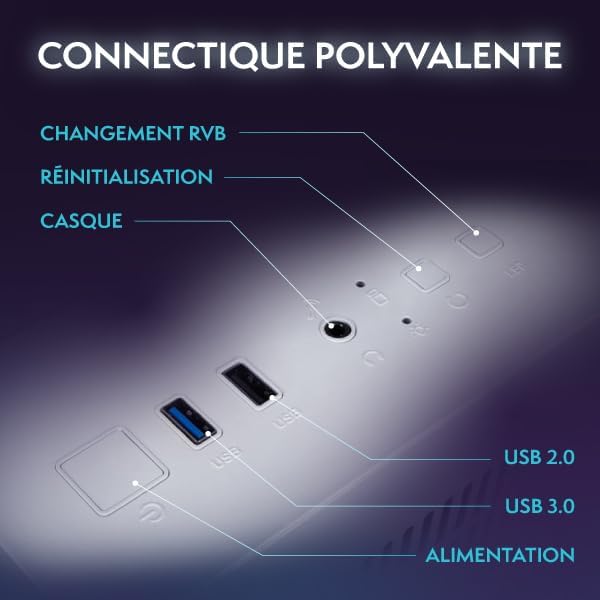
Image 3.2: Front panel connectivity. This image highlights the versatile front panel ports, including USB 2.0, USB 3.0, headset jack, power button, reset button, and a dedicated button for RGB lighting control.
3.3 Power Connection and Initial Boot
- Connect the power cable to the PC's power supply unit (PSU) and then to a grounded electrical outlet.
- Press the power button on the front of the PC.
- Follow the on-screen instructions to complete the Windows 11 setup process.
4. Operating Instructions
4.1 Windows 11 Home Operating System
Your Vibox IX-582 comes pre-installed with Windows 11 Home, optimized for gaming and productivity.
- Faster Loading Times: Benefit from DirectStorage technology for quicker game loading.
- Enhanced Graphics: AutoHDR improves visual quality in supported games.
- Xbox Game Pass Integration: Seamless access to a library of games.
- Optimized CPU Performance: Windows 11 is designed to maximize the performance of your AMD Ryzen 7 7800X3D processor.

Image 4.1: Windows 11 Home features. This graphic illustrates key gaming features of Windows 11 Home, such as faster loading with DirectStorage, AutoHDR for improved graphics, seamless Xbox Game Pass integration, and optimized CPU performance.
4.2 System Performance
The Vibox IX-582 is equipped with high-performance components:
- Processor: AMD Ryzen 7 7800X3D (8 Cores, up to 5.0 GHz) for demanding applications and games.
- Graphics Card: Nvidia GeForce RTX 5070 Ti (16 GB GDDR7) for high-resolution gaming and creative tasks.
- RAM: 32 GB Dual-Channel DDR5 at 5600 MHz for smooth multitasking.
- Storage: 1 TB NVMe SSD for rapid boot times and application loading.
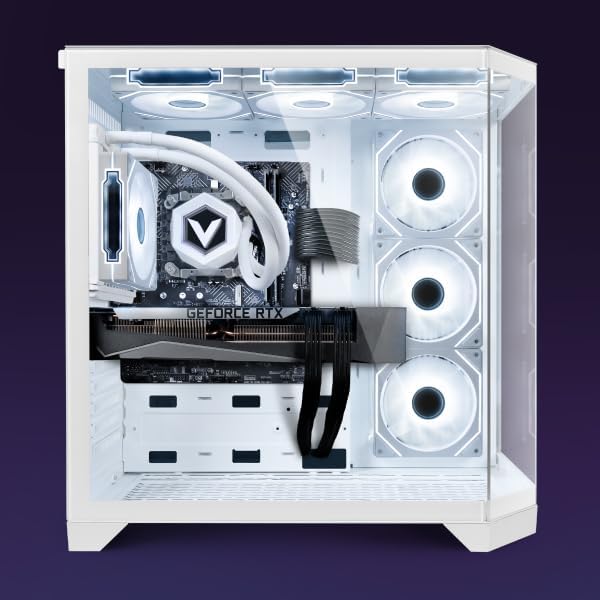
Image 4.2: Internal view of the Vibox IX-582 PC. This image shows the organized internal layout, highlighting the CPU cooler, graphics card, and other components.
4.3 Cooling System
The PC features an advanced cooling system to maintain optimal temperatures during intensive use.
- Water Cooling: An All-in-One (AIO) 120mm liquid cooler manages CPU temperatures efficiently.
- Optimized Airflow: The case design incorporates a reverse airflow system with multiple 120mm Hex RGB Infinity fans to ensure effective heat dissipation.

Image 4.3: Vibox AIO 120mm Liquid Cooler. This image displays the compact and efficient 120mm All-in-One liquid cooling solution for the CPU, featuring an RGB fan.
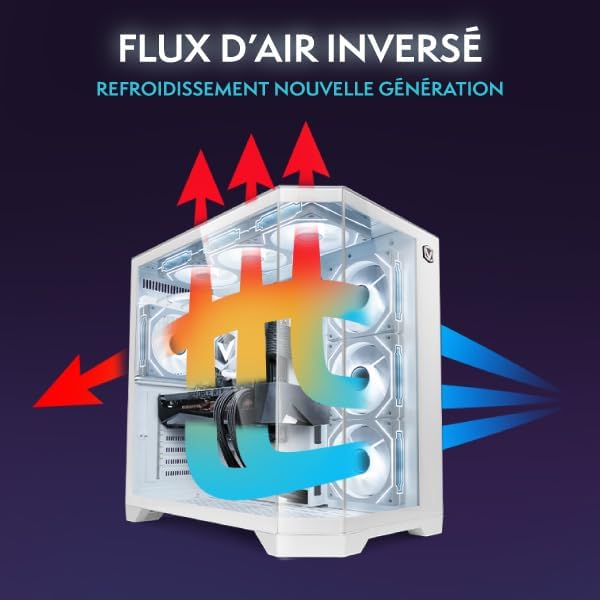
Image 4.4: Reverse Airflow Cooling Diagram. This diagram illustrates the new generation reverse airflow design, showing how cool air is drawn in and hot air is expelled for efficient thermal management.
4.4 RGB Lighting Control
The PC features customizable RGB lighting through Hex RGB Infinity 120mm fans.
- Use the dedicated RGB change button on the front panel (refer to Image 3.2) to cycle through various colors and lighting modes.
- Additional software may be available for more advanced customization; refer to the manufacturer's website for details.

Image 4.5: Hex RGB Infinity 120mm Fans. This image shows three 120mm Hex RGB Infinity fans, highlighting their customizable lighting effects and multiple color modes.
5. Maintenance
Regular maintenance helps ensure the longevity and optimal performance of your PC.
- Cleaning: Periodically clean the exterior of the PC with a soft, dry cloth. Use compressed air to gently clear dust from fan vents and internal components. Ensure the PC is powered off and unplugged before cleaning.
- Software Updates: Keep your Windows operating system, drivers (especially graphics drivers), and applications updated to the latest versions for security and performance improvements.
- System Backups: Regularly back up important data to an external drive or cloud storage to prevent data loss.
- Ventilation: Ensure that the PC's ventilation openings are not obstructed to prevent overheating.
6. Troubleshooting
This section addresses common issues you might encounter. For more complex problems, contact technical support.
| Problem | Possible Cause | Solution |
|---|---|---|
| PC does not power on. | Power cable disconnected, power supply issue. | Check power cable connections. Ensure the wall outlet is functional. |
| No display on monitor. | Monitor cable disconnected, incorrect input selected on monitor. | Verify monitor cable connection to the graphics card. Select correct input source on monitor. |
| System is slow or unresponsive. | Too many applications running, outdated drivers, malware. | Close unnecessary applications. Update drivers. Run a system scan for malware. |
| Overheating. | Blocked vents, excessive dust, fan malfunction. | Ensure vents are clear. Clean dust from fans and vents. Monitor temperatures with software. |
7. Specifications
Detailed technical specifications for the Vibox IX-582 PC Gaming System.
| Feature | Detail |
|---|---|
| Model Name | Vibox IX-582 |
| Product Model Number | IX-510 |
| Processor | AMD Ryzen 7 7800X3D (8 Cores, up to 5.0 GHz) |
| Graphics Card | NVIDIA GeForce RTX 5070 Ti (16 GB GDDR7 RAM) |
| RAM | 32 GB DDR5 (5600 MHz) |
| Storage | 1 TB NVMe SSD |
| Operating System | Windows 11 Home |
| Connectivity | Ethernet, HDMI (1 port), USB, Wi-Fi (300 Mbps adapter included) |
| Cooling Method | Water Cooling (AIO 120mm) |
| Case Design | Tower with 3-panel Tempered Glass |
| Color | VTX-7 White |
| Dimensions (L x W x H) | 42 x 28 x 43.5 cm |
| Weight | 16.38 kg |
| Compatible Devices | Headphones, Printer, Monitor, Mouse, Keyboard |
8. Warranty and Support
Vibox provides comprehensive warranty and support for your PC Gaming System.
- Product Warranty: 2 Years for parts.
- Labor Warranty: Lifetime labor warranty.
- Replacement Parts Availability: Guaranteed for 2 years in the EU.
- For technical assistance, troubleshooting, or warranty claims, please visit the official Vibox support website or contact their customer service. Refer to the documentation included with your PC for specific contact details.