1. Introduction
This manual provides essential information for the safe and effective use of your Generic CADDXFPV 256SL Thermal Imaging Camera. Please read this manual thoroughly before operating the device and retain it for future reference. This camera is designed to provide thermal visualization for various applications, including drone integration, equipment inspection, and nighttime observation.
2. Safety Information
- General Handling: Handle the camera with care. Avoid dropping or subjecting it to strong impacts.
- Environmental Conditions: Do not expose the camera to extreme temperatures, high humidity, or corrosive environments. Operate within specified temperature ranges.
- Power Supply: Ensure the power supply voltage and current match the camera's requirements. Incorrect power can damage the device.
- Wiring: Verify all connections are secure and correctly wired before applying power. Incorrect wiring can lead to malfunction or damage.
- Disassembly: Do not attempt to disassemble or modify the camera. This will void the warranty and may cause damage or injury.
3. Package Contents
Please check the package contents upon receipt. If any items are missing or damaged, contact your vendor immediately.
- CADDXFPV 256SL Thermal Imaging Camera Unit
- Connection Cable(s)
- Instruction Manual (this document)
4. Product Overview
The CADDXFPV 256SL Thermal Imaging Camera is a compact and lightweight device designed for integration into various systems, particularly drones. It provides clear thermal visualization with support for high-resolution imaging formats, capturing heat signatures and contrasts in diverse environments. Its durable construction ensures reliable performance in various scenarios.
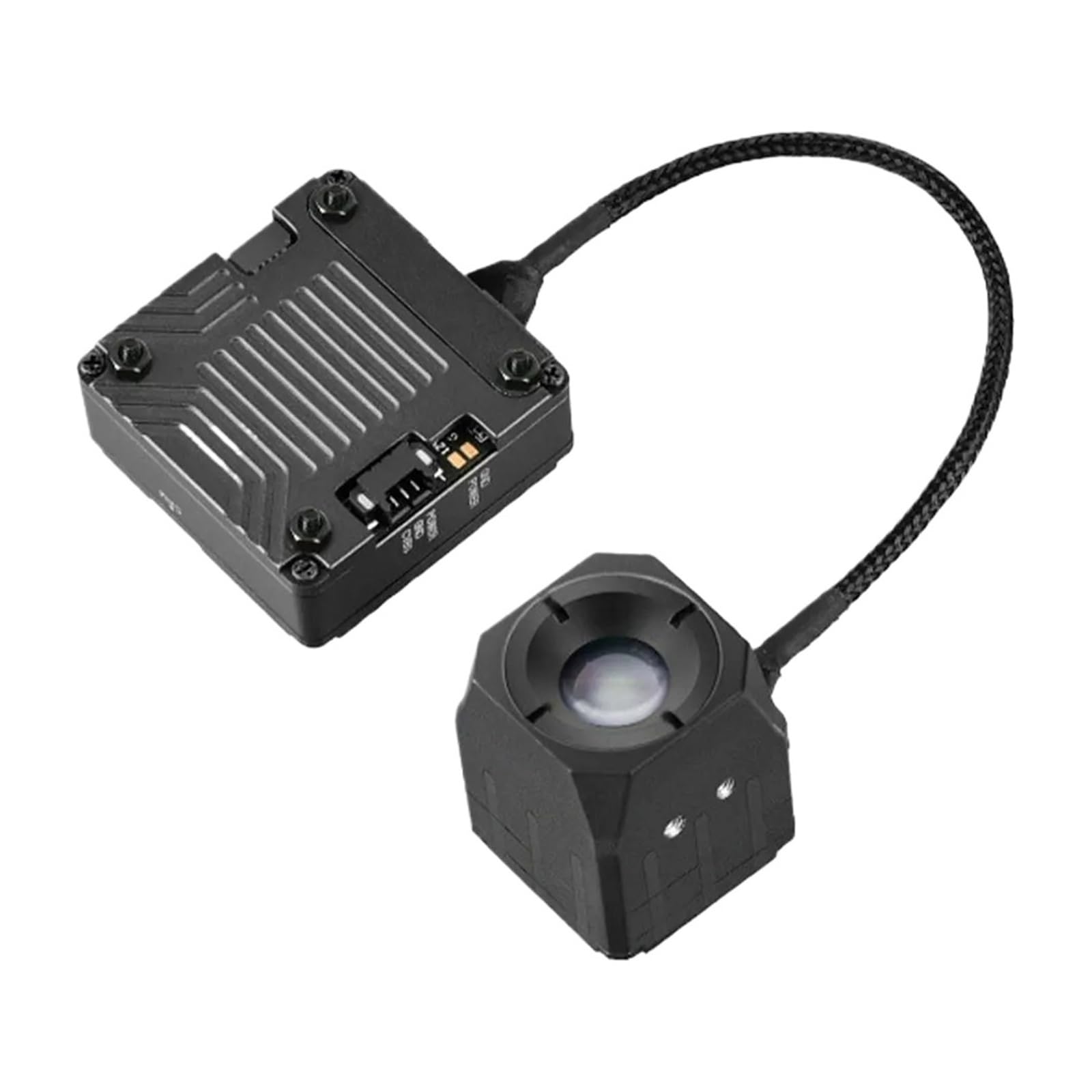
Figure 4.1: CADDXFPV 256SL Thermal Imaging Camera. The image shows the main processing unit connected to the thermal sensor module via a flexible cable.
The camera features user-friendly standardized interfaces for straightforward linking and quick deployment.
5. Setup
Follow these steps to set up your CADDXFPV 256SL Thermal Imaging Camera:
- Identify Components: Unpack all components and identify the main camera unit, the thermal sensor, and the connection cables.
- Mounting: Securely mount the camera unit and thermal sensor to your desired platform (e.g., drone). Ensure proper ventilation for the main unit.
- Connect Cables: Connect the thermal sensor to the main camera unit using the provided cable. Refer to the connection diagram below for proper wiring of power and video output.
- Power Connection: Connect the power input to a stable power source that meets the camera's voltage requirements. Observe polarity (GND, POWER).
- Video Output: Connect the CVBS (Composite Video Blanking and Sync) output to your display or recording device for PAL video signal.

Figure 5.1: Connection Diagram. This diagram illustrates the various input/output ports on the camera's main unit and the sensor module, including power, ground, video output, and thermal/digital connections.
6. Operating Instructions
Once the camera is properly set up and powered on, it will begin to output a PAL video signal. The camera is designed for continuous operation within its specified environmental limits.
- Power On: Apply power to the camera. The device will typically start up and begin thermal imaging automatically.
- Video Output: The thermal image will be displayed on the connected monitor or recording device via the CVBS output.
- Observation: Use the thermal feed for various applications such as identifying heat sources, observing in low-light conditions, or inspecting equipment for temperature anomalies.
- Integration: When integrated with a drone, ensure stable mounting and proper cable management to avoid interference or damage during flight.
7. Maintenance
Proper maintenance ensures the longevity and optimal performance of your thermal imaging camera.
- Cleaning: Gently clean the lens of the thermal sensor with a soft, lint-free cloth. Avoid abrasive materials or harsh chemicals. For the main unit, use a dry cloth to wipe dust.
- Storage: When not in use, store the camera in a cool, dry place, away from direct sunlight and extreme temperatures.
- Cable Inspection: Periodically inspect all cables for signs of wear, cuts, or damage. Replace damaged cables immediately.
8. Troubleshooting
If you encounter issues with your camera, refer to the following common problems and solutions:
| Problem | Possible Cause | Solution |
|---|---|---|
| No image on display | No power; incorrect video connection; faulty cable. | Check power supply and connections. Ensure video output is connected to the correct input on your display. Test with a different cable if available. |
| Image is distorted or flickering | Loose cable connection; power fluctuations; electromagnetic interference. | Secure all connections. Ensure stable power supply. Move camera away from strong electromagnetic fields. |
| Camera not powering on | No power; incorrect voltage; faulty power cable. | Verify power source is active. Check power cable for damage. Ensure power supply meets specifications. |
If the problem persists after attempting these solutions, please contact your vendor for further assistance.
9. Specifications
The following table outlines the technical specifications for the CADDXFPV 256SL Thermal Imaging Camera:
| Feature | Specification |
|---|---|
| Model Number | SDDEZZSIC-F718499C |
| Color Variant | 256 |
| Output Format | PAL Output |
| Item Weight | 1.76 ounces (approx. 50g) |
| Package Dimensions | 4.72 x 1.57 x 1.18 inches |
| Material | Composite Material |

Figure 9.1: Product Dimensions. This diagram provides detailed measurements of both the main camera unit and the thermal sensor module.
10. Warranty and Support
For warranty information and technical support, please refer to the documentation provided at the time of purchase or contact your authorized reseller or the manufacturer directly. Keep your purchase receipt as proof of purchase.


