
Introduction
Thank you for choosing the MOKOQI JJ-007 Solar Powered Ceiling Fan with Light. This portable and versatile fan is designed for outdoor and indoor covered areas such as gazebos, patios, camping tents, RVs, and more. Featuring an 18000mAh rechargeable battery, a high-efficiency solar panel, and a remote control, it provides cooling and illumination wherever you need it. Please read this manual thoroughly before use to ensure proper operation and maintenance.

Image: MOKOQI Solar Powered Ceiling Fan with Light installed in a gazebo, providing both air circulation and illumination.
Safety Instructions
To ensure safe operation, always follow these basic safety precautions:
- Do not expose the fan or solar panel to extreme temperatures or direct flame.
- Keep the device away from water or excessive moisture, except for its IP54 rated resistance to splashes and light rain. Do not submerge.
- Ensure the fan blades are securely locked in place before operation.
- Do not insert fingers or foreign objects into the fan blades while operating.
- Keep out of reach of children.
- Use only the provided charging cable and solar panel.
- If any damage is observed, discontinue use and contact customer support.
Package Contents
Verify that all items are present in your package:
- MOKOQI Solar Powered Ceiling Fan with Light
- Solar Panel
- Remote Control
- Mounting Hardware (e.g., hook, screws)
- USB-C Charging Cable
- Instruction Manual (this document)
Product Features
- High-Efficiency Solar Panel & 18000mAh Battery: Upgraded 15W solar panel for faster charging. The built-in 18000mAh battery provides extended operation, even at night.
- Adjustable LED Light: Features 3 color temperatures (3000K Warm, 4500K Natural, 6500K Cool) and dimmable brightness.
- Remote Controlled Convenience: Adjust fan speed, light brightness, and timer settings (2H/4H) easily from a distance.
- Versatile Application: Ideal for gazebos, patios, camping, tents, RVs, pergolas, backyards, and canopies.
- Strong Airflow & Low Noise: Provides powerful air circulation with quiet operation, ensuring comfort without disturbance.
- IP54 Weather-Resistant: Designed to withstand dust, splashes, and light rain, suitable for outdoor environments.

Image: The MOKOQI Solar Fan operating during the day to provide cooling and at night to provide bright illumination for outdoor relaxation.

Image: The MOKOQI Solar Fan providing comfort inside an RV and a camping tent, highlighting its portability and versatility.
Setup and Installation
Follow these steps to set up your MOKOQI Solar Powered Ceiling Fan:
- Assemble Fan Blades: Carefully attach the fan blades to the main unit. Ensure they click securely into position.
- Choose Mounting Location: Select a suitable location for the fan, such as a gazebo, pergola, or tent ceiling. Ensure it is a covered area if used outdoors, despite its IP54 rating, to prolong product life.
- Hang the Fan: Use the provided hook and mounting hardware to securely hang the fan. Ensure the mounting point can support the fan's weight.
- Position the Solar Panel: Place the solar panel in a location that receives maximum direct sunlight throughout the day. The panel comes with a stand for optimal angling. Connect the solar panel cable to the fan's charging port. The cable length is approximately 16.4 feet (5 meters).

Image: Diagram showing the solar panel connected to the fan, with installation steps for hanging the fan and positioning the solar panel for optimal sunlight exposure.

Image: Examples of ideal fan placements in different environments such as a gazebo, greenhouse, chicken coop, and tool room.
Operating Instructions
The MOKOQI Solar Fan is operated using the included remote control.
Remote Control Functions:
- Power Button: Turns the fan and light ON/OFF.
- Fan Speed Control: Increase (+) or Decrease (-) fan speed. There are multiple speed settings.
- Light Brightness Control: Increase (+) or Decrease (-) light brightness.
- Light Color Temperature: Cycle through 3000K Warm, 4500K Natural, and 6500K Cool light modes.
- Timer Settings: Set the fan/light to turn off automatically after 2 hours (2H) or 4 hours (4H).
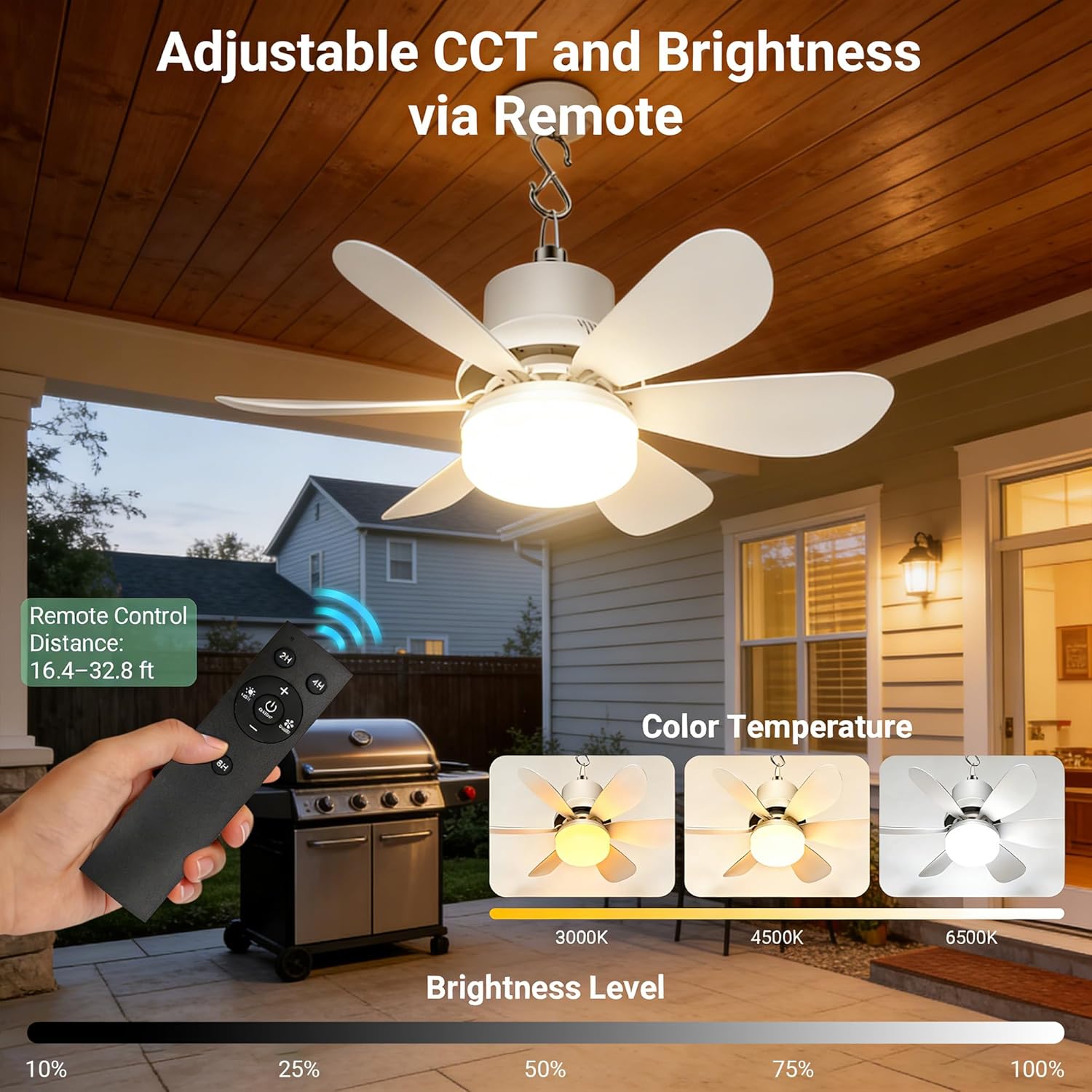
Image: The remote control for the MOKOQI fan, illustrating buttons for adjusting fan speed, light brightness, and color temperature settings.
Using the Fan and Light:
- Ensure the fan is charged (refer to the Charging section).
- Point the remote control towards the fan.
- Press the Power button to turn on the fan and light.
- Adjust fan speed, light brightness, and color temperature to your preference using the respective buttons.
- To set a timer, press the 2H or 4H button. The fan/light will operate for the selected duration and then turn off.
Video: Demonstration of the MOKOQI solar ceiling fan's remote control functions, including adjusting wind speed and light color temperature (3000K Warm, 4500K Natural, 6500K Cool).
Video: A brief overview of the MOKOQI solar ceiling fan operating outdoors, showcasing its use in various settings like camping and RVs.
Charging
The MOKOQI Solar Fan can be charged via its solar panel or a USB-C cable.
- Solar Charging: Connect the solar panel to the fan's Type-C charging port. Place the solar panel in direct sunlight for optimal charging. The 15W solar panel will charge the 18000mAh battery.
- USB-C Charging: For faster charging or when sunlight is unavailable, connect the provided USB-C cable to the fan's charging port and plug the other end into a compatible USB power adapter (not included).

Image: Detailed view of the fan's Type-C charging port and the solar panel, illustrating charging options and product dimensions.
Maintenance
Regular maintenance ensures the longevity and optimal performance of your fan:
- Cleaning: Use a soft, dry cloth to wipe down the fan and solar panel. For stubborn dirt, a slightly damp cloth can be used, but ensure the device is completely dry before next use. Do not use abrasive cleaners or solvents.
- Blade Cleaning: The fan blades are detachable for easier cleaning. Gently remove them, clean, and reattach securely.
- Storage: When not in use for extended periods, store the fan and solar panel in a cool, dry place. Ensure the battery has some charge before storing.
- Solar Panel Care: Keep the solar panel surface clean from dust, dirt, and debris to maintain charging efficiency.
Troubleshooting
If you encounter issues with your MOKOQI Solar Fan, refer to the following common problems and solutions:
| Problem | Possible Cause | Solution |
|---|---|---|
| Fan/Light does not turn on. | Low battery. Remote control battery depleted. Fan blades not securely attached. |
Charge the fan using solar panel or USB-C. Replace remote control battery. Ensure fan blades are clicked into place. |
| Fan airflow is weak. | Low battery. Fan speed set too low. |
Charge the fan. Increase fan speed using the remote control. |
| Solar panel not charging. | Insufficient sunlight. Solar panel dirty. Cable not connected properly. |
Relocate solar panel to direct sunlight. Clean solar panel surface. Check cable connection. |
| Remote control not working. | Remote control battery depleted. Obstruction between remote and fan. |
Replace remote control battery. Ensure clear line of sight to the fan. |
Specifications
| Feature | Detail |
|---|---|
| Brand | MOKOQI |
| Model Number | JJ-007 |
| Power Source | Solar Powered, USB-C |
| Battery Capacity | 18000mAh |
| Solar Panel Wattage | 15W |
| Light Source | LED |
| Color Temperatures | 3000K Warm, 4500K Natural, 6500K Cool |
| Brightness | Dimmable, up to 350 Lumens |
| Control Method | Remote Control |
| Timer Settings | 2H, 4H |
| Weather Resistance | IP54 Rated (Dust, splashes, light rain) |
| Fan Dimensions (L x W x H) | Approximately 17.5" (diameter) x 9.5" (height) |
| Solar Panel Dimensions (L x W) | Approximately 11.8" x 7.6" |
| Material | Metal, Plastic |
Warranty and Support
The MOKOQI JJ-007 Solar Powered Ceiling Fan with Light comes with a Limited Manufacturer Warranty. For specific details regarding warranty coverage, terms, and conditions, please refer to the warranty information provided at the time of purchase or contact MOKOQI customer support.
If you require assistance, have questions, or need to report an issue, please contact MOKOQI customer support through the retailer where the product was purchased or visit the official MOKOQI website for contact information.