
1. Introduction
Thank you for choosing the Generic X5S AI Translation Open-Ear Bluetooth Headphones. These headphones are designed to provide a comfortable, secure fit with advanced audio features, including AI translation capabilities and Bluetooth 6.0 connectivity. This manual will guide you through the setup, operation, and maintenance of your new headphones.
What's in the Box
- Open-ear Wireless Headphones (Left and Right)
- Charging Case
- USB Type-C Charging Cable
- User Manual
2. Product Overview
The X5S headphones feature an innovative open-ear design for comfort and situational awareness. They incorporate advanced audio technology for clear sound and include intelligent touch controls for easy management of functions.

Figure 2.1: Generic X5S Open-Ear Bluetooth Headphones. This image displays the sleek, ergonomic design of the headphones, highlighting their comfortable and secure fit for extended wear.

Figure 2.2: Open-Ear Design and Anti-Leakage Technology. This image shows a user wearing the X5S headphones, emphasizing the open-ear design that allows for environmental awareness while minimizing sound leakage through directional sound transmission and anti-leakage algorithms.

Figure 2.3: Audio Driver Components. An exploded view of the headphone's internal audio components, illustrating the design for powerful sound effects and high-fidelity audio quality.
Key Features
- Open-Ear Design: Rests comfortably outside the ear canal, maintaining awareness of surroundings.
- Advanced Bluetooth 6.0: Stable wireless connectivity up to 33 feet (10 meters).
- Intelligent Touch Controls: Manage music, calls, volume, and voice assistant with simple taps.
- Extended Battery Life: Up to 7 hours of playback per earbud, with a 300mAh charging case providing additional power.
- AI Translation Capability: Built-in feature to assist with language barriers.
- Multiple Modes: Music, Game, and Anti-interference modes for optimized listening.
- Type-C Charging: Fast 1.5-hour recharge time for earbuds.
3. Setup
3.1 Charging the Headphones and Case
- Place the earbuds into the charging case. Ensure they are correctly seated.
- Connect the provided USB Type-C charging cable to the charging port on the case and to a compatible USB power source (e.g., wall adapter, computer USB port).
- The indicator lights on the charging case will show the charging status. A full charge for the earbuds takes approximately 1.5 hours. The charging case itself has a 300mAh capacity, providing extended power for the earbuds.
3.2 Pairing with a Device
- Ensure the earbuds are charged.
- Open the charging case. The earbuds will automatically enter pairing mode, indicated by a flashing light (refer to specific light indicators in the product documentation if available).
- On your device (smartphone, tablet, computer), enable Bluetooth.
- Search for available Bluetooth devices. Select "X5S" from the list.
- Once connected, the earbuds will indicate successful pairing (e.g., a voice prompt or solid light).
- The headphones will automatically reconnect to the last paired device when taken out of the case, if Bluetooth is enabled on the device.
4. Operating Instructions
The X5S headphones feature intuitive touch controls on each earbud. The following table outlines the various functions:

Figure 4.1: Touch Control Functions. This diagram details the various touch gestures on the earbuds for controlling music, calls, volume, and other features.
| Action | Function |
|---|---|
| Single-click Left or Right Earbud | Music Play/Pause |
| Double-click Left Earbud | Previous Track |
| Double-click Right Earbud | Next Track |
| Triple-click Right Earbud | Volume + |
| Triple-click Left Earbud | Volume - |
| Single-click Left or Right Earbud (Incoming Call) | Answer Call |
| Double-click Left or Right Earbud (During Call) | Hang Up Call |
| Long Press Left or Right Earbud for 1 Second (Incoming Call) | Reject Call |
| Five-click Left or Right Earbud | Summon Voice Assistant |
| Single-click Left or Right Earbud (when not playing music) | Switch between Game Mode / Music Mode / Anti-interference Mode (Music mode is default) |
| Automatic Shutdown | If no connection and standby for more than 5 minutes after power-on, the earbuds will automatically shut down to save power. |
4.1 AI Translation Feature
The X5S headphones include a built-in AI translation feature designed to facilitate communication across language barriers. To utilize this feature, you may need to download a compatible translation application on your paired smartphone and follow its specific instructions for headphone integration. The headphones act as an audio interface for the translation software, allowing for real-time audio input and output.
5. Maintenance and Care
- Cleaning: Regularly wipe the earbuds and charging case with a soft, dry, lint-free cloth. Do not use harsh chemicals, cleaning solvents, or strong detergents.
- Water Resistance: These headphones are not water resistant. Avoid exposure to water, rain, sweat, or excessive moisture.
- Storage: When not in use, store the headphones in their charging case to protect them from dust and damage. Store in a cool, dry place.
- Battery Care: To prolong battery life, avoid fully discharging the battery frequently. Charge the headphones regularly, even if not used for extended periods.
- Avoid Extreme Temperatures: Do not expose the headphones to extremely high or low temperatures, as this can damage the battery and internal components.
6. Troubleshooting
If you encounter issues with your X5S headphones, please refer to the following common solutions:
- Headphones not turning on:
Ensure the earbuds are charged. Place them in the charging case and connect the case to a power source for at least 30 minutes. - Unable to pair with device:
a. Ensure Bluetooth is enabled on your device.
b. Make sure the earbuds are in pairing mode (usually indicated by a flashing light when taken out of the case).
c. Turn off Bluetooth on your device, then turn it back on. Try searching for "X5S" again.
d. If previously paired, try forgetting the device "X5S" from your device's Bluetooth settings and then re-pairing.
e. Ensure the earbuds are within the 33-foot (10-meter) Bluetooth range of your device. - No sound or intermittent sound:
a. Check the volume level on both your device and the headphones.
b. Ensure the headphones are properly connected to your device.
c. Try moving closer to your device to avoid interference.
d. Restart your device and the headphones. - Charging case not charging:
a. Ensure the USB Type-C cable is securely connected to both the case and the power source.
b. Try using a different USB cable or power adapter.
c. Check if the charging port on the case is clean and free of debris. - AI Translation not working:
a. Ensure you have a compatible translation application installed and configured on your smartphone.
b. Verify that the headphones are correctly selected as the audio input/output device within the translation app.
7. Specifications
The following table provides detailed technical specifications for the Generic X5S AI Translation Open-Ear Bluetooth Headphones:
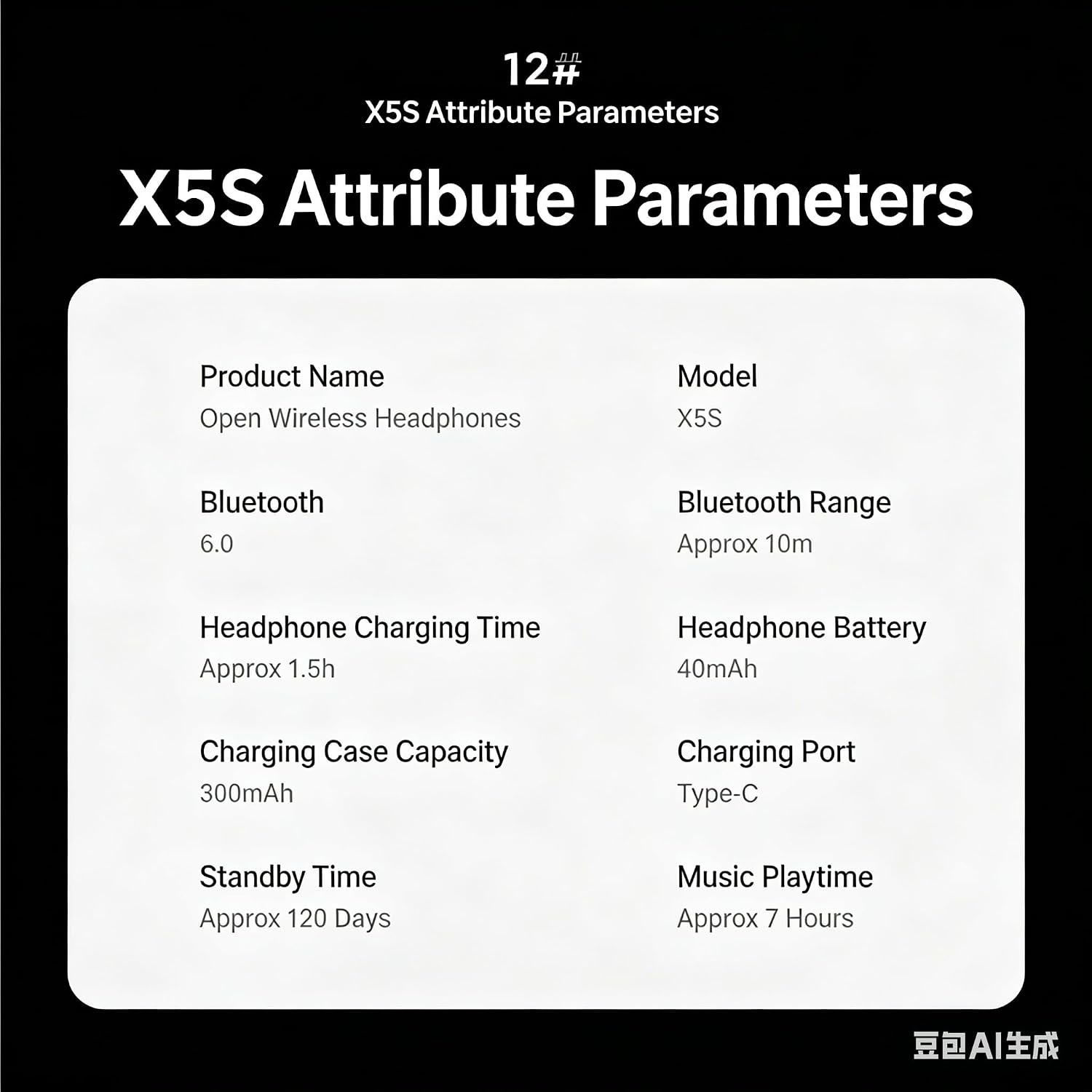
Figure 7.1: X5S Attribute Parameters. This image presents a summary of key specifications such as Bluetooth version, battery capacity, and playtime.
| Attribute | Value |
|---|---|
| Product Name | Open Wireless Headphones |
| Model | X5S |
| Brand | Generic |
| Color | White |
| Ear Placement | Open Ear |
| Form Factor | Open Ear |
| Impedance | 32 Ohms |
| Headphone Jack | Wireless |
| Connectivity Technology | Bluetooth, Wireless |
| Wireless Technology | Bluetooth |
| Bluetooth Version | 6.0 |
| Bluetooth Range | 32.8 Feet (Approx. 10m) |
| Control Type | Touch Control |
| Control Method | Touch, Voice |
| Item Weight | 0.18 Ounces (Earbuds) |
| Carrying Case Length | 3.5 Inches |
| Carrying Case Weight | 1.8 Ounces |
| Noise Control | Environmental Noise Cancellation |
| Frequency Response | 20 Hz - 20 kHz (Standard Range) |
| Sensitivity | 105 dB |
| Audio Driver Type | Dynamic Driver |
| Audio Latency | 60 Milliseconds |
| Audio Driver Size | 5 Inches (This value seems unusually large for an earbud driver, typically measured in mm. Please refer to product packaging for clarification if needed.) |
| Specific Uses For Product | AI Translation, Hands-free Calling, Music Playback |
| Compatible Devices | Bluetooth-enabled Devices, Cellphones, Computers, Laptops, Tablets |
| Water Resistance Level | Not Water Resistant |
| Additional Features | AI Translation, Open-ear Design, Sleep Power-saving Function, Touch Control, Voice Assistant Support |
| Earpiece Shape | Open-ear Hook Design |
| Battery Charge Time | 1.5 Hours (Earbuds) |
| Headphone Battery Capacity | 40mAh (Each Earbud) |
| Charging Case Capacity | 300mAh |
| Music Playtime | Approx. 7 Hours |
| Standby Time | Approx. 120 Days |
| Charging Port | Type-C |
8. Warranty Information
Based on the provided product information, there is no explicit warranty description for the Generic X5S AI Translation Open-Ear Bluetooth Headphones. Please refer to your point of purchase or the seller for any specific warranty terms or return policies that may apply.
9. Support
For further assistance, technical support, or inquiries regarding your Generic X5S AI Translation Open-Ear Bluetooth Headphones, please contact the seller or manufacturer directly through the platform where the product was purchased. Ensure you have your purchase details and model number (X5S) available when seeking support.


