
1. Product Overview
The Garvee 3-in-1 Vanity Desk is a versatile furniture piece designed to function as a makeup dressing table, a nightstand, and a laptop desk. It features a mirror with 3-color LED lighting, an integrated charging station with AC outlets and USB ports, and multiple storage compartments including drawers and a hidden chair organizer. This compact design is ideal for optimizing space in smaller rooms.

Image 1.1: The Garvee 3-in-1 Vanity Desk showcasing its versatile configurations as an office desk, vanity desk, and nightstand.
2. Important Safety Instructions
Please read and follow these safety guidelines carefully to ensure safe operation and prevent damage to the product or injury.
- Always unplug the vanity from the power source before assembly, disassembly, cleaning, or maintenance.
- Exercise caution when handling components during assembly due to potential sharp edges and the overall weight of the unit.
- Keep all electrical components, including the LED mirror and charging station, dry and away from water or other liquids.
- Avoid placing the vanity near heat sources or in direct sunlight for prolonged periods to prevent material degradation.
- Do not overload the electrical outlets on the charging station. Ensure connected devices do not exceed the specified power limits.
- Ensure the vanity is placed on a stable, level surface to prevent tipping.
3. Setup and Assembly
This Garvee Vanity Desk requires assembly. Please ensure all parts are present and undamaged before beginning. It is recommended to have at least two people for assembly due to the size and weight of some components.
3.1. Unpacking and Part Identification
- Carefully unpack all components from the packaging. Retain packaging materials until assembly is complete.
- Refer to the included assembly manual (not provided in this document) for a complete list of parts and hardware. Verify all items are accounted for.
- Identify each part by its label and compare it with the assembly diagram.
3.2. Assembly Steps
Follow the step-by-step instructions provided in the separate assembly manual that came with your product. Ensure all screws and fasteners are tightened securely, but do not overtighten.

Image 3.1: Product dimensions for the Garvee Vanity Desk, showing height, width, and depth measurements for the main unit and the stool.
4. Operating Instructions
4.1. 3-in-1 Functionality
The Garvee Vanity Desk offers three primary modes of use:
- Vanity Desk Mode: Lift the top panel to reveal the LED mirror and internal storage compartments. The accompanying stool can be pulled out for seating.
- Nightstand Mode: Keep the top panel closed. The unit functions as a compact nightstand with accessible drawers and the charging station.
- Laptop Desk Mode: With the top panel closed, the surface can be used as a small workspace for a laptop or other tasks. The stool can be used as a seat or stored away.
4.2. LED Mirror Operation
The integrated mirror features 3-color LED lighting with adjustable brightness.
- Power On/Off: Gently touch the smart touch button on the mirror surface to turn the lights on or off.
- Change Light Color: Short press the smart touch button to cycle through the three light colors: Cool Light, Warm White, and Warm Yellow.
- Adjust Brightness: Long press the smart touch button to increase or decrease the brightness of the selected light color. Release when the desired brightness is achieved.

Image 4.1: Examples of the three available LED light colors: Cool Light, Warm White, and Warm Yellow, for optimal illumination.
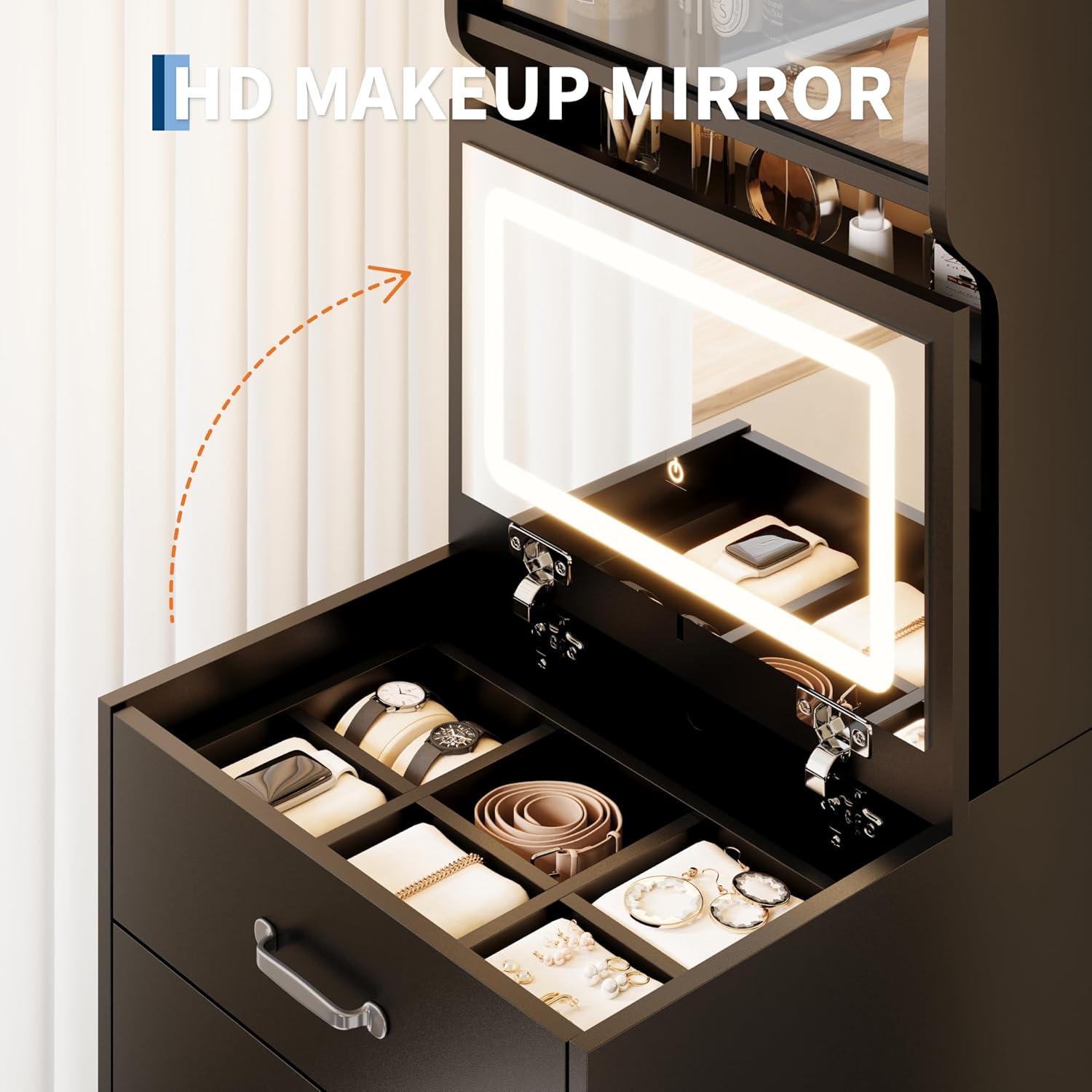
Image 4.2: The HD makeup mirror with its integrated LED lighting, revealing organized storage for cosmetics and jewelry when opened.
4.3. Charging Station Usage
The vanity desk includes a convenient charging station.
- Locate the charging station on the side or back of the vanity.
- Plug the vanity's main power cord into a standard wall outlet.
- Connect your electronic devices (e.g., phone, tablet, hair dryer) to the available AC outlets or USB ports.
4.4. Storage Compartments
Utilize the various storage options to keep your items organized.
- Drawers: The vanity features multiple drawers for storing makeup, accessories, or office supplies.
- Top Cabinet: The two-tier cabinet with acrylic doors provides additional storage for larger items. Shelves are height-adjustable.
- Hidden Chair Storage: The accompanying stool includes a large organizer drawer for discreet storage.

Image 4.3: The space-saving design of the vanity desk, illustrating its various storage solutions including open shelves, hidden drawers, and the storage stool.
5. Maintenance and Care
Proper maintenance will extend the life and appearance of your Garvee Vanity Desk.
- Cleaning Surfaces: Wipe wood surfaces with a soft, damp cloth. Avoid abrasive cleaners or harsh chemicals that may damage the finish.
- Mirror Cleaning: Use a glass cleaner and a soft, lint-free cloth to clean the mirror. Spray cleaner onto the cloth, not directly onto the mirror, to prevent liquid from seeping into electrical components.
- Electrical Components: Ensure the charging station and LED mirror components remain dry. Do not attempt to clean them with liquids.
- Tighten Fasteners: Periodically check and tighten all screws and fasteners to ensure the desk remains stable.
6. Troubleshooting
If you encounter issues with your Garvee Vanity Desk, refer to the following common problems and solutions.
- LED Mirror Not Lighting Up:
- Ensure the vanity's main power cord is securely plugged into a functional wall outlet.
- Verify that the smart touch button on the mirror is being pressed correctly. A firm, brief touch is usually sufficient to activate.
- Check for any loose connections if the mirror was recently assembled or moved.
- Charging Station Not Providing Power:
- Confirm the vanity's main power cord is plugged in and the wall outlet is active.
- Test the outlets and USB ports with a different device to rule out a device-specific issue.
- Avoid overloading the charging station with too many high-power devices simultaneously.
- Assembly Difficulties or Missing Parts:
- Carefully re-read the assembly manual and review all diagrams. Sometimes a small detail can be overlooked.
- If a part is genuinely missing or damaged, contact Garvee customer support with your model number and a description of the issue.
7. Product Specifications
| Feature | Specification |
|---|---|
| Brand | Garvee |
| Model Number | P1Le_5gDcJsdjVp7xjJQlgg1H5r |
| Color | Black |
| Material | Wood |
| Product Dimensions (D x W x H) | 18.9" x 17.5" x 58.5" |
| Item Weight | 103.62 Pounds |
| Number of Drawers | 2 (on main unit, plus 1 in stool) |
| LED Light Colors | 3 (Cool Light, Warm White, Warm Yellow) |
| Charging Station | Includes AC Outlets & USB Port |
| Assembly Required | Yes |
| UPC | 822200055754 |
8. Warranty Information
Garvee products are manufactured to high-quality standards. For specific warranty details regarding your 3-in-1 Vanity Desk, please refer to the warranty card included with your purchase or visit the official Garvee website. The warranty typically covers manufacturing defects under normal use conditions.
9. Customer Support
If you have any questions, require assistance with assembly, or need to report a missing/damaged part, please contact Garvee customer support.
- Online Support: Visit the official Garvee website for FAQs, support resources, and contact forms.
- Email Support: Refer to your product packaging or the Garvee website for the customer service email address.
- When contacting support, please have your product model number (P1Le_5gDcJsdjVp7xjJQlgg1H5r) and purchase information readily available.