
Introduction
Thank you for choosing the Kslysuty Desk Computer Gaming Chair. This manual provides detailed instructions for the assembly, operation, and maintenance of your new chair. Please read this manual thoroughly before assembly and use to ensure proper function and safety. Keep this manual for future reference.
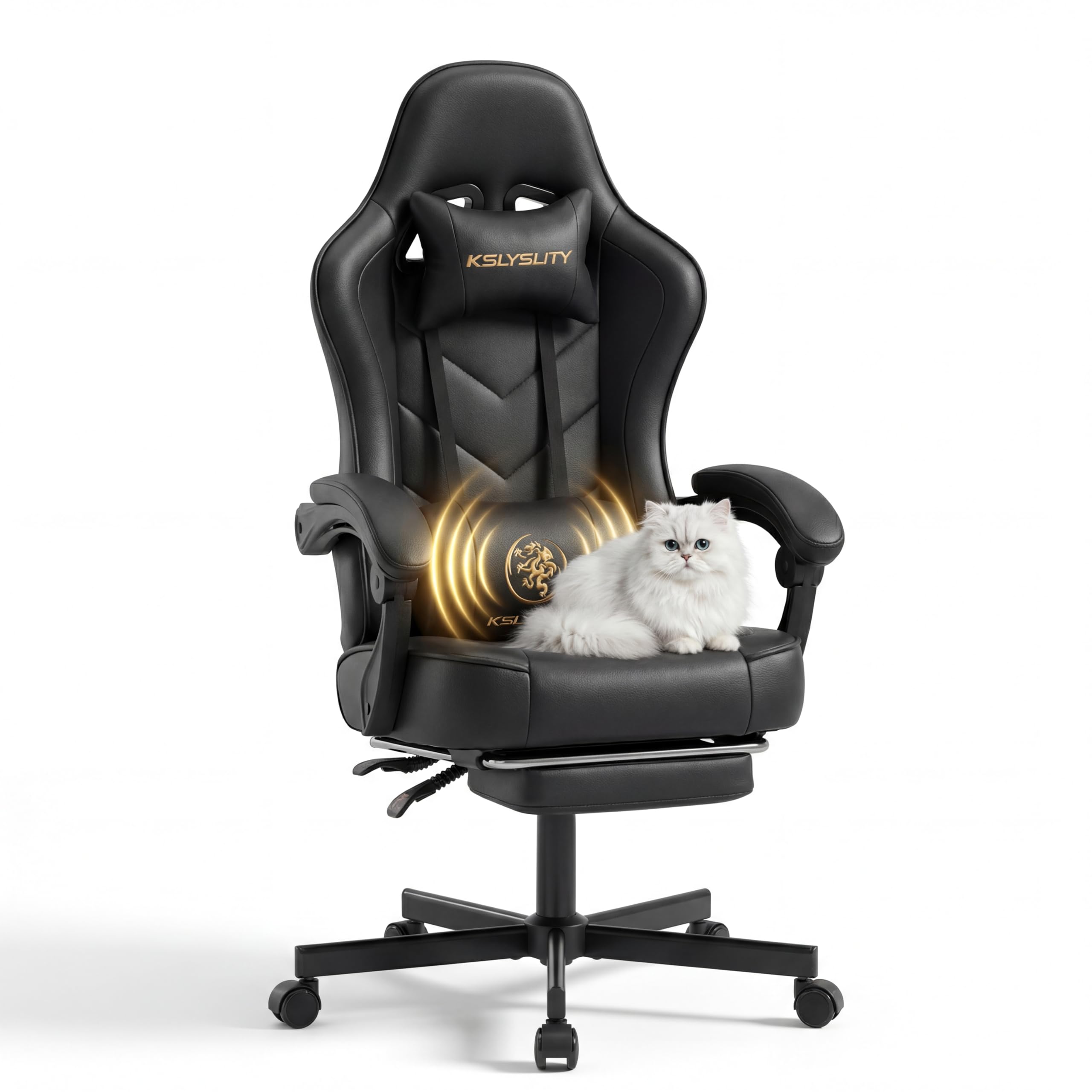
Image: The Kslysuty Desk Computer Gaming Chair, showcasing its high back, ergonomic design, and black leather finish.
Safety Information
- Ensure all parts are present and undamaged before assembly. Do not use if any parts are missing or damaged.
- Assemble the chair on a soft, clean surface to prevent scratches.
- Tighten all screws firmly, but do not overtighten. Recheck all screws periodically and retighten as necessary.
- Do not stand on the chair.
- Do not use the chair as a step stool.
- Do not exceed the maximum weight capacity of 400 pounds.
- Keep children away from moving parts during adjustment.
- Use the chair only for its intended purpose.
Package Contents
Please verify that all components are included in your package:
- Backrest
- Seat Cushion with Armrests and Footrest mechanism
- Star Base
- Gas Lift Cylinder
- Gas Lift Cover
- Casters (5 pieces)
- Mechanism Plate
- Lumbar Support Pillow (with massage function)
- Headrest Pillow
- Side Covers (2 pieces)
- Screws, Washers, and Allen Wrench

Image: Detailed dimensions of the chair, illustrating the full-body ergonomic wrap, extra-wide seat and backrest, and the 400 lbs weight capacity.
Assembly Instructions
Follow these steps carefully to assemble your chair:
- Attach Casters to Base: Insert each of the five casters into the holes at the end of the star base until they click securely into place.
- Install Gas Lift: Place the gas lift cylinder into the center hole of the star base. Cover the gas lift with the telescopic plastic cover.
- Attach Mechanism Plate to Seat: Align the mechanism plate with the pre-drilled holes on the underside of the seat cushion. Ensure the front of the mechanism plate faces the front of the seat. Secure with screws and washers using the provided Allen wrench.
- Connect Seat to Gas Lift: Carefully place the assembled seat onto the gas lift cylinder, ensuring the tapered end of the gas lift fits securely into the mechanism plate.
- Attach Backrest to Seat: Align the backrest with the metal brackets on the seat cushion. Secure the backrest to the seat using screws and washers.
- Install Side Covers: Once the backrest is securely attached, snap the plastic side covers over the metal brackets to conceal the screws.
- Attach Headrest and Lumbar Pillows: Slide the headrest pillow onto the top of the backrest. Attach the lumbar support pillow to the backrest using its straps. The lumbar pillow has a USB cable for its massage function.
- Final Check: Ensure all screws are tightened and all components are securely in place before using the chair.

Image: Detailed view of the chair's robust components: SGS certified Class 4 gas lift, heavy-duty metal base, and scratch-free PU casters, highlighting durability and stability.
Operating Instructions
Your Kslysuty Gaming Chair offers several adjustable features for personalized comfort:
- Height Adjustment: Pull the right lever (marked "LIFT") upwards while seated to lower the chair. To raise the chair, stand up and pull the same lever upwards. Release the lever at the desired height.
- Backrest Recline: Pull the left lever (marked "LOCK") upwards to unlock the backrest. Lean back to the desired angle (between 90° and 150°) and release the lever to lock it in place. The armrests are designed to move synchronously with the backrest.
- Footrest Operation: Pull the retractable footrest out from under the seat when desired. Push it back in when not in use.
- Lumbar Massage Function: The lumbar support pillow is equipped with a vibration massage function. Connect the USB cable from the pillow to a compatible USB power source (e.g., computer, power bank) to activate the massage.

Image: Visual guide to the chair's multi-gear recline feature, showing angles for working (90°), relaxing (135°), and full recline (150°). It also indicates the levers for seat height and back angle adjustments.

Image: An overview of the chair's "Ultimate Relaxation Kit," detailing the memory foam headrest, vibration massage lumbar support, and retractable footrest for enhanced comfort.
Maintenance and Care
Proper care will extend the life of your chair:
- Cleaning: Wipe clean with a damp cloth. For stubborn stains on the PU leather, use a mild soap solution and wipe dry immediately. Avoid harsh chemicals or abrasive cleaners.
- Hardware Check: Periodically check all screws and bolts to ensure they are tight. Retighten as needed to maintain stability and safety.
- Caster Care: Keep casters free of hair and debris to ensure smooth rolling.
- Avoid Direct Sunlight: Prolonged exposure to direct sunlight can cause the PU leather to fade or crack.
Troubleshooting
| Problem | Possible Cause | Solution |
|---|---|---|
| Chair wobbles or feels unstable. | Loose screws or uneven floor. | Check and tighten all assembly screws. Ensure the chair is on a flat surface. |
| Gas lift does not adjust height. | Gas lift lever not fully engaged or gas lift cylinder malfunction. | Ensure the lever is pulled completely. If the issue persists, the gas lift may need replacement. |
| Backrest does not recline or lock. | Recline lever not fully engaged or mechanism obstruction. | Ensure the recline lever is pulled fully to unlock and released to lock. Check for any obstructions in the recline mechanism. |
| Casters do not roll smoothly. | Debris (hair, dust) caught in casters. | Remove any debris from the caster wheels. |
| Lumbar massage not working. | USB cable not connected or power source issue. | Ensure the USB cable is securely connected to a working USB power source. Try a different USB port or power adapter. |
Specifications
| Feature | Detail |
|---|---|
| Brand | Kslysuty |
| Model Number | B0GHVWZPL6 |
| Color | Black Leather |
| Material | PU Leather, Sponge (Fill Material), Wood (Frame Material) |
| Product Dimensions (D x W x H) | 20.87"D x 26.38"W x 46.06"H |
| Item Weight | 37 Pounds |
| Maximum Weight Recommendation | 400 Pounds |
| Back Style | Wing Back |
| Arm Style | Linkage Armrests |
| Features | Adjustable Height, Arm Rest, Ergonomic, Head Support, Swivel, Massage Lumbar Support, Retractable Footrest |
| Assembly Required | Yes |
| Product Care Instructions | Wipe Clean |
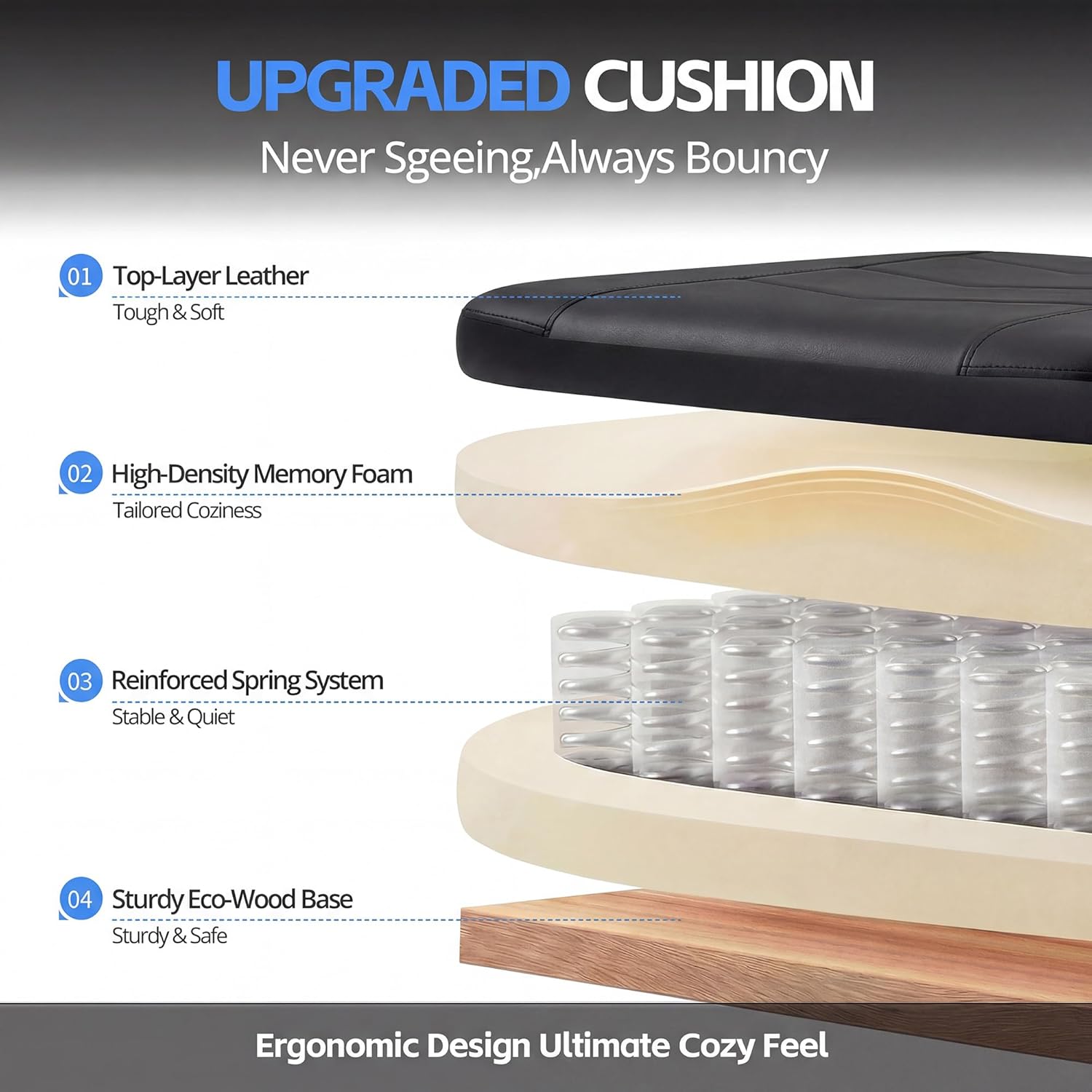
Image: Exploded view of the upgraded cushion, showing its layers: tough and soft top-layer leather, high-density memory foam, stable and quiet reinforced spring system, and a sturdy eco-wood base.
Warranty and Support
For warranty information or technical support, please contact Kslysuty customer service. Refer to your purchase documentation for specific warranty terms and contact details. Our dedicated customer service team is ready to assist you with any questions or concerns.
You can also visit the official Kslysuty store for more information: Kslysuty Store