
1. Important Safety Instructions
Always observe basic safety precautions when using electric tools to reduce the risk of fire, electric shock, and personal injury. Read all instructions before operating this product.
- Work Area Safety: Keep the work area clean and well-lit. Cluttered or dark areas invite accidents. Do not operate power tools in explosive atmospheres, such as in the presence of flammable liquids, gases, or dust.
- Electrical Safety: Power tool plugs must match the outlet. Never modify the plug in any way. Do not use any adapter plugs with earthed (grounded) power tools. Avoid body contact with earthed or grounded surfaces such as pipes, radiators, ranges, and refrigerators.
- Personal Safety: Always wear eye protection (safety goggles) and hearing protection (ear defenders) when operating the rotary hammer. Use a dust mask in dusty conditions. Dress properly; do not wear loose clothing or jewelry. Keep hair, clothing, and gloves away from moving parts.
- Tool Use and Care: Do not force the power tool. Use the correct power tool for your application. Disconnect the plug from the power source before making any adjustments, changing accessories, or storing power tools.
- Specific Rotary Hammer Safety:
- Hold the tool firmly with both hands, using the auxiliary handle provided.
- Be aware of hidden electrical wires, gas pipes, or water pipes when drilling into walls, floors, or ceilings. Use a suitable detector to locate them.
- Secure the workpiece. Do not hold it by hand.
- Allow the tool to cool down after extended use to prevent overheating.
2. Product Overview
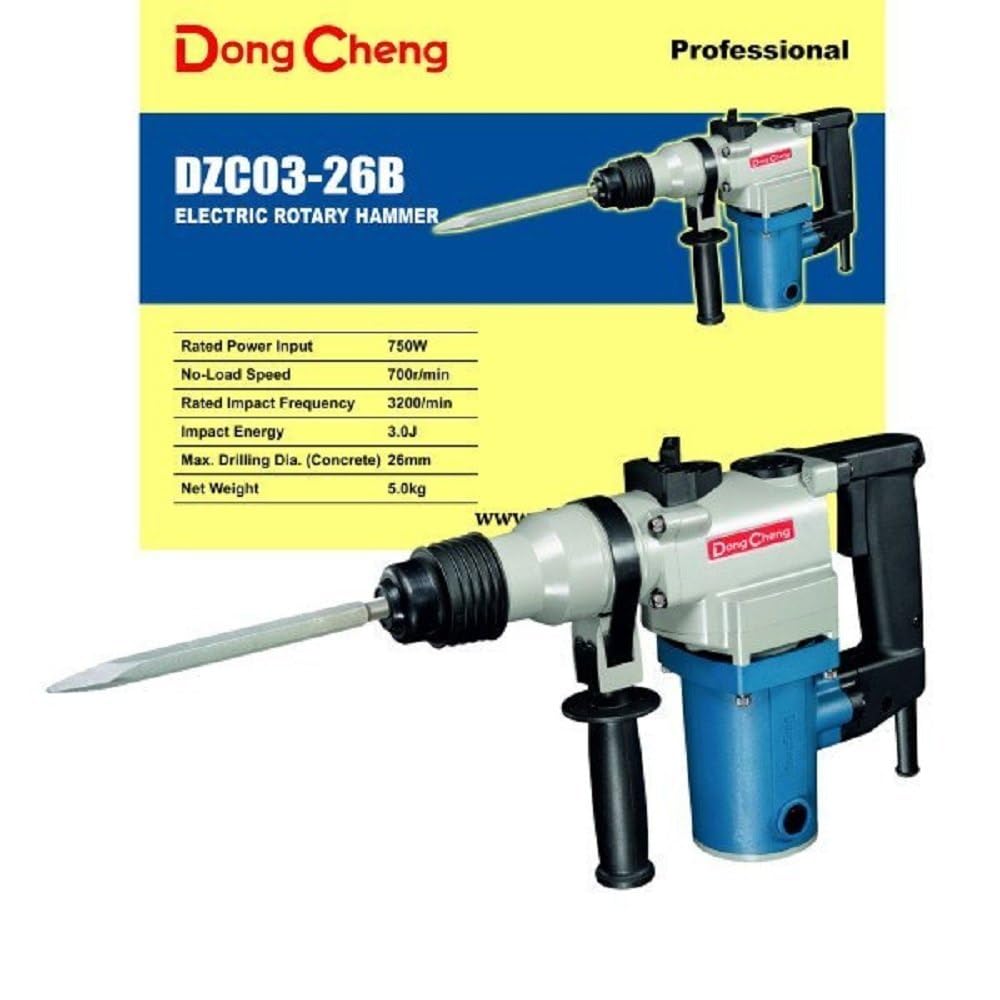
Figure 1: Dong Cheng DZC03-26B Rotary Hammer Drill.
This image shows the Dong Cheng DZC03-26B Rotary Hammer Drill. It features a robust body, an ergonomic main handle, and an adjustable auxiliary handle for better control. The SDS-Plus chuck is visible at the front, designed for quick bit changes. A depth gauge is also attached, allowing for precise drilling depth settings.
2.1 Components Included
The standard package for your Dong Cheng DZC03-26B Rotary Hammer Drill includes the following items:
- Rotary Hammer (DZC03-26B unit)
- SDS-Plus Chuck
- Auxiliary Handle
- Depth Gauge
- Dust Cap
- Replacement Carbon Brushes
- User Manual (this document)
- Warranty Card
2.2 Key Features
The DZC03-26B Rotary Hammer Drill is designed with features to enhance performance and user experience:
- Powerful Performance: Driven by a 750W high-torque motor for efficient drilling in heavy masonry and concrete.
- Dual-Mode Functionality: Features a selector switch for seamless switching between rotary hammer drilling and chiseling modes for structural demolition.
- Drilling Capacity: Engineered to deliver a maximum 26mm drilling diameter in concrete, suitable for heavy-duty construction and electrical installations.
- User Comfort: Equipped with an adjustable auxiliary handle and a depth gauge for precise control during deep-hole drilling applications.
- Heavy-Duty Build: Features an SDS-Plus chuck system for secure bit retention and rapid tool changes on busy job sites.
3. Setup
Before operating the rotary hammer, ensure it is properly set up according to these instructions.
3.1 Attaching the Auxiliary Handle
- Loosen the auxiliary handle by rotating it counter-clockwise.
- Slide the handle over the front barrel of the tool.
- Adjust the handle to a comfortable and secure position for your grip.
- Tighten the handle by rotating it clockwise until it is firmly secured.
3.2 Inserting SDS-Plus Bits
- Clean the shank of the SDS-Plus drill bit or chisel.
- Apply a small amount of SDS-Plus grease (not included) to the bit shank to ensure smooth operation and prolong chuck life.
- Insert the bit into the chuck until it clicks into place. Pull on the bit to ensure it is securely locked. A slight axial play is normal for SDS-Plus systems.
- To remove the bit, pull back the chuck collar and pull the bit out.
3.3 Setting the Depth Gauge
- Insert the depth gauge into the hole on the auxiliary handle.
- Adjust the depth gauge to the desired drilling depth. The tip of the drill bit should extend beyond the end of the depth gauge by the required drilling depth.
- Tighten the auxiliary handle to secure the depth gauge in position.
3.4 Power Connection
Ensure the power switch is in the "OFF" position before plugging the tool into a suitable power outlet (220-240V AC). Use an extension cord rated for the tool's power requirements if necessary.
4. Operating Instructions
Familiarize yourself with the operating modes and procedures for optimal performance and safety.
4.1 Mode Selection
The DZC03-26B features a mode selector switch to choose between two operating modes:
- Rotary Hammer Drilling Mode: For drilling in concrete, stone, and masonry. This mode combines rotation with hammering action.
- Chiseling (Demolition) Mode: For light chiseling and demolition work in concrete and masonry. This mode provides hammering action without rotation.
To change modes, rotate the mode selector switch to the desired icon. Ensure the tool is unplugged when changing modes to prevent accidental activation.
4.2 Drilling Operation (Rotary Hammer Mode)
- Select the Rotary Hammer Drilling mode.
- Insert the appropriate SDS-Plus drill bit.
- Mark the drilling location on the workpiece.
- Hold the tool firmly with both hands. Position the drill bit at the marked spot.
- Press the trigger switch to start the tool. Apply steady, moderate pressure. Do not force the tool; allow the hammering action to do the work.
- Once the desired depth is reached (indicated by the depth gauge), release the trigger and withdraw the drill bit from the hole.
4.3 Chiseling Operation (Demolition Mode)
- Select the Chiseling (Demolition) mode.
- Insert the appropriate SDS-Plus chisel bit.
- Hold the tool firmly with both hands. Position the chisel at the desired point of impact.
- Press the trigger switch to start the tool. Guide the chisel along the material, allowing the hammering action to break it apart.
- Do not apply excessive side pressure, as this can damage the chisel or the tool.
- Release the trigger to stop the tool.
5. Maintenance
Regular maintenance ensures the longevity and optimal performance of your Dong Cheng Rotary Hammer Drill.
5.1 Cleaning
- Always disconnect the tool from the power supply before cleaning.
- Clean the ventilation openings regularly to prevent overheating. Use a soft brush or compressed air.
- Wipe the tool housing with a damp cloth. Do not use harsh chemicals or abrasive cleaners.
- Keep the SDS-Plus chuck clean and free of dust and debris. Apply a small amount of SDS-Plus grease to the chuck mechanism periodically.
5.2 Carbon Brush Replacement
The carbon brushes are wear parts and need to be replaced when they are worn down. The DZC03-26B includes replacement carbon brushes in the package.
- Disconnect the tool from the power supply.
- Locate the brush caps on the sides of the motor housing.
- Unscrew the brush caps using a screwdriver.
- Remove the old carbon brushes.
- Insert the new carbon brushes, ensuring they are oriented correctly.
- Screw the brush caps back on securely.
- After replacement, run the tool without load for a few minutes to allow the brushes to seat properly.
5.3 Storage
Store the tool in a dry, secure place, out of reach of children. Protect it from moisture and direct sunlight.
6. Troubleshooting
Refer to this section for common issues and their solutions.
| Problem | Possible Cause | Solution |
|---|---|---|
| Tool does not start. | No power supply; faulty switch; worn carbon brushes. | Check power connection and outlet. Test the switch. Replace carbon brushes. |
| Low power or reduced performance. | Worn carbon brushes; incorrect mode selection; dull drill bit/chisel. | Replace carbon brushes. Ensure correct mode is selected. Use sharp accessories. |
| Excessive vibration. | Bent drill bit/chisel; loose auxiliary handle; internal damage. | Replace bent accessories. Tighten auxiliary handle. If problem persists, seek professional service. |
| Overheating. | Blocked ventilation slots; continuous heavy load. | Clean ventilation slots. Allow tool to cool down during extended use. Reduce load. |
If you encounter problems not listed here or if the suggested solutions do not resolve the issue, please contact authorized service personnel.
7. Specifications
Technical data for the Dong Cheng DZC03-26B Rotary Hammer Drill:
| Specification | Value |
|---|---|
| Brand | Dong Cheng |
| Model Number | DZC03-26B |
| Power Source | Corded Electric |
| Maximum Power | 750 Watts |
| Voltage | 229.97 Volts (Nominal 220-240V) |
| Amperage | 3.3 Amps |
| Maximum Rotational Speed | 500 RPM |
| Rated Impact Frequency | 3,200 impacts per minute |
| Impact Energy | 3.0 Joules per stroke |
| Max Drilling Capacity (Concrete) | 26mm |
| Item Weight | 3 Kilograms (Tool only) / 5.0 kg (Approx. shipping weight or with accessories) |
| Drill Type | Hammer Drill |
| Chuck Type | SDS-Plus |
8. Warranty and Support
Your Dong Cheng DZC03-26B Rotary Hammer Drill comes with a warranty. Please refer to the included Warranty Card for specific terms and conditions, including the warranty period and coverage details.
For technical support, service, or warranty claims, please contact your local dealer or the authorized service center. You may also reach out to the importer for assistance:
Importer Contact Information:
Perfect Engineers, No. 5-5-80/1, 1st Floor, Sri Srinivasa Commercial Complex, Ranigunj, Secunderabad, Telangana - 500003.
Manufacturer:
Jiangsu Dongcheng M &E Tools Co., Ltd.


