
1. Introduction
Thank you for choosing the SOONBOX S3000 Wireless Party Box Speaker. This portable speaker is designed to provide high-quality audio and versatile entertainment options, including karaoke functionality with built-in HD microphones. It features multiple connectivity options, dynamic RGB lighting, and a durable, water-resistant design for use in various environments. Please read this manual carefully before using the product to ensure proper operation and to maximize its lifespan.
2. Package Contents
Ensure all items listed below are present in your package. If any items are missing or damaged, please contact customer support.
- SOONBOX S3000 Wireless Party Box Speaker
- Charging Cable (for DC charging)
- Handling Strap
- User Manual

Image: The SOONBOX S3000 speaker, shown with its detachable shoulder strap for portability.
3. Product Overview
Familiarize yourself with the various components and controls of your SOONBOX S3000 speaker.
3.1 Key Features
- 40W Audio Output: Delivers clear and powerful sound.
- Built-in HD Microphones: For karaoke and voice applications.
- Multiple Playback Modes: Wireless (Bluetooth), USB, AUX, TF Card, FM Radio.
- TWS Function: Allows pairing with another S3000 speaker for stereo sound.
- RGB Lights: Dynamic lighting effects for enhanced atmosphere.
- IPX-5 Water Resistance: Provides protection against water splashes. Note: This product is not fully waterproof and should not be submerged.
- Portable Design: Durable fiber body with a handling strap for easy transport.
3.2 Controls and Ports
(Specific button layout and port descriptions are not available in the provided data. Please refer to the product itself for exact labeling. General functions are listed below.)
- Power Button: Turns the speaker on/off.
- Mode Button: Switches between input modes (Bluetooth, USB, AUX, TF Card, FM).
- Volume Controls: Adjusts the speaker's output volume.
- Play/Pause Button: Controls audio playback.
- Track Skip Buttons: Skips to the next or previous track.
- RGB Light Button: Controls the RGB lighting effects.
- USB Port: For USB drive playback.
- AUX Input: For wired audio connection.
- TF Card Slot: For TF (MicroSD) card playback.
- DC Charging Port: For connecting the charging cable.

Image: Multiple SOONBOX S3000 speakers stacked, showcasing different color options and the speaker's compact design.
4. Setup
4.1 Initial Charging
Before first use, fully charge the speaker. Connect the provided charging cable to the DC charging port on the speaker and plug the other end into a suitable power source. The charging indicator light will typically show charging status and turn off or change color when fully charged.
4.2 Powering On/Off
Press and hold the Power Button for a few seconds to turn the speaker on or off. A sound prompt or indicator light will confirm the status.
5. Operating Instructions
5.1 Wireless (Bluetooth) Mode
- Turn on the speaker. It will automatically enter Bluetooth pairing mode, indicated by a flashing light or voice prompt.
- On your mobile device (smartphone, tablet, etc.), enable Bluetooth and search for available devices.
- Select "SOONBOX S3000" from the list of devices.
- Once paired, the speaker will confirm with a sound, and the indicator light will become solid.
- You can now play audio from your device through the speaker.
5.2 USB Playback
- Insert a USB flash drive containing MP3 audio files into the USB port.
- The speaker will automatically switch to USB mode and begin playing audio. If not, press the Mode Button to select USB mode.
- Use the track skip buttons to navigate between songs.
5.3 TF Card Playback
- Insert a TF (MicroSD) card containing MP3 audio files into the TF card slot.
- The speaker will automatically switch to TF card mode and begin playing audio. If not, press the Mode Button to select TF card mode.
- Use the track skip buttons to navigate between songs.
5.4 AUX Input
- Connect one end of a 3.5mm audio cable (not included) to the AUX input port on the speaker.
- Connect the other end to the audio output jack of your external device (e.g., MP3 player, computer).
- Press the Mode Button to select AUX mode.
- Audio will now play from your external device through the speaker. Control playback from your external device.
5.5 FM Radio
- Press the Mode Button to switch to FM Radio mode.
- Press the Play/Pause Button to automatically scan and save available FM stations.
- Use the track skip buttons to navigate between saved stations.
5.6 TWS (True Wireless Stereo) Function
To achieve true wireless stereo sound, you need two SOONBOX S3000 speakers.
- Ensure both S3000 speakers are powered on and in Bluetooth mode, but not connected to any device.
- On one of the speakers (this will be the primary speaker), press and hold the TWS button (if available, otherwise refer to product specific instructions for TWS pairing).
- The speakers will attempt to pair with each other. A confirmation sound will indicate successful pairing.
- Once paired, connect your mobile device to the primary speaker via Bluetooth as described in section 5.1.
- Audio will now play in stereo through both speakers.
5.7 Using the Built-in HD Microphones
The speaker features integrated HD microphones for karaoke or public address functions. Simply speak into the microphone while audio is playing or paused. The microphone volume may be adjustable via dedicated controls on the speaker (refer to product for specific controls).
5.8 RGB Lights
Press the RGB Light Button to cycle through different lighting modes or to turn the lights on/off. The lights will synchronize with the music or display a continuous pattern.
6. Charging the Speaker
The SOONBOX S3000 is powered by an internal rechargeable battery. When the battery is low, the speaker may indicate this with a voice prompt or flashing indicator light.
- Connect the provided DC charging cable to the speaker's DC input port.
- Plug the other end of the cable into a standard wall outlet or a compatible USB power adapter (not included).
- The charging indicator light will illuminate during charging.
- Once fully charged, the indicator light will typically change color or turn off. Disconnect the charger to conserve energy.
Note: Do not use damaged chargers or cables. Only use chargers that meet the product's power requirements.
7. Maintenance
Proper care will ensure the longevity of your SOONBOX S3000 speaker.
- Cleaning: Wipe the speaker with a soft, dry, or slightly damp cloth. Do not use abrasive cleaners, alcohol, or chemical solvents.
- Water Resistance: The speaker is IPX-5 water-resistant, meaning it can withstand splashes. Do not submerge it in water or expose it to heavy rain. Ensure the charging port cover is securely closed when not charging to maintain water resistance.
- Storage: Store the speaker in a cool, dry place away from direct sunlight and extreme temperatures.
- Battery Care: If not used for extended periods, charge the speaker at least once every three months to maintain battery health.
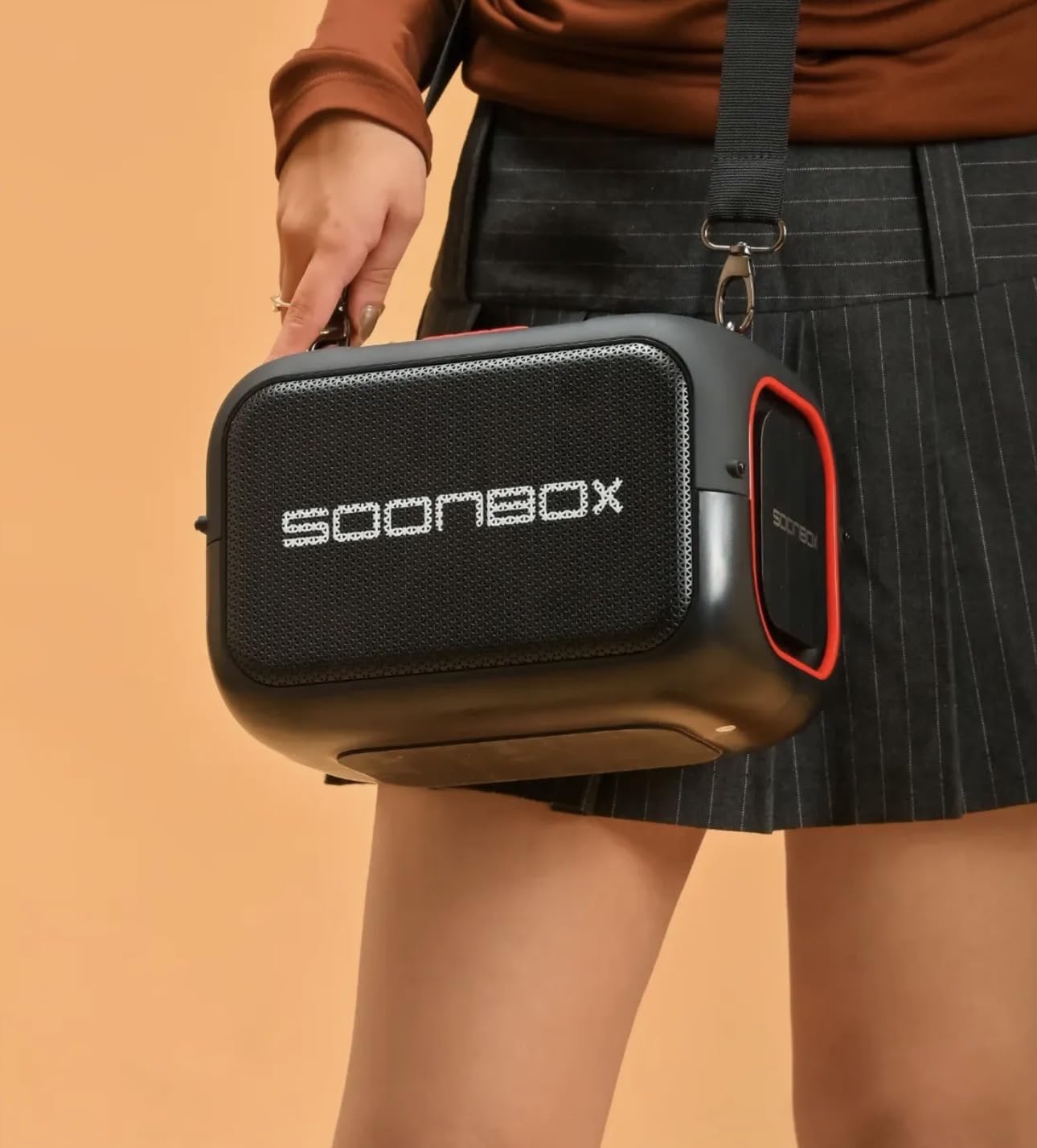
Image: A person carrying the black SOONBOX S3000 speaker using its shoulder strap, demonstrating its portability.
8. Troubleshooting
If you encounter issues with your speaker, refer to the following common problems and solutions.
| Problem | Possible Cause | Solution |
|---|---|---|
| Speaker does not power on. | Low battery; Power button not pressed correctly. | Charge the speaker fully. Press and hold the Power button for a few seconds. |
| No sound. | Volume too low; Incorrect input mode; Device not connected. | Increase speaker and device volume. Ensure correct mode (Bluetooth, USB, AUX, TF). Reconnect Bluetooth device or check cable. |
| Bluetooth pairing fails. | Speaker not in pairing mode; Device too far; Interference. | Ensure speaker is in Bluetooth pairing mode. Move device closer to speaker. Turn off other Bluetooth devices. Forget "SOONBOX S3000" on your device and try pairing again. |
| USB/TF card not playing. | Incorrect file format; Card/drive not inserted correctly; Corrupted files. | Ensure files are in MP3 format. Reinsert the USB drive/TF card. Try a different USB drive/TF card. |
| Microphone not working. | Microphone volume too low; Speaker not in appropriate mode. | Check if there are dedicated microphone volume controls. Ensure speaker is in a playback mode that supports microphone input. |
9. Specifications
The following are the technical specifications for the SOONBOX S3000 Wireless Party Box Speaker:
| Model Name | S3000 |
| Brand | SOONBOX |
| Speaker Type | Soundbar / Party Box |
| Audio Output | 40 Watts |
| Wireless Technology | Bluetooth |
| Connectivity Options | Bluetooth, USB, AUX, TF Card, FM Radio |
| Microphones | Built-in HD Microphones |
| Water Resistance | IPX-5 (Splash Resistant) |
| Material | Fibre |
| Power Source | Battery Powered (DC Charging) |
| Item Dimensions (D x W x H) | 24D x 9W x 24H Centimeters |
| Item Weight | 3 Kilograms |
| Compatible Devices | Mobile devices |
10. Warranty and Support
Warranty: According to product information, this product comes with No Warranty. Please check with your retailer for any specific return or exchange policies.
Customer Support: For any questions, technical assistance, or issues not covered in this manual, please contact your point of purchase or refer to the manufacturer's official website for support contact information.
Manufacturer: SOONBOX


