
1. Introduction
This manual provides essential instructions for the installation, operation, and maintenance of the Generic 316462878 Control Board, Clock/Timer Assembly. This part is designed as a direct replacement for Frigidaire SF5531-S2878G appliances. Please read this manual thoroughly before attempting any installation or operation to ensure safe and correct usage.
2. Safety Information
WARNING: Risk of Electric Shock. Disconnect power before servicing.
- Always disconnect the appliance from its power source before attempting any installation, repair, or maintenance. Failure to do so can result in serious injury or death.
- Installation should only be performed by qualified personnel or a certified technician.
- Wear appropriate personal protective equipment (PPE), such as gloves and safety glasses, during installation.
- Ensure all connections are secure and correctly made before restoring power to the appliance.
- Keep children and pets away from the work area.
3. Package Contents
Verify that all components are present and undamaged upon opening the package. If any parts are missing or damaged, contact your supplier immediately.
- 1 x Generic 316462878 Control Board, Clock/Timer Assembly
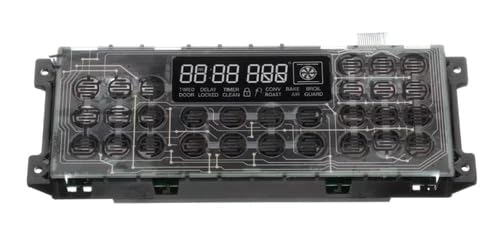
Image: The Generic 316462878 Control Board, Clock/Timer Assembly. This image displays the main component included in the package, showing its general shape and connectors.
4. Installation (Setup)
This section outlines the general steps for replacing the control board. Specific appliance models may vary, so always refer to your appliance's service manual for detailed instructions.
- Disconnect Power: Before beginning, ensure the appliance is completely disconnected from the electrical supply. Turn off the circuit breaker or unplug the appliance.
- Access the Control Board: Depending on your appliance model, you may need to remove back panels, control panel covers, or other components to gain access to the existing control board.
- Document Connections: Before disconnecting any wires, take clear photos or make a diagram of all wire connections to the old control board. This will aid in correct reassembly.
- Disconnect Wires: Carefully disconnect all wire harnesses and connectors from the old control board. Note any specific locking mechanisms.
- Remove Old Control Board: Unscrew or unclip the old control board from its mounting brackets.
- Install New Control Board: Position the new Generic 316462878 control board in the same location as the old one and secure it with screws or clips.
- Reconnect Wires: Using your photos or diagrams, carefully reconnect all wire harnesses and connectors to the new control board. Ensure each connection is firm and correctly seated.
- Reassemble Appliance: Replace any panels or covers that were removed to access the control board.
- Restore Power: Once the appliance is fully reassembled, restore power by turning on the circuit breaker or plugging it back in.
- Test Functionality: Test the appliance's functions, including the clock and timer, to ensure the new control board is operating correctly.
5. Operating Instructions
The Generic 316462878 Control Board functions as the primary interface for your appliance's clock and timer features. Refer to your specific appliance's user manual for detailed instructions on setting the time, programming cooking cycles, or utilizing other timer-based functions. The replacement control board is designed to restore these original functionalities.
- Setting the Clock: Typically involves pressing a "Clock" or "Time Set" button, then using arrow keys or a numeric keypad to adjust hours and minutes. Confirm the setting.
- Using the Timer: Usually activated by a "Timer" button, allowing you to set a countdown. An audible alert will sound when the timer expires.
- Programming Cooking Functions: For ovens, this might involve setting a delayed start or a specific cooking duration. Consult your appliance's manual for precise steps.
6. Maintenance
The 316462878 Control Board is a sealed electronic component and requires minimal maintenance. To ensure its longevity and proper function:
- Keep Dry: Prevent liquids from coming into contact with the control board or the control panel area.
- Clean Gently: If the control panel surface needs cleaning, use a soft, damp cloth. Avoid abrasive cleaners or excessive moisture.
- Avoid Physical Impact: Protect the control panel from bumps or impacts that could damage the internal components.
7. Troubleshooting
If you encounter issues after installing the new control board, consider the following troubleshooting steps:
| Problem | Possible Cause | Solution |
|---|---|---|
| Appliance does not power on. | Power not restored; loose wiring; faulty installation. | Check circuit breaker. Verify all wire connections are secure. Re-check installation steps. |
| Clock/Timer not functioning. | Incorrect wiring; settings not applied. | Review wiring connections. Refer to appliance user manual for setting instructions. |
| Error codes displayed. | Specific appliance fault. | Consult your appliance's service manual for error code definitions and solutions. |
| Intermittent operation. | Loose connections; environmental factors. | Ensure all connections are tight. Ensure the appliance is in a stable environment. |
If troubleshooting steps do not resolve the issue, it is recommended to contact a qualified appliance technician or your supplier for further assistance.
8. Specifications
| Feature | Detail |
|---|---|
| Part Number | 316462878 |
| Item Model Number | 316462878 |
| Compatibility | Frigidaire SF5531-S2878G (and potentially other compatible models) |
| Manufacturer | GXHSTO |
| Item Weight | 1 pounds |
| Product Dimensions | 1 x 1 x 1 inches |
| Number of Pieces | 1 |
9. Warranty and Support
Warranty coverage for this replacement part is typically provided by the seller or manufacturer. Please refer to the documentation included with your purchase or contact your point of sale for specific warranty terms and conditions.
For technical support or assistance with installation, it is recommended to contact the seller or a qualified appliance repair professional. Always provide the part number (316462878) and your appliance model number when seeking support.