
1. Introduction
This instruction manual provides comprehensive guidance for the assembly, safe operation, and proper maintenance of your Tangkula 62" Reversible L-Shaped Computer Desk. This desk features a built-in power strip with USB and Type-C ports, a hutch, shelves, and a mobile CPU stand, designed to optimize your workspace. Please read all instructions carefully before assembly and use to ensure safety and product longevity.

Image 1.1: Overview of the Tangkula L-Shaped Computer Desk, showcasing its spacious design, hutch, and integrated power strip.
2. Safety Information
- Always assemble the desk on a soft, clean surface to prevent scratches.
- Ensure all screws and fasteners are securely tightened before use. Periodically check and retighten as necessary.
- Do not overload the desk or shelves beyond their specified weight capacities. Refer to the 'Specifications' section for details.
- Keep children and pets away from the assembly area. Small parts can be a choking hazard.
- For electrical safety, ensure the power cord is not pinched or damaged. Do not expose the power strip to moisture.
- Use only the provided power cord and do not attempt to modify the electrical components.
- If any parts are missing or damaged, do not proceed with assembly. Contact customer support immediately.
3. Package Contents
Verify that all components are present and undamaged before beginning assembly. The package should contain:
- L-shaped Desk Panels (various sizes for tabletops and hutch)
- Metal Frame Components (legs, support bars, X-shaped reinforcements)
- Built-in Power Strip with USB, Type-C, and AC Outlets
- Mobile CPU Stand with Casters
- Metal Mesh Shelves
- Assembly Hardware (screws, bolts, Allen wrench)
- User Manual
4. Setup and Assembly
Assembly requires two people for optimal safety and ease. Follow the numbered steps in the included assembly diagram. The desk features a reversible design, allowing the L-shape to be configured for either left or right-hand orientation to suit your room layout.
4.1 Reversible Installation
The L-shaped desk can be assembled with the longer section on either the left or right side. Carefully review the assembly diagrams to select your preferred orientation before attaching the main tabletop sections.

Image 4.1: Illustration of the reversible L-shaped configuration, demonstrating how the desk can be adapted to different room layouts.
4.2 Frame Assembly
Begin by assembling the heavy-duty metal frame. Ensure all X-shaped reinforced structures are correctly positioned and tightened to provide maximum stability.

Image 4.2: Detail of the desk's robust metal frame, highlighting the X-shaped reinforcement and triangle support brackets for enhanced stability.
4.3 Attaching Tabletop and Hutch
Once the frame is stable, attach the engineered wood tabletop sections and the hutch. The hutch provides additional storage compartments above the desk surface.
4.4 Installing Shelves and CPU Stand
Secure the metal mesh shelves to the designated areas on the desk frame. Assemble the mobile CPU stand by attaching the 4 universal casters, ensuring the 2 lockable casters are positioned for easy access.

Image 4.3: The desk's storage features, including the 3-cube hutch and two metal mesh shelves, designed to keep your workspace organized.
5. Operating Instructions
5.1 Built-in Power Strip
The desk includes a built-in power strip for convenient device charging. It features 2 AC outlets (125V/12A), 1 USB port, and 1 Type-C port (5V/2.4A). Connect the desk's 4.9 ft power cord to a standard wall outlet.
- Plug your devices into the appropriate ports.
- Do not exceed the maximum electrical load for the power strip.
- Ensure the power cord is not a tripping hazard and is kept away from water.
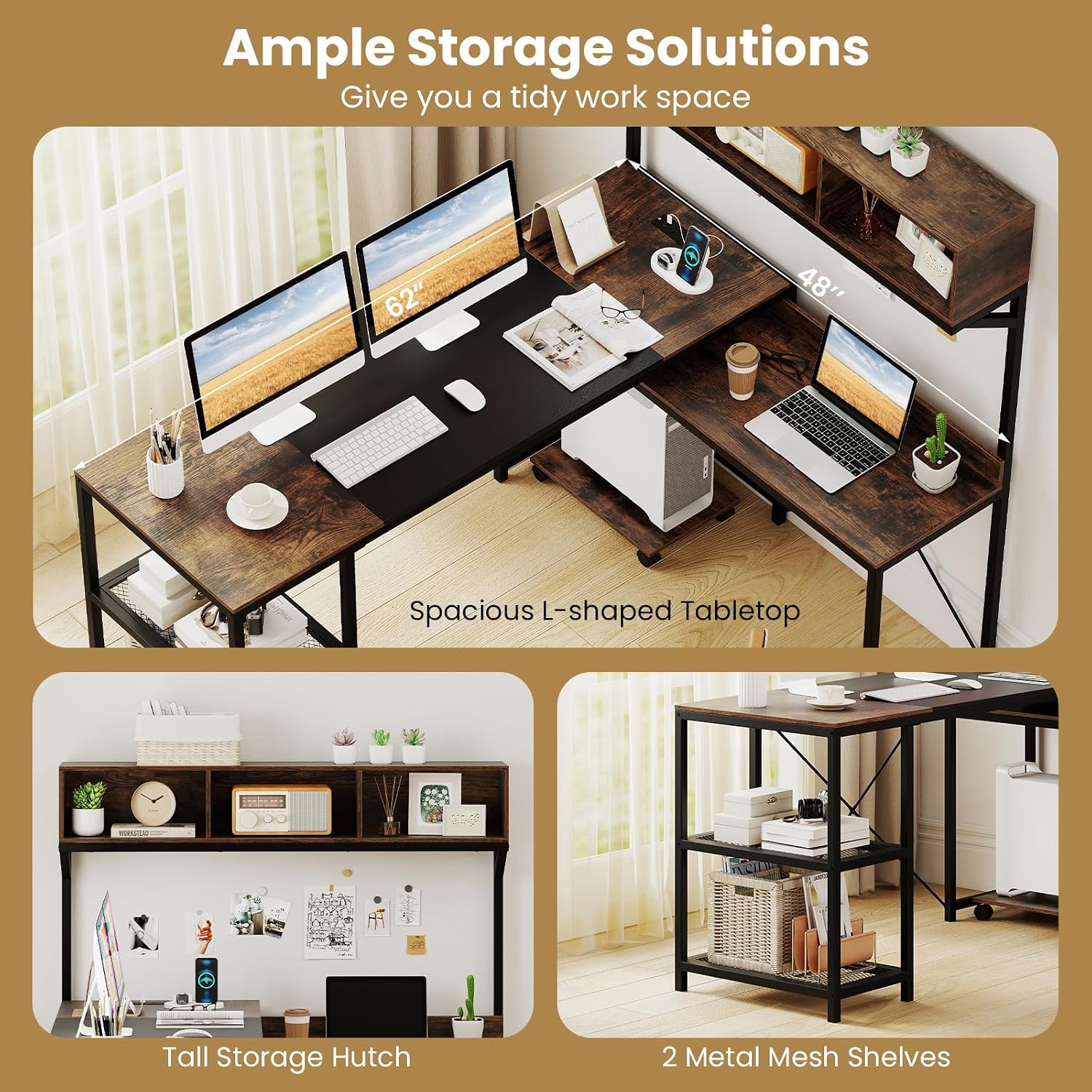
Image 5.1: Detailed view of the integrated power strip, showing the 2 AC outlets, USB port, and Type-C port for charging various devices.
5.2 Mobile CPU Stand
The mobile CPU stand is equipped with 4 universal casters, two of which are lockable. This allows for flexible placement of your computer tower and easy movement for cleaning or access.
- To move the CPU stand, unlock the casters.
- To secure the CPU stand in place, engage the brakes on the two lockable casters.

Image 5.2: The mobile CPU stand, featuring 360-degree universal casters, with two equipped with brakes for stability and easy repositioning.
6. Maintenance
- Cleaning: Wipe surfaces with a soft, damp cloth. Avoid harsh chemicals or abrasive cleaners that could damage the finish.
- Dusting: Regularly dust all surfaces to prevent buildup.
- Fasteners: Periodically check all screws and bolts to ensure they remain tight. Retighten if necessary to maintain stability.
- Spills: Clean up spills immediately to prevent staining or damage to the engineered wood.
- Heat: Avoid placing hot items directly on the desk surface. Use coasters or protective pads.
7. Troubleshooting
- Desk is wobbly: Ensure all assembly screws and bolts are fully tightened. Check that the desk is on a level surface. Adjust non-slip foot pads if necessary.
- Power strip not working: Verify that the desk's power cord is securely plugged into a functional wall outlet. Check if the wall outlet itself is receiving power. Ensure devices are properly plugged into the power strip.
- Missing parts: If any parts are missing upon unboxing, do not proceed with assembly. Contact Tangkula customer support for assistance.
- Difficulty with assembly: Review the assembly diagrams carefully. Ensure you are using the correct hardware for each step. If issues persist, contact customer support.
8. Specifications
Detailed product specifications for the Tangkula L-Shaped Computer Desk (Model AM12666HM):

Image 8.1: Comprehensive dimensions of the L-shaped computer desk, including tabletop lengths, heights, and hutch measurements.
| Feature | Detail |
|---|---|
| Model Number | AM12666HM |
| Overall Dimensions | 62"L x 48"W x 56"H (158 x 123 x 142 cm) |
| Higher Tabletop Dimensions | 62"L x 21.5"W x 29.5"H (158 x 55 x 75 cm) |
| Lower Tabletop (Exposed Part) | 27"L x 14"W x 25"H (68 x 36 x 63 cm) |
| Storage Compartment Dimensions | 15.5"W x 8"D x 7"H (39 x 20 x 18 cm) |
| Metal Mesh Shelf Dimensions | 19.5"L x 10.5"W x 12"H (50 x 27 x 30 cm) |
| Space Between Higher Tabletop and Hutch | 19" (49 cm) |
| CPU Stand Dimensions | 16.5"L x 11"W x 2.5"H (42 x 28 x 6.5 cm) |
| Power Cord Length | 4.9 ft (150 cm) |
| AC Outlet Rating | 125V/12A |
| USB + Type-C Output | 5V/2.4A |
| Weight Capacity (Higher Tabletop) | 135 lbs (60 kg) |
| Weight Capacity (Lower Tabletop) | 90 lbs (40 kg) |
| Weight Capacity (Metal Mesh Shelf) | 25 lbs (10 kg) |
| Weight Capacity (Storage Compartment) | 10 lbs (5 kg) |
| Weight Capacity (Hutch Top) | 45 lbs (20 kg) |
| Weight Capacity (CPU Stand) | 25 lbs (10 kg) |
| Net Weight | 78 lbs (35.5 kg) |
| Material | Engineered Wood, MDF, Metal |
| Color | Rustic Brown + Black |
9. Warranty and Support
For warranty information, missing parts, or any questions regarding your Tangkula L-Shaped Computer Desk, please refer to the purchase documentation or contact Tangkula customer support directly. Keep your purchase receipt for warranty claims.