
Introduction
Thank you for choosing the Generic V16 Pro Smartwatch. This device combines advanced technology with a sleek design to enhance your daily life. It features a vibrant 1.52-inch AMOLED display, Bluetooth calling capabilities, comprehensive health monitoring, and convenient wireless charging. This manual provides essential information for setting up, operating, and maintaining your smartwatch.
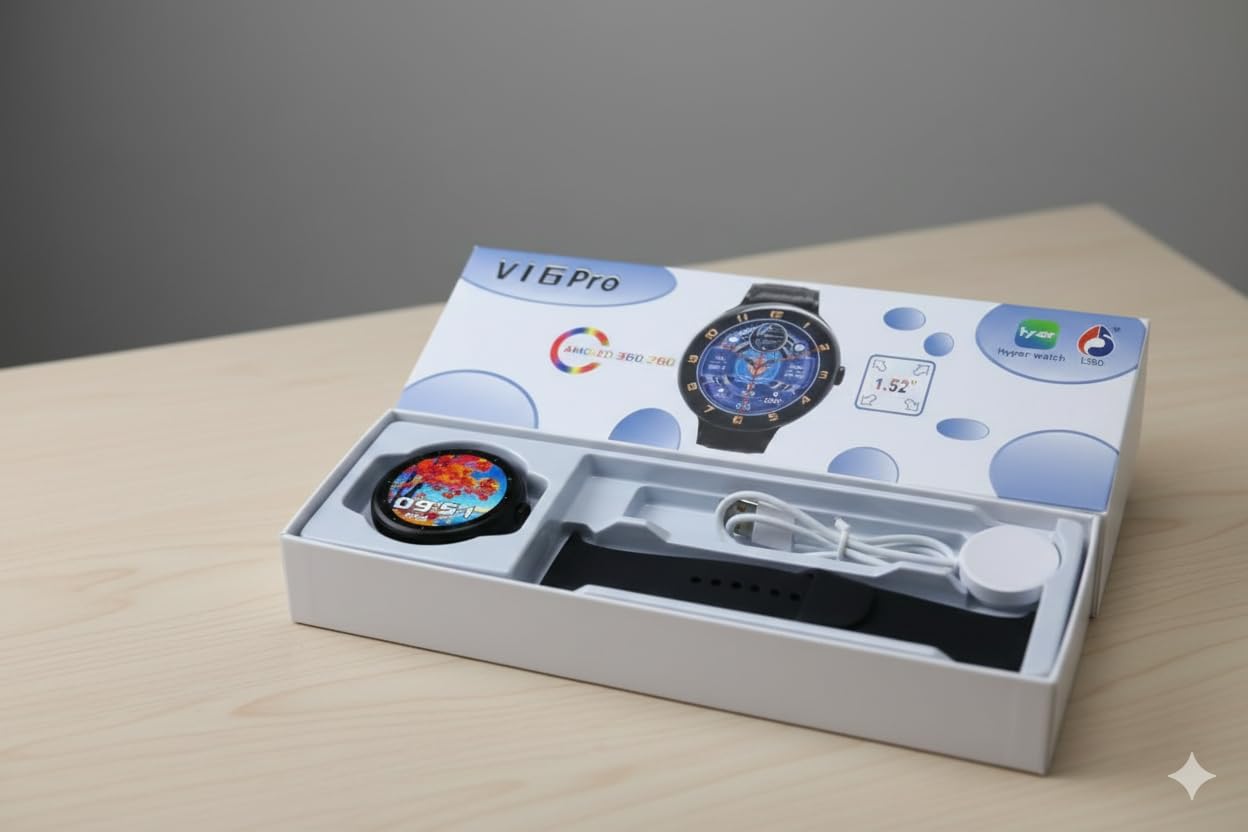
Image: The V16 Pro Smartwatch displayed on a clear stand, showcasing its round black dial and strap, with the product packaging visible in the background.
What's in the Box
Please check the package contents to ensure all items are present:
- V16 Pro Smartwatch
- Charging Cable
- Watch Band
- User Manual (this document)
Setup
1. Charging the Smartwatch
Before first use, fully charge your V16 Pro Smartwatch.
- Place the smartwatch on the wireless charging pad.
- Ensure the charging cable is connected to a compatible USB power adapter (not included) and a power source.
- The watch display will indicate charging status. A full charge typically takes approximately 2 hours.
2. Power On/Off
- Power On: Press and hold the side button until the screen lights up.
- Power Off: Press and hold the side button, then select "Power Off" on the screen.
3. Installing the Watch Band
Align the watch band with the lugs on the smartwatch case and slide it into place until you hear a click. Ensure both ends of the band are securely attached.
4. Pairing with Your Smartphone
To unlock the full features of your V16 Pro Smartwatch, pair it with your smartphone using the dedicated application.
- Download the Hyper Watch application from your smartphone's app store (available for Android and iOS devices).
- Enable Bluetooth on your smartphone.
- Open the Hyper Watch app and follow the on-screen instructions to search for and connect to your V16 Pro Smartwatch.
- Confirm the pairing request on both your smartphone and the smartwatch.
Operating Instructions
1. Display and Navigation
The V16 Pro features a 1.52-inch AMOLED touchscreen display.
- Swipe Up/Down: Scroll through menus and notifications.
- Swipe Left/Right: Access quick functions or different widgets.
- Tap: Select an item or confirm an action.
- Press Side Button: Return to the home screen or access the app menu.

Image: A close-up view of the smartwatch screen, displaying a colorful tree-themed watch face with the digital time "18:12" and the date "Tue 21".
2. Bluetooth Calling
Once paired with your smartphone, you can make and receive calls directly from your smartwatch.
- Making a Call: Access the dialer or contacts list on your smartwatch and select a contact or dial a number.
- Receiving a Call: When a call comes in, tap the green icon on the smartwatch screen to answer, or the red icon to reject.
3. Health Monitoring
The V16 Pro Smartwatch includes sensors for tracking various health metrics.
- Heart Rate: Monitor your heart rate throughout the day.
- Fitness Metrics: Track steps, distance, and calories burned.
- Sleep Tracking: Analyze your sleep patterns.
Note: Health monitoring data is for reference only and should not be used for medical diagnosis or treatment.
4. Watch Faces
Customize your smartwatch's appearance by changing watch faces.
- Press and hold the home screen to access watch face options.
- Swipe left or right to browse available watch faces.
- Tap to select your preferred watch face.
- Additional watch faces may be available through the Hyper Watch app.

Image: The V16 Pro Smartwatch on a stand, showcasing a blue digital watch face with golden accents, displaying time, date, and various health metrics.
Maintenance
1. Cleaning Your Smartwatch
To maintain the appearance and functionality of your smartwatch:
- Wipe the screen and case with a soft, lint-free cloth.
- For stubborn marks, slightly dampen the cloth with water.
- Avoid using harsh chemicals or abrasive materials.
- Clean the charging contacts regularly to ensure efficient charging.
2. Water Resistance
The V16 Pro Smartwatch is water-resistant with an IP67 rating, allowing it to withstand immersion in water up to 5 meters.
- It is suitable for daily use and can withstand splashes, rain, and brief immersion.
- Avoid prolonged exposure to water, hot water, or steam.
- Do not press buttons underwater.
- Dry the smartwatch thoroughly after exposure to water.
Troubleshooting
If you encounter issues with your V16 Pro Smartwatch, try the following solutions:
- Device not powering on: Ensure the smartwatch is fully charged. Connect it to the wireless charger for at least 30 minutes.
- Cannot pair with smartphone:
- Ensure Bluetooth is enabled on your smartphone.
- Make sure the smartwatch is within range of your smartphone.
- Restart both the smartwatch and your smartphone.
- Try unpairing and re-pairing the device through the Hyper Watch app.
- Inaccurate health data: Ensure the smartwatch is worn snugly on your wrist, not too tight or too loose. Clean the sensor on the back of the watch.
- Touchscreen unresponsive: Restart the smartwatch. If the issue persists, ensure the screen is clean and dry.
For further assistance, please refer to the support information provided in the Warranty and Support section.
Specifications
| Feature | Detail |
|---|---|
| Model Name | V16 Pro 1.52-inch AMOLED Smartwatch, Touchscreen, Bluetooth Calling, Health Tracker, for Man & Women, Black |
| Brand | Generic |
| Display Type | AMOLED |
| Screen Size | 1.52 Inches |
| Connectivity Technology | Bluetooth |
| Wireless Communication Standard | Bluetooth |
| Operating System | Android (Compatible with Android & iOS Devices) |
| Special Feature | Water-resistant |
| Water Resistance Level | Water Resistant (IP67) |
| Water Resistance Depth | 5 Metres |
| Case Material Type | Aluminium |
| Band Material Type | Silicone |
| Battery Capacity | 100 Amp Hours |
| Supported Application | Hyper Watch |
| Human Interface Input | Touchscreen |
| Colour | Black |
| Item Weight | 450 Grams |
| Manufacturer | Jai Ambey Enterprices |
| Country of Origin | China |
Warranty and Support
The V16 Pro Smartwatch comes with a Limited Warranty. Please refer to the warranty card included in your package for specific terms and conditions.
For technical support or service inquiries, please contact your retailer or the manufacturer:
- Manufacturer: Jai Ambey Enterprices
- Packer Contact Information: Surya Gadgets, 877/7, Urban Estate, Kurukshetra, Haryana - 136118
- Importer Contact Information: Not Provided
Please retain your proof of purchase for warranty claims.