
Introduction
This manual provides comprehensive instructions for the proper setup, operation, and maintenance of your Zyrev 2-in-1 Otoscope Ophthalmoscope Set. Designed for medical and nursing students, this versatile diagnostic tool allows for thorough examination of both the ear and eye. Please read this manual carefully before use to ensure safe and effective operation.

Image: The Zyrev 2-in-1 Otoscope Ophthalmoscope Set, showcasing the handle, otoscope head, ophthalmoscope head, ear speculums, and carrying case.
Product Overview and Contents
The Zyrev 2-in-1 Otoscope Ophthalmoscope Set is a portable diagnostic instrument providing illumination and magnification for ear and eye examinations. The set includes the following components:
- Full-size handle
- One Otoscope Head
- One Ophthalmoscope Head
- Three Reusable Ear Speculums
- Sight Chart
- Carry Case
- Two Replacement LED Bulbs
Note: Two standard C batteries are required and are not included with the set.
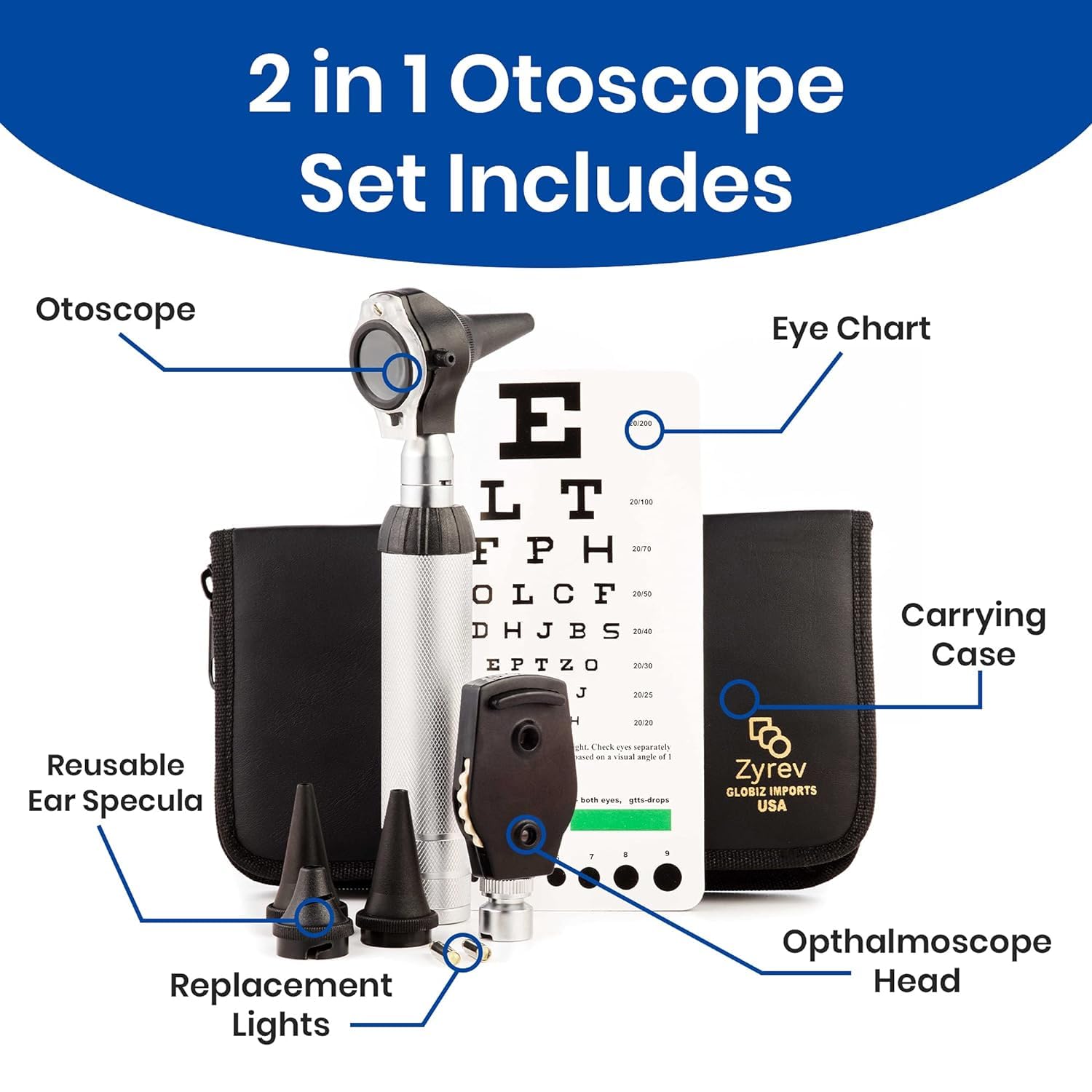
Image: A detailed diagram labeling each component of the Zyrev 2-in-1 Otoscope Set, including the otoscope, ophthalmoscope head, reusable ear specula, replacement lights, eye chart, and carrying case.
Setup
1. Battery Installation
- Unscrew the bottom cap of the handle.
- Insert two standard C batteries, ensuring correct polarity (+/-).
- Screw the bottom cap back on securely.
2. Attaching the Instrument Head
The device uses an innovative bayonet locking system for attaching the otoscope or ophthalmoscope head to the handle.
- Align the bayonet fitting on the desired instrument head (otoscope or ophthalmoscope) with the corresponding slot on the handle.
- Gently push the head onto the handle.
- Rotate the head clockwise until it locks securely into place. Do not overtighten.
3. Attaching Ear Speculums (for Otoscope)
When using the otoscope head, attach a reusable ear speculum:
- Select an appropriately sized ear speculum.
- Gently push the speculum onto the tip of the otoscope head until it is firmly seated.
Operating Instructions
Using the Otoscope
The otoscope is used for examining the ear canal and tympanic membrane. It features 3x magnification and LED illumination.
- Ensure the otoscope head is securely attached to the handle and an ear speculum is in place.
- Turn on the device by rotating the power switch on the handle. The LED light will illuminate.
- Gently insert the speculum into the patient's ear canal, taking care not to cause discomfort.
- Look through the viewing lens to observe the ear canal and eardrum. The 3x magnification aids in detailed examination.
- Adjust your position and the angle of the otoscope as needed for a clear view.
- After examination, gently remove the otoscope and turn off the device.
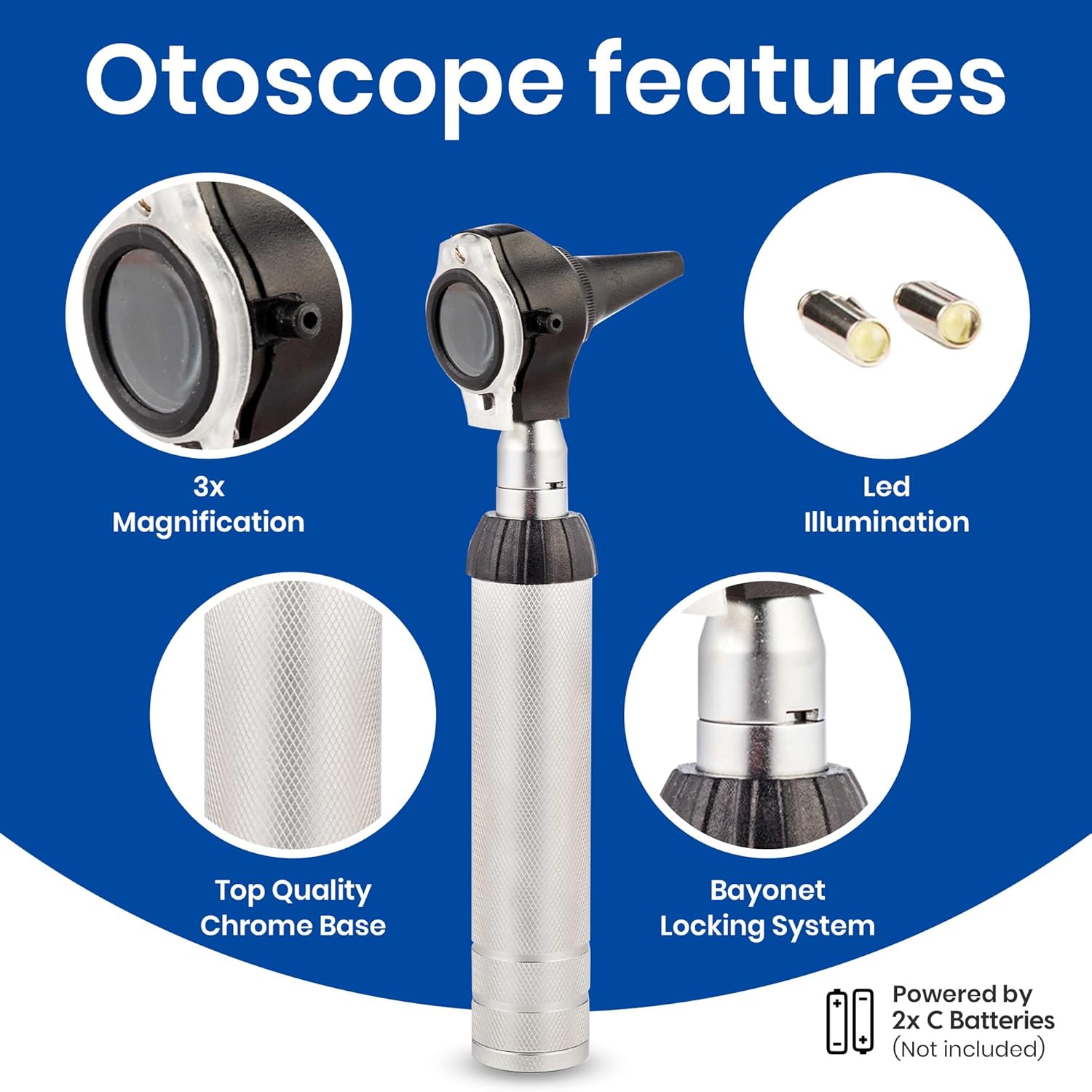
Image: A close-up of the otoscope head, highlighting its 3x magnification lens, LED illumination, top quality chrome base, and the bayonet locking system for attachment.

Image: An otoscope in use, demonstrating the proper technique for examining a patient's ear.
Using the Ophthalmoscope
The ophthalmoscope is used for examining the internal structures of the eye, including the retina, optic disc, and blood vessels.
- Ensure the ophthalmoscope head is securely attached to the handle.
- Turn on the device by rotating the power switch on the handle. The light will illuminate.
- Adjust the lens correction knob on the side of the ophthalmoscope head to focus the view. This knob allows for diopter adjustments to compensate for refractive errors of both the examiner and the patient.
- Position yourself approximately 6-10 inches from the patient's eye. Direct the light beam into the pupil.
- Look through the viewing aperture to observe the fundus (back of the eye).
- After examination, turn off the device.

Image: A close-up of the ophthalmoscope head, detailing its higher quality visor, premium lens correction knob, and light mode indicator.

Image: A medical professional demonstrating the use of a diagnostic tool, similar to the Zyrev set, during an examination.
Maintenance
Cleaning
- Reusable Ear Speculums: Clean speculums with an appropriate disinfectant solution after each use. Ensure they are thoroughly dried before storage.
- Instrument Heads and Handle: Wipe the surfaces of the otoscope head, ophthalmoscope head, and handle with a soft cloth dampened with a mild disinfectant. Do not immerse any part of the device in liquid.
- Avoid using abrasive cleaners or solvents, as these can damage the device's finish and optical components.
Storage
Store the Zyrev 2-in-1 Otoscope Ophthalmoscope Set in its provided carry case when not in use. This protects the instruments from dust, damage, and ensures all components are kept together.
LED Bulb Replacement
If the illumination becomes dim or fails, the LED bulb may need replacement.
- Ensure the device is turned off.
- Carefully unscrew the instrument head from the handle.
- Locate the small LED bulb at the base of the instrument head.
- Gently pull out the old bulb and insert a new replacement LED bulb (two are included in your set).
- Reattach the instrument head to the handle.
Battery Replacement
Replace the two C batteries when the light output becomes noticeably dim or the device fails to power on. Refer to the "Battery Installation" section under Setup for detailed instructions.
Troubleshooting
| Problem | Possible Cause | Solution |
|---|---|---|
| Device does not turn on. | Dead or incorrectly inserted batteries. Instrument head not securely attached. | Check battery polarity and replace if necessary. Ensure instrument head is fully engaged with the bayonet locking system. |
| Light is dim or flickers. | Low batteries. Faulty LED bulb. | Replace batteries. Replace the LED bulb as per maintenance instructions. |
| Difficulty focusing (Ophthalmoscope). | Lens correction knob not adjusted. | Rotate the lens correction knob to achieve a clear focus. |
| Instrument head detaches easily. | Head not properly locked into place. | Ensure the head is pushed onto the handle and rotated clockwise until it clicks and locks securely. |
Specifications
- Model: Zyrev 2-in-1 Otoscope Ophthalmoscope Set
- Manufacturer: ZetaLife
- Otoscope Magnification: 3x
- Power Source: 2 x C batteries (not included)
- Item Weight: 15.2 ounces
- Package Dimensions: 9.19 x 5.35 x 1.93 inches
- ASIN: B07NW64CJQ
- Date First Available: February 17, 2019
Warranty and Support
Warranty Information
Specific warranty details are not provided in the product information. Please refer to your purchase documentation or contact the retailer for any applicable warranty coverage.
Customer Support
For further assistance, technical support, or inquiries regarding your Zyrev 2-in-1 Otoscope Ophthalmoscope Set, please contact the manufacturer, ZYREV, or the retailer from whom you purchased the product.