
Introduction
Thank you for choosing the Cecotec MultiShape 2000 Liberty Cordless Wood Router. This powerful and versatile tool is designed for precision woodworking tasks, offering the freedom of cordless operation with a high-efficiency brushless motor. This manual provides essential information for the safe and effective use, setup, operation, and maintenance of your router.
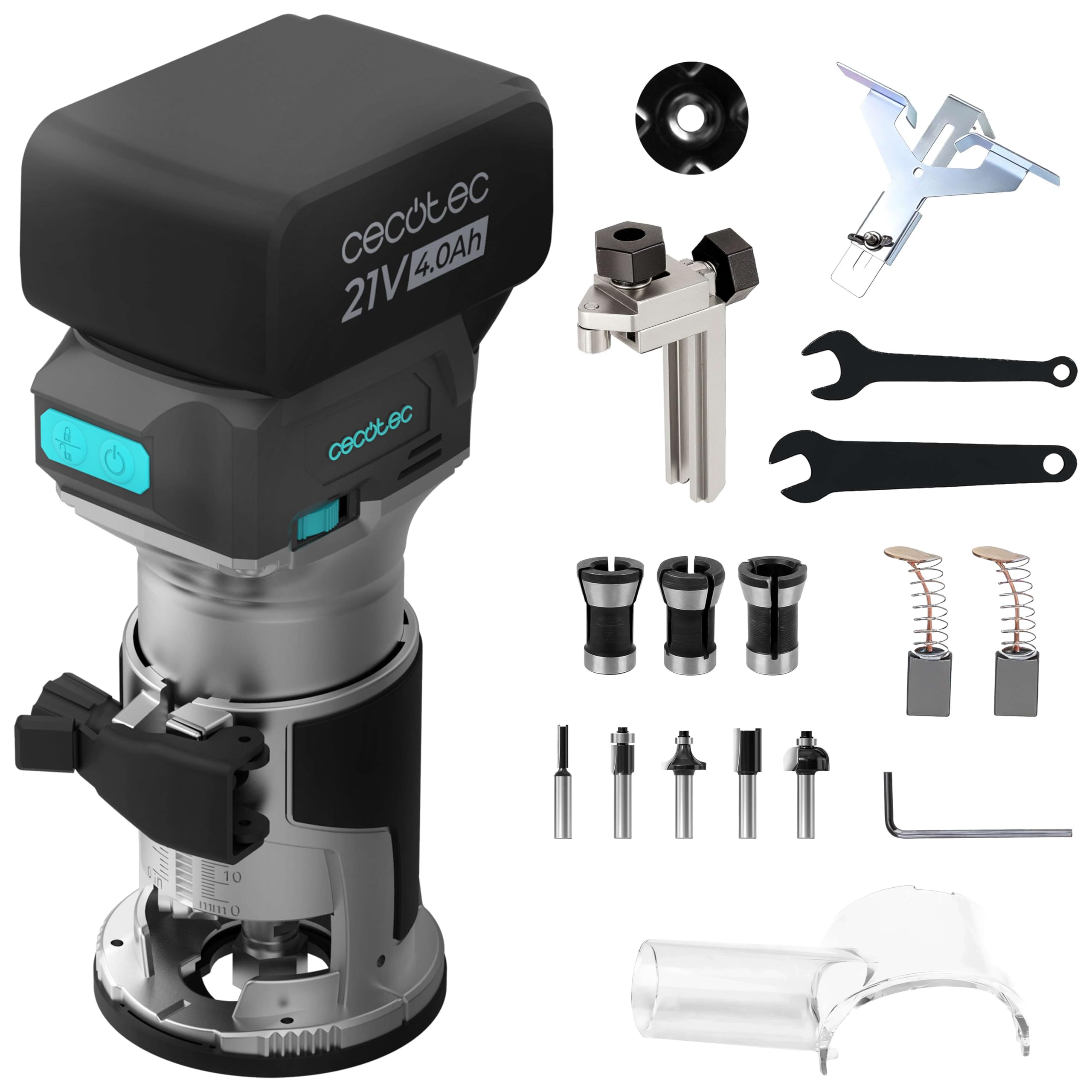
Figure 1: The Cecotec MultiShape 2000 Liberty Cordless Wood Router kit, including the router, Nexus 21V battery, various bits, and a carrying case.
Setup
1. Unpacking and Checking Contents
Carefully unpack all components and ensure the following items are present:
- Cecotec MultiShape 2000 Liberty Cordless Wood Router
- Nexus 21V 4Ah Battery
- 5 Router Bits (various profiles)
- Collets (6 mm, 6.35 mm, 8 mm)
- Parallel Guide
- Vacuum Adapter
- Instruction Manual
2. Battery Installation and Charging
Ensure the battery is fully charged before first use. Insert the Nexus 21V 4Ah battery into the designated slot on top of the router until it clicks securely into place.
3. Router Bit Installation
Always disconnect the battery before installing or changing bits.
- Loosen the collet nut using the provided wrench.
- Insert the desired router bit into the collet, ensuring it is seated firmly but not bottomed out.
- Tighten the collet nut securely with the wrench. Do not overtighten.

Figure 2: Proper installation of a router bit into the tool's collet.
4. Depth Adjustment
The router features adjustable depth for precise cuts.
- Loosen the depth adjustment lever or knob.
- Lower or raise the motor housing until the bit reaches the desired depth relative to the base. Use the depth scale for reference.
- Tighten the depth adjustment lever or knob to secure the setting.

Figure 3: Adjusting the routing depth using the integrated scale and locking mechanism.
5. Attaching Accessories (Parallel Guide, Vacuum Adapter)
Attach the parallel guide for straight cuts along an edge or the vacuum adapter for dust extraction as needed. Refer to the specific accessory instructions for secure attachment.

Figure 4: The router in use with the parallel guide for consistent edge routing.

Figure 5: The vacuum adapter connected to a dust extraction system during operation.
Operating Instructions
1. Powering On/Off
To turn the router ON, press the power button. To turn it OFF, press the power button again. Always ensure a firm grip on the tool before starting.
2. Speed Adjustment
The router features adjustable speed to suit different materials and bit types. Use the speed dial to select the appropriate RPM (Revolutions Per Minute) for your task.
- Lower speeds are generally recommended for larger bits, harder woods, or when more control is needed.
- Higher speeds are suitable for smaller bits and softer materials.

Figure 6: The speed adjustment dial, allowing users to select optimal RPM for various tasks.
3. Routing Techniques
Always perform test cuts on scrap material to verify settings and technique. Maintain a steady, controlled feed rate. Avoid forcing the tool, as this can lead to poor cut quality and potential kickback.

Figure 7: The brushless motor providing smooth and efficient cutting performance.

Figure 8: Examples of different routing tasks achievable with the MultiShape 2000 Liberty.

Figure 9: Demonstrating the router's capability to create precise grooves.
Maintenance
Always disconnect the battery before performing any maintenance.
1. Cleaning
Regularly clean the router to ensure optimal performance and longevity. Use a soft brush or compressed air to remove dust and debris from the motor vents, base, and collet area. Wipe the exterior with a damp cloth.

Figure 10: Effective dust collection helps keep the workspace and tool clean.
2. Battery Care
Store the Lithium-ion battery in a cool, dry place away from direct sunlight. Do not expose the battery to extreme temperatures. Follow the charging instructions provided with your battery charger.
3. Router Bit Care
Keep router bits clean and sharp. Dull bits can cause poor cuts, overheating, and increased strain on the tool. Clean resin and pitch buildup from bits using a specialized cleaner.
Troubleshooting
- Tool does not start: Ensure the battery is fully charged and properly inserted. Check if the power button is functioning correctly.
- Poor cut quality / Burning wood: The router bit may be dull or dirty. Replace or clean the bit. The feed rate might be too slow, or the speed setting too high for the material. Adjust accordingly.
- Excessive vibration: Ensure the router bit is correctly installed and tightened. Check for any damage to the bit or collet.
- Overheating: Reduce the depth of cut or feed rate. Ensure motor vents are clear of debris. Allow the tool to cool down.
Technical Specifications
| Brand | Cecotec |
| Model Number | A01_EU01_111981 |
| Product Type | Cordless Wood Router |
| Power Source | Battery Powered |
| Battery Type | Nexus 21V 4Ah Lithium-ion |
| Motor Type | Brushless |
| Collet Sizes | 6 mm, 6.35 mm, 8 mm |
| Material (Tool Body) | Aluminum |
| Product Dimensions | 15L x 24H cm |
| Item Weight | 1.38 Kilograms |
| Country of Origin | Spain |
| Voltage (Note: Source data lists 710V, but battery is 21V) | 21V (Battery) |
Warranty Information
The Cecotec MultiShape 2000 Liberty Cordless Wood Router comes with a 3-year warranty from the date of purchase. This warranty covers manufacturing defects and material faults under normal use. Please retain your proof of purchase for warranty claims. The warranty does not cover damage caused by misuse, neglect, unauthorized repairs, or normal wear and tear.
Customer Support
For technical assistance, spare parts, or warranty inquiries, please contact Cecotec customer support. Refer to the official Cecotec website or your purchase documentation for the most up-to-date contact information.