
1. Introduction
Thank you for choosing the ExploreHorizon 53QT Dual Zone Portable Refrigerator. This versatile electric cooler is designed to provide reliable cooling and freezing for your food and beverages during travel, camping, road trips, and other outdoor adventures. With its advanced dual-zone compressor technology, you can independently control temperatures from 0°F to 50°F, allowing it to function as both a refrigerator and a freezer. This manual provides essential information for safe operation, setup, maintenance, and troubleshooting to ensure optimal performance and longevity of your appliance.
2. Safety Information
Please read all safety instructions carefully before using the appliance. Failure to follow these instructions may result in electric shock, fire, or serious injury.
- Ensure the power supply voltage matches the voltage specified on the appliance's rating label.
- Do not operate the appliance with a damaged power cord or plug. If the cord is damaged, it must be replaced by the manufacturer or a qualified service agent to avoid hazards.
- Keep the ventilation openings clear of obstructions. Do not block the air vents.
- Do not use electrical appliances inside the refrigerator unless they are of the type recommended by the manufacturer.
- Avoid placing the refrigerator in direct sunlight or near heat sources.
- Do not immerse the appliance in water or expose it to heavy rain.
- Always disconnect the power supply before cleaning or performing maintenance.
- This appliance is not intended for use by persons (including children) with reduced physical, sensory or mental capabilities, or lack of experience and knowledge, unless they have been given supervision or instruction concerning use of the appliance by a person responsible for their safety.
- Children should be supervised to ensure that they do not play with the appliance.
3. Product Overview
The ExploreHorizon 53QT Portable Refrigerator is designed for convenience and durability. Familiarize yourself with its components and features.

This image displays the ExploreHorizon 53QT portable refrigerator, highlighting its dimensions (14.84"D x 25.74"W x 20.74"H) and capacity for various items like 76 cans, 38 bottles of water, or 15 wine bottles.
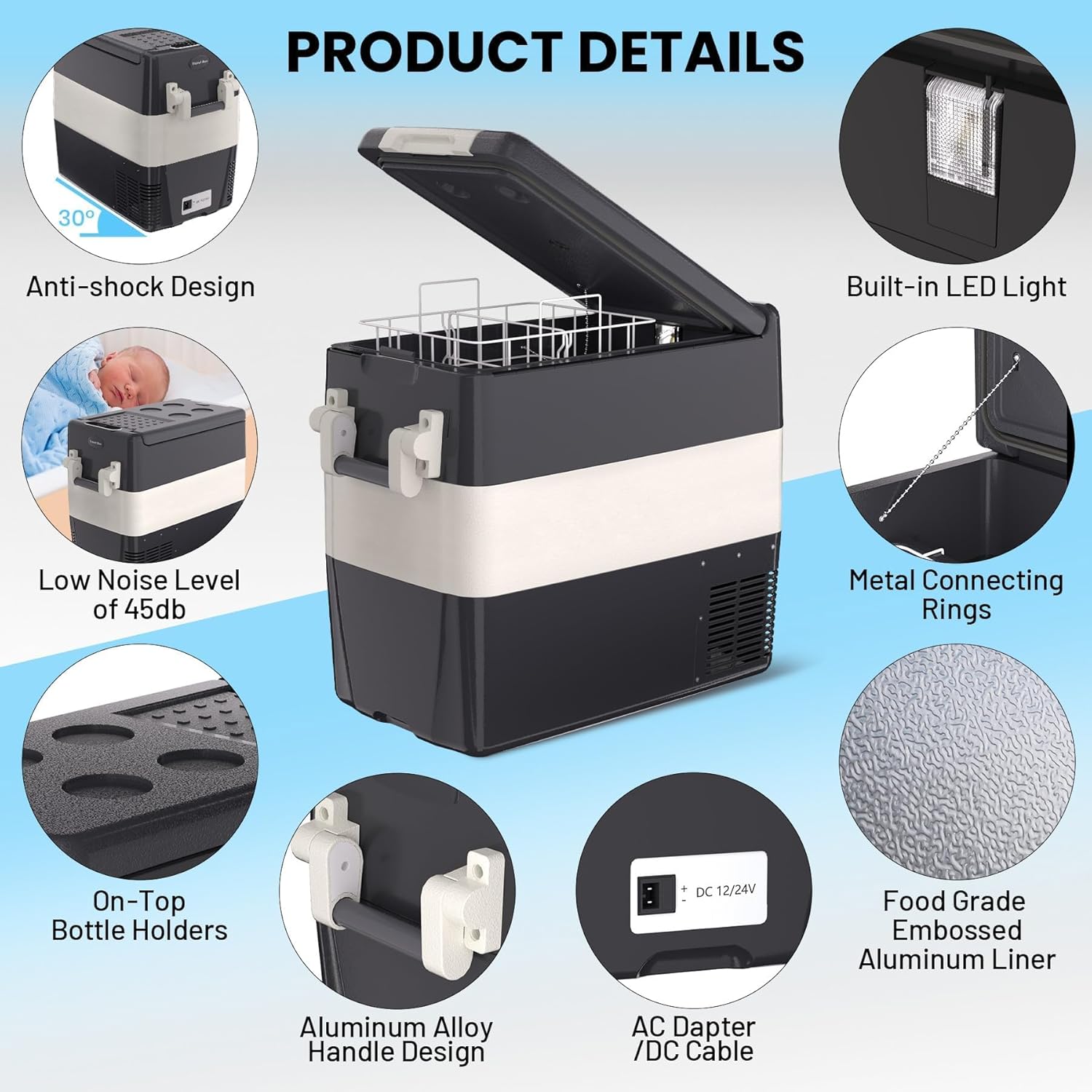
This image highlights several product features: anti-shock design, low noise level (45dB), on-top bottle holders, aluminum alloy handle, AC adapter/DC cable input, built-in LED light, metal connecting rings, and a food-grade embossed aluminum liner.
Key Components:
- Main Unit: The insulated body of the refrigerator.
- Lid: Top cover for accessing the interior compartments.
- Control Panel: Located on the side, used for power, temperature, and mode settings.
- Handles: Aluminum alloy handles for portability.
- Power Input Ports: For DC (12V/24V) and AC (110-240V) power cords.
- Internal Baskets: Removable baskets for organizing contents.
- LED Light: Built-in light for visibility inside.
4. Setup
Follow these steps for initial setup of your portable refrigerator.
4.1 Unpacking
- Carefully remove the refrigerator from its packaging.
- Remove all packing materials, including any protective films or tapes.
- Inspect the appliance for any damage incurred during shipping. If damaged, do not operate and contact customer support.
4.2 Placement
- Place the refrigerator on a flat, stable surface.
- Ensure adequate ventilation around the unit. Maintain at least 4 inches (10 cm) of space from walls or other objects to allow for proper airflow.
- Avoid placing the unit in direct sunlight or near heat-emitting appliances.
4.3 Power Connection
Your refrigerator supports both DC and AC power sources.
- DC Power (12V/24V): Use the provided DC power cord to connect the refrigerator to your vehicle's cigarette lighter socket (12V) or a 24V power outlet.
- AC Power (110-240V): Use the provided AC adapter and power cord to connect the refrigerator to a standard household electrical outlet.
Ensure the power cord is securely plugged into both the refrigerator and the power source.
5. Operating Instructions
Learn how to operate your portable refrigerator using the control panel.
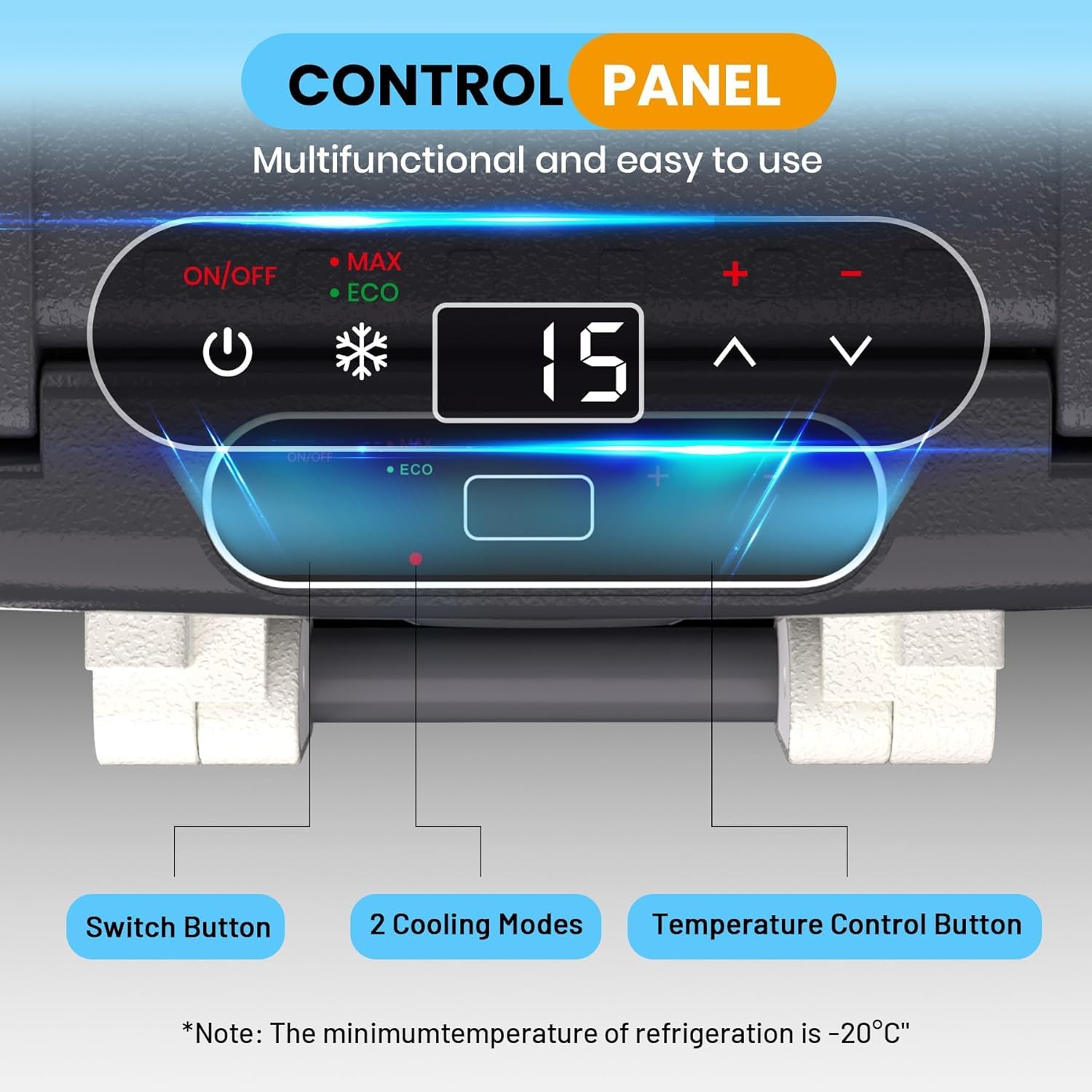
This image shows the multifunctional control panel with an ON/OFF switch, MAX/ECO mode indicator, digital temperature display, and temperature adjustment buttons (+/-). A note indicates the minimum refrigeration temperature is -20°C.
5.1 Powering On/Off
- Press the ON/OFF button on the control panel to turn the refrigerator on or off.
- The digital display will illuminate when the unit is powered on.
5.2 Temperature Adjustment (Dual Zone)
- The refrigerator features dual zones, allowing independent temperature control for each compartment.
- Press the SET button (if available, or cycle through zones with a dedicated button) to select the zone you wish to adjust.
- Use the + and - buttons to set the desired temperature for each zone. The temperature range is typically 0°F to 50°F (-18°C to 10°C).
- The display will show the current temperature and then flash the set temperature before returning to the current temperature.
5.3 Cooling Modes
Your refrigerator offers two cooling modes:

The image illustrates the two cooling modes: MAX (60W) for fast cooling and ECO (45W) for energy-saving operation, indicating minimal electricity is needed to keep food fresh.
- MAX Mode (60W): Provides fast cooling for quick temperature reduction. Ideal when you need to cool items rapidly.
- ECO Mode (45W): Energy-saving mode for efficient operation. Recommended for prolonged use to conserve power.
Press the MAX/ECO button (or similar) to switch between these modes.
5.4 Car Battery Protection
The refrigerator includes a car battery protection system to prevent your vehicle's battery from draining completely.

This image illustrates the car battery protection system, which includes H/M/L level settings, a built-in memory chip, voltage monitoring, low power consumption, and ensures travel safety.
- There are typically three levels: H (High), M (Medium), and L (Low).
- Select the appropriate level based on your vehicle's battery condition and usage. Higher settings offer more protection but may cut off power sooner.
- The refrigerator has a built-in memory chip that retains your settings even after power off, automatically recovering upon the next power on.
6. Maintenance
Proper maintenance ensures the longevity and efficiency of your portable refrigerator.
6.1 Cleaning
- Always disconnect the power supply before cleaning.
- Wipe the interior and exterior surfaces with a damp cloth and a mild detergent.
- Do not use abrasive cleaners, harsh chemicals, or sharp objects, as these can damage the surfaces.
- Ensure the unit is completely dry before reconnecting power.
- Clean the ventilation openings regularly to prevent dust buildup, which can affect cooling performance.
6.2 Storage
- If storing the refrigerator for an extended period, ensure it is clean and dry.
- Leave the lid slightly ajar to prevent odors and mold growth.
- Store in a dry, well-ventilated area, away from direct sunlight and extreme temperatures.
7. Troubleshooting
If you encounter issues with your refrigerator, refer to the following common problems and solutions.
| Problem | Possible Cause | Solution |
|---|---|---|
| Refrigerator not turning on. | No power supply; Damaged power cord; Blown fuse in vehicle. | Check power connection; Try a different power outlet; Inspect and replace fuse if necessary. |
| Refrigerator not cooling effectively. | Lid not closed properly; Overloaded with warm items; Poor ventilation; ECO mode selected. | Ensure lid is sealed; Allow time for cooling; Clear ventilation openings; Switch to MAX mode for faster cooling. |
| Display shows an error code. | Specific internal fault. | Refer to the specific error code in a more detailed manual (if available) or contact customer support. |
| Excessive noise during operation. | Unit not on a stable surface; Obstruction near fan. | Place on a flat, stable surface; Check for and remove any obstructions. |
| Car battery protection activates too soon. | Battery protection level set too high. | Adjust battery protection level to M (Medium) or L (Low) if safe for your vehicle's battery. |
If the problem persists after attempting these solutions, please contact customer support.
8. Specifications
Detailed technical specifications for the ExploreHorizon 53QT Dual Zone Portable Refrigerator.
| Feature | Specification |
|---|---|
| Model Name | GD5DHAXVY05 |
| Capacity | 53 Quarts (50 Liters) |
| Product Dimensions (D x W x H) | 14.84"D x 25.74"W x 20.74"H |
| Item Weight | 37.37 Pounds |
| Cooling Method | Compressor |
| Temperature Range | 0°F to 50°F (-18°C to 10°C) |
| Power Input | DC 12V/24V, AC 110-240V |
| Cooling Modes | MAX (60W), ECO (45W) |
| Noise Level | 45dB |
| Defrost System | Automatic |
| Special Features | Portable, Dual Zone, Car Battery Protection, Built-in LED Light |
| Included Components | AC/DC power cords |
| UPC | 820061657735 |
| ASIN | B0GGYH73J8 |
9. Warranty and Support
9.1 Warranty Information
The ExploreHorizon 53QT Dual Zone Portable Refrigerator comes with a 1-Year Limited Warranty from the date of purchase. This warranty covers manufacturing defects in materials and workmanship under normal use. It does not cover damage caused by misuse, accident, unauthorized modification, or improper installation.
Please retain your proof of purchase for warranty claims.
9.2 Customer Support
For technical assistance, warranty claims, or any questions regarding your ExploreHorizon portable refrigerator, please contact our customer support team:
- Email: support@explorehorizon.com (Example Email)
- Phone: 1-800-XXX-XXXX (Example Phone Number)
- Website: www.explorehorizon.com/support (Example Website)
Please have your model number (GD5DHAXVY05) and purchase date ready when contacting support.