
Introduction
This manual provides essential information for the safe and effective use of your BORGUSI CTM5521L Smart Treadmill. Please read all instructions carefully before assembly and operation. Retain this manual for future reference.
Important Safety Information
- Consult a physician before starting any exercise program.
- Keep children and pets away from the treadmill during operation.
- Place the treadmill on a flat, stable surface with adequate clearance around it.
- Always attach the safety key clip to your clothing before starting the treadmill.
- Do not operate the treadmill if it is damaged or malfunctioning.
- Wear appropriate athletic footwear.
- Maximum user weight capacity: 300 lbs.
Setup and Assembly
The BORGUSI CTM5521L treadmill features a space-saving design and requires minimal assembly. Follow these steps for proper setup:
1. Unpacking and Placement
- Carefully remove all components from the packaging.
- Place the treadmill on a level surface, ensuring at least 2 feet of clearance on the sides and 6 feet at the rear for safety.
2. Handlebar Assembly
Attach the handlebars to the main frame using the provided screws and tools. Ensure all connections are secure.

Image: The BORGUSI CTM5521L Smart Treadmill with its handlebars and console fully assembled, ready for use. This image shows the overall structure and design of the treadmill.
3. Console Attachment
Secure the console to the top of the handlebars. Connect any necessary cables as indicated in the detailed assembly instructions provided in the box.

Image: A detailed view of the treadmill's multi-functional console, highlighting the iPad holder, cup holders, and control buttons for speed, incline, and programs.
4. Power Connection
Plug the power cord into a grounded electrical outlet. Ensure the power switch on the treadmill is in the "ON" position.
Installation Video
Video: This official BORGUSI video demonstrates the step-by-step installation process for the CTM5521L Treadmill, covering assembly of the frame, console, and final checks.
Operating Instructions
1. Control Panel Overview
The LED display shows key metrics such as time, speed, distance, calories burned, and incline. The console includes buttons for starting/stopping, adjusting speed and incline, and selecting preset programs.

Image: The multi-functional control panel displaying various workout metrics including speed, distance, time, calories, incline, and heart rate. It also shows the safety key placement.
2. Starting a Workout
- Ensure the safety key is properly placed on the console and clipped to your clothing.
- Press the "START" button. The belt will begin moving at a low speed.
- Adjust speed using the "+" and "-" buttons or quick-speed buttons (e.g., 2, 5, 8 MPH). The treadmill supports speeds from 0.6 to 10 MPH.
- Adjust incline using the "INCLINE +" and "INCLINE -" buttons. The treadmill offers 15 levels of automatic incline.

Image: Demonstrates the treadmill's versatility for different workout intensities, showing a user in walking (0.6-3 MPH), jogging (3-6.5 MPH), and running (6.5-10 MPH) modes.
3. Preset Programs
The treadmill includes 40 built-in workout programs. Press the "PROGRAM" button to cycle through the available programs. Each program offers varying speed and incline profiles to challenge different fitness levels.

Image: A visual representation of the 40 preset workout programs, each with a unique profile of speed and incline changes over time.
4. Bluetooth App Connectivity
Connect your treadmill to compatible fitness apps like KINOMAP, Zwift, and Fitshow via Bluetooth. This allows for personalized workouts, progress tracking, and interactive training experiences.

Image: A user exercising on the treadmill, with various fitness app interfaces shown in the background, illustrating the Bluetooth connectivity feature.
Video: This official BORGUSI video highlights the auto-incline feature and the spacious 47.3" x 17.5" running deck of the treadmill, demonstrating its functionality during a workout.
Maintenance
Regular maintenance ensures the longevity and optimal performance of your treadmill.
1. Cleaning
- Wipe down the console and other surfaces with a damp cloth after each use. Avoid abrasive cleaners.
- Vacuum underneath the treadmill regularly to prevent dust and debris buildup.
2. Running Belt Lubrication
Lubricate the running belt every 3-6 months, or after approximately 100 hours of use, using the provided lubricant. Refer to the detailed instructions in your physical user manual for the correct procedure.
3. Running Belt Adjustment
If the running belt slips or drifts to one side, it may need adjustment. Use the included Allen wrench to adjust the tension bolts at the rear of the treadmill. Adjust in small increments (quarter turns) and test the belt after each adjustment.

Image: An exploded view illustrating the 7-layer construction of the treadmill's running belt, designed for wear resistance, shock absorption, and sound insulation.
Troubleshooting
| Problem | Possible Cause | Solution |
|---|---|---|
| Treadmill does not power on. | Power cord not connected, power switch off, circuit breaker tripped. | Check power cord connection, ensure switch is ON, reset circuit breaker. |
| Running belt slips. | Belt too loose, worn belt. | Adjust belt tension (refer to manual), contact support if belt is worn. |
| Unusual noise during operation. | Loose components, lack of lubrication, motor issue. | Check for loose screws, lubricate belt, contact support for motor issues. |
| Incline not adjusting. | Incline motor malfunction, obstruction. | Check for obstructions, contact support. |
Specifications
| Feature | Detail |
|---|---|
| Brand | BORGUSI |
| Model Name | CTM5521L |
| Color | Black |
| Product Dimensions (D x W x H) | 55.1"D x 27.2"W x 46.1"H |
| Folded Size (L x W x H) | 32.2"L x 27.2"W x 46.9"H |
| Item Weight | 93.5 Pounds |
| Material | Alloy Steel, Plastic |
| Maximum Speed | 10 Miles per Hour |
| Minimum Speed | 0.6 Miles per Hour |
| Maximum Horsepower | 3.5 Horsepower |
| Maximum Incline Percentage | 15 Levels (Automatic) |
| Number of Programs | 40 Preset Programs |
| Display | LED |
| Connectivity Technology | Bluetooth (KINOMAP, Zwift, Fitshow App Connectivity) |
| Metrics Measured | Distance, Speed, Incline, Time, Calories Burned |
| Maximum Weight Recommendation | 300 Pounds |
| Special Features | Shock Absorbent, Heavy Duty, Foldable, Heart Rate Monitor, Water Bottle Holder, Wheeled |
| Included Components | Lubricant, Power Cord, Safety Key, Tool Kit, User Manual |
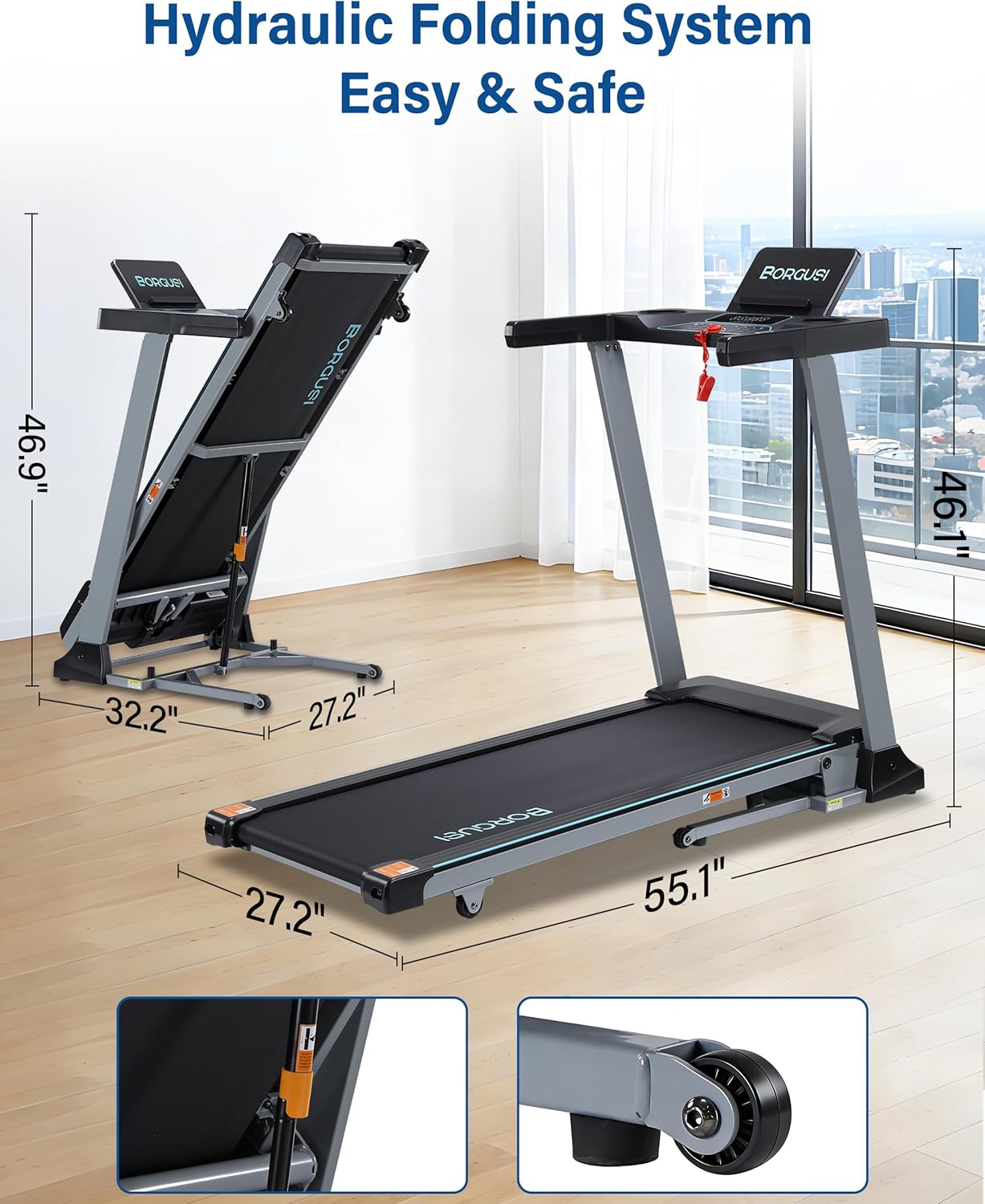
Image: The treadmill in both its unfolded and folded states, with dimensions clearly marked, demonstrating its space-saving hydraulic folding system.
Warranty and Support
Warranty Information
The BORGUSI CTM5521L Smart Treadmill comes with a 1-year parts protection plan. This warranty covers manufacturing defects and component failures under normal use. Please retain your proof of purchase for warranty claims.
Customer Support
For any questions, assistance, or warranty inquiries, please contact BORGUSI customer support. You can reach us via email through the Amazon platform, and we aim to respond within 12 business hours.
Please refer to the contact information provided with your product packaging or on the official BORGUSI store page on Amazon for the most current support details.