
1. Introduction
Thank you for choosing the LUXSURE Magnetic Ring Light with Stand and Phone Clip. This versatile device is designed to enhance your video recording, photography, and live streaming experiences by providing optimal lighting and stable phone support. It features a magnetic phone mount, an extendable tripod, dual-zone dimming, and a long-lasting battery, making it ideal for various content creation needs.
2. Package Contents
Please verify that all items listed below are included in your package:
- 1 x Selfie Light (Ring Light)
- 2 x Phone Clip
- 1 x 2-in-1 Tripod (Extendable Tripod)
- 1 x Wireless Remote (Bluetooth Remote)
- 1 x Charging Line
- 1 x Metal Ring (for non-magnetic phones)
- 1 x User Manual (this document)
3. Setup Guide
3.1 Assembling the Tripod and Ring Light
The LUXSURE Magnetic Ring Light is designed for quick and easy assembly. Follow these steps to set up your device:
- Unfold the Tripod: Gently spread the tripod legs until they are fully extended and stable. The legs feature an adjustable angle and lockable design for secure positioning.
- Extend the Pole: Loosen the locking mechanism on the main pole and extend it to your desired height. Securely tighten the lock. The pole can extend from 12.6 inches to 61 inches.
- Attach the Ring Light: The ring light head is pre-attached to the tripod. Ensure it is securely fastened.

Figure 3.1: Tripod legs with adjustable angles and lockable design for stability.

Figure 3.2: Dimensions and adjustable features of the LUXSURE tripod and ring light.
3.2 Attaching Your Phone
The ring light offers two methods for attaching your smartphone:
- Magnetic Attachment (for MagSafe compatible phones): Simply align your MagSafe-compatible phone with the magnetic center of the ring light. The strong magnetic force will secure your phone in place.
- Phone Clamp Attachment (for all smartphones): For non-MagSafe phones or enhanced stability, use one of the provided phone clips. Attach the phone clip to the magnetic center of the ring light, then insert your phone into the clamp. The clamp supports phones between 2.5 and 3.5 inches wide.
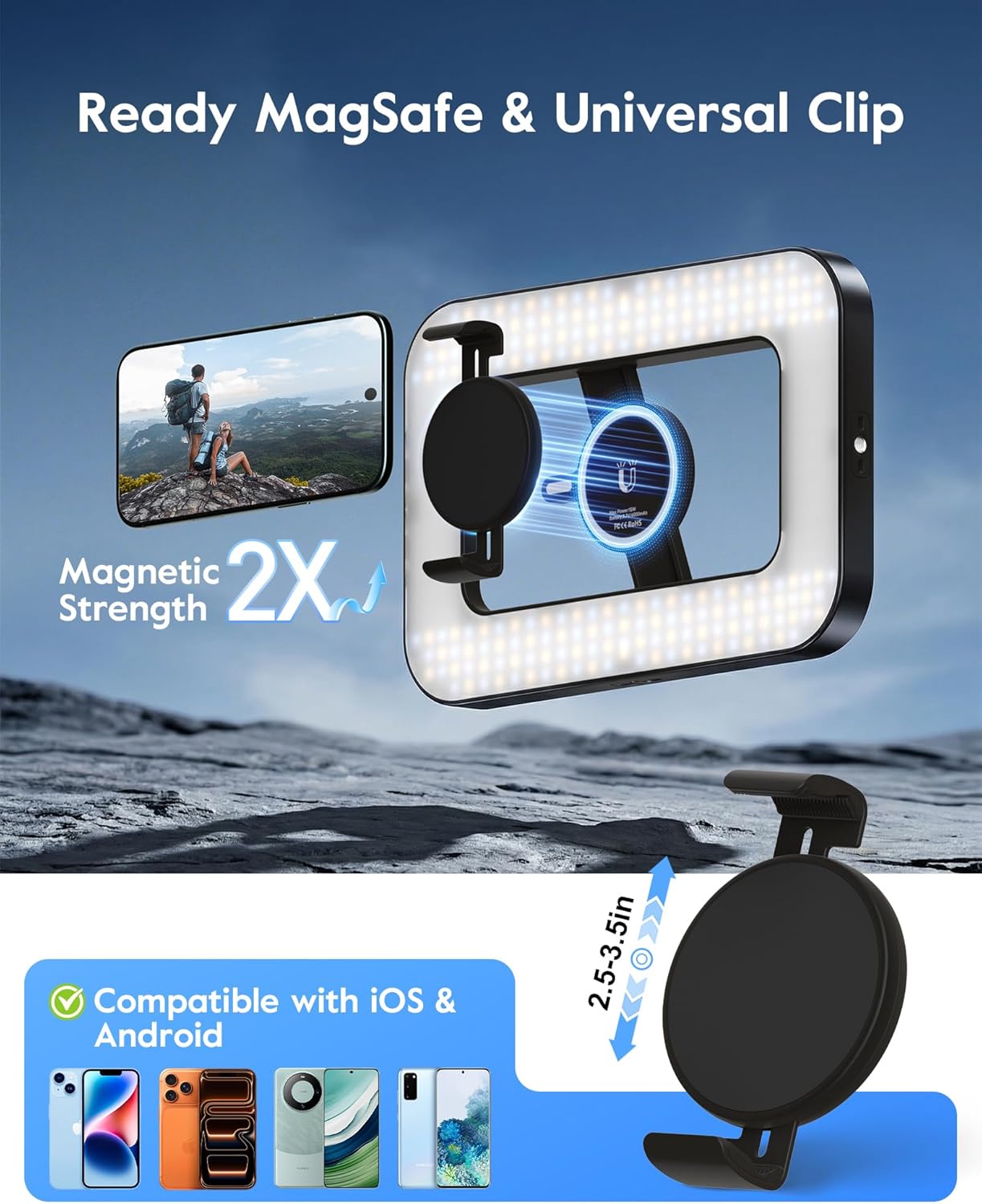
Figure 3.3: Magnetic and clamp attachment methods for smartphones.
3.3 Initial Charging
Before first use, fully charge the ring light using the provided charging cable. The built-in 6000mAh battery provides up to 15 hours of lighting at low brightness.

Figure 3.4: Power indicator lights on the ring light.
3.4 Bluetooth Remote Pairing
The wireless remote allows for convenient photo and video capture. To pair the remote:
- Power On Remote: Turn on the Bluetooth remote.
- Activate Bluetooth on Phone: Go to your phone's Bluetooth settings and search for new devices.
- Pair: Select the remote (usually named "AB Shutter3" or similar) from the list of available devices to pair.

Figure 3.5: Bluetooth remote pairing process.
4. Operating Instructions
4.1 Powering On/Off and Basic Lighting
To power on the ring light, press and hold the power button located on the side. Press again to cycle through different lighting modes or turn off. The light delivers 15W output with CRI 95+ for natural colors.
4.2 Adjusting Brightness and Color Temperature
The ring light features stepless dimming and adjustable color temperature (2500K-9000K) to suit various environments and creative needs.
- Brightness Adjustment: Use the dedicated brightness adjustment dial or button to increase or decrease the light intensity from 0% to 100%.
- Color Temperature Adjustment: Use the color temperature adjustment dial or button to switch between warm (2500K), neutral, and cool (9000K) lighting.
Figure 4.1: Controls for brightness and color temperature adjustment.
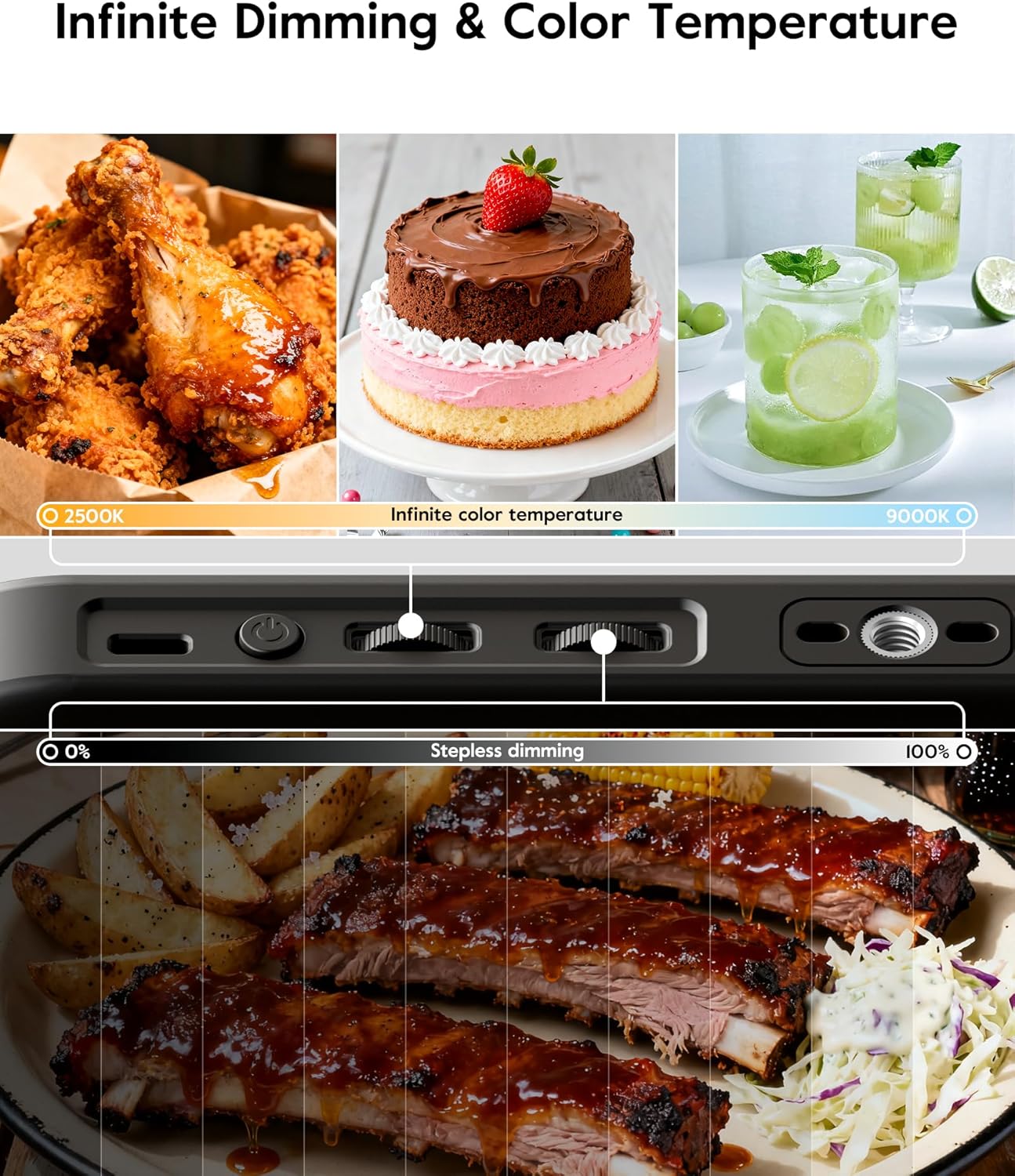
Figure 4.2: Visual representation of infinite dimming and color temperature options.
4.3 Custom Dual-Zone Dimming
The ring light features dual-zone brightness control, allowing independent adjustment of different areas of the light panel. This helps reduce shadows during handheld use and ensures evenly distributed professional lighting.

Figure 4.3: Customizable dual-zone lighting in action.

Figure 4.4: Dual-zone dimming prevents unwanted shadows.
4.4 Multi-Mode Usage
This device supports multiple usage modes:
- Floor Tripod: Extend the tripod legs and pole to maximum height for stable floor placement.
- Desktop Tripod: Keep the pole retracted and legs spread for stable use on tables or desks.
- Extendable Selfie Stick: Collapse the tripod legs and extend the pole for use as a selfie stick.
- Handheld Light: Remove the light head from the tripod for portable, handheld lighting.

Figure 4.5: The portable design allows for easy transport.
Video 4.1: Demonstration of the LUXSURE Ring Light with Enhanced Phone Clamp, showcasing its various modes and features.
5. Maintenance
Proper maintenance ensures the longevity and optimal performance of your LUXSURE Magnetic Ring Light.
- Cleaning: Use a soft, dry cloth to wipe the surface of the ring light and tripod. Avoid using abrasive cleaners or solvents, which can damage the finish or electronic components.
- Battery Care:
- Charge the device regularly, even if not in frequent use, to maintain battery health.
- Avoid fully discharging the battery frequently.
- Store the device in a cool, dry place away from extreme temperatures.
- Storage: When not in use, fold the tripod to its compact size and store it in a protective bag to prevent dust accumulation and physical damage.
6. Troubleshooting
If you encounter any issues with your LUXSURE Magnetic Ring Light, please refer to the following common problems and solutions:
| Problem | Possible Cause | Solution |
|---|---|---|
| Light does not turn on. | Low battery or power button not pressed correctly. | Charge the device fully. Press and hold the power button for a few seconds. |
| Bluetooth remote not connecting. | Remote battery low, not in pairing mode, or phone's Bluetooth is off. | Ensure remote has power. Turn remote off and on. Check phone's Bluetooth settings and re-pair. |
| Phone is not stable on the mount. | Phone is too heavy for magnetic mount alone, or clamp is not secured. | Always use the phone clamp for heavier phones or for added security. Ensure the clamp is properly gripping the phone. |
| Tripod feels unstable. | Legs not fully extended or locked, or on an uneven surface. | Ensure tripod legs are fully spread and locked. Place on a flat, stable surface. Avoid use in strong winds outdoors. |
If the problem persists, please contact LUXSURE customer support.
7. Specifications
| Feature | Detail |
|---|---|
| Brand | LUXSURE |
| Model Number | F05C |
| Connectivity Technology | Bluetooth, USB |
| Hardware Interface | USB |
| Product Dimensions (L x W x H) | 6" x 2.2" x 12.6" (folded) |
| Extendable Height | Up to 62.5" (approx. 61" as per image) |
| Item Weight | 2 Pounds |
| Battery Capacity | 6000mAh |
| Battery Life | 2.5-15 hours (depending on brightness) |
| Light Output | 15W, 1500 Lumens |
| Color Rendering Index (CRI) | >95 |
| Color Temperature Range | 2500K-9000K |
| Phone Clamp Compatibility | 2.5" - 3.5" wide smartphones |
| Water Resistance Level | Not Water Resistant |
8. Warranty and Support
LUXSURE provides a 5-year quality service warranty for this product. If you encounter any issues or have questions regarding your Magnetic Ring Light, please do not hesitate to contact our customer support team.
Customer Support: For assistance, please visit the LUXSURE Store on Amazon or refer to the contact information provided with your purchase documentation.