1. Introduction
Thank you for choosing the VSYSTO F4.5T Motorcycle Dashboard Camera Recorder. This device is designed to provide reliable video recording for your motorcycle, enhancing safety and providing evidence in case of incidents. It features dual 1080P waterproof cameras, a 4.5-inch LCD display, and supports advanced functions like TPMS, parking mode, and WiFi connectivity. Please read this manual thoroughly before installation and operation to ensure proper use and optimal performance.
2. Package Contents
Verify that all items listed below are present in your package:
- Monitor (Main Unit)
- Cameras (2)
- Power Cable
- Wired Controller
- USB Test Cable
- GPS Module
3. Product Overview
The VSYSTO F4.5T system consists of a main monitor unit, two separate cameras (front and rear), and various accessories for power and control. The main unit features a 4.5-inch HD IPS screen for live view and playback.
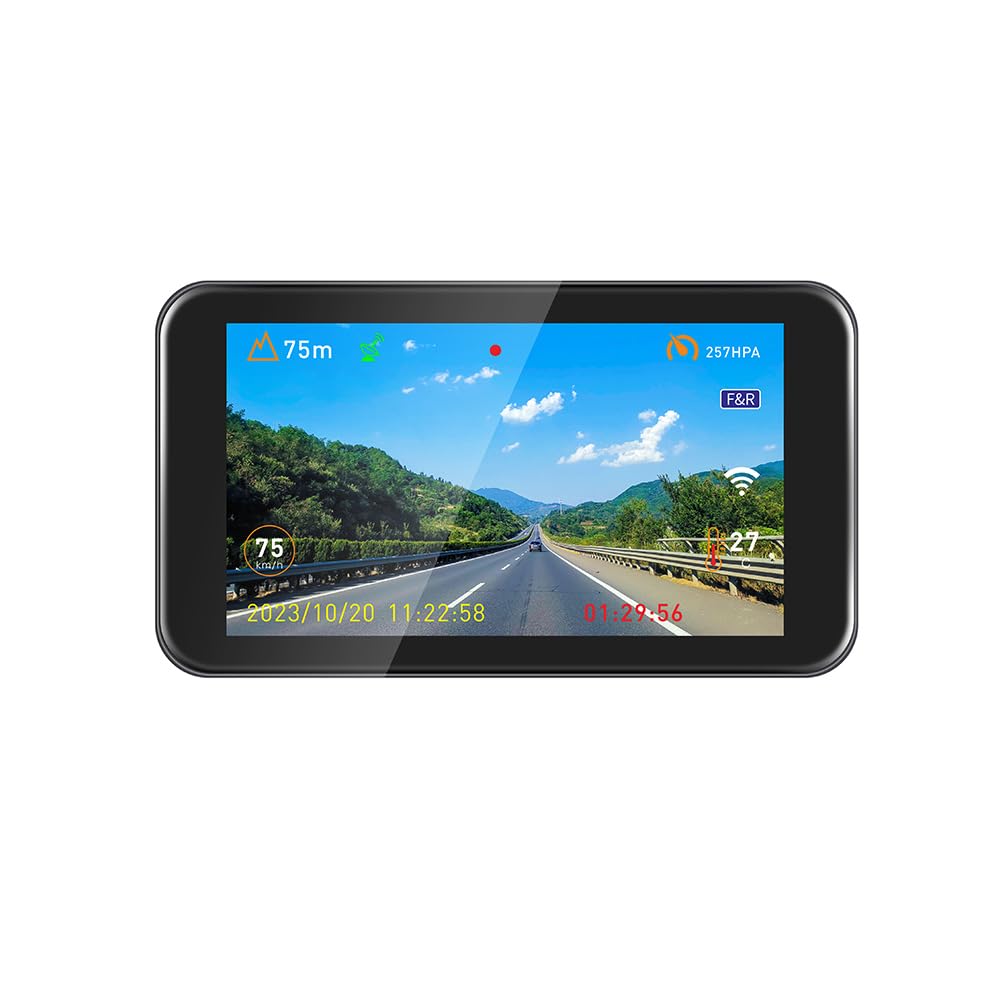
Figure 3.1: VSYSTO F4.5T Motorcycle Dashboard Camera Recorder main unit and included components. This image displays the 4.5-inch LCD monitor, the two compact camera units, and various cables and modules.
Key Features:
- Dual 1080P Cameras: Records simultaneously at 1920x1080 Full HD 25fps with 150° wide-angle lenses.
- 4.5-inch HD IPS Screen: Displays front and rear views, with adjustable brightness.
- Super Night Vision: Enhanced low-light performance with 1080p CMOS sensor.
- Parking Mode: Automatic recording triggered by movement when the engine is off.
- WiFi App Connectivity: View, playback, configure, and download videos wirelessly.
- Smart Gauge Mode: Displays speed, location, altitude, atmospheric pressure, air temperature, and battery voltage (requires GPS tracker and power cord connection).
- Loop Recording: Overwrites oldest files when storage is full.
- Emergency Mode (G-sensor): Automatically saves footage during collisions or manual trigger.
- Supercapacitor Power: Ensures longer life and safety without battery explosion risk.
- Waterproof Design: Reliable operation in various weather conditions.
4. Setup and Installation
Proper installation is crucial for the performance and longevity of your dash camera system. It is recommended to have this installed by a professional if you are not familiar with motorcycle electrical systems.
4.1 Mounting the Main Unit and Cameras
- Choose Mounting Locations:
- Main Unit: Select a secure, easily viewable location on your handlebars or dashboard that does not obstruct your view or controls.
- Front Camera: Mount the front camera securely at the front of your motorcycle, ensuring a clear, unobstructed view of the road ahead.
- Rear Camera: Mount the rear camera at the back of your motorcycle, providing a clear view of the road behind. Ensure it is protected from direct impact and road debris.
- Secure Mounting: Use the provided mounting accessories to firmly attach the main unit and cameras. Ensure they are stable and will not vibrate excessively during riding.
4.2 Wiring the System
The DVR system is hard-wired directly to your motorcycle's battery. This allows for automatic recording to start and stop with the ignition.
- Connect Power Cable: Connect the provided power cable to your motorcycle's battery terminals. Ensure correct polarity (red to positive, black to negative).
- Connect Cameras: Connect the front and rear cameras to the designated ports on the main unit. The camera cables are typically 3.3ft/6.6ft long, allowing for flexible routing.
- Connect GPS Module: Plug the GPS module into its dedicated port on the main unit. Position the GPS module in a location with a clear view of the sky for optimal signal reception.
- Connect Wired Controller: Attach the wired controller to the main unit and mount it on your handlebar for easy access during riding.
- Route Cables: Carefully route all cables, securing them with zip ties or cable clips to prevent interference with moving parts, heat sources, or potential snagging. Ensure cables are not pinched or stretched.
4.3 Initial Power-On and Setup
- Insert MicroSD Card: Before powering on, insert a compatible MicroSD card (up to 512GB, Class 10 or higher recommended) into the main unit's card slot.
- Power On: Turn on your motorcycle's ignition. The dash cam system should power on automatically and begin recording.
- Format MicroSD Card: It is highly recommended to format the MicroSD card through the dash cam's menu settings upon first use and periodically thereafter to ensure optimal performance and prevent data corruption.
- Set Date and Time: Adjust the date and time settings in the menu for accurate timestamping of recordings.
- Check Camera Views: Verify that both front and rear camera views are displayed correctly on the screen. Adjust camera angles as needed.
5. Operating Instructions
5.1 Basic Operation
- Automatic Recording: The system automatically starts recording when the motorcycle ignition is turned on and stops when the ignition is turned off.
- Screen Display: The 4.5-inch IPS screen can display front view, rear view, or a split-screen view of both simultaneously. Use the wired controller or main unit buttons to switch display modes.
- Adjusting Brightness: Screen brightness can be adjusted via the system settings menu.
5.2 Wired Controller Functions
The handlebar wired controller provides convenient access to key functions without diverting your attention from the road.
- Emergency Recording: Press the designated button on the wired controller to manually trigger an emergency recording. This footage will be locked and protected from loop recording overwrites.
- Display Mode Switch: Use the controller to cycle through different screen display modes (front, rear, split-screen).
- Rear-View Backup Camera: A single button press can activate the rear-view backup camera in full-screen mirror image mode, providing grid guidelines for enhanced visibility when reversing.
5.3 Parking Mode
When Parking Mode is activated, the DVR acts as a surveillance system. It automatically records video from both front and rear cameras when your bike is parked and the engine is off, triggered by movement detection.
- Activation: Enable Parking Mode in the system settings.
- Operation: Once enabled, the system will enter parking surveillance mode after the ignition is turned off. It will automatically record short video clips if motion is detected around your motorcycle.
5.4 WiFi App Connectivity
The integrated WiFi allows you to connect your mobile device to the dash cam for easy management of recordings.
- Download App: Download the VSYSTO companion app from your mobile device's app store.
- Connect to WiFi: Enable WiFi on the dash cam via the settings menu. On your mobile device, connect to the dash cam's WiFi network (SSID and password typically displayed on the dash cam screen).
- App Functions:
- Live View: See real-time camera feeds on your phone.
- Playback: Review recorded videos directly on your mobile device.
- Download: Save important video clips to your phone's storage.
- Configuration: Adjust dash cam settings remotely through the app.
6. Smart Gauge Mode
When the GPS tracker and power cord are properly connected, the Smart Gauge Mode provides real-time valuable motorcycle data on the display.
- Data Displayed:
- Speed
- Location (GPS coordinates)
- Altitude
- Atmospheric Pressure
- Air Temperature
- Battery Voltage
- Activation: This mode is typically activated automatically once the GPS module is connected and receiving a signal. You may need to select this display mode from the main unit's menu.
7. Maintenance
- Cleaning: Use a soft, damp cloth to clean the main unit screen and camera lenses. Avoid abrasive cleaners or solvents.
- MicroSD Card: Regularly format the MicroSD card (at least once a month) to maintain optimal recording performance and prevent data corruption. Replace the card if it shows signs of wear or error.
- Firmware Updates: Check the VSYSTO official website periodically for firmware updates. Follow the instructions provided with the update carefully.
- Cable Inspection: Periodically inspect all cables for wear, damage, or loose connections. Ensure they remain securely routed and fastened.
8. Troubleshooting
| Problem | Possible Cause | Solution |
|---|---|---|
| Device does not power on. | Loose power connection, motorcycle battery issue, faulty power cable. | Check all power cable connections. Ensure motorcycle battery has sufficient charge. Test power cable with USB test cable if possible. |
| Cameras not recording or showing blank screen. | Loose camera connection, faulty camera, MicroSD card error. | Ensure camera cables are securely connected. Format MicroSD card. Try a different MicroSD card. |
| "Card Full" error or recording stops. | MicroSD card is full, loop recording not enabled, card corruption. | Format the MicroSD card. Ensure loop recording is enabled in settings. Replace MicroSD card if issue persists. |
| WiFi connection issues. | Incorrect WiFi password, app issues, interference. | Verify WiFi password. Restart both dash cam and mobile device. Ensure app is up to date. |
| GPS data not displayed in Smart Gauge Mode. | GPS module not connected, poor signal, faulty module. | Ensure GPS module is securely connected and has a clear view of the sky. Wait for a few minutes for signal acquisition. |
9. Specifications
| Feature | Detail |
|---|---|
| Model Name | F4.5T |
| Display | 4.5-inch HD IPS Screen |
| Video Capture Resolution | Dual 1080p (1920x1080 @ 25fps) |
| Field of View | 150 Degrees |
| Storage | Supports MicroSD card up to 512GB |
| Connectivity | Hard-wired connection, Wi-Fi |
| Special Features | Reverse Assist, Parking Monitor, Night Vision, Smart Gauge Mode, G-sensor, Loop Recording |
| Power Source | Motorcycle battery (hard-wired), Supercapacitor for power stability |
| Item Weight | 3.08 pounds (approx. 1.4 kg) |
| Product Dimensions | 0.91 x 4.92 x 2.83 inches (Main Unit) |
| Operating Temperature | (Not specified, but typically wide range for motorcycle electronics) |
10. Warranty and Support
For warranty information and technical support, please refer to the documentation included with your purchase or visit the official VSYSTO website. If you encounter any issues not covered in this manual, please contact VSYSTO customer service for assistance.
Manufacturer: VSYSTO
Website: VSYSTO Official Store on Amazon