
Product Overview
The Aecooly Mini Portable Neck Fan, Model Click 01, is a compact and lightweight personal cooling device designed for convenience and portability. It features a magnetic attachment system, three adjustable speed settings, and a rechargeable battery providing up to 10 hours of cooling.
Key Features:
- Mini Size: Weighs only 3.35 oz and measures 2.9 × 2.3 × 1.4 inches, designed to be unobtrusive.
- Strong Airflow: Delivers wind speeds up to 23 ft/s to effectively move heat away.
- Magnetic Fit: Securely attaches to clothing for stable cooling during light activities.
- Extended Battery Life: Provides up to 10 hours of cooling on a single charge.
- 3-Speed Adjustable Airflow: Easily switch between three fan speeds for varied cooling needs.
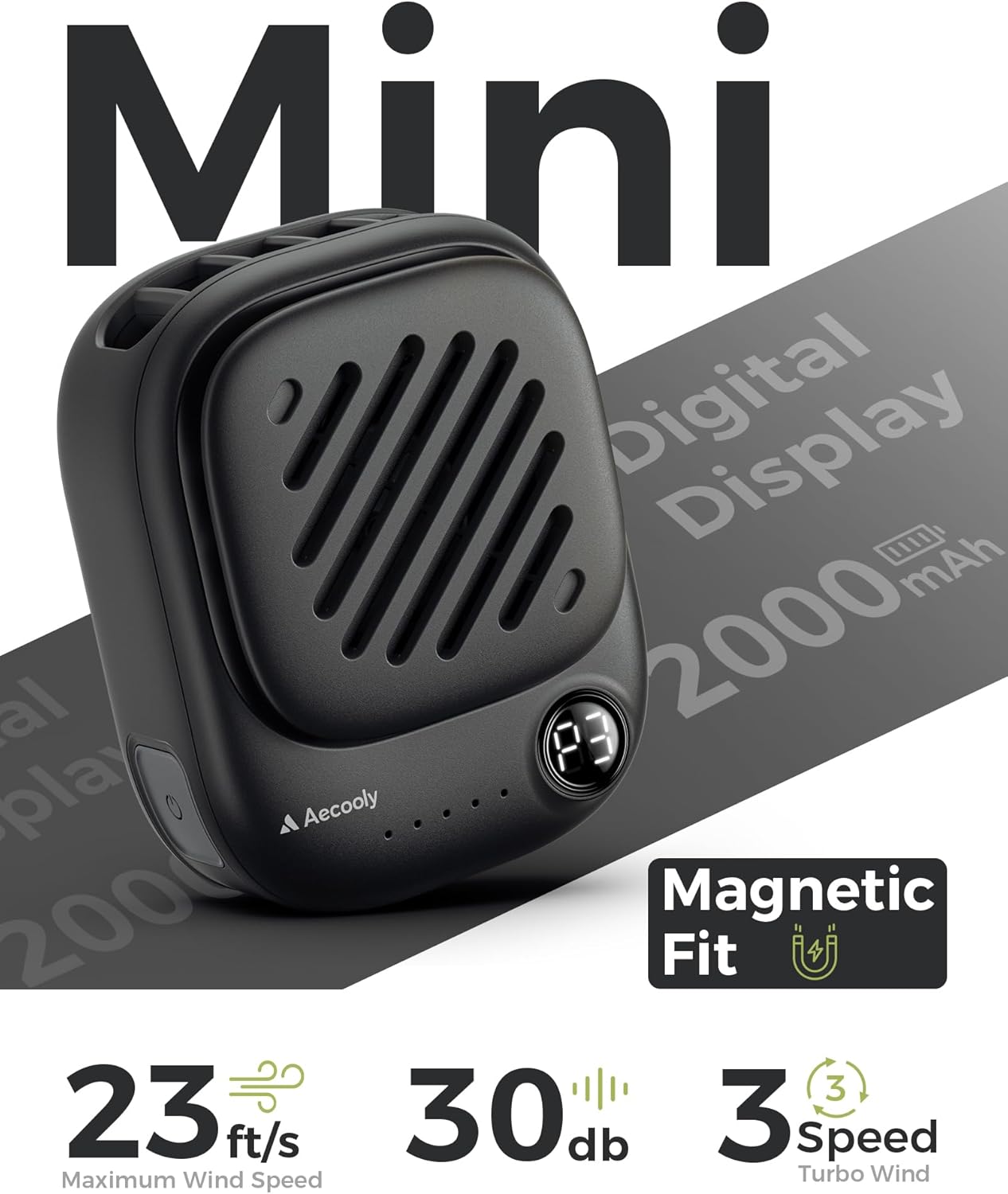
Image: The Aecooly Mini Portable Neck Fan, highlighting its compact size, digital display, 2000mAh battery, 23 ft/s wind speed, 30dB noise level, and 3-speed turbo wind.
Package Contents
Please verify that all items are present in your package:
- 1 x Aecooly Mini Neck Fan
- 1 x Charging Cable (USB Type-C)
- 1 x Lanyard
- 1 x User Manual (this document)

Image: A visual representation of the package contents, including the mini neck fan, charging cable, lanyard, and user manual.
Setup
Attaching the Lanyard:
- Locate the small loop on the top edge of the fan.
- Thread the thin end of the lanyard through this loop.
- Pass the larger end of the lanyard through the loop you just created with the thin end, then pull gently to secure.
- Ensure the lanyard is firmly attached before wearing.

Image: A step-by-step guide demonstrating how to attach the lanyard to the fan, labeled "Snap On, Pull Off".
Wearing the Fan:
- Neck Wear: Place the lanyard around your neck. The fan can hang freely or be magnetically attached to your clothing.
- Magnetic Attachment: The fan features a magnetic back. Position the fan on the outside of your clothing, then place the included magnetic plate on the inside of your clothing, directly behind the fan. The magnets will secure the fan in place. This allows for hands-free operation and directs airflow towards your upper body.

Image: A person wearing the mini neck fan, demonstrating its magnetic attachment and hands-free use.
Operating Instructions
Power On/Off and Speed Adjustment:
- Power On: Press and hold the power button (usually located on the side or front of the fan) for 2-3 seconds. The fan will start at Speed 1.
- Adjust Speed: Briefly press the power button to cycle through the fan speeds:
- Press once for Speed 1 (Low)
- Press twice for Speed 2 (Medium)
- Press three times for Speed 3 (High)
- Power Off: Press and hold the power button again for 2-3 seconds, or cycle through all speeds until the fan turns off.
The digital display on the fan will indicate the current speed setting (P1, P2, P3) and battery level.

Image: Visualizing the three adjustable fan speeds and their respective wind outputs, demonstrating the fan's cooling capability.
Charging
Charging the Battery:
- Connect the provided USB Type-C charging cable to the charging port on the fan.
- Connect the other end of the USB cable to a compatible USB power source (e.g., computer, wall adapter, power bank).
- The battery indicator lights or digital display will show the charging status. Once fully charged, the indicator will change or turn off.
- A full charge provides up to 10 hours of operation, depending on the speed setting used.
Note: For optimal battery life, avoid completely draining the battery before recharging. Use a standard 5V/1A or 5V/2A USB charger.
Maintenance
Cleaning:
- Ensure the fan is turned off and disconnected from any power source before cleaning.
- Wipe the exterior of the fan with a soft, dry cloth.
- Do not use harsh chemicals, abrasive cleaners, or immerse the fan in water.
- Periodically check the fan grille for dust accumulation and gently clean with a soft brush if necessary to maintain optimal airflow.
Storage:
- Store the fan in a cool, dry place away from direct sunlight and extreme temperatures.
- If storing for an extended period, charge the battery to approximately 50% to preserve battery health.
Troubleshooting
| Problem | Possible Cause | Solution |
|---|---|---|
| Fan does not turn on. | Low battery or no charge. | Charge the fan using the provided USB Type-C cable. |
| Fan stops unexpectedly. | Battery depleted. | Recharge the fan. |
| Weak airflow. | Fan is on a low speed setting. | Press the power button to increase the fan speed. |
| Magnetic attachment is not secure. | Clothing material is too thick or magnetic plate is misaligned. | Ensure the magnetic plate is directly behind the fan and try with thinner clothing if necessary. |
Specifications
| Feature | Detail |
|---|---|
| Brand | Aecooly |
| Model Name | Click 01 |
| Product Dimensions | 1.38"D x 2.32"W x 2.94"H |
| Weight | Approximately 3.35 oz |
| Power Source | Battery Powered (USB Rechargeable) |
| Number of Speeds | 3 |
| Maximum Airflow | 23 ft/s |
| Battery Life | Up to 10 hours (depending on speed) |
| Mounting Type | Neck, Magnetic Clip |
| Material | Plastic |
Important Safety Information
- Keep out of reach of children.
- Do not insert fingers or foreign objects into the fan grille.
- Avoid exposure to water or excessive moisture.
- Do not disassemble or attempt to repair the fan yourself.
- Use only the provided charging cable or a certified equivalent.
- Do not expose the battery to high temperatures or dispose of it in fire.
Warranty and Support
For warranty information and customer support, please refer to the contact details provided on the product packaging or visit the official Aecooly website. Keep your purchase receipt for warranty claims.
Product Videos
Snap On & Go
Video: Demonstrates the quick and easy magnetic attachment of the Aecooly Mini Neck Fan to clothing.
Mini Neck Fan NK01
Video: An overview of the Mini Neck Fan NK01, showcasing its features and design.