Introduction
Welcome to the user manual for your new Fire-Boltt Ninja Phantom Smart Watch. This guide provides essential information on setting up, operating, and maintaining your device. The Ninja Phantom features a unique transparent design, a vibrant 1.83-inch display, Bluetooth calling, and a comprehensive suite of health and fitness tracking capabilities.

Image: Fire-Boltt Ninja Phantom Smart Watch, Transparent Edition. This image highlights the unique transparent design of the watch.
Product Overview
Video: A comprehensive overview of the Fire-Boltt Ninja Phantom Smart Watch, showcasing its transparent design, display, calling features, sports modes, health tracking, and water resistance.
Setup Guide
1. Unboxing
Upon opening the package, ensure all components are present:
- 1 x Fire-Boltt Ninja Phantom Smart Watch
- 1 x User Manual (this document)
- 1 x Magnetic Charger
- 1 x Warranty Card
2. Charging the Smart Watch
Before initial use, fully charge your smart watch.
- Connect the magnetic charger to the charging points on the back of the watch.
- Plug the USB end of the charger into a standard USB power adapter (not included) or a computer's USB port.
- The watch display will indicate charging status. A full charge typically takes approximately 2 hours.
A fully charged watch provides an average battery life of up to 8 days, depending on usage.

Image: The rear view of the Fire-Boltt Ninja Phantom Smart Watch, showing the magnetic charging pins and the heart rate sensor.
3. Pairing with Your Smartphone
To unlock all features, pair your smart watch with the companion application on your smartphone. The watch is compatible with Android 5.0 and iOS 9.0 or above.
- Download the official Fire-Boltt companion app from your smartphone's app store (Google Play Store for Android, Apple App Store for iOS).
- Ensure Bluetooth is enabled on your smartphone.
- Open the app and follow the on-screen instructions to create an account and pair your device.
- Select "Ninja Phantom" from the list of available devices in the app.
- Confirm the pairing request on both your watch and smartphone.
4. Strap Adjustment
The Fire-Boltt Ninja Phantom comes with a comfortable silicone strap. Adjust the strap to ensure a snug fit on your wrist for accurate health monitoring. The strap width is 20 millimeters and has a total length of 265 millimeters.

Image: Various color options for the Fire-Boltt Ninja Phantom Smart Watch, showcasing the silicone straps and transparent cases.
Operating Your Smart Watch
1. Basic Navigation
The watch features both touchscreen and button input for navigation.
- Swipe: Navigate through menus and notifications.
- Tap: Select items or confirm actions.
- Side Button/Crown: Press to return to the home screen, or rotate to scroll through lists (functionality may vary by watch face/menu).

Image: The main display of the Fire-Boltt Ninja Phantom Smart Watch, showing the current time, date, weather, step count, and heart rate.
2. Bluetooth Calling
With built-in microphone and speaker, you can make and receive calls directly from your wrist.
- To make a call, access the dial pad or contacts list on your watch.
- When a call comes in, you can answer or reject it directly from the watch screen.

Image: The Fire-Boltt Ninja Phantom Smart Watch worn on a wrist, showing an incoming call notification on its display.
3. Sports Modes
The watch supports over 120 sports modes to track your physical activities.
- Access the Sports Mode menu to select your desired activity, such as Walking, Running, Cycling, Skipping, Badminton, Basketball, Football, Tennis, Climbing, Rugby, Golf, Yoga, Workout, Dancing, Baseball, Elliptical Machine, Indoor Cycling, Skiing, Bowling, Dumbbells, Sit-Ups, Hiking, Indoor Walking, Indoor Running, Cricket, Kabaddi, and more.
- The watch will record relevant data like duration, calories burned, and heart rate during your workout.
4. Health Monitoring
The Fire-Boltt Ninja Phantom includes a comprehensive health suite for continuous monitoring.
- Heart Rate Tracking: Monitors your heart rate throughout the day.
- SpO2 Monitoring: Measures your blood oxygen levels.
- Sleep Monitoring: Tracks your sleep patterns and quality.
- Activity Tracker: Records steps, distance, and calories burned.
- Sedentary Reminder: Alerts you to move after periods of inactivity.

Image: The Fire-Boltt Ninja Phantom Smart Watch showing various health metrics, including heart rate, sleep analysis, and activity insights.
5. Smart Notifications and Voice Assistant
Stay informed and control your device hands-free.
- Notifications: Receive alerts for calls, messages, and app notifications directly on your watch.
- Voice Assistant: Utilize the built-in voice assistant (compatible with Google Assistant and Siri) to perform tasks, set reminders, or get information using voice commands.
Maintenance
1. Water Resistance
The Fire-Boltt Ninja Phantom Smart Watch is IP67 water resistant, meaning it is protected against dust and can withstand immersion in water up to 1 meter for 30 minutes. It is suitable for daily wear, workouts, and outdoor activities, including splashes, sweat, and rain. However, it is not recommended for swimming or diving.
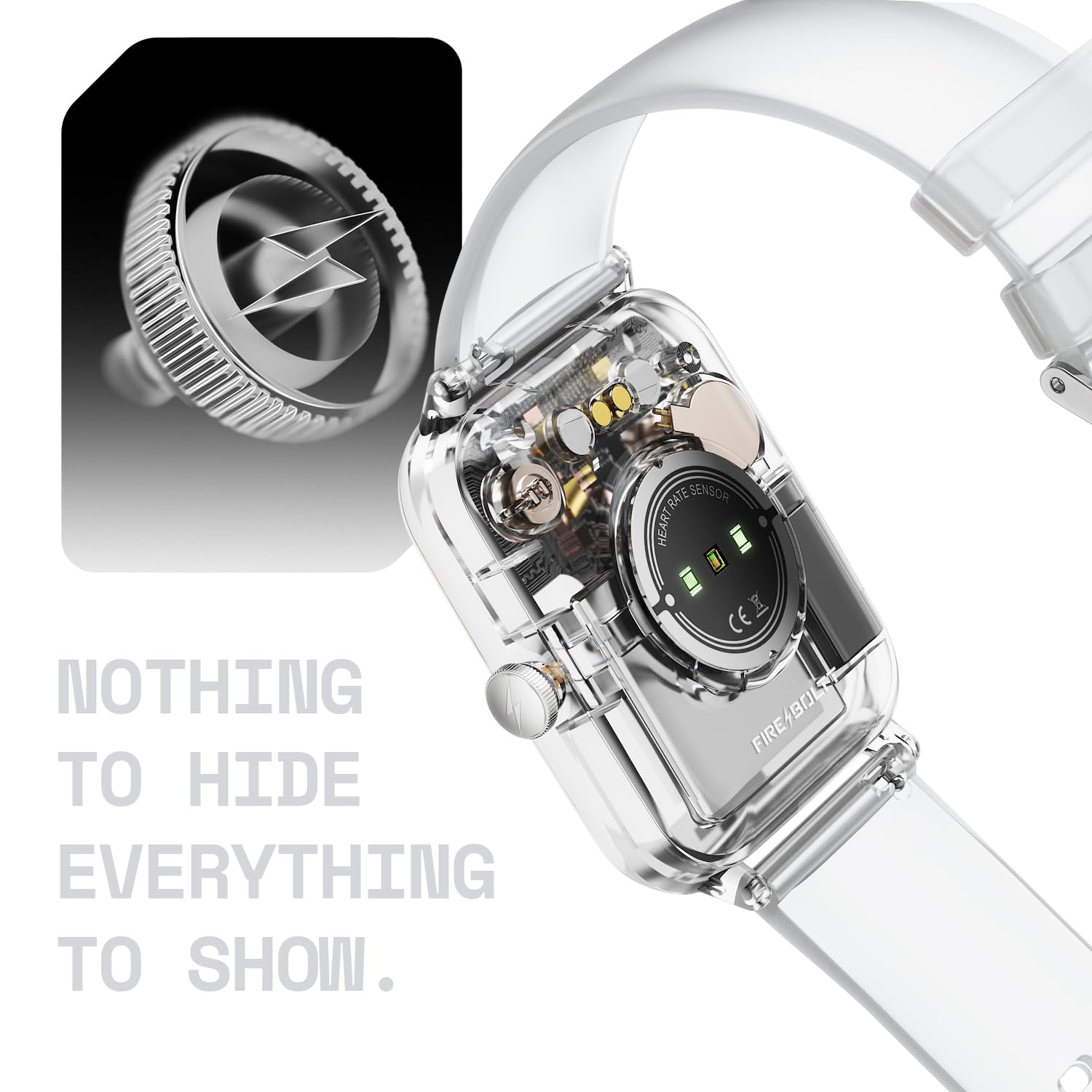
Image: The Fire-Boltt Ninja Phantom Smart Watch with water droplets on its screen, illustrating its IP67 water resistance.
2. Cleaning
To maintain your watch's appearance and functionality:
- Wipe the watch and strap regularly with a soft, damp cloth.
- Avoid using harsh chemicals or abrasive materials.
- Ensure the charging contacts are clean and dry before charging.
Troubleshooting
- Watch not turning on: Ensure the watch is fully charged. Connect it to the charger for at least 30 minutes.
- Cannot pair with smartphone:
- Ensure Bluetooth is enabled on your phone.
- Make sure the watch is within range of your phone.
- Restart both the watch and your phone, then try pairing again.
- Check if the companion app is updated to the latest version.
- Inaccurate health data: Ensure the watch is worn snugly on your wrist, not too tight or too loose. Clean the sensor on the back of the watch.
- Notifications not appearing: Check your phone's app settings to ensure notification permissions are granted for the companion app and the watch.
Specifications

Image: A banner summarizing key specifications of the Fire-Boltt Ninja Phantom Smart Watch.
| Feature | Detail |
|---|---|
| Model Name | Ninja Phantom |
| Model Number | BGSW003 |
| Display | 1.83 inches LCD, 280 Nit Brightness |
| Connectivity | Bluetooth |
| Operating System | Android 5.0+, iOS 9.0+ |
| Memory Storage Capacity | 128 MB |
| Special Features | Bluetooth Calling, IP67 Water Resistant, 120+ Sports Modes, Voice Assistant (Google Assistant, Siri), Heart Rate Tracking, SpO2 Monitoring, Sleep Monitor, Activity Tracker, Transparent Case, Built-in Mic & Speaker, Games, Find Phone |
| Battery Life (Average) | 8 Days |
| Battery Charge Time | 2 Hours |
| Water Resistance Rating | IP67 (up to 1 meter depth) |
| Band Material | Silicone |
| Item Weight | 50 Grams |
| Manufacturer | Boltt Games Pvt Ltd, Fire-Boltt |
| Country of Origin | India |
Warranty and Support
Your Fire-Boltt Ninja Phantom Smart Watch comes with a 1-year warranty covering manufacturing defects.
For technical support, warranty claims, or further assistance, please contact Fire-Boltt customer service. Refer to the warranty card included in your package for specific contact details.
Manufacturer: Boltt Games Pvt Ltd, Fire-Boltt
Importer: Boltt Games Pvt Ltd


