
1. Product Overview
1.1 Introduction
The Desobry 14.2" Portable TV is a versatile, high-definition LCD display designed for portable entertainment. It features a built-in ATSC tuner for digital TV reception, multiple input options including HDMI, USB, and AV, and a rechargeable battery for extended use. This manual provides detailed instructions for setting up, operating, and maintaining your portable TV.
1.2 Key Features
- 14.2-inch HD LCD Display: Enjoy clear and crisp visuals with 1080P resolution.
- Built-in ATSC Tuner: Receive free over-the-air digital TV channels.
- Multiple Connectivity Options: HDMI, AV, and USB inputs for connecting various devices.
- Rechargeable Battery: Integrated 4000mAh battery for portable power.
- Dual Charging Systems: Charge via 12V AC adapter or car charger.
- Multimedia Playback: Supports various video, audio, and image formats via USB.
- Portable Design: Includes desktop stand and headrest stand for flexible placement.
- Built-in Dual Speakers: Provides integrated audio output.
2. What's in the Box
Please check the package contents upon unboxing to ensure all items are present:
- Desobry 14.2" Portable TV
- Antenna
- Car Charger
- 12V AC Adapter
- RCA Cable (AV Cable)
- Car Headrest Mount Holder
- 2*AAA Batteries (for remote control)
- Remote Control
- User Manual

Image: All components included in the Desobry 14.2" Portable TV package, neatly arranged.
3. Product Diagram
Familiarize yourself with the various parts and controls of your Desobry Portable TV:
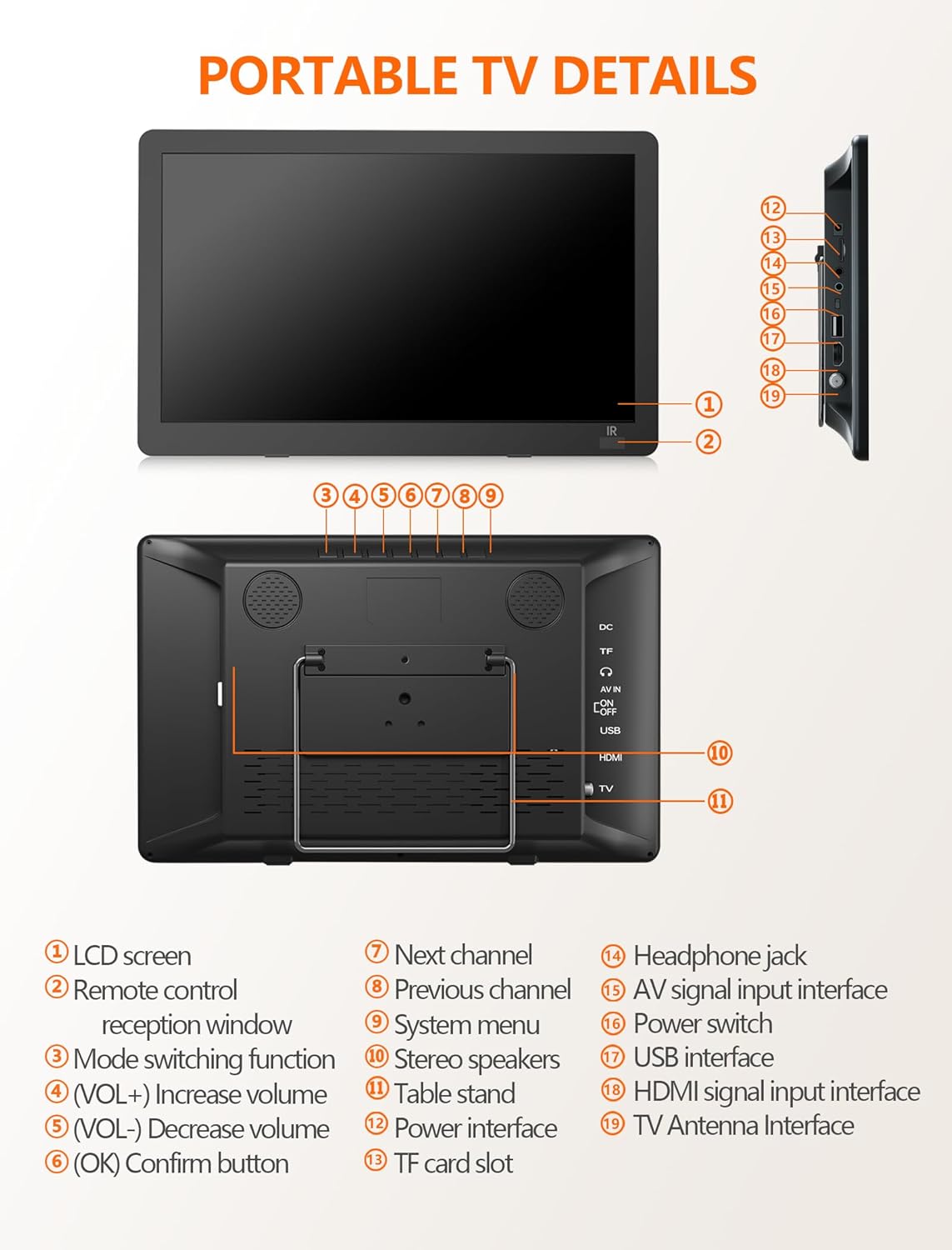
Image: Detailed diagram illustrating the various ports, buttons, and features of the portable TV.
- LCD screen
- Remote control reception window
- Mode switching function
- VOL+ (Increase volume)
- VOL- (Decrease volume)
- OK (Confirm button)
- Next channel
- Previous channel
- System menu
- Stereo speakers
- Table stand
- Power interface (DC IN)
- TF card slot
- Headphone jack
- AV signal input interface
- Power switch
- USB interface
- HDMI signal input interface
- TV Antenna Interface
4. Setup Instructions
4.1 Powering On the TV
Your Desobry Portable TV can be powered in three ways:
- AC Adapter: Connect the provided 12V AC adapter to the "DC IN" port (12) on the TV and plug it into a standard wall outlet.
- Car Charger: Use the provided car charger to power the TV from your vehicle's 12V power socket.
- Built-in Battery: The TV has a 4000mAh rechargeable battery. Ensure it is charged before portable use. The TV will charge automatically when connected to the AC adapter or car charger.

Image: Illustration of the three power options: AC adapter, built-in battery, and car charger.
4.2 Connecting the Antenna
To receive digital TV channels, connect the included antenna to the "TV Antenna Interface" (19) on the TV. For optimal signal reception, place the antenna near a window or outdoors if possible.

Image: The portable TV being used outdoors with its antenna connected, demonstrating its portability.
4.3 Initial Channel Scan
After connecting the antenna and powering on the TV:
- Press the "System menu" button (9) on the TV or the MENU button on the remote.
- Navigate to the "Channel" or "Setup" menu.
- Select "Auto Scan" or "Channel Search" to scan for available digital channels.
- Ensure the TV is set to ATSC mode for digital signal reception.
Note: Only free-to-air digital TV channels are supported. Encrypted channels cannot be received. Signal coverage varies by location; check for signal availability in your area.
5. Operating Instructions
5.1 Basic Controls
You can control the TV using the buttons on the device or the included remote control.
- Power Switch (16): Turns the TV on or off.
- Mode Switching Function (3): Cycles through input sources (TV, HDMI, AV, USB).
- VOL+ (4) / VOL- (5): Adjusts the volume level.
- Next Channel (7) / Previous Channel (8): Changes TV channels.
- OK Button (6): Confirms selections in menus.
- System Menu (9): Accesses the TV's settings menu.
For remote control usage, ensure the AAA batteries are correctly inserted and aim the remote within 3 meters and a 30° angle of the remote control reception window (2) on the TV.
5.2 Connecting External Devices (HDMI, AV, USB)
The Desobry Portable TV supports various external devices:
- HDMI Input (18): Connect devices like laptops, Amazon Firestick, Roku, Slingbox, or game consoles using an HDMI cable (not included). Select HDMI input via the Mode button.

Image: Demonstrates HDMI input for screen mirroring from a smartphone, compatible with various devices.
Note: An HDMI cable is not included. For Android devices, an external power bank may be required to provide power during HDMI connection.
- AV Input (15): Connect older devices using the provided RCA (AV) cable. Select AV input via the Mode button.

Image: The portable TV connected to an external device using the AV cable, showing a child watching content.
- USB Interface (17): Insert a USB drive to play multimedia files. Select USB input via the Mode button.
- TF Card Slot (13): Insert a TF (MicroSD) card to play multimedia files.
5.3 Multimedia Playback
The TV supports various multimedia formats when playing from a USB drive or TF card:
- Video: AVI, MP4, MPG, MOV, MKV, TS, VOB, DAT, MPEG1, MPEG2, MPEG4, XVID, H.264, H.265 (HEVC)
- Audio: MP3, WMA, M4A, AAC
- Images: JPG, JPEG, BMP, PNG
- Text: TXT

Image: The portable TV displaying an image, with a USB drive connected, highlighting its multi-format playback capability.
6. Maintenance
6.1 Cleaning the TV
- Always unplug the TV from the power source before cleaning.
- Use a soft, dry cloth to wipe the screen and exterior surfaces.
- For stubborn marks, lightly dampen the cloth with water or a mild, non-abrasive screen cleaner. Do not spray liquids directly onto the TV.
- Avoid using harsh chemicals, solvents, or abrasive materials, as these can damage the screen or finish.
6.2 Battery Care
- To prolong battery life, avoid fully discharging the battery frequently.
- If storing the TV for an extended period, charge the battery to approximately 50% and store in a cool, dry place.
- Do not expose the TV to extreme temperatures.
7. Troubleshooting
If you encounter issues with your Desobry Portable TV, refer to the following common solutions:
| Problem | Possible Cause / Solution |
|---|---|
| No Signal / Poor TV Reception |
|
| Remote Control Not Responding |
|
| No Picture via HDMI Input |
|
| USB/TF Card Not Reading |
|
| No Sound |
|
8. Specifications
| Feature | Detail |
|---|---|
| Model Number | B0GG9YBF8X |
| Screen Size | 14.2 inches |
| Display Technology | LCD |
| Resolution | 1080p |
| Refresh Rate | 60 Hz |
| Aspect Ratio | 16:9 |
| Connectivity Technology | HDMI, AV, USB |
| Audio Input | HDMI, RCA, USB |
| Signal Format | ATSC |
| Total HDMI Ports | 1 |
| Total USB Ports | 1 |
| Built-in Battery | 4000mAh (12V battery included) |
| Speakers | 2.0 channel stereo speakers |
| Product Dimensions (D x W x H) | 2"D x 2"W x 2"H (approximate) |
| Control Method | Remote |
| Color | Black |
| Compatible Devices | Smartphone, Laptops, Amazon Firestick, Roku, Slingbox, Game Consoles |
| Video Encoding | H.264, H.265 (HEVC) |
9. Warranty and Support
9.1 Warranty Information
The Desobry Portable TV comes with a limited warranty. Please refer to the warranty card included in your package for specific terms and conditions. Keep your purchase receipt as proof of purchase for warranty claims.
9.2 Customer Support
For any questions, technical assistance, or warranty inquiries, please contact Desobry customer support. Contact information can typically be found on the manufacturer's website or on the warranty card included with your product.
When contacting support, please have your product model number (B0GG9YBF8X) and purchase details ready.