Introduction
This manual provides instructions for the proper use and maintenance of your Generic RM-D1266+E Universal TV Remote Control. This remote is designed to operate various devices including DVB, STB, IPTV, and TV Boxes, offering a convenient replacement for your original remote.
Product Overview
The RM-D1266+E remote control is a compact and easy-to-grip device, featuring dedicated menu navigation keys and direct channel access for digital TV. It is designed to replicate the functions of many original remote controls without requiring complex setup.
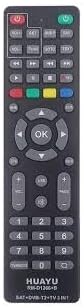
Image: Front view of the RM-D1266+E Universal TV Remote Control. This image displays the full layout of the remote, including all buttons and their labels.
Key Features:
- No Setup Required: Operates immediately after battery insertion.
- Universal Compatibility: Works with various TV types including LCD, LED, and Plasma, as well as DVB, STB, and IPTV boxes.
- Ergonomic Design: Small, compact, and easy to grip.
- Full Functionality: Covers almost all functions of original remote controls.
- Dedicated Keys: Includes specific keys for menu navigation and direct digital TV channel access.
Setup
Inserting Batteries:
- Locate the battery compartment on the back of the remote control.
- Slide the battery compartment cover downwards or press the latch and lift to open.
- Insert two AAA batteries (not included), ensuring the positive (+) and negative (-) terminals align correctly with the markings inside the compartment.
- Replace the battery compartment cover, ensuring it clicks securely into place.
Note: This remote control requires no programming. Once batteries are inserted, it is ready for use with compatible devices.
Operating Instructions
The RM-D1266+E remote control is designed for intuitive operation. Point the remote directly at the device you wish to control.

Image: Top section of the RM-D1266+E remote control. This image highlights the power, volume, channel, and directional navigation buttons.
Basic Functions:
- Power Button (●): Press to turn your device on or off.
- Volume Up/Down (VOL+/-): Adjusts the audio volume.
- Channel Up/Down (CH+/-): Changes the channel.
- Number Buttons (0-9): Directly input channel numbers.
- OK Button: Confirms selections in menus.
- Directional Arrows (Up, Down, Left, Right): Navigate through menus and options.
- Menu Button: Accesses the device's main menu.
- Exit Button: Exits the current menu or function.
- Mute Button: Mutes or unmutes the audio.
For advanced functions, refer to your device's original manual, as this remote aims to replicate those functions directly.
Maintenance
- Keep the remote control dry. Moisture can damage the internal circuits.
- Avoid exposing the remote to extreme temperatures.
- Clean the remote with a soft, dry cloth. Do not use abrasive cleaners or solvents.
- If the remote will not be used for an extended period, remove the batteries to prevent leakage.
- Do not drop or subject the remote to strong impacts.
Troubleshooting
| Problem | Possible Cause | Solution |
|---|---|---|
| Remote not responding. | Dead or incorrectly inserted batteries. | Replace batteries with new ones, ensuring correct polarity (+/-). |
| Remote range is poor. | Weak batteries; Obstruction between remote and device. | Replace batteries. Ensure a clear line of sight to the device's IR receiver. |
| Certain functions do not work. | Device incompatibility; Specific function not supported by universal remote. | While universal, some highly specific functions of original remotes may not be replicated. Verify compatibility with your device's original manual. |
Specifications
- Model Number: RM-D1266+E
- Brand: Generic
- Compatible Devices: Smart Television, DVB, STB, IPTV, TV Box
- Controller Type: Button Control
- Maximum Range: 10 Meters
- Power Source: 2 x AAA Batteries (not included)
- Dimensions: Approximately 18L x 8W x 3H centimetres
- Color: Black
- Special Feature: No Programming Required
Warranty and Support
This product comes with a manufacturer's warranty of 6 Months from the date of purchase. Please retain your proof of purchase for warranty claims.
For support or warranty inquiries, please contact your retailer or the manufacturer directly. Spare part information is not available or provided for this product.


