
1. Introduction
Thank you for choosing the frecaer BM08 Cordless Stick Vacuum Cleaner. This manual provides essential information for the safe and efficient operation, maintenance, and troubleshooting of your new appliance. Please read it thoroughly before first use and keep it for future reference.
Important Safety Instructions
- Read all instructions before using the appliance.
- Do not use outdoors or on wet surfaces.
- Do not allow to be used as a toy. Close attention is necessary when used by or near children.
- Use only as described in this manual. Use only manufacturer's recommended attachments.
- Do not use with damaged cord or plug. If appliance is not working as it should, has been dropped, damaged, left outdoors, or dropped into water, return it to a service center.
- Do not pull or carry by cord, use cord as a handle, close a door on cord, or pull cord around sharp edges or corners. Do not run appliance over cord. Keep cord away from heated surfaces.
- Do not unplug by pulling on cord. To unplug, grasp the plug, not the cord.
- Do not handle plug or appliance with wet hands.
- Do not put any object into openings. Do not use with any opening blocked; keep free of dust, lint, hair, and anything that may reduce air flow.
- Keep hair, loose clothing, fingers, and all parts of body away from openings and moving parts.
- Do not pick up anything that is burning or smoking, such as cigarettes, matches, or hot ashes.
- Use extra care when cleaning on stairs.
- Do not use to pick up flammable or combustible liquids, such as gasoline, or use in areas where they may be present.
- Do not use without dust cup and/or filters in place.
- Turn off all controls before unplugging.
2. Product Overview
The frecaer BM08 Cordless Stick Vacuum Cleaner is designed for efficient and versatile cleaning across various surfaces. It features advanced technology for optimal performance and user convenience.
Key Features:
- Smart Auto Sensor Technology: Automatically detects dust levels and adjusts suction power.
- Powerful Suction: 550W brushless motor with 50KPA suction power.
- Long-Lasting Detachable Battery: Up to 70 minutes runtime in Eco Mode.
- Pet Hair Removal: Anti-tangle brush and 180° adjustable swivel head.
- Advanced Filtration: 6-stage HEPA filtration system captures 99.99% of particles.
- LED Touch Display: Shows battery level, suction mode, and fault detection.
- Self-Standing Design: Convenient for pausing during cleaning and storage.
Components:
- Main Body (with dust cup and motor)
- Battery Pack
- Telescopic Rod
- Power Brush (floor head with LED lights)
- Power Adapter
- Wall Mounting Bracket
- Long Flat brush
- 2-in-1 Brush
- HEPA Filter (2 included)
- Sponge Filter
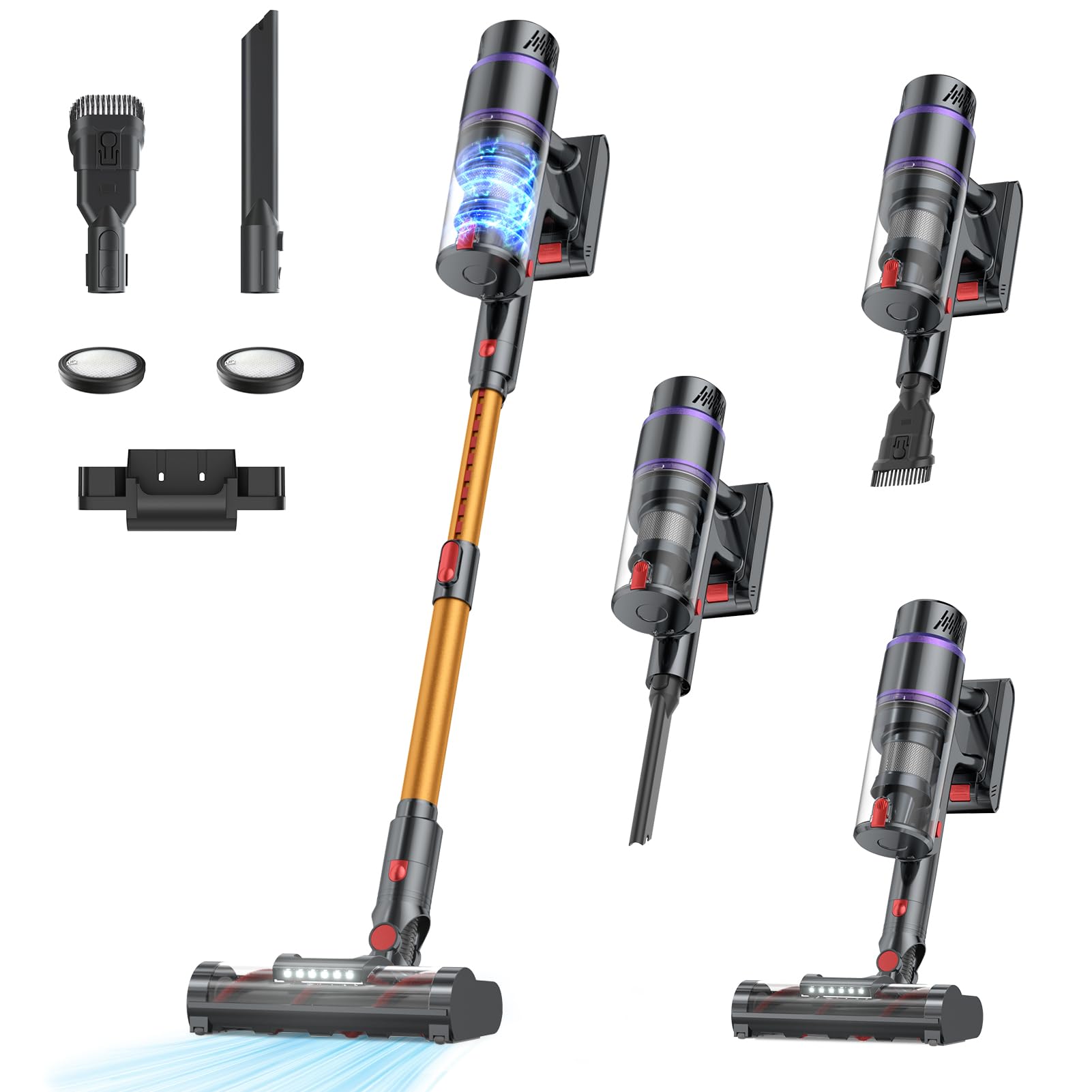
Image 1: The LED touch display on the main body of the frecaer BM08 vacuum, showing battery percentage, suction mode, and fault detection indicators.
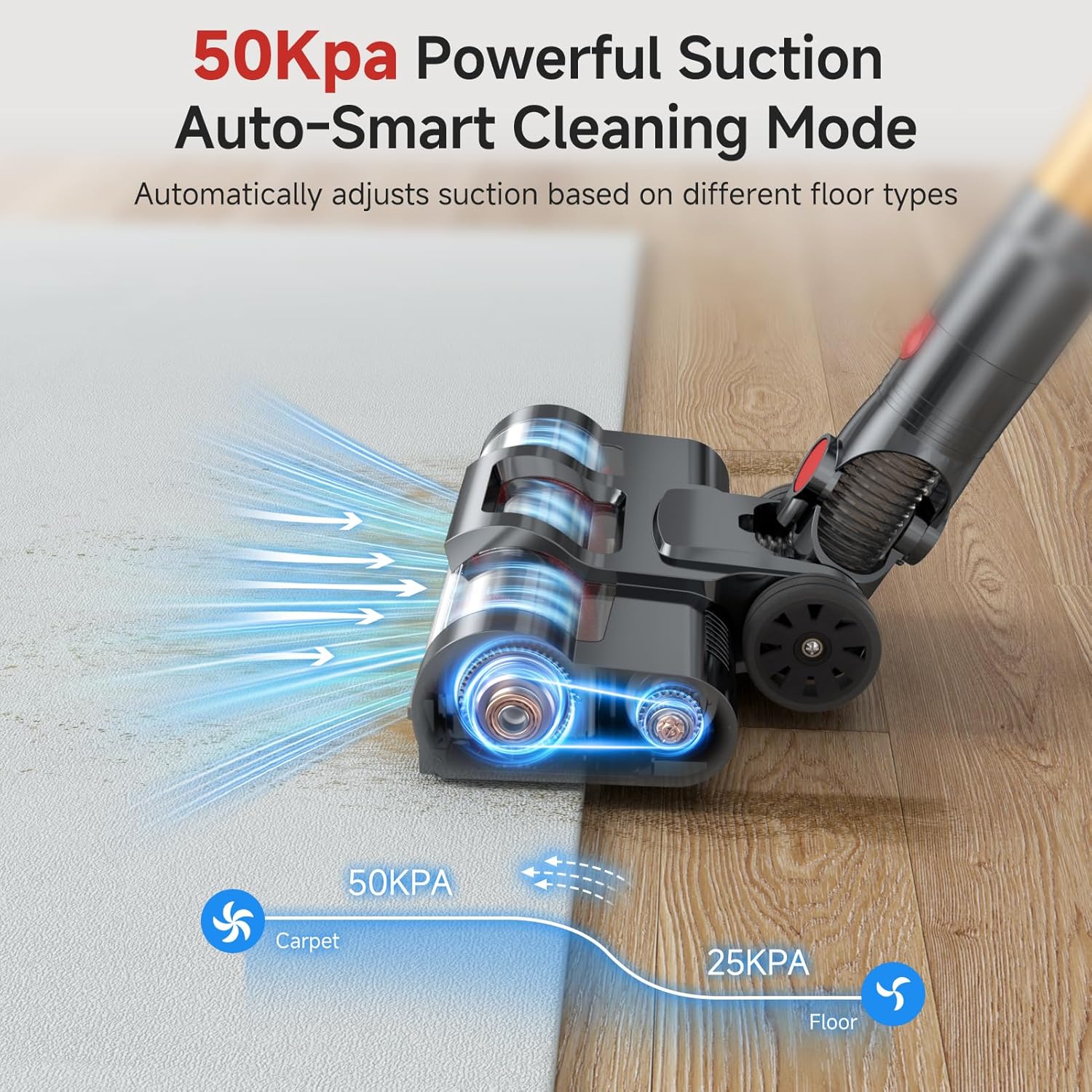
Image 2: Illustration of the Smart Auto Sensor Technology adjusting suction power based on surface type (e.g., 50KPA for carpet, 25KPA for hard floor).

Image 3: Visual representation of the vacuum's ultra-long battery life, highlighting 70 minutes runtime, 8*2500mAh removable battery, and 4.5-hour quick charge.

Image 4: Diagram illustrating the 6-stage filtration system, including the high-density filtration, sponge filter, dust separation technology, dust cup, stainless steel honeycomb filter, and cyclone centrifugation technology.
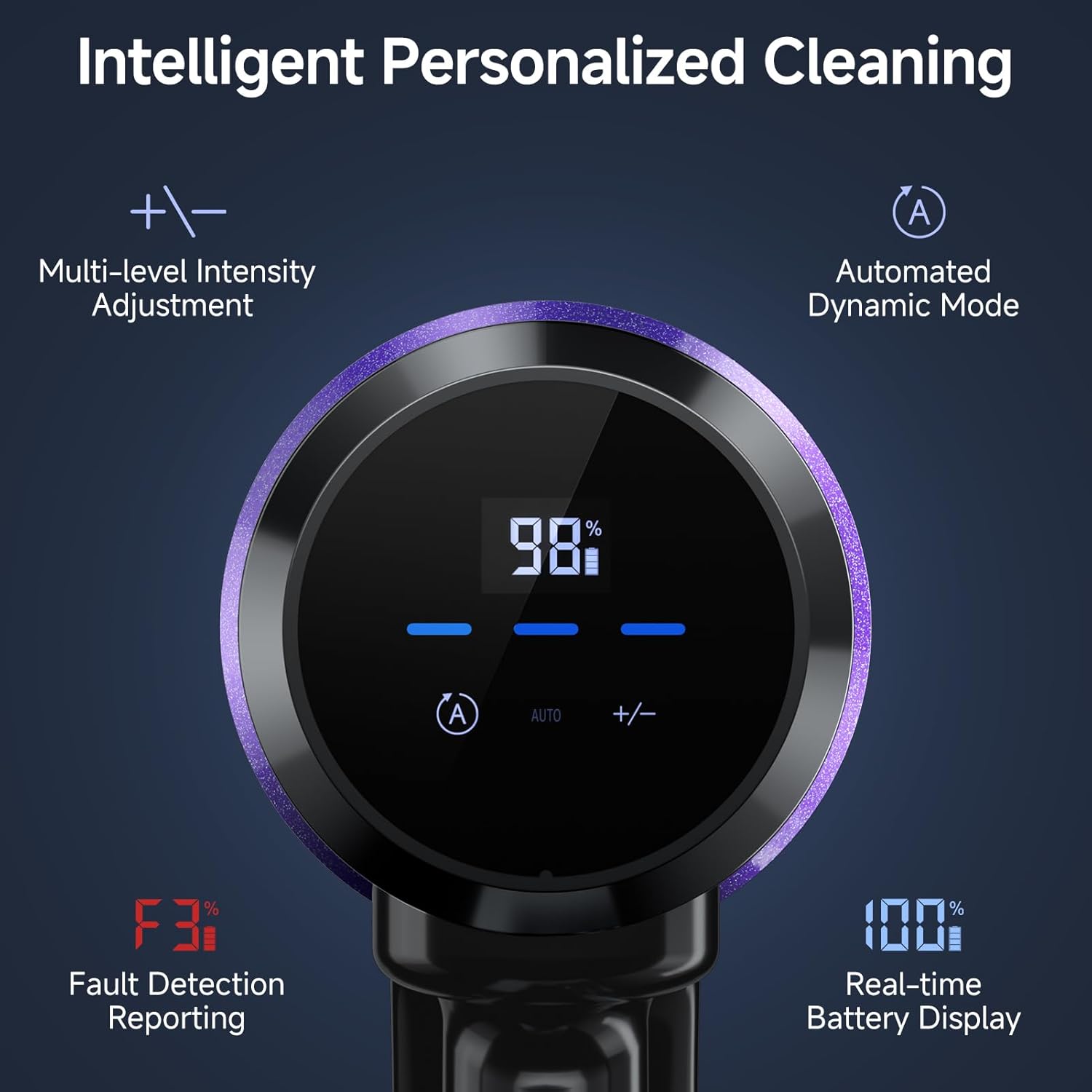
Image 5: Close-up view of the upgraded V-shaped anti-tangle brush roll (BM08) compared to a standard brush roll, designed to prevent hair entanglement.

Image 6: The frecaer BM08 vacuum standing upright independently, demonstrating its self-standing design for convenient pausing and storage.
3. Setup
Assembly
- Attach the Telescopic Rod: Insert the telescopic rod into the main body until it clicks securely into place.
- Attach the Power Brush: Connect the power brush (floor head) to the other end of the telescopic rod until it clicks.
- Install the Battery Pack: Slide the battery pack into the designated slot on the main body until it locks.
- Optional Attachments: For handheld use or specific cleaning tasks, detach the telescopic rod and power brush. Attach the long flat brush or 2-in-1 brush directly to the main body.
Charging
Before first use, fully charge the battery. The battery can be charged while attached to the vacuum or separately.
- Connect the power adapter to the charging port on the battery pack or the wall mounting bracket.
- Plug the adapter into a wall outlet.
- The LED display will show the charging status. A full charge typically takes 4.5 hours.
- For convenient storage and charging, use the included wall mounting bracket.
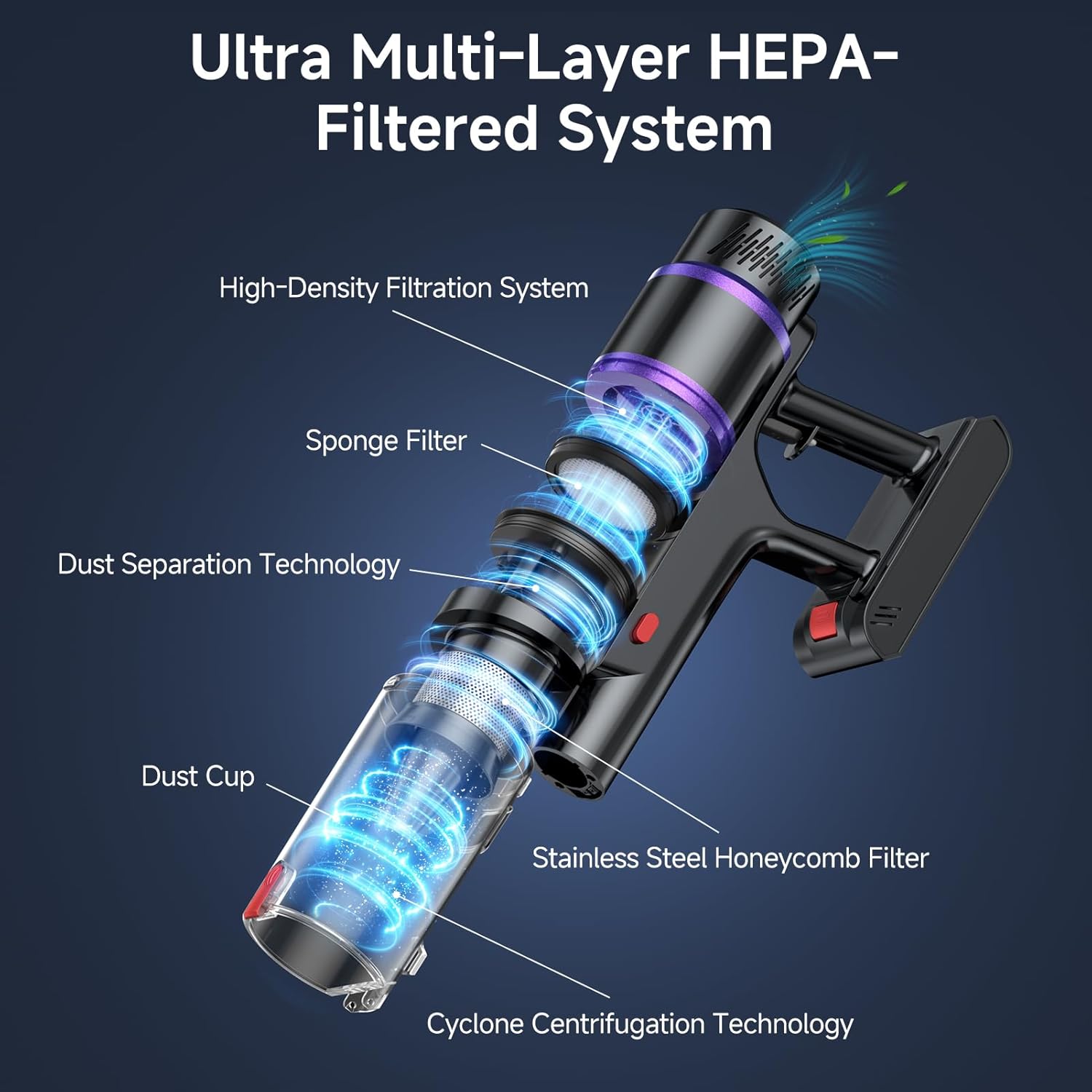
Image 7: The frecaer BM08 vacuum showing two charging methods: directly plugging the adapter into the battery pack, or using the wall-mounted charging station.
4. Operating Instructions
Powering On/Off
Press the power button on the main body to turn the vacuum on or off.
Adjusting Suction Modes
The LED touch display allows you to easily switch between three suction levels or activate Smart Auto Mode:
- Eco Mode: For light cleaning and extended runtime (up to 70 minutes).
- Standard Mode: Balanced power for everyday messes.
- Max Mode: Maximum suction for deep cleaning stubborn dirt and pet hair.
- Smart Auto Mode: The vacuum automatically detects the dust level and adjusts suction power for optimal cleaning and battery conservation.
Using Attachments
- Power Brush: Ideal for all floor types, including hard floors and carpets. The LED lights illuminate dust in dark areas.
- Long Flat Brush: Perfect for reaching narrow gaps, corners, and tight spaces.
- 2-in-1 Brush: Use the brush bristles for delicate surfaces like upholstery or curtains, and retract them for wider suction on flat surfaces.
Video 1: An unboxing and first impressions video of the frecaer BM08 Cordless Vacuum Cleaner, demonstrating its components and initial setup.
Video 2: A demonstration of the frecaer BM08 vacuum's performance, highlighting its strong suction and quiet operation on various surfaces.
Video 3: A short clip showcasing the frecaer BM08 vacuum's ease of use and effectiveness in quick cleanups.
Video 4: A detailed review demonstrating the frecaer BM08 vacuum's features and strong performance on different floor types.
Video 5: A comprehensive video review highlighting the convenience and efficiency of having the frecaer BM08 vacuum for multi-floor homes.
5. Maintenance
Regular maintenance ensures optimal performance and extends the lifespan of your vacuum cleaner.
Emptying the Dust Cup
- Ensure the vacuum is turned off.
- Press the dust cup release button to detach the dust cup from the main body.
- Hold the dust cup over a trash bin and press the bottom release button to open the lid and empty the contents.
- Close the lid and reattach the dust cup to the main body.
Cleaning Filters
The frecaer BM08 features washable and reusable filters. It is recommended to clean them regularly, especially the HEPA filter, to maintain suction power and air quality.
- Remove the dust cup.
- Twist and pull out the HEPA filter and sponge filter from the dust cup.
- Rinse the filters under cold running water until the water runs clear.
- Allow filters to air dry completely for at least 24 hours before reassembling. Do not use a dryer or other heating devices.
- Ensure filters are completely dry before placing them back into the dust cup and reattaching to the vacuum.
Brush Roll Maintenance
The V-shaped anti-tangle brush is designed to minimize hair wrapping, but occasional cleaning may be necessary.
- Turn off the vacuum and detach the power brush.
- Use a coin or a flat tool to unlock the brush roll cover.
- Remove the brush roll and clear any tangled hair or debris.
- Reinsert the brush roll and secure the cover.
6. Troubleshooting
If you encounter any issues with your frecaer BM08 vacuum, please refer to the following common problems and solutions:
| Problem | Possible Cause | Solution |
|---|---|---|
| Vacuum does not turn on | Battery is not charged or not properly installed. | Charge the battery fully. Ensure the battery pack is securely clicked into place. |
| Low suction power | Dust cup is full. Filters are clogged. Brush roll is tangled. Obstruction in nozzle/hose. | Empty the dust cup. Clean or replace filters. Clear any tangled hair from the brush roll. Remove any blockages. |
| Brush roll not spinning | Brush roll is tangled or jammed. Power brush is not properly connected. | Clear any obstructions from the brush roll. Ensure the power brush is securely attached. |
| Short runtime | Battery not fully charged. Using Max Mode continuously. | Fully charge the battery. Use Eco or Standard Mode for longer cleaning sessions. |
If the problem persists, please contact customer support.
7. Specifications
| Feature | Detail |
|---|---|
| Brand | frecaer |
| Model Name/Number | BM08 |
| Power Source | Battery Powered (Lithium-Ion) |
| Wattage | 550 watts |
| Suction Power | 50Kpa |
| Runtime | Up to 70 minutes (Eco Mode) |
| Charging Time | Approx. 4.5 hours |
| Dust Container Capacity | 1.5 Liters |
| Filter Type | 6-stage HEPA Filter (99.99% filtration) |
| Noise Level | 68 Decibels |
| Surface Recommendation | All floors |
| Item Weight | 6 Pounds |
| Item Dimensions (L x W x H) | 17.3"L x 9.4"W x 7.7"H |
| Control Method | Touch |
| UPC | 752259532114 |
8. Warranty and Support
Warranty Information
Your frecaer BM08 Cordless Stick Vacuum Cleaner comes with a 2-year warranty. This warranty covers manufacturing defects and ensures return and exchange service for eligible issues.
Customer Support
For any questions, technical assistance, or warranty claims, please do not hesitate to contact our professional technical team. We are available to provide support within 24 hours.
Please refer to your purchase documentation or the official frecaer website for specific contact details.