
1. Setup and Assembly
Follow these steps to correctly assemble your Primy Office Chair. Ensure all components are present before beginning.
Assembly Video Guide
Video 1: How to Assemble an Office Chair
This video provides a step-by-step visual guide for assembling your Primy Office Chair, covering all major components and ensuring correct setup.
Key Assembly Steps
- Attach the Foot Stool to the Central Base: Secure the five foot stool components to the central base tube using the provided M6*20mm screws and Hexagon Wrench. Ensure they are firmly tightened.
- Insert Casters and Air Rod: Firmly press the five casters into the foot stool. Insert the air rod into the hole of the central base tube. Ensure casters are deeply inserted to prevent them from falling out.
- Attach Base Plate to Seat Cushion: Align the base plate with the 'FRONT' mark on the bottom of the seat cushion. Tighten the four M6*30mm screws using the Hexagon Wrench. Half-tighten screws first, then fully tighten after aligning all holes to prevent shifting.
- Connect Seat Cushion to Air Rod: Insert the air rod into the base plate on the seat cushion. Press the seat cushion from top to bottom, using your whole body's strength to firmly insert it.
- Attach Armrests: Take out the two armrests. Tighten the four M8*25mm screws with the Hexagon Wrench to fix the armrests to the sides of the seat cushion.
- Insert Backrest: Insert the backrest between the two armrests. Align the holes, then press the armrests in and fasten them. Tighten with the four M8*25mm screws. It is recommended for two people to perform this step due to the chair's weight.
- Cover Screw Holes: Cover the screw holes on both sides of the armrests with the eight decoration caps to complete the assembly.
2. Operating Instructions
Your Primy Office Chair offers several adjustable features for optimal comfort and support.
Feature Overview Video
Video 2: Primy Ergonomic Office Chair Features
This video demonstrates the key features of the Primy Office Chair, including height adjustment, rocking function, and flip-up armrests.
Adjustable Features
- Ergonomic Support: The high backrest is designed to follow the natural curve of your spine, providing multi-point support for your back, waist, and shoulders. This helps alleviate pressure during prolonged sitting and promotes better posture.
- 90° Flip-Up Armrests: The armrests can be flipped up 90 degrees, allowing the chair to slide completely under your desk when not in use, ideal for compact spaces. When down, they provide comfortable arm support.
- Rocking Function: Use the right-side handle to control the chair angle. Pull it out to recline, and push it back to return upright. Adjust the rocking tension with the knob for a smooth transition between work and relaxation.
- Height Adjustment: Utilize the lever located under the seat to adjust the chair's height to your preferred level.
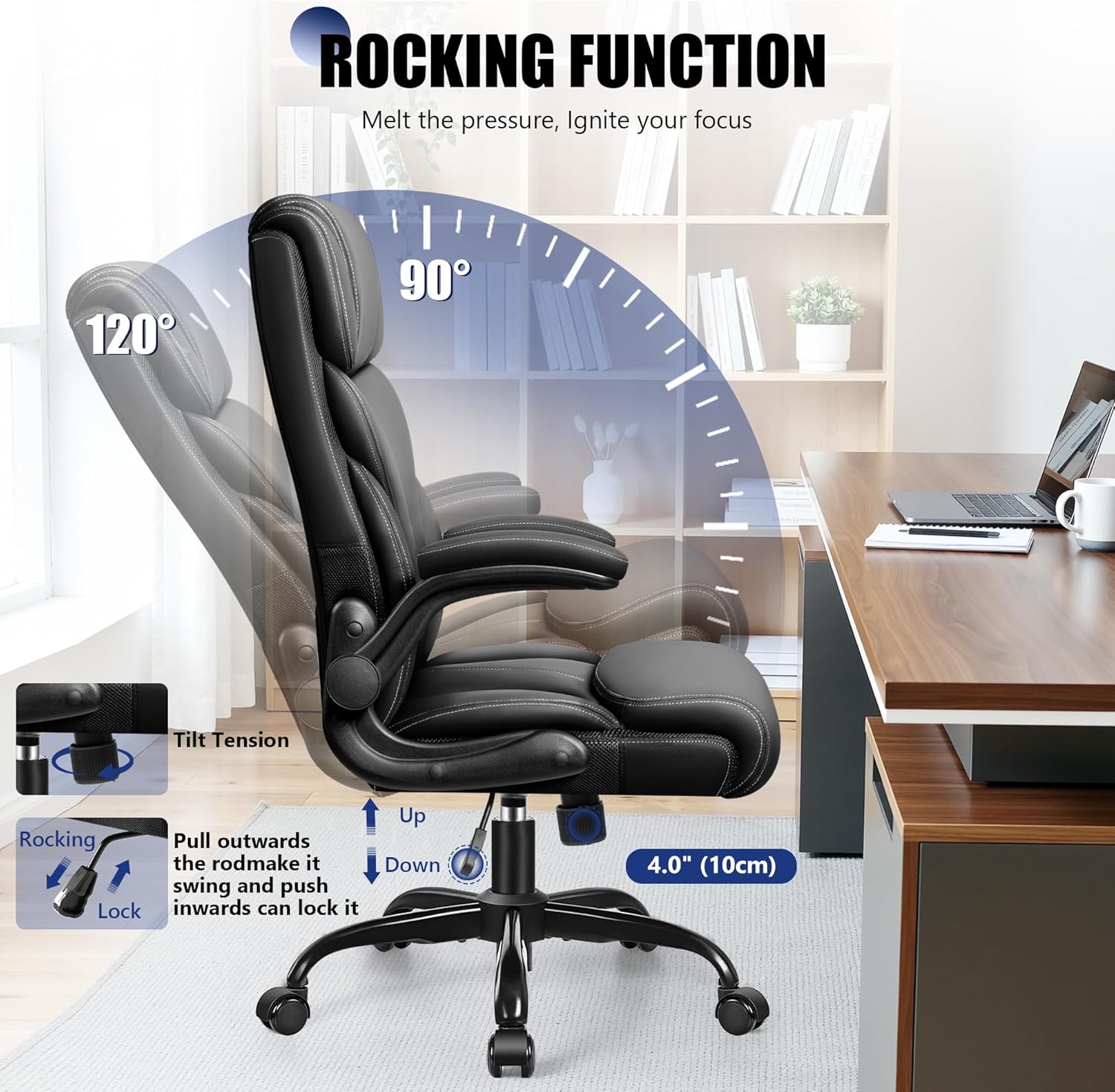
Image 1: Rocking Function
This image illustrates the rocking function, showing the chair's ability to recline from 90° to 120° for comfort and relaxation.

Image 2: 90° Flip-Up Armrests
This image highlights the flip-up armrests, demonstrating how they can be raised to save space or lowered for arm support.

Image 3: Ergonomic Design
This image details the ergonomic design, showcasing the head, back, lumbar, and waist support features that conform to the human body.
3. Maintenance
Proper maintenance ensures the longevity and appearance of your Primy Office Chair.
- Cleaning: The high-quality PU leather upholstery is breathable, durable, and easy to clean. Simply wipe away daily dirt and spills with a damp cloth. Avoid harsh chemicals that may damage the material.
- Caster Care: Periodically check the 360° silent swivel casters for any debris (hair, dust) that might hinder smooth movement. Clean as necessary to maintain floor-friendly operation.
- Tighten Fasteners: Over time, screws and bolts may loosen. Periodically check and tighten all fasteners to ensure the chair remains stable and safe.
4. Troubleshooting
If you encounter any issues with your Primy Office Chair, refer to the following common solutions:
- Chair not adjusting height: Ensure the gas lift lever is fully engaged. If the issue persists, check for any obstructions or contact customer support.
- Chair feels unstable/wobbly: Check all assembly screws and bolts, especially those connecting the base, armrests, and backrest. Tighten any loose fasteners.
- Casters not rolling smoothly: Inspect the casters for trapped debris (hair, lint) and clean them thoroughly. Ensure they are properly inserted into the foot stool.
- Rocking function not working: Verify that the rocking tension knob is not overtightened or too loose. Adjust the knob to find the desired resistance. Ensure the recline lever is correctly engaged.
5. Specifications
Detailed specifications for the Primy Office Chair (Model B0GFSNBJ7B).

Image 4: Product Dimensions
This image provides a visual representation of the chair's dimensions, including height, width, and depth, along with recommended user size and weight capacity.
| Feature | Detail |
|---|---|
| Brand | Primy |
| Model | B0GFSNBJ7B |
| Color | Black |
| Material | Faux Leather (Seat), Leather (General), Foam (Fill) |
| Product Dimensions (D x W x H) | 22.8"D x 26.7"W x 46.9"H |
| Item Weight | 30 Pounds |
| Maximum Weight Recommendation | 400 Pounds |
| Back Style | High Back |
| Additional Features | Adjustable Height, Flip-Up Arm Rests, Ergonomic, Head Support, Swivel, Rocking Function |
| Frame Material Type | Metal |
| Gas Lift | SGS-certified Class 3 |
| Casters | 360° Silent Swivel |
| Required Assembly | Yes |
6. Warranty and Support
For any questions, concerns, or support regarding your Primy Office Chair, please refer to the following information:
- Warranty: Please consult your purchase documentation or the product packaging for specific warranty details.
- Customer Service: For assistance, please contact Primy customer support through the retailer's platform or the contact information provided in your product packaging.


