
Introduction
The Tuomico HT-707Pro is a rechargeable, battery-powered electric air pump designed for inflating and deflating various inflatable water sports equipment and other items. This portable air compressor delivers up to 20 PSI of high pressure and features an automatic shut-off function for precise inflation. Its cordless design and multiple nozzle attachments make it a versatile tool for outdoor activities.
What's in the Box
Upon unpacking, please ensure all the following components are present:
- Electric Air Pump (HT-707Pro)
- Air Hose
- Multiple Nozzles (8 universal fit adapters)
- Carrying Case
Key Features
- Dual Stage Inflation & Deflation: Provides efficient inflation and deflation for quick setup and takedown.
- Large Battery Capacity: Equipped with a 14.8V/74WH built-in battery, capable of inflating multiple paddleboards on a single charge.
- Active Cooling System: Prevents overheating during extended use, allowing for continuous inflation of multiple items.
- Automatic Shut-off: Automatically stops when the preset target pressure is reached, preventing over-inflation.
- Compact & Lightweight Design: Easy to transport and store, weighing only 1.55 kg (3.4 lbs).
- Fast Charging & Power Bank Function: Supports 45W fast charging (charger not included) and can act as a power bank via its Type-C output.
- Versatile Adapters: Includes 8 universal fit adapters for compatibility with various inflatable items.
Setup
1. Charging the Pump
Before initial use, fully charge the pump. Connect a Type-C charging cable (not included) to the pump's Type-C input port and a compatible 45W fast charger. A full charge takes approximately 3 hours. The LED display will indicate the charging status.

Image: The Tuomico HT-707Pro pump connected to a wall charger via a USB-C cable, illustrating the charging process.
2. Attaching the Hose and Nozzle
- Connect the air hose to the appropriate inflation or deflation port on the pump. Ensure it is securely twisted into place.
- Select the correct nozzle adapter for your inflatable item. The pump includes 8 universal fit adapters.
- Attach the selected nozzle to the other end of the air hose.

Image: The Tuomico HT-707Pro pump connected to a paddleboard for inflation, with various nozzle adapters displayed in the foreground.
Operating Instructions
1. Powering On/Off
- To power on, press and hold the power button (usually marked with a power symbol) for a few seconds until the LED display illuminates.
- To power off, press and hold the power button again.
2. Setting Desired Pressure (PSI/BAR) and Modes
The pump features an intuitive LED display and control buttons for setting pressure and selecting modes.

Image: The Tuomico HT-707Pro pump's LED display and control panel, showing buttons for custom mode, paddle board mode, tent mode, air mattress mode, inflation, deflation, and power.
- After powering on, use the Mode Switch Button (M) to cycle through preset modes (Paddle Board, Tent, Air Mattress) or select the Custom mode.
- Use the Pressurizing Button (+) and Decompressing Button (-) to adjust the target pressure. The digital display shows the pressure in PSI or BAR.
- To switch between PSI and BAR units, press the Pressure Unit Toggle Button.
3. Inflation Process
- Connect the hose with the appropriate nozzle to your inflatable item's valve.
- Ensure the target pressure is set.
- Press the ON/OFF Button to start inflation. The pump will operate in two stages: a high-volume stage followed by a high-pressure stage.
- The pump will automatically shut off once the set pressure is reached.
- Disconnect the hose from the item and the pump.
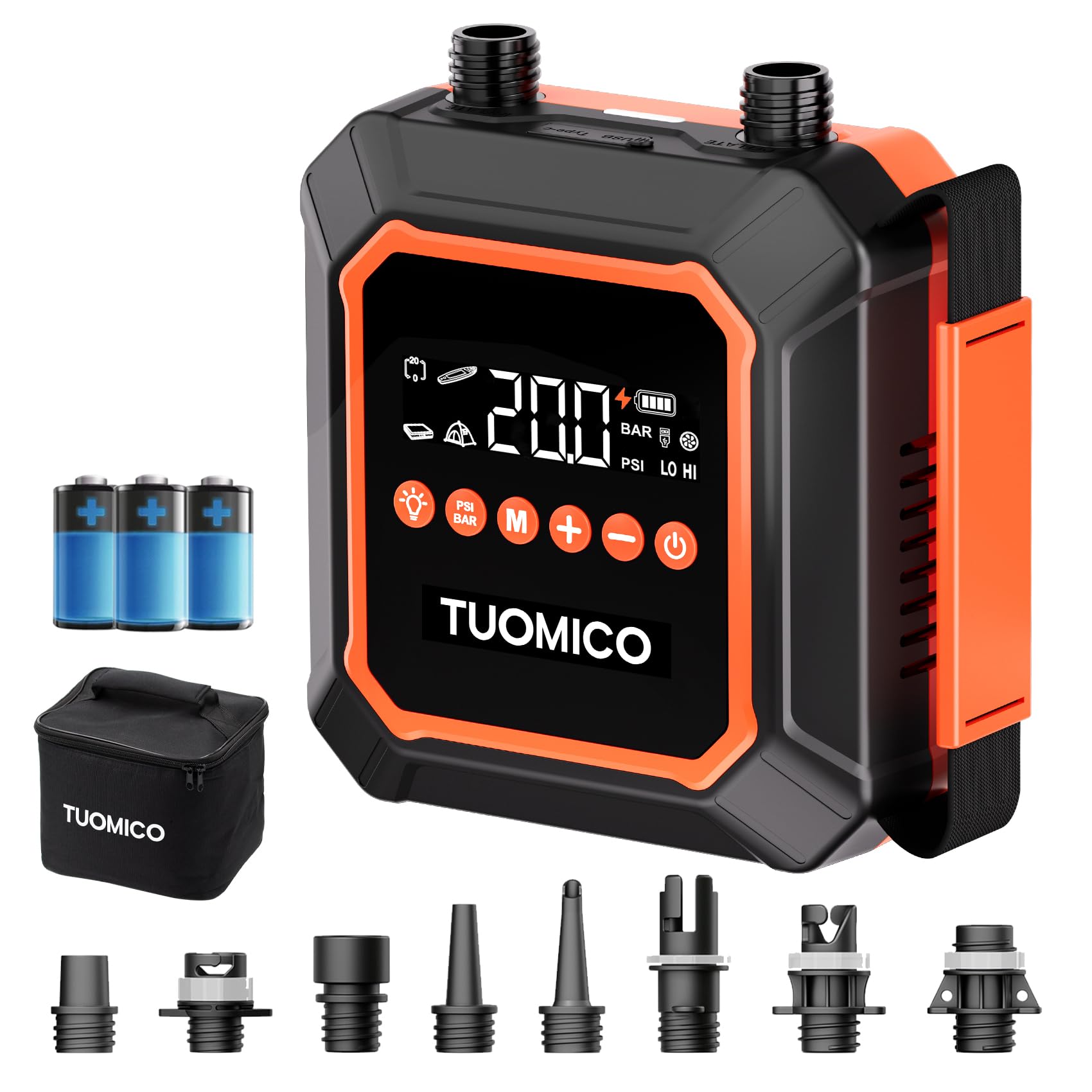
Image: A Tuomico HT-707Pro pump actively inflating a paddleboard on a sandy beach, demonstrating its portable use.
4. Deflation Process
- Connect the hose with the appropriate nozzle to your inflatable item's valve, ensuring it's connected to the deflation port on the pump.
- Press the ON/OFF Button to start deflation.
- The pump will quickly remove air from the item.
- Once deflated, disconnect the hose.

Image: A Tuomico HT-707Pro pump connected to a paddleboard for deflation, showing the process of packing up.
5. Using as a Power Bank
The pump features a Type-C output port, allowing it to be used as a power bank to charge compatible electronic devices like smartphones. Connect your device using a Type-C cable to the pump's output port.
Maintenance
1. Cleaning
Wipe the pump's exterior with a soft, damp cloth. Do not use harsh chemicals or abrasive cleaners. Ensure the pump is completely dry before storage or next use.
2. Storage
Store the pump and its accessories in the provided carrying case in a cool, dry place, away from direct sunlight and extreme temperatures. Ensure the hose is not kinked during storage.
3. Battery Care
To maximize battery longevity, it is recommended to fully discharge the battery before recharging it. Allow the unit to cool down after use before plugging it in for charging, especially after prolonged operation, to prevent overheating and promote battery health.
Troubleshooting
- Pump does not turn on:
- Ensure the battery is charged. Connect the pump to a power source and allow it to charge for at least 30 minutes before attempting to power on again.
- Pump inflates slowly or not to desired pressure:
- Check that the hose and nozzle are securely attached and there are no air leaks.
- Verify that the correct target pressure is set on the display.
- Ensure the battery has sufficient charge. Performance may decrease with low battery levels.
- Confirm the nozzle is fully inserted into the inflatable item's valve.
- Pump overheats during use:
- The pump has an active cooling system, but continuous operation for very large items or multiple items in hot conditions can still generate heat. If the pump feels excessively hot, turn it off and allow it to cool down for at least 15-20 minutes before resuming operation. Avoid operating in direct sunlight for extended periods.
- Digital display is not working or showing incorrect readings:
- Try turning the pump off and on again. If the issue persists, ensure the battery is fully charged. If the problem continues, contact customer support.
Specifications
| Brand | Tuomico |
| Model Number | HT-707Pro |
| Material | Plastic |
| Item Weight | 1.55 Kilograms (3.4 lbs) |
| Product Dimensions (L x W x H) | 7" x 6.7" x 3.4" |
| Power Source | Battery Powered (Lithium-ion) |
| Air Flow Capacity | 350 Liters Per Minute |
| Maximum Pressure | 20 PSI |
| Operation Mode | Automatic |
| Connector Type | USB Type-C (Input & Output) |
| Hose Length | 3.3 Feet |
Warranty and Support
The Tuomico HT-707Pro Electric Paddle Board Pump comes with a 1-Year Manufacturer Warranty.
For warranty claims, technical support, or any questions regarding the product, please contact Tuomico customer service through the retailer where the product was purchased or visit the official Tuomico website for contact information.