1. Product Overview
The Generic I428 125V~.3W Red Indicator Light is a compact and efficient signaling device designed for various electrical applications. It provides a clear visual indication of circuit status, power presence, or operational state. This indicator light operates at 125 Volts and consumes 0.3 Watts, making it suitable for integration into control panels, machinery, and other equipment. It is compatible with systems requiring indicator lights for models such as 80130, 80580 (HSSW-SS), and 81150 (FSPW-SS).
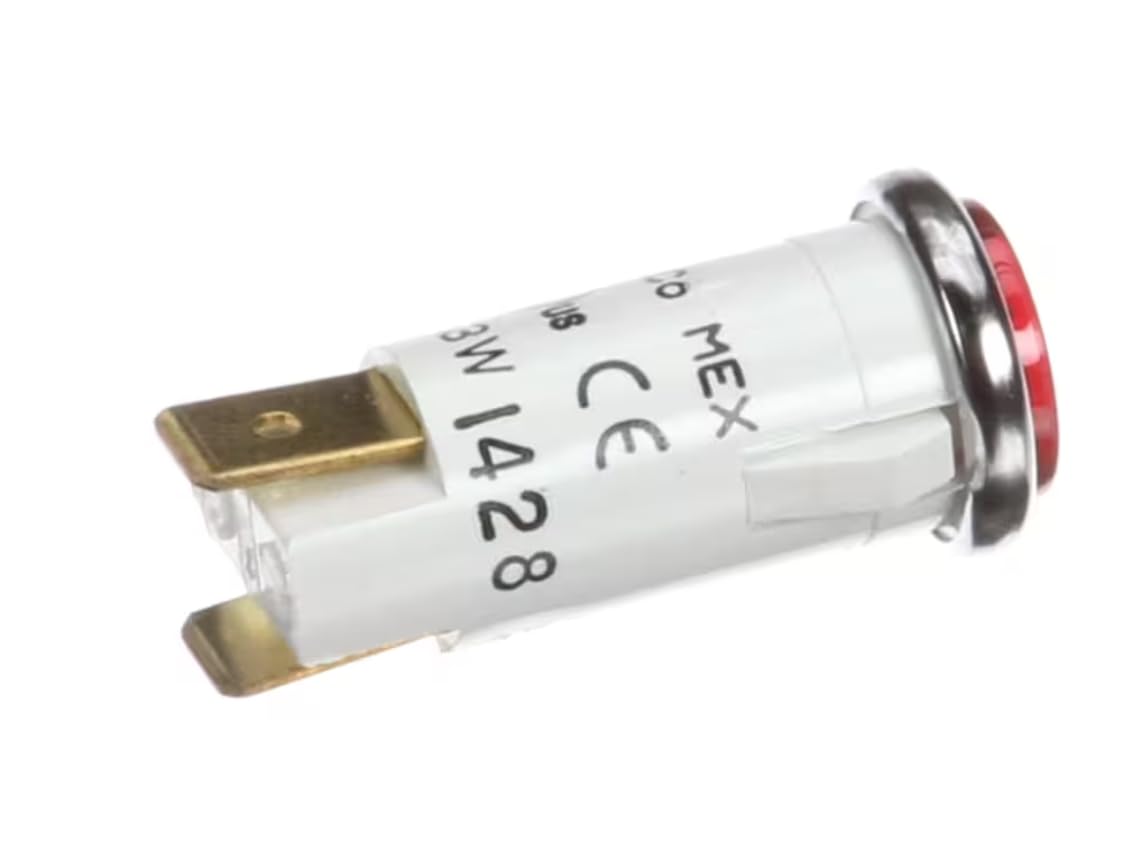
Figure 1: Front view of the Generic I428 Red Indicator Light, showing the red lens and metal bezel.
2. Safety Information
Please read and understand all safety instructions before installing or operating the indicator light. Failure to follow these instructions may result in electrical shock, fire, or personal injury.
- Electrical Hazard: Ensure power is disconnected at the main circuit breaker or fuse box before installation or maintenance.
- Qualified Personnel: Installation and wiring should only be performed by a qualified electrician or trained personnel.
- Voltage Compatibility: Verify that the supply voltage matches the indicator light's rated voltage (125V). Connecting to an incorrect voltage can damage the device and pose a safety risk.
- Proper Wiring: Use appropriate wire gauges and connectors for the electrical load and ensure all connections are secure.
- Environmental Conditions: Do not expose the indicator light to excessive moisture, dust, or extreme temperatures beyond its specified operating range.
3. Package Contents
Carefully unpack the product and check for any damage. If any components are missing or damaged, contact your supplier immediately.
- 1 x Generic I428 125V~.3W Red Indicator Light
4. Setup and Installation
Follow these steps for proper installation of the indicator light.
4.1 Mounting
- Prepare Mounting Hole: Ensure the mounting surface has a suitable hole for the indicator light. The product dimensions are 1.4"L x 0.55"W x 0.55"H, so a hole slightly larger than 0.55" (approximately 14mm) in diameter is typically required for the bezel.
- Insert Light: Carefully insert the indicator light into the prepared mounting hole from the front of the panel.
- Secure Light: If applicable, use the provided locking nut or clip (not explicitly stated as included, but common for such devices) to secure the indicator light firmly in place from the rear of the panel.
4.2 Wiring

Figure 2: Rear view of the indicator light, showing the spade terminals for electrical connection.
- Disconnect Power: Before making any electrical connections, ensure that the power supply to the circuit is completely disconnected.
- Identify Terminals: The indicator light typically has two spade terminals for connection. These are usually non-polarized for AC applications, meaning either terminal can be connected to the live or neutral wire.
- Connect Wires: Connect the appropriate wires from your 125V AC circuit to the spade terminals of the indicator light. Use insulated spade connectors for a secure and safe connection.
- Verify Connections: Double-check all wiring to ensure connections are tight and correct according to local electrical codes.
- Restore Power: Once installation is complete and verified, restore power to the circuit.
5. Operating Instructions
The Generic I428 Red Indicator Light operates automatically once correctly installed and powered.
- When the indicator light receives 125V AC power, the red LED will illuminate, providing a visual signal.
- The light will remain illuminated as long as power is supplied to its terminals.
- When power is removed, the light will turn off.
This indicator is designed for continuous operation within its specified voltage and power ratings.
6. Maintenance
The Generic I428 Red Indicator Light requires minimal maintenance.
- Cleaning: Periodically clean the lens with a soft, dry cloth to ensure optimal visibility. Do not use abrasive cleaners or solvents.
- Inspection: Regularly inspect the indicator light and its wiring for any signs of damage, loose connections, or discoloration. If any issues are found, disconnect power and address them immediately.
- Replacement: If the indicator light fails to illuminate or shows signs of damage, it should be replaced by a qualified technician. Ensure the replacement part matches the original specifications (Model I428, 125V~.3W).
7. Troubleshooting
If the indicator light is not functioning as expected, refer to the following troubleshooting guide:
| Problem | Possible Cause | Solution |
|---|---|---|
| Indicator light does not illuminate. |
|
|
| Indicator light flickers or is dim. |
|
|
If troubleshooting steps do not resolve the issue, consult a qualified electrician.
8. Specifications
| Brand | Generic |
| Model Number | I428 125V~.3W |
| Voltage | 125 Volts |
| Power Consumption | 0.3 Watts (implied from model number) |
| Light Color | Red |
| Item Weight | 0.08 Pounds |
| Product Dimensions (L x W x H) | 1.4" x 0.55" x 0.55" |
| Unit Count | 1.0 Count |
9. Warranty and Support
Specific warranty information for this Generic product is not provided within this manual. For details regarding warranty coverage, technical support, or replacement parts, please refer to the documentation included with your purchase or contact the retailer or manufacturer directly.
Always provide the model number (I428 125V~.3W) when seeking support.


