1. Introduction
This manual provides essential information for the safe and effective use of your Niceminiwall Three-Phase Voltage Protector. This device is designed to safeguard electrical systems from various power anomalies, including overvoltage, undervoltage, overcurrent, short circuits, and phase imbalance issues. It features dual digital displays for real-time voltage and current monitoring and supports both synchronous and asynchronous operation modes.
2. Safety Information
WARNING: Electrical shock hazard. Installation and maintenance should only be performed by qualified personnel.
- Always disconnect power before installing or servicing the device.
- Ensure all wiring connections are secure and comply with local electrical codes.
- Do not operate the device if it appears damaged.
- Keep the device away from moisture and extreme temperatures.
- Verify the voltage and current ratings of your electrical system match the device specifications.
3. Product Overview
The Niceminiwall Three-Phase Voltage Protector is housed in a flame-resistant plastic casing, designed for durability and safety. It features a clear digital display for monitoring and control buttons for configuration.
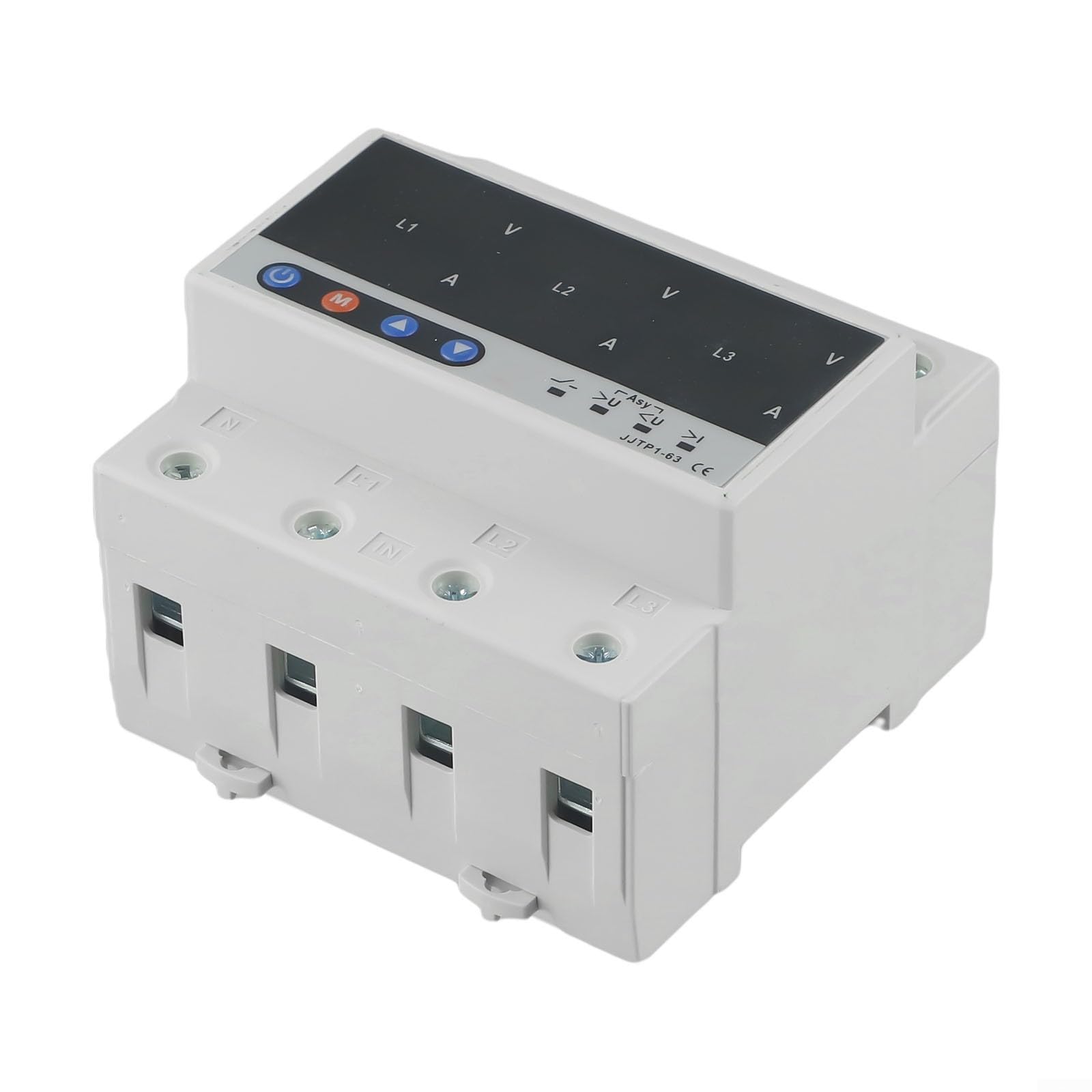
Image: Front view of the Niceminiwall Three-Phase Voltage Protector, showing the digital display and control buttons.
Key Components:
- Digital Display: Two large-font LED screens show real-time voltage (V) and current (A) readings for each phase (L1, L2, L3).
- Control Buttons: Power button, Mode button (M), and Up/Down arrow buttons for navigation and setting adjustments.
- Input/Output Terminals: Clearly labeled terminals for connecting the three-phase power input and protected load output.
- Status Indicators: Icons indicating operational mode (ASY), overvoltage (>U), undervoltage (<U), and overcurrent (>I).
4. Specifications
| Feature | Description |
|---|---|
| Manufacturer | Niceminiwall |
| Part Number | Digital Display Voltage |
| Product Dimensions | 10 x 2 x 2.7 inches (105 x 85 x 95 mm) |
| Item Model Number | Three-Phase Voltage Protector |
| Material | Flame-resistant plastic shell |
| Protection Features | Overvoltage, Undervoltage, Overcurrent, Short Circuit, Overload, Wire-related issues, Voltage Balance |
| Display | Dual digital displays for Voltage (V) and Current (A) |
| Operating Modes | Synchronous (SYN) and Asynchronous (ASY) |
5. Setup and Installation
Proper installation is crucial for the safe and effective operation of the voltage protector. It is recommended that installation be performed by a certified electrician.

Image: Side view of the voltage protector, illustrating its compact design and potential mounting points.
Installation Steps:
- Power Disconnection: Ensure all power to the circuit where the protector will be installed is completely disconnected at the main breaker.
- Mounting: Mount the device securely in a suitable electrical enclosure or on a DIN rail, ensuring adequate ventilation.
- Wiring Input: Connect the incoming three-phase power lines (L1, L2, L3) and neutral (N) to the designated "IN" terminals on the protector.
- Wiring Output: Connect the protected load lines (T1, T2, T3) and neutral (N) to the designated "OUT" terminals.
- Verify Connections: Double-check all wiring for correct polarity and secure connections to prevent loose contacts.
- Restore Power: Once installation is complete and verified, restore power to the circuit. The device will power on and display current readings.
6. Operating Instructions
The voltage protector is designed for automatic operation, but settings can be adjusted using the control buttons.

Image: The voltage protector's digital display showing active voltage and current readings for each phase.
Initial Power-On:
Upon power-up, the device will perform a self-test and then display the real-time voltage and current for each phase. If any discrepancies are noted, manual calibration may be performed as per advanced settings (refer to the full technical manual for detailed calibration procedures).
Operating Modes:
- Synchronous Mode (SYN): In this mode, the protector's relay opens simultaneously for all three phases if a fault is detected. This functions as a unified three-phase protector.
- Asynchronous Mode (ASY): In this mode, the three-phase relay operates separately. It functions as three individual single-phase protectors, allowing for independent protection of each phase. The ASY indicator will be visible on the display.
Use the 'M' (Mode) button to cycle through display information or enter settings menus. Use the Up/Down arrow buttons to adjust values or navigate options.
Protection Functions:
- Automatic Power Off: In the event of detected overvoltage, undervoltage, or overcurrent, the protector will instantly cut off the power supply to protect connected electrical equipment.
- Overload Protection: The device includes an automatic power-off function if the current exceeds the specified power range.
- Automatic Reset: If the protector is in ASY mode and a phase voltage imbalance is resolved, the device will automatically reset and restore power, preventing prolonged outages. It also quickly responds to overvoltage and undervoltage issues.
- Adjustable Delay: The device allows for adjustable reset timing and other delays to suit specific application requirements.
7. Maintenance
The Niceminiwall Three-Phase Voltage Protector requires minimal maintenance to ensure optimal performance.
- Regular Inspection: Periodically inspect the device for any signs of physical damage, loose connections, or discoloration.
- Cleaning: Gently clean the exterior of the device with a dry, soft cloth. Do not use abrasive cleaners or solvents. Ensure power is disconnected before cleaning.
- Environmental Conditions: Ensure the operating environment remains within the specified temperature and humidity ranges.
8. Troubleshooting
If you encounter issues with your voltage protector, refer to the following common problems and solutions:
| Problem | Possible Cause | Solution |
|---|---|---|
| Device not powering on | No input power; Loose wiring; Internal fault | Check main power supply; Verify all input wiring connections; Contact support if power is present but device remains off. |
| Frequent tripping/power cuts | Actual over/undervoltage or overcurrent; Incorrect settings; Faulty load | Check power grid stability; Verify load current/voltage; Adjust protection parameters if necessary (consult full manual); Inspect connected equipment for faults. |
| Inaccurate display readings | Need for calibration; Sensor issue | Perform manual calibration (refer to full manual); Contact support if calibration does not resolve the issue. |
| Device remains off after fault clears (ASY mode) | Automatic reset delay active; Persistent fault | Wait for the adjustable reset delay to complete; Ensure the underlying fault has truly cleared. |
If the problem persists after attempting these solutions, please contact customer support.
9. Warranty and Support
For warranty information, technical support, or service inquiries, please contact Niceminiwall directly. Refer to the product packaging or the official Niceminiwall website for the most current contact details.
Manufacturer Contact Information: Niceminiwall