
1. Introduction
This manual provides essential instructions for the safe and efficient use of your DATOUBOSS FBM-JC-6232-EU-3 Home Energy Storage System. This all-in-one unit integrates a powerful 48V 6200W hybrid inverter with a 48V 628Ah Lithium Iron Phosphate (LiFePO4) battery, offering a total capacity of 32.15 kWh. Designed for home energy storage, off-grid solar systems, and backup power applications, this system simplifies installation by combining components into a single, movable unit.
The system features a base equipped with movable pulleys, allowing for easy relocation after unpacking without manual installation. Its integrated design eliminates the need for separate inverter and battery purchases, reducing complex wiring and communication setups.

2. Safety Information
Read all safety instructions carefully before installation, operation, or maintenance. Failure to follow these instructions may result in electric shock, fire, serious injury, or property damage.
2.1 General Safety Precautions
- Qualified Personnel: Installation and maintenance must be performed by qualified personnel familiar with electrical systems and battery storage.
- Disconnect Power: Always disconnect all power sources (AC grid, PV input, battery) before performing any service or maintenance.
- Grounding: Ensure the system is properly grounded according to local electrical codes.
- Ventilation: Install the system in a well-ventilated area to prevent overheating. Do not block ventilation openings.
- Weight: The unit weighs approximately 526 pounds (239 kg). Use appropriate lifting equipment and techniques to prevent injury during unpacking and placement.
- Environment: Do not expose the unit to rain, snow, liquids, or excessive dust. Operate within specified temperature and humidity ranges.
2.2 Battery Safety
The integrated LiFePO4 battery includes a Battery Management System (BMS) for protection. However, observe the following precautions:
- No Disassembly: Do not attempt to open or disassemble the battery pack or the system unit. There are no user-serviceable parts inside.
- Avoid Short Circuits: Ensure all connections are secure and prevent any possibility of short circuits.
- Temperature: The BMS protects against overheating and low temperatures. However, avoid installing the unit in environments with extreme temperatures outside the operating range (-10°C to 50°C).
- Damage: If the battery or unit appears damaged, do not operate it. Contact customer service immediately.
3. Product Overview
The DATOUBOSS Home Energy Storage System is an all-in-one solution featuring a hybrid inverter, a high-capacity LiFePO4 battery, and an integrated Battery Management System (BMS). It is designed for ease of use and monitoring through its touch color LCD display.
3.1 Main Components
- Hybrid Inverter: 48V 6200W capacity, managing power flow between solar panels, battery, grid, and loads.
- LiFePO4 Battery: 48V 628Ah (32.15 kWh) for stable and long-lasting energy storage.
- Battery Management System (BMS): Built-in protection against overcharging, over-discharging, over-current, short circuits, overheating, and low temperatures.
- Touch Color LCD Display: For monitoring system status and configuring settings.
- Movable Casters: 360° swivel casters for easy mobility of the unit.
3.2 Front Panel and Connections
The front panel provides access to the touch screen, indicator lights, and control buttons. The lower section houses the various input and output ports.

- Touch Screen: Main interface for monitoring and control.
- Indicator Lights: RUN (operation status), ALM (alarm), RESET (system reset).
- Battery Indicator Light: Shows charge level (100%, 75%, 50%, 25%).
- AC IN ON/OFF Switch: Controls the AC grid input.
- ON/OFF Inverter Switch: Controls the inverter operation.
- ON/OFF Battery Switch: Controls the battery power.
- AC OUT ON/OFF Switch: Controls the AC output to loads.
- PV ON/OFF Switch (x2): Controls the solar panel inputs.
- PV Interface (x2): Connects to solar panels.
- AC Input: Connects to the utility grid.
- AC Output (x2): Provides power to household loads.

4. Setup
4.1 Unpacking and Placement
The DATOUBOSS system is shipped in a protective crate. Due to its significant weight (approximately 526 pounds / 239 kg), ensure adequate personnel or lifting equipment is available for safe handling.
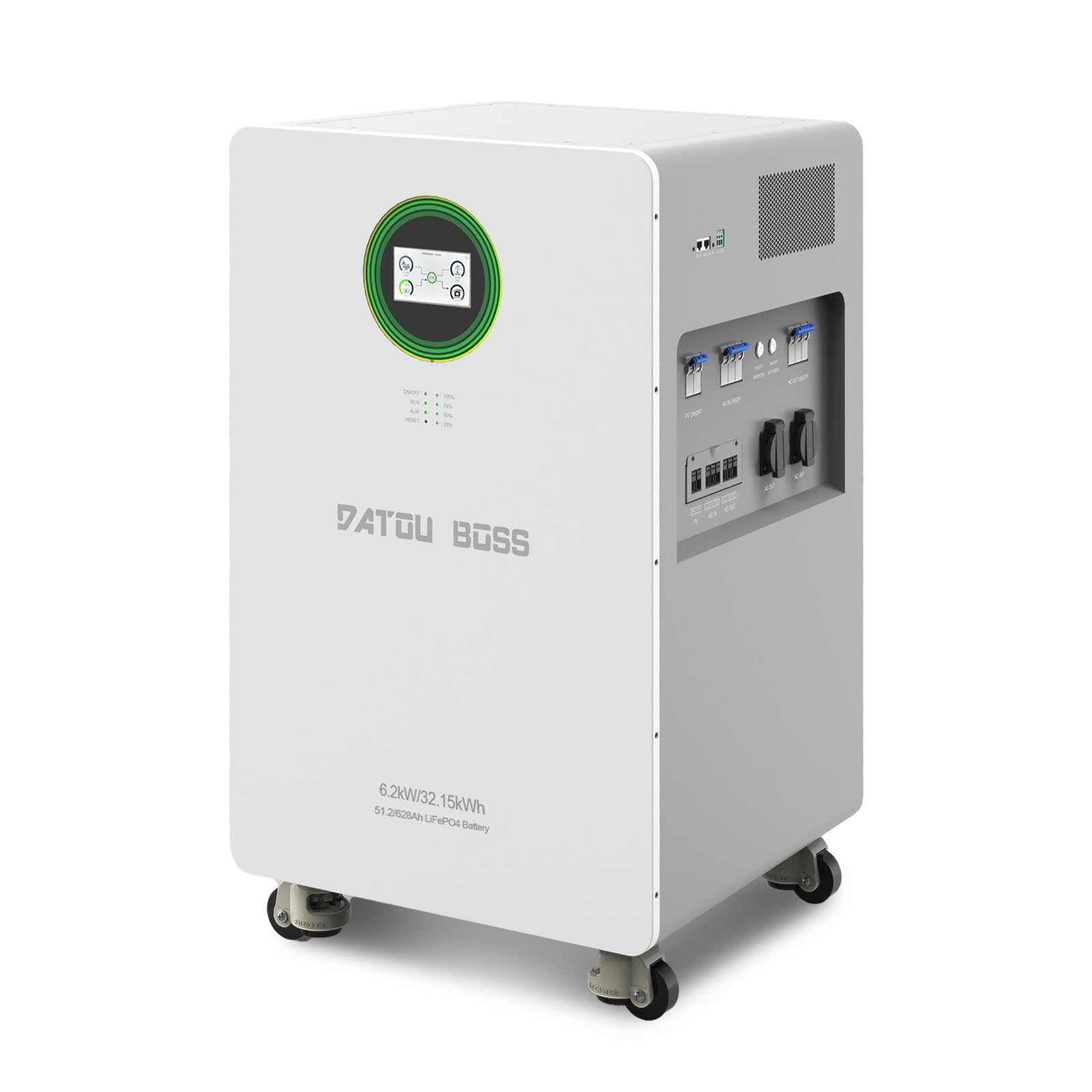
- Carefully remove the unit from its packaging.
- Utilize the integrated movable pulleys to position the unit in its desired location.
- Ensure the installation area is well-ventilated, dry, and free from direct sunlight or heat sources. Maintain adequate clearance around the unit for airflow.
- The ambient operating temperature range is -10°C to 50°C.
4.2 Electrical Connections
All electrical connections must be performed by a qualified electrician in accordance with local and national electrical codes.
- PV Input Connection: Connect your solar panel arrays to the PV Interface ports. Ensure correct polarity (+/-) and that the PV input voltage and current are within the system's specifications (Max PV input power: 8500W, MPPT tracking range: 60-500VDC, Max PV input voltage: 500VDC, Max PV input current: 27A).
- AC Input Connection: Connect the utility grid power to the AC Input port.
- AC Output Connection: Connect your household loads or distribution panel to the AC Output ports.
- Grounding: Ensure the system is properly grounded.
4.3 Initial Power-Up
After all connections are securely made and verified:
- Turn on the ON/OFF Battery Switch.
- Turn on the ON/OFF Inverter Switch.
- If connecting to the grid, turn on the AC IN ON/OFF Switch.
- If connecting solar panels, turn on the PV ON/OFF Switches.
- Finally, turn on the AC OUT ON/OFF Switch to supply power to your loads.
5. Operation
The DATOUBOSS system features a color touch LCD display for intuitive monitoring and control.
5.1 Touch Screen Interface
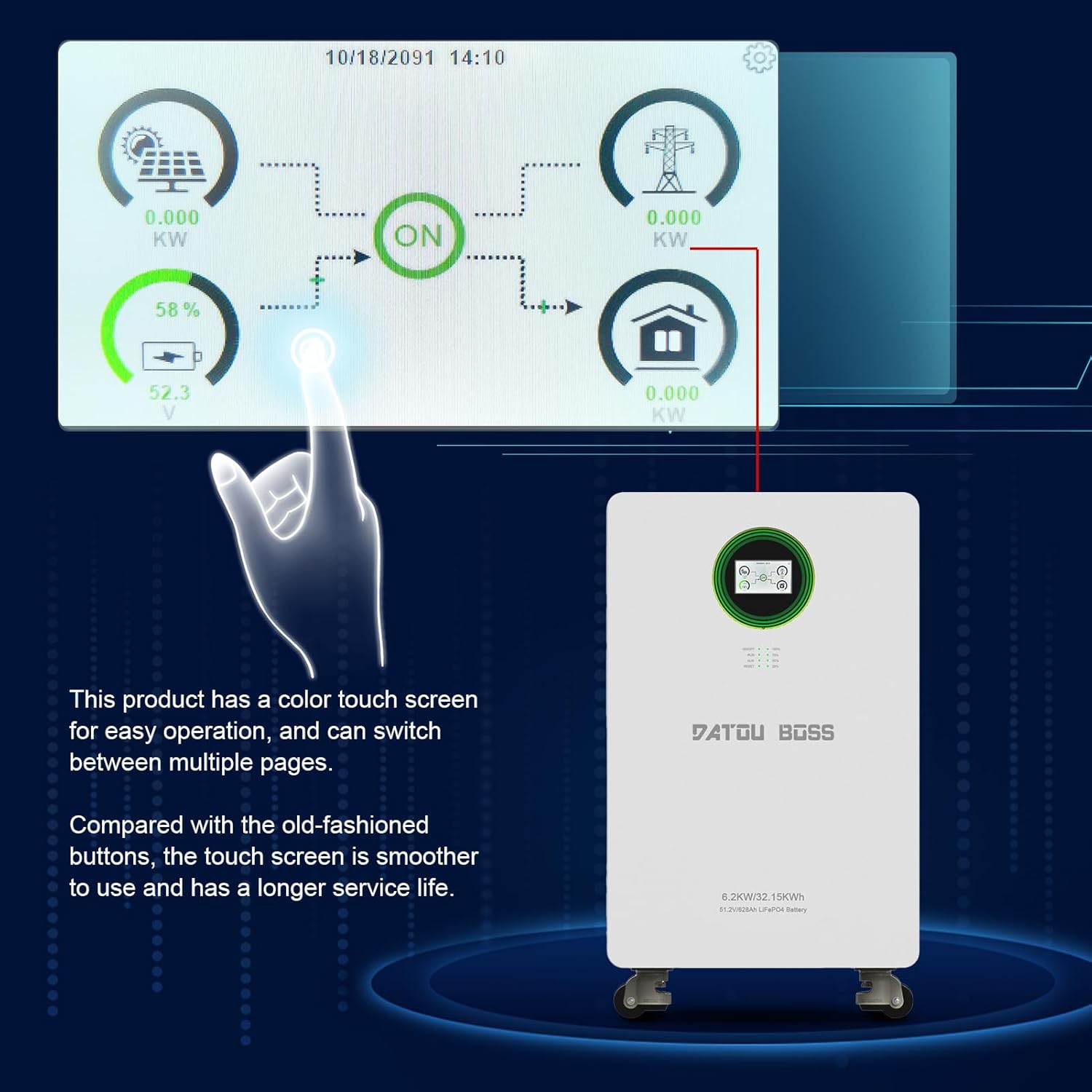
- Monitoring: The display allows you to monitor real-time information such as PV input power, grid status, battery charge level, and power output to loads.
- Navigation: Swipe or tap on the screen to navigate between different pages and view detailed system information.
- Settings: Access system settings for configuration, including 'Battery Setting', 'System Work Mode', 'Grid Setting', 'Charge Setting', 'Basic Setting', 'Advanced Function', and 'Device Info'. Refer to the detailed electronic manual for specific setting adjustments.
5.2 Indicator Lights
- RUN: Indicates normal system operation.
- ALM (Alarm): Illuminates when a warning or error condition is detected. Check the LCD display for specific codes.
- RESET: Used to reset the system in case of certain errors or for troubleshooting.
- Battery Indicator: Provides a quick visual reference of the battery's state of charge.
6. Maintenance
Regular maintenance ensures the longevity and optimal performance of your DATOUBOSS Home Energy Storage System.
- Cleaning: Periodically clean the exterior of the unit with a dry, soft cloth. Do not use liquid cleaners or solvents. Ensure ventilation openings are free from dust and debris.
- Connection Check: Annually, or as needed, inspect all electrical connections (PV, AC input, AC output) to ensure they are tight and free from corrosion.
- Environmental Conditions: Monitor the ambient temperature and humidity to ensure they remain within the specified operating ranges. Extreme conditions can affect performance and lifespan.
- Software Updates: Check for any available firmware updates through the manufacturer's support channels to ensure optimal system performance and feature enhancements.
7. Troubleshooting
The system's touch screen display will show warning or error codes if an issue arises. Refer to the detailed electronic manual for a comprehensive list of error codes and their solutions. Below are general troubleshooting steps for common issues.
7.1 Common Issues and Solutions
- No Power Output:
- Check if the AC OUT ON/OFF Switch is in the 'ON' position.
- Verify that the ON/OFF Inverter Switch and ON/OFF Battery Switch are 'ON'.
- Check the battery charge level on the display. If low, the system may not output power.
- Inspect circuit breakers for any trips.
- Battery Not Charging:
- Ensure PV ON/OFF Switches are 'ON' and solar panels are receiving sunlight.
- Verify AC IN ON/OFF Switch is 'ON' if charging from the grid.
- Check PV input voltage and current on the display to ensure solar panels are producing power.
- Look for any alarm codes on the display that might indicate a charging fault.
- System Alarm (ALM light on):
- Check the touch screen display for the specific error or warning code.
- Consult the electronic manual for the meaning of the code and recommended actions.
- If the issue persists after following manual instructions, contact customer support.
If you are unable to resolve an issue, do not attempt further repairs. Contact DATOUBOSS professional technicians for assistance.
8. Specifications
The following table details the technical specifications of the DATOUBOSS FBM-JC-6232-EU-3 Home Energy Storage System.
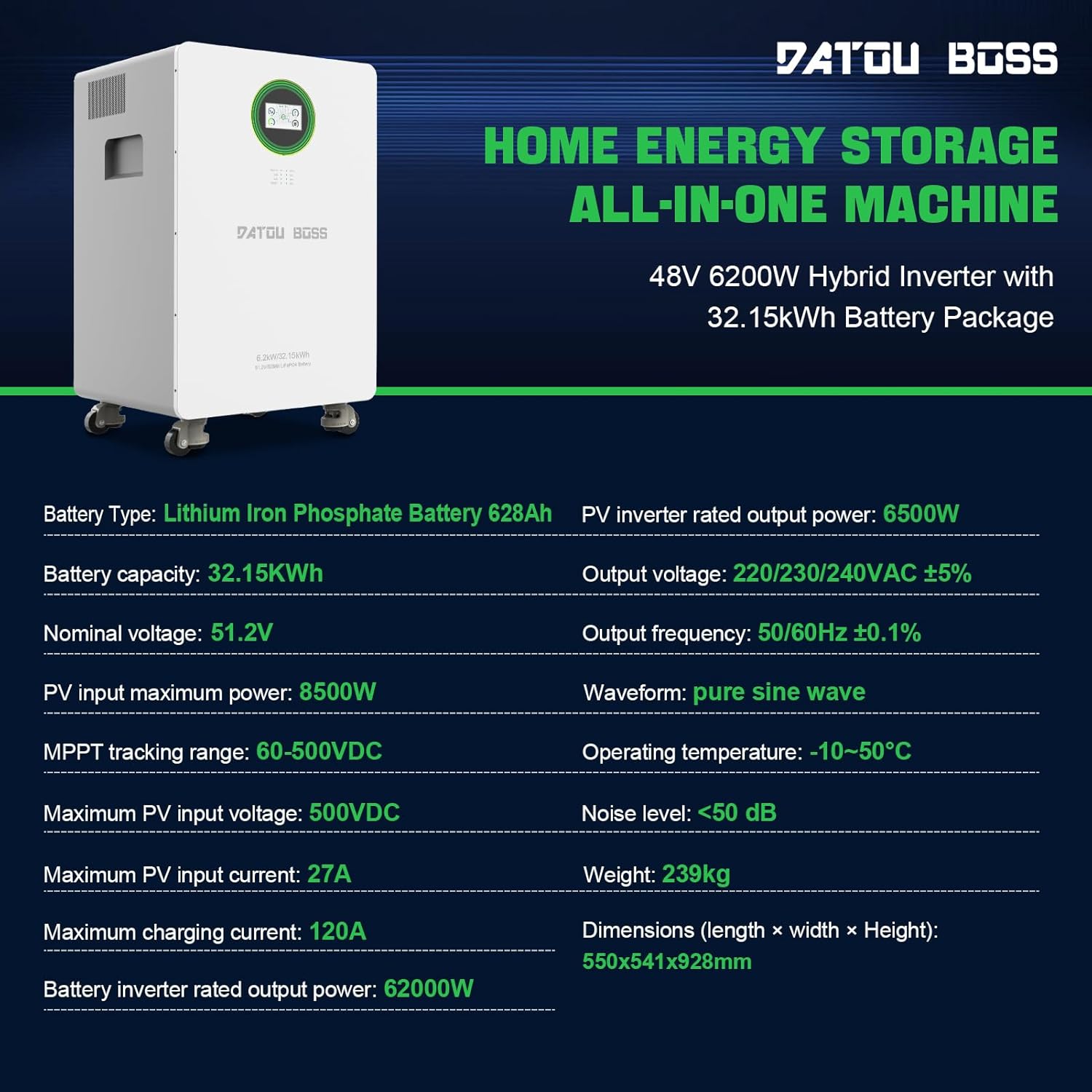
| Feature | Specification |
|---|---|
| Model Number | FBM-JC-6232-EU-3 |
| Battery Type | Lithium Iron Phosphate (LiFePO4) |
| Battery Capacity | 628Ah (32.15 kWh) |
| Nominal Voltage | 51.2V |
| Hybrid Inverter Power | 6200W (48V) |
| PV Inverter Rated Output Power | 6500W |
| Maximum PV Input Power | 8500W |
| MPPT Tracking Range | 60-500VDC |
| Maximum PV Input Voltage | 500VDC |
| Maximum PV Input Current | 27A |
| Maximum Charging Current | 120A |
| Output Voltage | 220/230/240VAC ±5% |
| Output Frequency | 50/60Hz ±0.1% |
| Waveform | Pure Sine Wave |
| Operating Temperature | -10°C to 50°C |
| Noise Level | <50 dB |
| Product Dimensions (L x W x H) | 21.65 x 21.3 x 36.54 inches (550 x 541 x 928 mm) |
| Item Weight | 526 pounds (239 kg) |
| Communication Interfaces | RS232, RS485 |
9. Warranty and Support
DATOUBOSS stands behind the quality of its products. This all-in-one home energy storage system comes with a 5-year warranty.
9.1 Customer Service
For any product-related questions, technical assistance, or warranty claims, please contact DATOUBOSS customer service. Our professional customer service team is available 24 hours a day to provide friendly and patient support.
- Contact Method: Please reach out via the Amazon messaging system or through the contact information provided with your purchase.
9.2 Multilingual User Manuals
An English printed user manual is included in the product packaging. If you require a manual in a different language or an electronic version, please contact us via Amazon messaging. We can provide electronic manuals for various countries upon request.


