
1. Introduction
This manual provides detailed instructions for the installation, operation, maintenance, and troubleshooting of the Generic Z3N-TB22 Photoelectric Switch. Please read this manual thoroughly before using the product to ensure safe and correct operation. Keep this manual for future reference.
2. Safety Information
WARNING: Electrical shock hazard. Always disconnect power before installation, maintenance, or troubleshooting.
- Installation should only be performed by qualified personnel in accordance with all local and national electrical codes.
- Ensure the operating voltage and current ratings of the switch match your application requirements.
- The Z3N-TB22 has an International Protection Rating of IP00, meaning it offers no protection against solid objects or liquids. It must be installed in an enclosure that provides adequate protection from dust, moisture, and other environmental factors.
- Do not operate the switch outside its specified temperature range.
- Avoid exposing the switch to strong vibrations, corrosive gases, or direct sunlight.
3. Product Overview
The Generic Z3N-TB22 is a compact photoelectric switch designed for industrial applications. It utilizes a bipolar transistor as its switching element and operates with a Normally Closed contact type. Its small dimensions and DIN rail mount capability make it suitable for integration into various control systems.
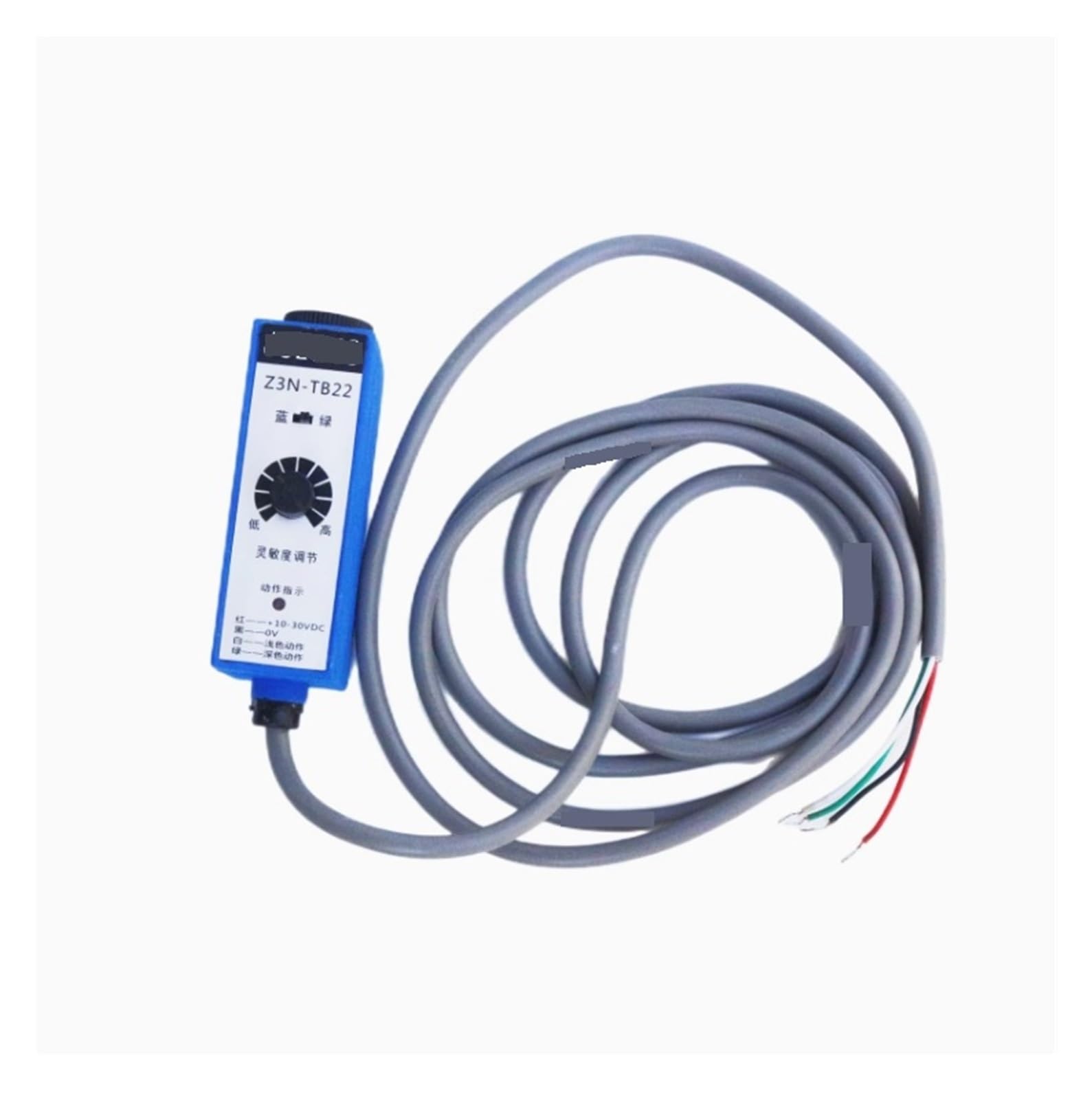
Figure 1: Generic Z3N-TB22 Photoelectric Switch. This image shows the compact design of the photoelectric switch, highlighting its main body and connection points.
4. Setup and Installation
4.1 Mounting
- Ensure power is disconnected from the installation area.
- The Z3N-TB22 is designed for DIN Rail Mount. Securely attach the switch to a standard DIN rail within a protective enclosure.
- Ensure the switch is positioned correctly for its intended detection area, considering any potential obstructions.
4.2 Wiring
- Refer to the wiring diagram provided with your specific system or consult a qualified electrician.
- Connect the power supply to the switch, ensuring the operating voltage of 1 Kilovolt and current rating of 0.01 Amps are respected.
- Utilize appropriate wiring with the Clamp connector type and Blade terminals.
- Connect the output of the 1-way circuit to your control system. The contact type is Normally Closed.
- Double-check all connections for secure and correct wiring before restoring power.
5. Operating Instructions
The Z3N-TB22 Photoelectric Switch operates in an OFF-NONE-ON mode. When an object enters the detection range, the switch's internal bipolar transistor changes state, affecting the Normally Closed contact. This change in state is then communicated to the connected control system.
- Once installed and wired correctly, apply power to the system.
- The switch will begin monitoring its detection area.
- When an object is detected, the switch's output will change according to its Normally Closed configuration and the OFF-NONE-ON operation mode.
- Monitor your control system to confirm proper detection and response.
6. Maintenance
Regular maintenance ensures the longevity and reliable operation of your Z3N-TB22 Photoelectric Switch.
- Cleaning: Due to its IP00 rating, ensure the switch is kept clean and free from dust and debris. Use a soft, dry cloth for cleaning. Do not use liquids or abrasive cleaners.
- Inspection: Periodically inspect the switch and its wiring for any signs of damage, wear, or loose connections.
- Environmental Conditions: Verify that the operating environment remains within the specified temperature range (1 Degrees Celsius lower and upper rating) and is free from excessive moisture or corrosive substances.
- Material: The switch housing is made of Acrylonitrile Butadiene Styrene, and contacts are Alloy Steel. Handle with care to prevent physical damage.
7. Troubleshooting
If you encounter issues with your Z3N-TB22 Photoelectric Switch, refer to the following troubleshooting steps:
- No Power:
- Check the power supply to ensure it is connected and providing the correct voltage (1 Kilovolt).
- Verify all wiring connections are secure and correct.
- Not Detecting Objects:
- Ensure the detection path is clear and unobstructed.
- Verify the object being detected is within the switch's operational range and characteristics.
- Check for any dirt or dust accumulation on the sensor surface (if applicable, given IP00 rating, this should be within a clean enclosure).
- False Triggers:
- Inspect the environment for reflective surfaces or other light sources that might interfere with detection.
- Ensure the switch is securely mounted and not subject to vibrations.
- Incorrect Output:
- Confirm the control system is correctly configured for a Normally Closed contact type.
- Verify the wiring for the 1-way circuit is correct.
If problems persist after following these steps, contact your supplier or a qualified technician.
8. Specifications
| Specification | Value |
|---|---|
| Model | Z3N-TB22 |
| Brand | Generic |
| Operation Mode | OFF-NONE-ON |
| Current Rating | 0.01 Amps |
| Operating Voltage | 1 Kilovolts |
| Contact Type | Normally Closed |
| Connector Type | Clamp |
| Switch Type | Bipolar Transistor |
| Terminal | Blade |
| Material | Acrylonitrile Butadiene Styrene |
| Item Dimensions (L x W x H) | 0.39 x 0.39 x 0.39 inches |
| Circuit Type | 1-way |
| Mounting Type | DIN Rail Mount |
| Number of Positions | 1 |
| Lower Temperature Rating | 1 Degrees Celsius |
| Upper Temperature Rating | 1 Degrees Celsius |
| International Protection Rating | IP00 |
| Specification Met | UL |
| Contact Material | Alloy Steel |
9. Warranty and Support
For warranty information and technical support, please refer to the documentation provided at the time of purchase or contact the seller directly. Keep your purchase receipt as proof of purchase.