
Introduction
Thank you for choosing the Aidoly Mini Stair Stepper with Resistance Bands. This manual provides essential information for the safe and effective use of your new fitness equipment. Please read it thoroughly before initial use and retain it for future reference.
Important Safety Information
- Consult your physician before starting any new exercise program.
- Always warm up before exercising and cool down afterward.
- Ensure the stepper is placed on a flat, stable surface.
- Wear appropriate athletic footwear. Do not use with socks or barefoot.
- Maintain balance during use. If you are new to stepping, hold onto a stable object for support.
- The maximum user weight capacity for this stepper is 300 lbs (136 kg).
- Keep children and pets away from the equipment during use.
- Inspect the stepper for any damage or loose parts before each use. Do not use if damaged.
- Stop exercising immediately if you feel pain, dizziness, or shortness of breath.
What's in the Box
Your Aidoly Mini Stair Stepper package includes the following components:
- Mini Stepper Machine with Resistance Bands
- User Manual
Product Overview
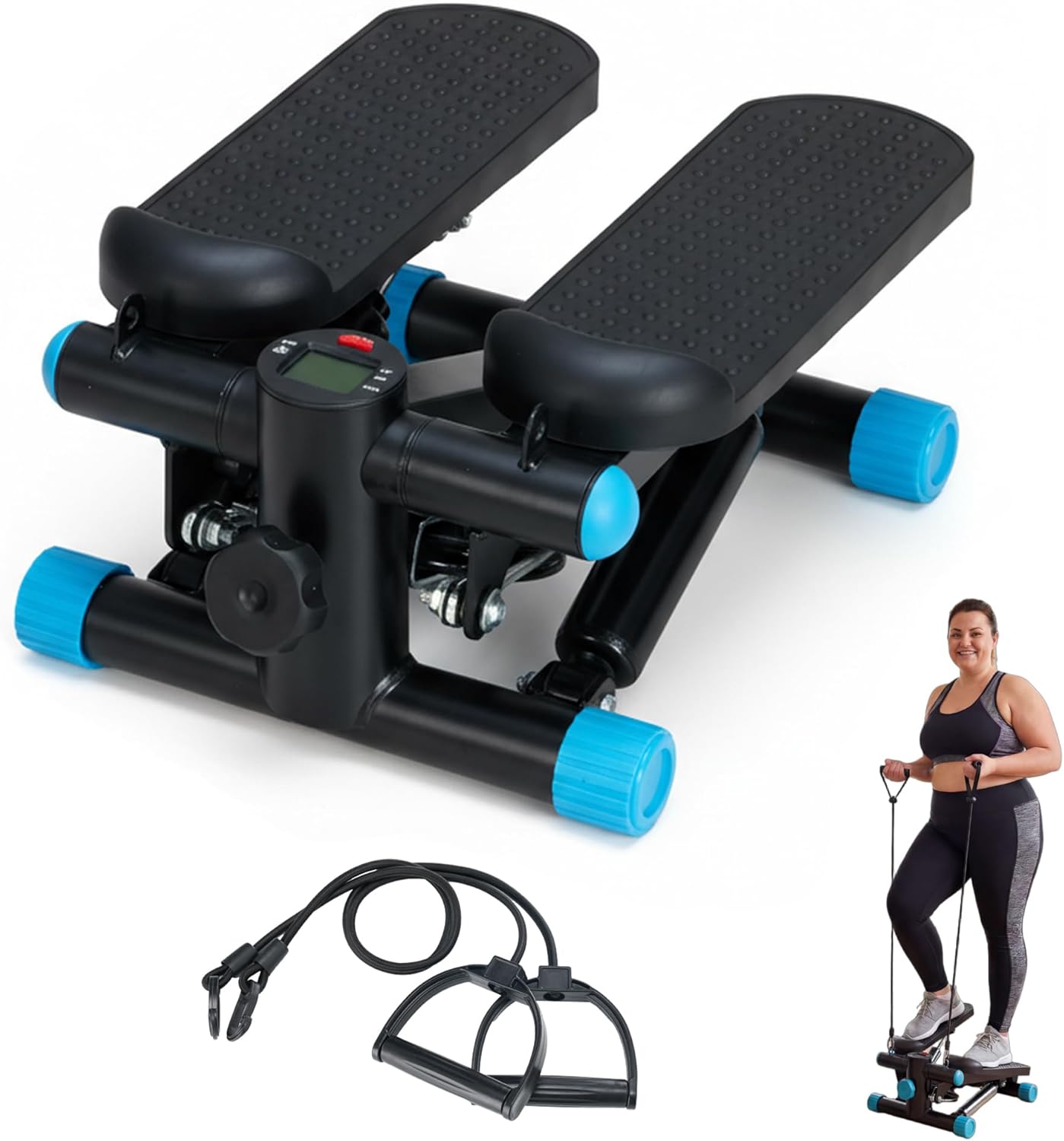
The Aidoly Mini Stair Stepper is designed for effective home fitness, offering both cardio and strength training. Key features include adjustable step height, hydraulic resistance, an LCD monitor, and integrated resistance bands.


Setup
The Aidoly Mini Stair Stepper is designed for immediate use with minimal setup required.
- Unboxing: Carefully remove the stepper and all components from the packaging.
- Placement: Place the stepper on a flat, stable, non-slip surface. Ensure there is enough clear space around the stepper for safe operation.
- Inspection: Before first use, inspect the stepper for any signs of damage or loose parts. Ensure the resistance bands are securely attached if you plan to use them.

Operating Instructions
Using the Stepper
- Step onto the pedals one foot at a time, ensuring your feet are centered and stable.
- Begin a stepping motion, pressing down alternately with each foot. Maintain a steady rhythm.
- Keep your back straight and engage your core muscles throughout the exercise.
Adjusting Step Height/Resistance
The step height and resistance can be adjusted using the control knob located at the front of the stepper. Turning the knob clockwise increases resistance and step height, while turning it counter-clockwise decreases them.
- Lower Height (3-5 inches): Ideal for warm-up or gentle, low-impact cardio.
- Medium Height (6-8 inches): Suitable for a moderate cardio workout.
- Higher Height (9-11 inches): For high-intensity training, boosting calorie burning and muscle toning.

Using Resistance Bands
Attach the resistance bands to the designated points on the stepper. Hold the handles firmly and perform arm exercises (e.g., bicep curls, tricep extensions, shoulder presses) while stepping to engage your upper body.

LCD Monitor Functions
The integrated LCD monitor tracks your workout in real-time:
- COUNT: Displays the total number of steps taken.
- TIME: Shows the duration of your workout.
- CAL: Estimates the calories burned during your session.
- REPS/MIN: Displays the average steps per minute.
- SCAN: Cycles through all metrics automatically.
Press the 'MODE' button to switch between display modes or to reset the values.

Video Guide: Adjusting the Stepper
This video demonstrates how to adjust the stepper's pedals to be level with the ground and how to use the adjustment button to modify resistance and step height.
Maintenance
- Cleaning: Wipe down the stepper with a damp cloth after each use to remove sweat and dust. Avoid abrasive cleaners.
- Inspection: Regularly check all bolts, nuts, and moving parts for tightness and wear. Tighten any loose fasteners.
- Lubrication: The hydraulic cylinders are designed for long-term use and generally do not require lubrication. If you notice unusual noise or stiffness, contact customer support.
- Storage: Store the stepper in a cool, dry place away from direct sunlight and extreme temperatures. Its compact size allows for storage under desks or in corners.
Troubleshooting
| Problem | Possible Cause | Solution |
|---|---|---|
| Stepper feels too loose or too stiff. | Resistance knob not adjusted correctly. | Turn the adjustment knob clockwise to increase resistance/height, or counter-clockwise to decrease. Ensure it is tightened sufficiently for desired resistance. |
| LCD monitor not displaying data. | Battery drained or loose connection. | Replace the battery (typically a button cell). Check for secure connection of the sensor cable. |
| Unusual noise during operation. | Loose components or wear on hydraulic cylinders. | Check and tighten all bolts and nuts. If noise persists, contact customer support. |
| Resistance bands break or fray. | Normal wear and tear or improper use. | Resistance bands are consumable items. Replace them if they show signs of wear. Ensure they are not overstretched. |
Specifications
- Brand: Aidoly
- Model Number: AIDOST
- Material: Alloy Steel
- Product Dimensions (L x W x H): 12.8" x 11.8" x 11"
- Item Weight: 11.9 pounds
- Weight Capacity Maximum: 300 pounds
- Included Components: Mini Stepper Machine with Resistance Bands, User Manual
- UPC: 715569025660
Warranty and Support
The Aidoly Mini Stair Stepper comes with a 1 Year Manufacturer Warranty. For warranty claims, technical support, or any questions regarding your product, please contact Aidoly customer service through the retailer where the product was purchased or visit the official Aidoly store page.
Return Policy: This product is eligible for a refund/replacement within 30 days of purchase, subject to the retailer's return policy.