1. Introduction
The Jumplushion BEM-TCT-4B is a digital temperature controller designed for heat press machines, offering integrated time and temperature control. This device features PID control for precise temperature management, supports various thermocouple input types (K, J, R, S, B, E, N, T), and includes a built-in timer with alarm functions. It is engineered for reliable operation in diverse industrial environments.
2. Safety Information
Please read and understand all safety instructions before installation and operation. Failure to follow these instructions may result in electric shock, fire, or damage to the device.
- Electrical Safety: Ensure the power supply matches the specified voltage range (100-240VAC 50/60Hz). Disconnect power before making any wiring connections.
- Installation: Install the controller in a dry, well-ventilated area, away from excessive heat, moisture, and corrosive gases.
- Qualified Personnel: All installation and wiring should be performed by qualified personnel.
- Grounding: Ensure proper grounding to prevent electric shock.
- Overload Protection: For power loads above 2000W, an AC contactor is required with the relay output model.
3. Package Contents
Verify that all items are present in the package:
- 1 x Jumplushion BEM-TCT-4B Digital Temperature Controller
- 2 x Installation Screws
- 1 x Instruction Manual (this document)
4. Product Overview
The BEM-TCT-4B controller integrates temperature and time control for heat press applications. Its robust design ensures reliable performance even in challenging industrial environments.
Key Features:
- Integrated Control: Combines temperature and time control for streamlined operation.
- PID Control: Advanced PID algorithm for stable and accurate temperature regulation.
- Wide Thermocouple Compatibility: Supports K, J, R, S, B, E, N, T type thermocouples.
- Flexible Output: Available with Relay output (250VAC 30A) or Solid State output (12VDC ±2V 20mA).
- Time Control: Adjustable time range from 0-999 seconds with timing input.
- Alarm Functions: Built-in buzzer with 12 alarm modes and 0-250 seconds advance alarm time.
- Industrial Reliability: Passed industrial level four testing for lightning surge, cycle drop, and other harsh environment conditions.
- Non-Volatile Memory: Settings are retained for approximately 10 years without power.

Figure 4.1: Front view of the BEM-TCT-4B controller, displaying temperature and time settings.
5. Installation
5.1 Physical Installation
- Panel Size: 48 x 96 mm
- Opening Size: 45 x 92 mm
Insert the controller into the panel opening. Secure it using the provided installation screws on the sides of the unit. Ensure a snug fit to prevent movement during operation.
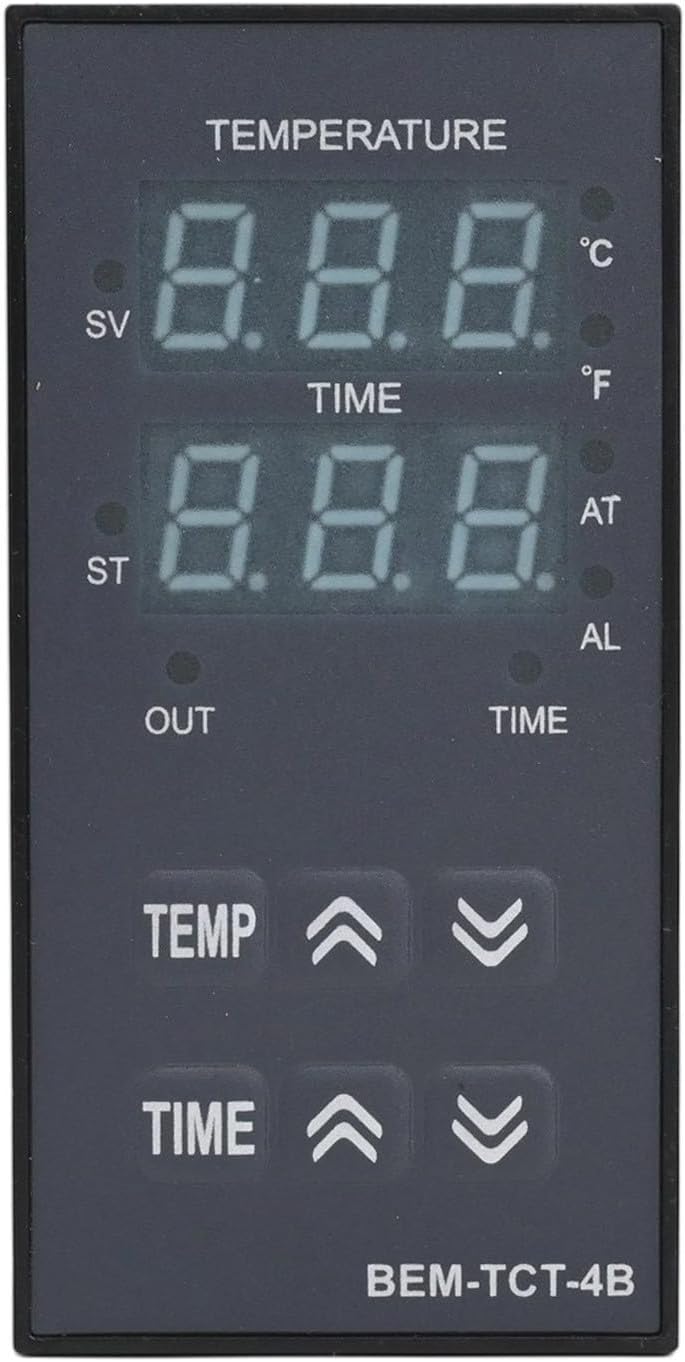
Figure 5.1: BEM-TCT-4B controller with installation screws.
5.2 Wiring
Refer to the wiring diagram located on the side of the controller for correct connections. Ensure all connections are secure and insulated.
- Power Supply: Connect 100-240VAC 50/60Hz to the designated power terminals.
- Input Type: Connect your K/J/R/S/B/E/N/T type thermocouple to the input terminals. Ensure correct polarity for thermocouples.
- Output Type:
- Relay Output: Connect your heating element or load to the relay output terminals (250VAC 30A). For loads exceeding 2000W, an external AC contactor must be used.
- Solid State Output: Connect to a Solid State Relay (SSR) input (12VDC ±2V 20mA or less).

Figure 5.2: Side view of the BEM-TCT-4B controller with wiring diagram.
6. Operating Instructions
6.1 Powering On
After completing all wiring, apply power to the controller. The LED displays will illuminate, showing the current temperature (PV) and set value (SV) or time.
6.2 Front Panel Controls

Figure 6.1: Front panel controls and indicators.
- TEMP Up/Down Buttons: Used to adjust the temperature set value (SV).
- TIME Up/Down Buttons: Used to adjust the time set value.
- SV (Set Value): Displays the target temperature.
- ST (Set Time): Displays the target time.
- OUT (Output Indicator): Illuminates when the control output is active.
- AT (Auto-Tuning Indicator): Illuminates during PID auto-tuning.
- AL (Alarm Indicator): Illuminates when an alarm condition is met.
6.3 Setting Temperature and Time
Use the TEMP up/down buttons to set your desired temperature. Use the TIME up/down buttons to set your desired countdown time. The controller will automatically begin heating to the set temperature and initiate the timer once the temperature is reached.
6.4 Buzzer Operation
The built-in buzzer provides audible alerts. For example, if OTM*10Ms is set to 30, the buzzer will activate for 0.3 seconds when the countdown ends. Setting OTM to 0 results in a continuous beep. The buzzer can be configured for 12 different alarm modes.
7. Maintenance
7.1 Cleaning
To clean the controller, wipe the surface with a soft, dry cloth. Do not use abrasive cleaners or solvents, as these can damage the display or casing. Ensure the device is powered off before cleaning.
7.2 Environmental Conditions
The controller is designed to operate reliably in ambient temperatures between -10°C and 50°C (unfrozen state). Avoid exposing the device to extreme temperatures, high humidity, or corrosive environments to ensure longevity.
7.3 Memory Retention
The BEM-TCT-4B utilizes non-volatile semiconductor storage, ensuring that all settings are retained for approximately 10 years even without power.
8. Troubleshooting
If you encounter issues with your Jumplushion BEM-TCT-4B controller, refer to the following common problems and solutions:
- No Power: Check the power supply connections and ensure the voltage is within the specified 100-240VAC range. Verify that the circuit breaker or fuse is not tripped.
- Incorrect Temperature Reading: Ensure the thermocouple is correctly connected and is the correct type (K, J, etc.) for your application. Check for damaged thermocouple wires.
- Heating Element Not Activating: Verify that the output indicator (OUT) is illuminated. Check wiring to the heating element and ensure it is not faulty. For relay output, confirm that an AC contactor is used for high-power loads.
- Unstable Temperature Control: If temperature fluctuates significantly, consider performing a PID auto-tuning cycle if available in the advanced settings (refer to the full manual for specific steps). Ensure the sensor is properly placed.
- Buzzer Not Functioning: Check buzzer settings in the configuration menu. Ensure the alarm conditions are met.
- Device Malfunction in Harsh Environments: The controller has passed industrial level four testing for reliability. If issues persist in such environments, ensure proper shielding and stable power supply.
For persistent issues not covered here, please contact customer support.
9. Specifications
| Parameter | Value |
|---|---|
| Part Name | Temperature controller |
| Model | BEM-TCT-4B |
| Working Power Supply | 100-240VAC 50/60Hz |
| Allowable Voltage Range | 90%-110% of rated voltage |
| Power Consumption | Below 5W (100-240VAC); Below 3W (24-48VDC) |
| Input Type (Thermocouple) | K/J/R/S/B/E/N/T |
| Output Type | Relay output / Solid state output |
| Relay Output | 250VAC 30A (AC contactor required for power above 2000W) |
| Solid State Output | 12VDC ±2V 20mA or less |
| Control Method | PID control |
| Control Accuracy | 1~100℃ / 0.1~50.0℃ |
| Time Range | 0-999 seconds |
| Maximum Temperature | 0~999℃ |
| Control Period (T) | 0.5~120.0 seconds |
| Insulation Resistance | Above 100MΩ (500VDC basis) |
| Anti-interference | Interference simulator square wave interference (pulse width 1 us) ±2kV R S |
| Memory Retention | Approx. 10 years (using non-volatile semiconductor storage) |
| Ambient Temperature | -10~50℃ (unfrozen state) |
| Insulation Type | Double insulation or reinforced insulation |
| Panel Size | 48 x 96 mm |
| Opening Size | 45 x 92 mm |
| Item Weight | 207g (7.1 ounces) |
| Product Dimensions | 4.72 x 3.54 x 3.15 inches |
10. Warranty and Support
For technical assistance, warranty claims, or further inquiries regarding your Jumplushion BEM-TCT-4B Digital Temperature Controller, please contact the manufacturer or your point of purchase. Please have your model number and purchase date available when contacting support.