
1. Introduction
Thank you for choosing QXUFV QX68 Open Ear Headphones. These headphones are designed to provide a comfortable and secure listening experience while maintaining situational awareness. Featuring Bluetooth 5.4 technology, HiFi stereo sound, and IPX7 waterproofing, they are ideal for sports, work, and daily use.
2. What's in the Box
- Open Ear Earbuds x 2
- Charging Case x 1
- Type-C Cable x 1
- User Manual x 1
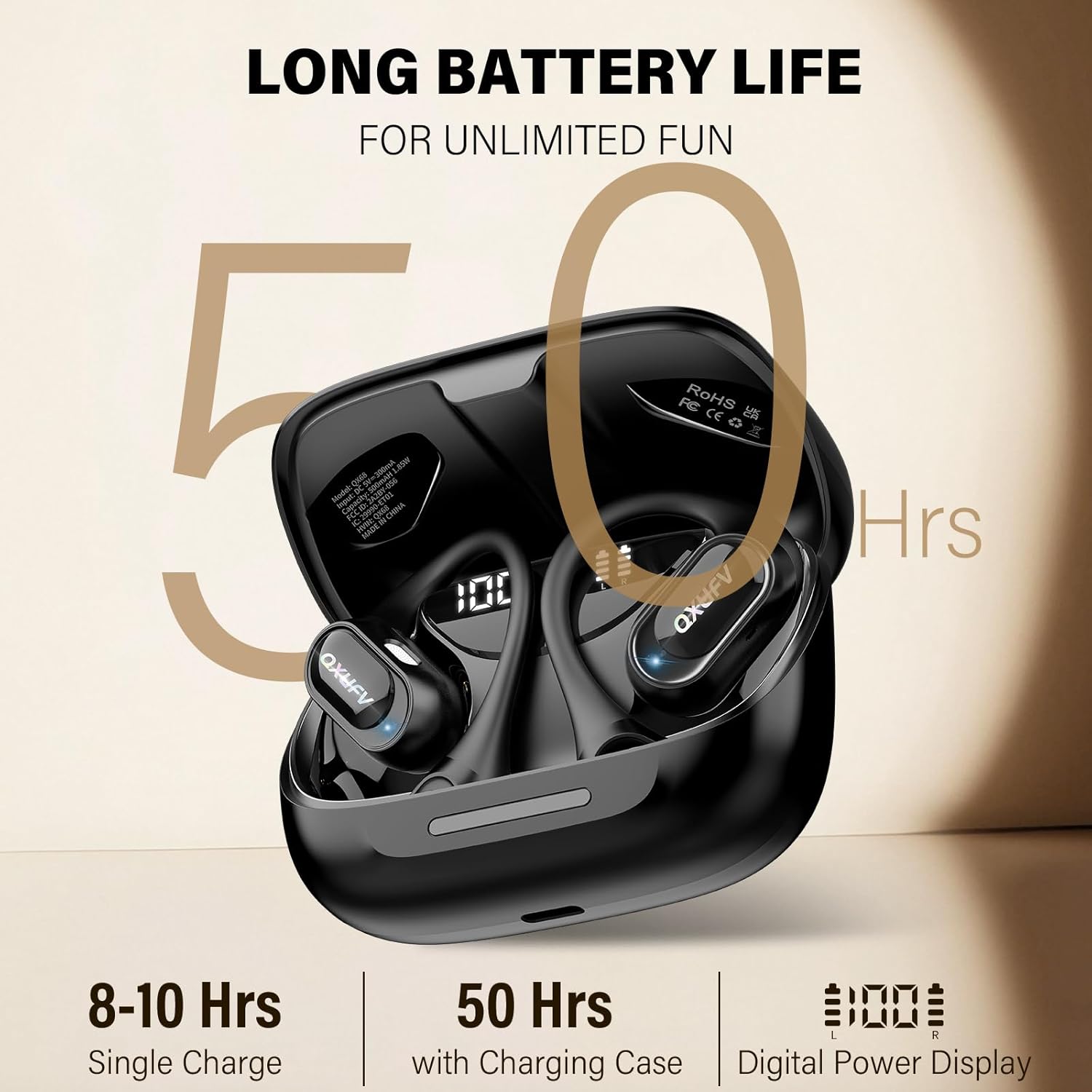
Image: All components included in the QXUFV QX68 package.
Video: A short demonstration of the QXUFV QX68 Open Ear Headphones and their included accessories.
3. Product Overview
The QXUFV QX68 headphones feature an innovative open-ear design for comfort and safety. They are equipped with advanced technology to deliver high-quality audio and reliable performance.
3.1. True Open-Ear Design
Crafted to rest gently around your ears, keeping your ear canals completely open. This ultra-lightweight design (9.5g) ensures all-day comfort and prevents ear fatigue. It also allows you to maintain situational awareness, hearing your surroundings while enjoying your audio.

Image: The ergonomic design of the QXUFV QX68 earbuds, highlighting their ultra-light and skin-friendly materials for comfortable wear during sports.
3.2. Premium Sound and Clear Calls
Equipped with upgraded 14.2mm dynamic drivers for crystal-clear HD stereo sound and excellent call clarity. Enjoy powerful bass for a motivating audio experience during workouts.
3.3. Advanced Bluetooth 5.4
Utilizes the latest Bluetooth 5.4 technology for a stable and fast connection up to 15 meters. After initial pairing, the earbuds connect instantly upon removal from the case, ensuring zero latency and uninterrupted audio.

Image: An internal view of the QXUFV QX68 earbud, emphasizing its Bluetooth 5.4 chip for stable and fast wireless connectivity.
3.4. Smart Touch Controls
Precise touch control system allows easy management of music playback, calls, volume adjustment, track switching, and voice assistant activation with simple taps.

Image: A visual guide to the touch controls on the QXUFV QX68 earbuds, detailing actions for music, calls, and voice assistant.
3.5. IPX7 Waterproof Rating
Built with an IPX7 waterproof rating, these earbuds are resistant to sweat and rain, making them suitable for various sports and outdoor activities.

Image: The QXUFV QX68 earbuds are shown with water splashing, demonstrating their IPX7 waterproof feature, suitable for sweaty workouts or rainy conditions.
3.6. Long Battery Life
The earbuds offer up to 10 hours of continuous use per earbud, with an impressive total playtime of 50 hours with the charging case. The built-in LED display on the charging case shows the remaining power in real-time.

Image: The QXUFV QX68 charging case and earbuds, highlighting the 50-hour total battery life and the digital power display on the case.
4. Setup Instructions
4.1. Initial Charging
Before first use, fully charge the earbuds and the charging case. Connect the provided Type-C cable to the charging port on the case and to a USB power source. The LED display on the case will indicate the charging status.
4.2. Pairing with Your Device
- Ensure the earbuds are charged.
- Open the charging case. The earbuds will automatically enter pairing mode.
- On your device (smartphone, tablet, computer), enable Bluetooth.
- Search for "QX68" in the list of available Bluetooth devices and select it to connect.
- Once connected, you will hear an audio prompt, and the earbuds will be ready for use.

Image: The QXUFV QX68 earbuds are shown in their charging case next to a smartphone displaying its Bluetooth pairing menu, illustrating the setup process.
5. Operating Instructions
The QX68 earbuds feature intuitive touch controls for various functions:
- Play/Pause Music: Double-tap either earbud.
- Answer/End Call: Single-tap either earbud.
- Reject Call: Long-press either earbud for 2 seconds.
- Volume Up: Single-tap the right earbud.
- Volume Down: Single-tap the left earbud.
- Next Track: Triple-tap the right earbud.
- Previous Track: Triple-tap the left earbud.
- Activate Voice Assistant: Long-press either earbud for 2 seconds (after rejecting a call).
6. Maintenance
6.1. Cleaning
Wipe the earbuds and charging case with a soft, dry cloth. Avoid using harsh chemicals or abrasive materials. Ensure the charging contacts are clean and dry.
6.2. Storage
Store the earbuds in their charging case when not in use to protect them and keep them charged. Store in a cool, dry place away from extreme temperatures.
6.3. Battery Care
To prolong battery life, avoid fully discharging the earbuds and charging case frequently. Charge them regularly, even if not in constant use.
7. Troubleshooting
- Earbuds not pairing: Ensure both earbuds are in the charging case, then open the lid to activate pairing mode. Check your device's Bluetooth settings and try reconnecting.
- No sound: Check the volume level on both your device and the earbuds. Ensure the earbuds are properly connected via Bluetooth.
- Charging issues: Verify the Type-C cable is securely connected to both the case and the power source. Check the charging case's LED display for battery status.
- Intermittent connection: Ensure your device is within the 15-meter Bluetooth range and there are no significant obstacles between the device and earbuds.
8. Specifications
| Feature | Detail |
|---|---|
| Model Name | QX68 |
| Connectivity Technology | Wireless (Bluetooth 5.4) |
| Bluetooth Range | 15 Meters |
| Audio Driver Size | 14.2 Millimeters |
| Battery Life (Earbuds) | Up to 10 Hours (continuous use) |
| Total Playtime (with Case) | Up to 50 Hours |
| Water Resistance Level | IPX7 Waterproof |
| Control Method | Touch |
| Ear Placement | Open Ear |
| Material | Liquid silicone rubber |
9. Warranty and Support
QXUFV provides a 2-Year Warranty for the QX68 Open Ear Headphones. For any product inquiries, technical support, or warranty claims, please refer to the contact information provided in the included User Manual or visit the official QXUFV website.
10. Safety Information
- Do not use the earbuds at excessively high volumes for prolonged periods to prevent hearing damage.
- Always be aware of your surroundings when using open-ear headphones, especially in traffic or other potentially hazardous environments.
- Keep the earbuds and charging case away from extreme temperatures, direct sunlight, and liquids (beyond IPX7 rating).
- Do not attempt to disassemble or modify the product. This may void the warranty and cause damage.
- Keep out of reach of children and pets.