
PEAKPULSE LE600AG
PeakPulse LE600AG Golf Rangefinder User Manual
Model: LE600AG | Brand: PEAKPULSE
1. Introduction
Thank you for choosing the PeakPulse LE600AG Golf Rangefinder. This device is designed to provide accurate distance measurements for golfers, enhancing your game with precision and ease. It features advanced optical technology, flag-lock with vibration, and slope compensation, all within a compact and durable design.

Image 1.1: PeakPulse LE600AG Golf Rangefinder showcasing its main features including 650 yards range, 0.5s fast focus, flagpole lock, accuracy, slope compensation, 5000 measurements, slope switch, vibration reminder, and screw hole.
2. Package Contents
Please ensure all items are present in your package:
- PeakPulse LE600AG Golf Rangefinder
- Carrying Case
- 1 x CR2 Battery
- Instruction Manual
- Lanyard
- Cleaning Cloth

Image 2.1: The PeakPulse LE600AG Golf Rangefinder and its accompanying accessories, including a carrying case, CR2 battery, user manual, lanyard, and cleaning cloth.
3. Setup
3.1 Battery Installation
- Locate the battery compartment on the device.
- Twist the battery cover counter-clockwise to open.
- Insert the provided CR2 battery, ensuring correct polarity (+/-).
- Replace the battery cover and twist clockwise to secure.
3.2 Power On/Off
Press the Power/Measure button (usually the top button) briefly to turn the device on. The display will activate. The device will automatically power off after 8 seconds of inactivity to conserve battery life.
3.3 Adjusting the Eyepiece
Rotate the eyepiece to adjust the focus until the display and target appear clear and sharp.
3.4 Switching Measurement Units (Yards/Meters)
With the device powered on, long press the 'Mode' button (usually the bottom button) to switch between yards (Y) and meters (M).

Image 3.1: The ergonomic design of the rangefinder ensures comfortable handling, and the tripod nut design allows for stable measurements when mounted.
4. Operating Modes
4.1 Standard Distance Measurement
Point the rangefinder at your target and press the Power/Measure button briefly. The distance to the target will be displayed instantly. The device measures distances from 6 to 656 yards with an accuracy of +/- 1 yard.
4.2 Flag-Lock Technology with Vibration
In this mode, scan the area around the flag. The device will lock onto the closest target (the flagstick) within 300 meters and provide a short vibration feedback to confirm the lock. This ensures you measure the flag, not objects behind it.
4.3 Slope Compensation
The slope compensation feature calculates the adjusted distance based on the incline or decline to the target. This can be toggled on or off with a dedicated button for compliance with tournament rules.
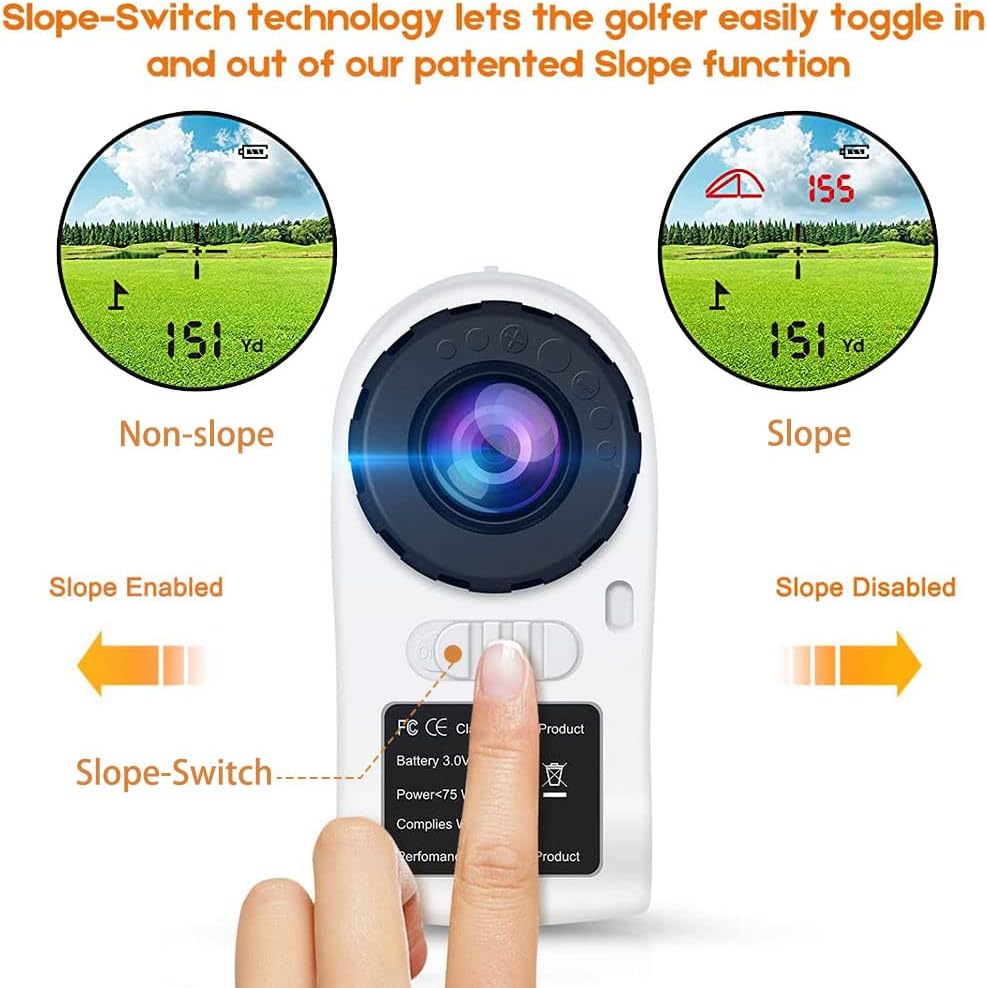
Image 4.1: The Slope-Switch technology allows golfers to easily toggle the patented Slope function on or off, indicated by the green light.

Image 4.2: Visual representation of slope compensation, showing how the device adjusts the distance for uphill or downhill shots (e.g., 160 yards horizontal plays as 175 yards uphill).
4.4 6X Magnification & 7.5° Field of View
The rangefinder features a 6x magnification and a 7.5° field of view, providing a clear and wide perspective of your target. The multi-coated optical lens ensures sufficient light transmission for bright images.

Image 4.3: The rangefinder offers advanced optics with 6X magnification and a 7° field of view, perfect for golf performance.
4.5 Diopter Adjustment
The diopter adjustment function allows users with myopia or hyperopia to achieve a clear field of view without wearing glasses.
4.6 Fast Measurement
The device provides precise and rapid measurements, displaying results in approximately 0.3 seconds.

Image 4.4: The rangefinder's LCD screen shows precise and fast measurements, with results displayed in approximately 0.3 seconds.
4.7 Additional Modes (from videos)
While primarily a golf rangefinder, this device may also feature additional measurement modes:
- Rain and Fog Ranging Mode: Prioritizes longer ranges in adverse weather conditions.
- Bow Mode (HD): Measures horizontal distance from the user to the target, suitable for bow hunting.
- Vertical Height (HT): Measures the vertical height of a target.
- Speed Measurement Mode: Measures the speed of a moving object (range 18-300 km/h).
Video 4.1: This video demonstrates various measurement modes including Rain and Fog Ranging, Bow Mode (HD) for horizontal distance, Vertical Height (HT), and Speed Measurement, showcasing the versatility of a rangefinder for different applications beyond golf.
5. Maintenance
5.1 Cleaning
Use the provided cleaning cloth to gently wipe the lenses and the body of the rangefinder. Do not use abrasive materials or harsh chemicals.
5.2 Battery Life & Conservation
The CR2 battery lasts for approximately 5000 measurements. The rangefinder features an automatic shutdown function after 8 seconds of inactivity to maximize battery life.
5.3 Water Resistance
The device has an IPX4 international protection rating, meaning it is resistant to splashing water from any direction. It is suitable for use in light rain but should not be submerged in water.
6. Troubleshooting
- No Display: Check if the battery is correctly installed and has sufficient charge. Replace if necessary.
- Unclear Image: Adjust the eyepiece focus until the image is sharp. Clean the lenses with the provided cloth if smudged.
- Inaccurate Measurement: Ensure the target is within the measurement range (6-656 yards). Make sure the aiming circle is stable on the target.
- Flag-Lock Not Working: Ensure you are in the correct mode. Scan the area around the flag slowly to allow the device to lock onto the closest target.
7. Specifications
| Feature | Detail |
|---|---|
| Brand | PEAKPULSE |
| Model Number | LE600AG |
| Color | White |
| Material | Acrylonitrile Butadiene Styrene |
| Sport | Golf |
| Max Magnification | 6x |
| Measurement Range | 6-656 yards |
| International Protection Rating | IPX4 |
| Battery Type | Lithium (CR2) |
| UPC | 820912870207 |
8. Warranty & Support
Your PeakPulse LE600AG Golf Rangefinder comes with a 2-year warranty. Additionally, PeakPulse offers lifetime customer support to assist you with any questions or issues you may encounter. Please refer to the contact information provided in your package for support.
 | [pdf] User Manual 未命名 1 PeakPulse 6Pro Rangefinder User Manual stripeygreentv 2022 02 Stripey Green TV 4 If slope is on the adjusted distance will appear above crosshair Then non below TVPeakPulse Manual未命名 14 crosshairPeakPulse 6 Pro Golf Laser Review未命名 1stripeygreentv Manualstripeygreentv 1PEAKPULSE LE600AG Rangefinderstripeygreentv Manualmanual internal 2024 11 PEAKPULSE ||| 未命名 1 PeakPulse 6Pro Rangefinder User Manual stripeygreentv 2022 02 Stripey Green TV 4 If slope is on the adjusted distance will appear above crosshair Then non below TVPeakPulse Manual未命名 14 crosshairPeakPulse 6 Pro Golf Laser Review未命名 1stripeygreentv Manualstripeygreentv 1PEAKPULSE LE600AG Rangefinderstripeygreentv Manualmanual internal 2024 11 PEAKPULSE ||| score:16 filesize: 1.65 M page_count: 0 document date: 0000-00-00 |
Ask a question about this manual
Ask about setup, troubleshooting, compatibility, parts, safety, or missing instructions. Manuals+ will review the question and use this page’s manual context to help answer it.