
1. Overview
The BENTSAI BT-HH62 Series Handheld Inkjet Printer is a versatile and portable coding solution designed for various industrial and commercial applications. This device allows for efficient printing of batch numbers, date codes, logos, serial numbers, and QR codes on a wide range of surfaces including plastic, cardboard, wood, and metal. Its ergonomic design and advanced features ensure reliable and high-quality printing.

Figure 1: BENTSAI BT-HH62 Series Handheld Inkjet Printer
2. What's in the Box
Upon unboxing your BENTSAI BT-HH62 Series Handheld Inkjet Printer, please verify that all the following components are included:
- BT-HH6210BL Handheld Inkjet Printer
- EB22B Fast Dry Black Ink Cartridge
- Metal Positioner
- Roller Guide
- Sensor
Video 1: Unboxing and overview of the BENTSAI Handheld Printer. This video demonstrates the contents of the package and a general look at the printer's design and features.
3. Key Features
- Extended Power: Offers over 16 hours of non-stop operation with reduced recharge frequency due to unique motherboard technology.
- Seamless Assembly Line Integration: Equipped with a high-precision photoelectric sensor for instant item detection and automatic printing, ideal for assembly line operations.
- Adjustable Print Height and Contents: Supports adjustable print heights from 0.03 inches (0.8mm) to 1 inch (25.4mm) and can print up to 10 lines of text. Capable of printing batch numbers, QR codes, dates, text, logos, pictures, and variable data.
- Versatile Coding Solutions: Utilizes 42ml quick-drying ink suitable for various surfaces including wood, cardboard, plastic, polyethylene, metal, glass, ceramic, aluminum foil, and concrete.
- Upgraded Ergonomic Design: Weighs 410g for portability, features an upgraded 5-roller system for smoother printing, and includes an ergonomic handle with a 4.3-inch HD touchscreen for effortless and intuitive use.

Figure 2: Key features of the BENTSAI BT-HH62 Series, highlighting its resolution, roller system, battery life, weight, and touchscreen.

Figure 3: The extended battery life of the BENTSAI BT-HH62 Series, offering up to 16 hours of operation.
4. Setup Guide
4.1 Charging the Printer
Before initial use, fully charge the printer using the provided power adapter. The charging port is located on the top of the device. A full charge ensures optimal performance and extended operation time.
4.2 Installing the Ink Cartridge
- Open the ink cartridge compartment cover on the top of the printer.
- Carefully insert the EB22B Fast Dry Black Ink Cartridge into the slot, ensuring it clicks into place.
- Close the compartment cover securely.
- Remove the protective cap from the ink cartridge nozzle before printing.
Video 2: This video demonstrates the installation of the ink cartridge and various applications of the BENTSAI BT-HH62 Series printer.
5. Operating Instructions
5.1 Powering On/Off
- To power on, press and hold the power button until the screen illuminates.
- To power off, press and hold the power button until the shutdown prompt appears, then confirm.
5.2 Creating and Editing Print Content
The 4.3-inch HD touchscreen allows for intuitive creation and editing of print content. You can input text, dates, batch numbers, and other variable data directly on the screen.
- Navigate through the menu using the touchscreen.
- Select options for text, date, QR code, barcode, and image printing.
- Adjust font size, style, and print orientation as needed.
5.3 Importing Content via USB
The printer supports importing external fonts, images (JPG, PNG, BMP), and variable data via a USB flash drive. Insert the USB drive into the designated port and follow the on-screen prompts to import your files.

Figure 4: The printer's capability to print content directly from USB files, including external fonts, images, and variable data.
5.4 Printing on Various Surfaces
The BT-HH62 Series is designed for printing on diverse materials. The built-in roller sensor ensures smooth and consistent printing as long as the printer's rollers maintain contact with the object's surface.
- Place the printer's nozzle gently on the surface to be printed.
- Press the print trigger button.
- Slide the printer smoothly across the surface to apply the print.
- For precise positioning, utilize the included metal positioner.

Figure 5: Examples of printing applications across various materials such as plastic, carton, wood, fabric, metal, glass, foam, and ceramic.
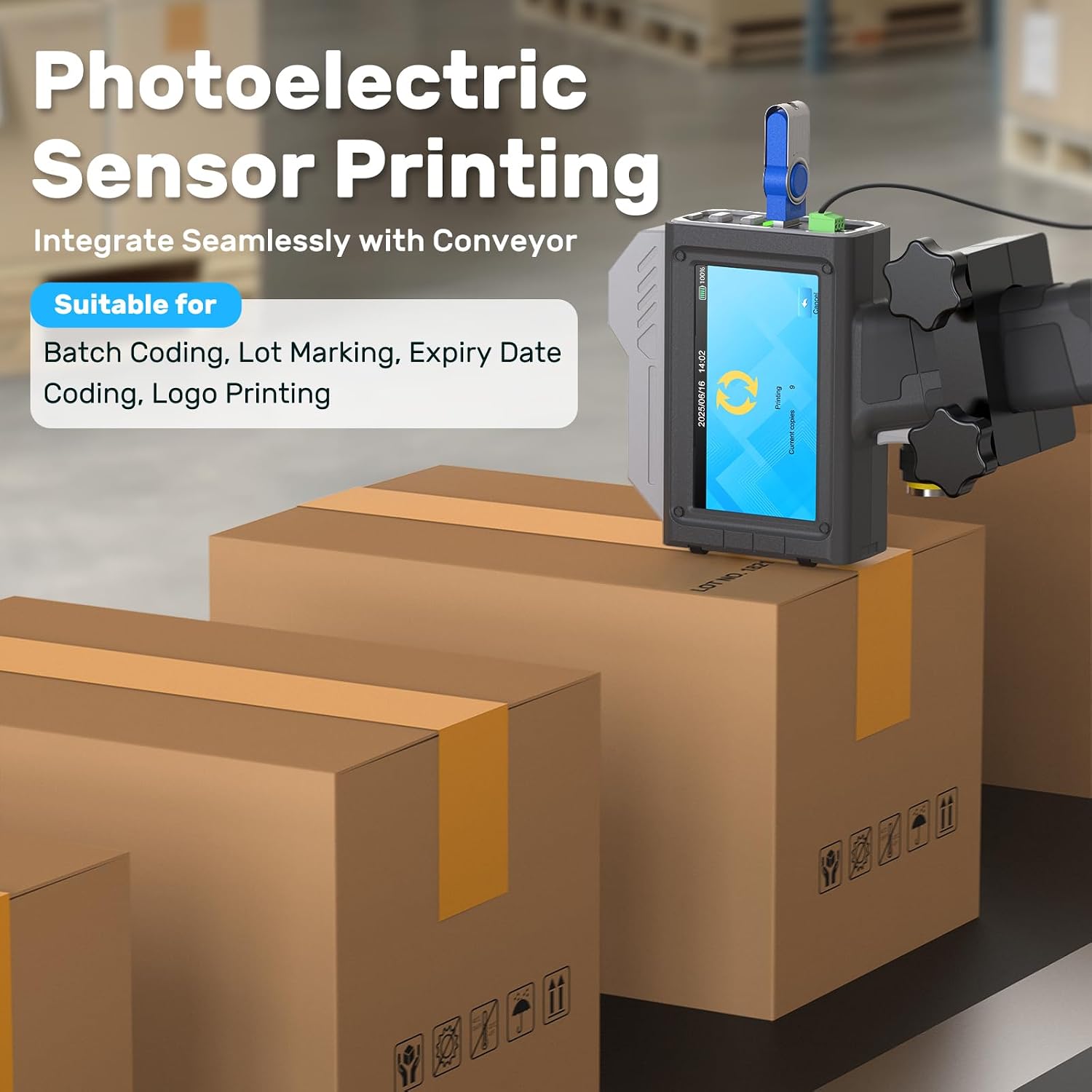
Figure 6: The photoelectric sensor enables automatic printing on assembly lines for batch coding, lot marking, expiry dates, and logos.

Figure 7: The printer supports various content types including QR codes, signs, pictures, variable data, time auto-updates, production dates, and batch numbers.
6. Maintenance
6.1 Ink Nozzle Cleaning
To ensure clear and complete prints, regular cleaning of the ink cartridge nozzle is essential, especially if prints appear unclear or incomplete due to ink drying or clogging.
- Wet a tissue with alcohol.
- Cover the ink cartridge nozzle with the wet tissue.
- Gently shake the cartridge vigorously up and down to dislodge any dried ink.
- Drag the ink cartridge across the tissue to print two lines, ensuring ink flows freely.
- If streaks persist, repeat the above steps.
- After each use, remove the ink cartridge from the printer.
- Wipe the nozzle surface again with an alcohol-wet tissue.
- Clean any residual ink on the protective cap.
- Cover the nozzle with the protective cap to prevent ink from drying.
Video 3: Detailed guide on how to clean the ink nozzle to prevent clogging and ensure optimal print quality.
6.2 Storage
Store the ink cartridge in a cool, dry, and shaded area when not in use. Ensure the protective cap is securely placed on the nozzle to prevent ink from drying out.
7. Troubleshooting
| Problem | Possible Cause | Solution |
|---|---|---|
| Unclear or Incomplete Prints | Ink nozzle clogged or ink dried. | Perform ink nozzle cleaning as described in Section 6.1. Ensure the protective cap is used when storing the cartridge. |
| Printer Not Powering On | Low battery or power cable issue. | Charge the printer fully. Check the power adapter and cable for damage. |
| Printing Not Starting | Print trigger not pressed, rollers not in contact with surface, or no content selected. | Ensure the print trigger is pressed, the printer rollers are in firm contact with the surface, and print content is selected on the screen. |
| Difficulty Printing on Certain Surfaces | Surface texture or material incompatibility. | Ensure the surface is clean and dry. For very uneven surfaces, use the roller guide or consider alternative printing methods if the material is highly absorbent or non-porous beyond the ink's capability. |
8. Specifications
| Feature | Detail |
|---|---|
| Brand | BENTSAI |
| Model Name | BT-HH62 Series |
| Printing Technology | Inkjet |
| Connectivity Technology | USB |
| Special Features | Display Screen, Lightweight, Portable |
| Color | Dark Grey |
| Printer Output | Monochrome |
| Max Print Speed (Monochrome) | 60 ppm |
| Product Dimensions (D x W x H) | 8.19"D x 1.77"W x 5.24"H |
| Print Media | Fabric, Labels, Wood, Cardboard, Plastic, Polyethylene, Metal, Glass, Ceramic, Aluminum Foil, Concrete |
| Ink Color Options | Black, White, Cyan, Green, Yellow, Magenta, Invisible (UV) |
| Resolution | 600 x 600 DPI (Max Print Resolution Black and White), 300 DPI (Max Print Resolution Color) |
| Control Method | Touch |
| Compatible Cartridge | BENTSAI EB21 Series Ink Cartridges, BENTSAI EB22 Series Ink Cartridges |
| Total USB Ports | 1 |
| Maximum Media Size | Unlimited |
| Dual-sided printing | No (Simplex) |
9. Warranty and Support
9.1 Product Warranty
The BENTSAI BT-HH62 Series Handheld Inkjet Printer comes with a 1-Year Warranty from the manufacturer. Please retain your proof of purchase for warranty claims.
9.2 Customer Support
For technical assistance, troubleshooting, or any inquiries regarding your BENTSAI product, please contact BENTSAI customer support. Refer to the contact information provided in your product packaging or visit the official BENTSAI website for further details.
You can also visit the BENTSAI Store on Amazon for additional resources and product information.


