
1. Product Overview
The CASANOOKK Vanity Desk is designed to provide a functional and organized space for personal grooming. It features a large mirror with adjustable LED lighting, a built-in charging station, and extensive storage options including multiple drawers and shelves.

Image 1.1: Fully assembled CASANOOKK Vanity Desk with various items displayed on shelves and tabletop.
2. Safety Information
Please read and understand all safety instructions before assembly and use.
- This product requires assembly.
- Always unplug the product before assembly or disassembly.
- Keep electrical components away from water to prevent electric shock.
- Do not place heavy objects on the vanity to prevent tipping.
- Always supervise children when they are near or using the vanity.
3. Package Contents
Verify that all components are present before beginning assembly. If any parts are missing or damaged, please contact customer support.
- Makeup vanity desk components
- Mirror with integrated LED light strip
- Charging station unit (2 standard plug sockets, 2 USB ports)
- Assembly hardware (screws, dowels, etc.)
- Detailed installation instructions
4. Specifications
| Feature | Detail |
|---|---|
| Color | White |
| Overall Dimensions (D x W x H) | 15.7" x 59" x 57" |
| Mirror Dimensions (L x W) | 39.3" x 20.4" |
| Material | Engineered Wood (MDF) |
| Item Weight | 65 Pounds |
| Number of Drawers | 8 |
| Lighting Modes | 3 (Cold Light, Natural Light, Warm Light) |
| Charging Station | 2 Standard Plug Sockets, 2 USB Ports |
| Assembly Required | Yes |

Image 4.1: Diagram illustrating the key dimensions of the vanity desk, including overall width, height, depth, and mirror size.
5. Setup and Assembly
The vanity desk is designed for straightforward assembly. Refer to the detailed installation instructions included in your package for step-by-step guidance. Each part is labeled to assist with the process.
5.1. Preparation
- Clear a spacious area for assembly.
- Unpack all components and verify against the parts list in the manual.
- Gather necessary tools (e.g., screwdriver, hammer - typically not included).
5.2. Assembly Steps (General)
- Assemble the main desk frame according to the provided diagrams.
- Install the drawers and their slides.
- Attach the upper shelving unit.
- Mount the mirror with the integrated LED light strip.
- Install the charging station into its designated slot.
- Connect all electrical components as instructed.
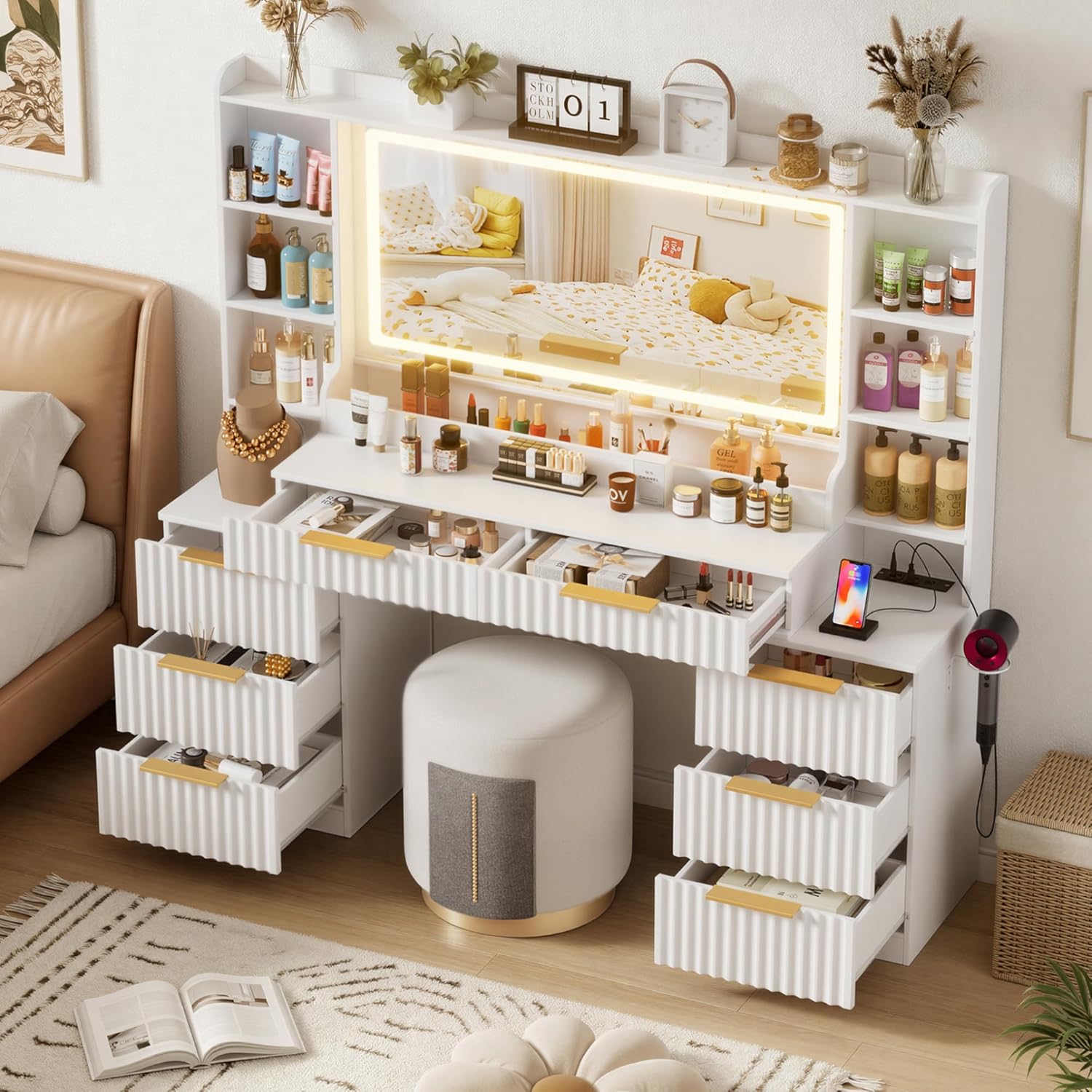
Image 5.1: The vanity desk with multiple drawers open, showcasing the storage capacity. This image represents the assembled state of the storage components.
6. Operating Instructions
6.1. Mirror Lighting
The large mirror is equipped with LED lights offering three color modes and adjustable brightness.
- Changing Color Mode: Locate the touch sensor or button on the mirror. A short press will cycle through the three lighting modes: Cold Light, Natural Light, and Warm Light.
- Adjusting Brightness: Long press the touch sensor or button to increase or decrease the brightness of the selected light mode. Release when the desired brightness is achieved.

Image 6.1: This image displays the vanity mirror illuminated in three different light settings: cold light, natural light, and warm light, demonstrating the adjustable color temperature feature.
6.2. Charging Station
The integrated charging station provides convenient power access for your electronic devices.
- Plug the vanity desk's main power cord into a standard wall outlet.
- Use the 2 standard plug sockets for appliances like hair dryers or curling irons.
- Use the 2 USB ports to charge smartphones, tablets, or other USB-powered devices.

Image 6.2: A close-up view of the vanity desk's charging station, showing the two standard power outlets and two USB ports in use with a phone and hair dryer.
7. Maintenance
Proper care will ensure the longevity and appearance of your vanity desk.
- Cleaning Surfaces: Wipe the engineered wood surfaces with a damp cloth, then immediately dry with a clean, dry cloth to prevent moisture damage. Avoid abrasive cleaners.
- Mirror Cleaning: Use a soft, lint-free cloth and a glass cleaner suitable for mirrors. Spray cleaner onto the cloth, not directly onto the mirror, to avoid liquid seeping into the edges.
- Electrical Components: Ensure the vanity is unplugged before cleaning near the charging station or mirror lights. Use a dry cloth to wipe dust.
- Drawer Maintenance: Periodically check drawer slides for smooth operation. If needed, clean any debris and apply a small amount of silicone lubricant.
8. Troubleshooting
If you encounter issues with your vanity desk, refer to the following common problems and solutions.
- Lights Not Working:
- Ensure the vanity is properly plugged into a working power outlet.
- Check if the power switch for the lights is turned on.
- Verify all electrical connections made during assembly are secure.
- Charging Station Not Providing Power:
- Confirm the vanity's main power cord is securely plugged in.
- Test the outlet with another device to ensure it is functional.
- Check the device you are trying to charge to ensure it is working correctly.
- Drawers Stick or Do Not Close Smoothly:
- Ensure drawers are not overloaded.
- Check for any obstructions in the drawer slides.
- Verify that the drawer slides were installed correctly during assembly.
- Vanity Feels Unstable:
- Ensure all assembly screws and fasteners are tightened securely.
- Place the vanity on a flat, level surface.
9. Warranty and Support
For warranty information or if you require further assistance, please contact CASANOOKK customer support. Keep your purchase receipt and model information handy when contacting support.
Contact information can typically be found on the product packaging or the retailer's website where the product was purchased.